Plex-first IPTV catalog manager, downloader, tracker, playback surface, and operations dashboard.
Discover new IPTV content, filter it, decide what to keep, download it, play it locally or through Plex, track watch state, and keep recovery paths visible.
مدير IPTV شامل لـ Plex والتنزيل والمتابعة والتشغيل المحلي
يكتشف الجديد من المزود، يفلتره، يخليك تقبل أو ترفض، يحمل تلقائيًا، يتابع المشاهدة، ويترك كل خطوة قابلة للمراجعة والاسترجاع.









IPTV Manager turns a large, noisy IPTV subscription catalog into a controlled media library workflow. It is not only a downloader. It is a full decision system: it imports provider catalogs, enriches titles with metadata, applies global and per-section rules, shows every item in a review dashboard, downloads accepted content with aria2c, supports local/browser playback, tracks Plex watch state, discovers files already on disk, detects broken downloads, keeps a trash/restore path, monitors connected clients, and publishes update packages.
IPTV Manager يحول كتالوج IPTV الضخم والفوضوي إلى مكتبة منظمة قابلة للتحكم. هو ليس برنامج تحميل فقط؛ هو نظام قرار كامل: يجلب الكتالوج، يثري العناوين بالميتاداتا، يطبق قواعد عامة ولكل قسم، يعرض كل شيء في لوحة مراجعة، يحمل المقبول، يشغل محليًا، يتابع Plex، يكتشف الملفات الموجودة، يفحص التلف، يحافظ على مسار Trash/Restore، ويراقب الأجهزة والتحديثات.
IPTV manager, Plex IPTV downloader, self-hosted VOD manager, IPTV catalog organizer, aria2c media downloader, TMDB OMDb IMDb metadata, local VOD playback, Plex watch tracking, IPTV series tracker, disk discovery, safe trash restore, connected devices dashboard, Docker IPTV app, Arabic IPTV manager, Egyptian holiday themes, IPTV PWA, IPTV download automation.
Most IPTV subscriptions expose huge catalogs but weak ownership: no clean resume, no reliable thumbnails, no structured decisions, limited watch history, repeated duplicates, unclear source quality, and high bandwidth waste. IPTV Manager fixes that by making the workflow explicit:
- Fetch the provider catalog.
- Enrich titles with metadata and covers.
- Apply filters, exclusions, and section rules.
- Let the user accept, reject, swap, or ignore.
- Download only accepted content.
- Play locally or through Plex.
- Track progress, future episodes, file health, trash, and device state.
docker run -d --name iptv-manager --restart unless-stopped \
  -p 443:443 \
  -v iptv-data:/app/data \
  -v /path/to/media:/media \
  -e TZ=Africa/Cairo \
  iptv-manager

# Open https://iptv.local
Docker is the recommended production path. Windows users can download setup-docker.bat from the latest release for a guided setup.
Every screenshot is shown separately with its own explanation. The older public screenshots were restored into the flow, the newer v3.5 screenshots were added, and all published screenshots were re-saved without embedded file metadata.
كل صورة هنا لها قسم مستقل وشرحها الخاص. الصور القديمة رجعت داخل الجولة، الصور الجديدة اتضافت، وكل الصور المنشورة أعيد حفظها بدون metadata داخل الملف.
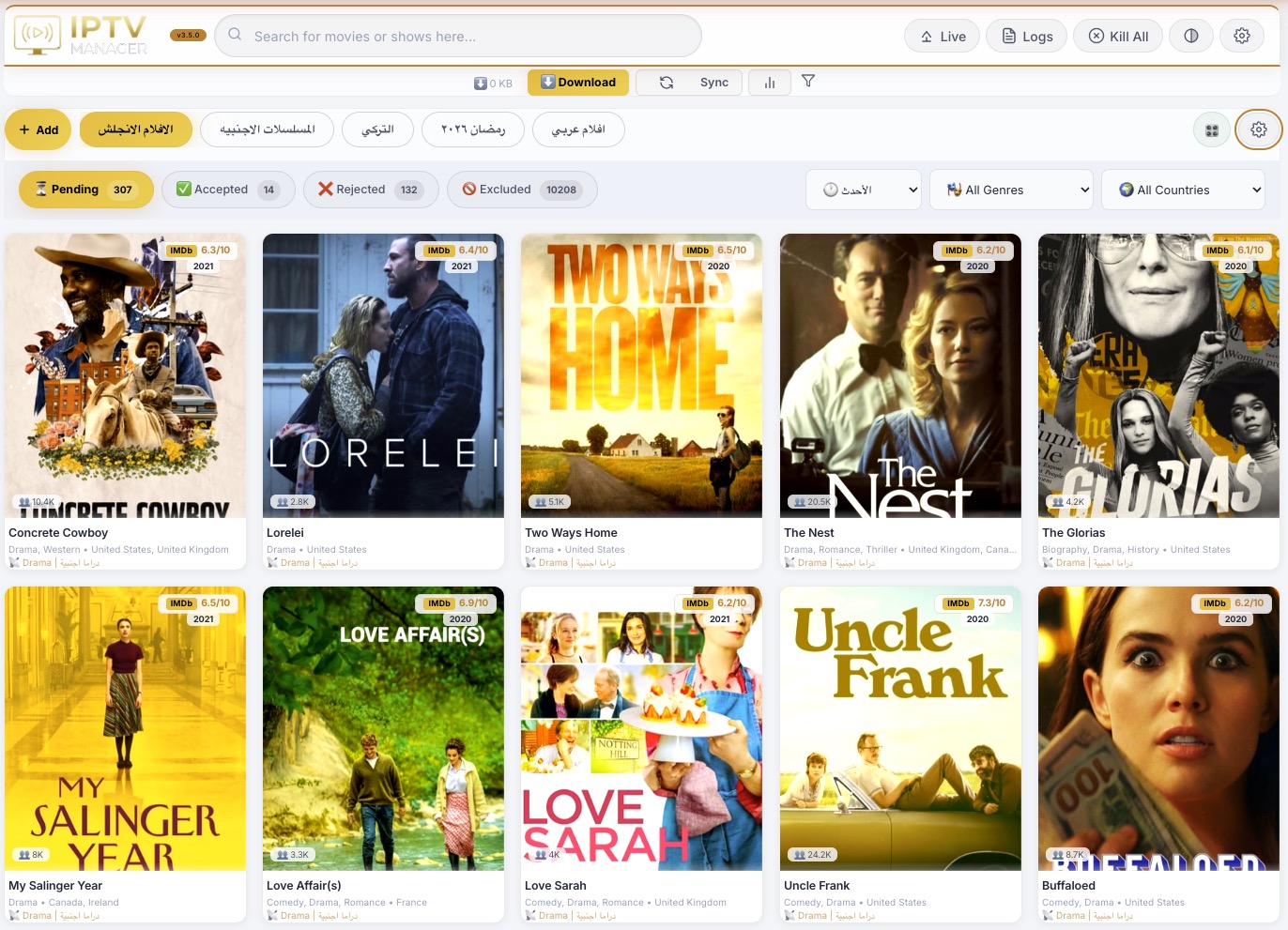
The first screen is the working review board, not a marketing page. It shows sections, media cards, posters, ratings, year, country, genre, source labels, and live counts so the user can decide quickly what is worth keeping.
الشاشة الأولى هي لوحة العمل الحقيقية: أقسام، كروت، بوسترات، تقييمات، سنة، بلد، نوع، مصدر، وأعداد مباشرة تساعدك تختار بسرعة.
- Custom sections for movies, series, Arabic, foreign, Turkish, Ramadan, 4K, and any provider grouping.
- Cards combine IPTV source data with TMDB, OMDb, IMDb, local disk state, and decision state.
- The layout is built for repeated daily review: scan, compare, accept, reject, search, and continue watching.
- The dashboard remembers navigation state without losing the selected section, tab, or active filters.
The status row separates the whole workflow into Pending, Accepted, Rejected, Excluded, richer review tabs, and live counters. The filter bar adds sort, genre, country, year, source, and group-only filtering.
شريط الحالات يقسم دورة العمل: معلق، مقبول، مرفوض، مستبعد، وتابات مراجعة إضافية مع أعداد حية وفلاتر دقيقة.
- Counts update from the same backend state used by the cards.
- Filters are section-aware so counts and dropdowns reflect the current media slice.
- Sort modes support newest, highest rating, most voted, latest downloaded, and source-focused review.
- The UI keeps fast scanning possible even when the IPTV catalog contains tens of thousands of items.

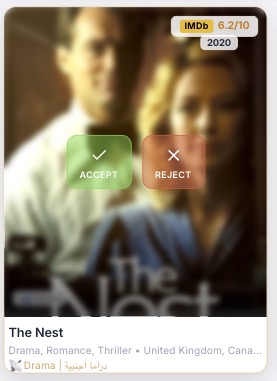
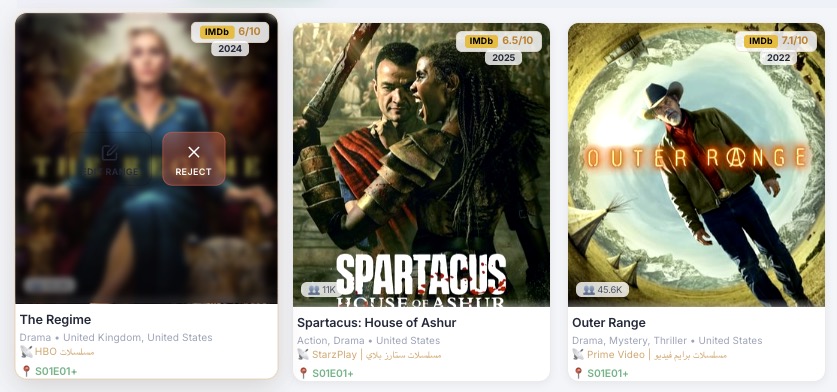
Hovering a card reveals direct decision actions. Accept starts the ownership path toward download and playback; Reject removes noise without deleting history.
عند الوقوف على الكارت تظهر أزرار القرار. القبول يبدأ مسار التحميل، والرفض ينقل العنصر من غير ما يضيع أثره.
- Decisions are saved immediately through the API.
- Accept supports movies and series, including later variant and episode-range choices.
- Reject can be reversed from the Rejected tab when needed.
- Decision state is visible in cards, search, logs, and analytics.
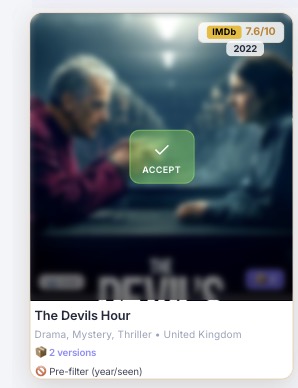
When the same title appears from more than one IPTV source, the app groups the versions instead of treating them as unrelated duplicates.
لو نفس العمل موجود في أكثر من مصدر IPTV، التطبيق يجمع النسخ بدل اعتبارها عناصر عشوائية منفصلة.
- Version badges expose duplicate/source groups directly on the card.
- Sibling variants preserve category, source, stream ID, quality hints, and section ownership.
- The chosen variant is stored separately so future syncs do not overwrite the selected source.
- Group actions can target all variants when the user wants to clean a noisy title.
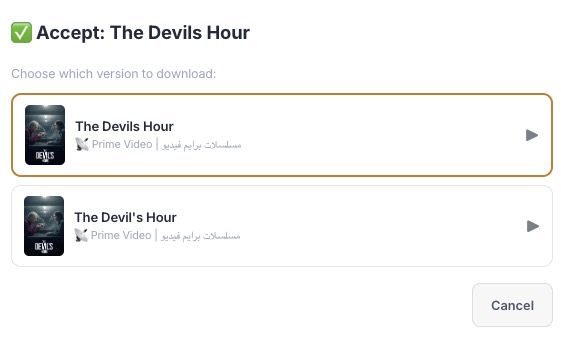
The picker shows the available sources for a title and lets the user select the exact provider category or platform-like feed to use.
نافذة اختيار النسخة تعرض المصادر المتاحة للعمل وتخليك تختار مصدر التحميل المطلوب بدقة.
- Every version remains traceable to its IPTV category.
- The UI marks the currently chosen version when a decision already exists.
- Source changes do not require deleting and recreating the decision.
- The flow protects against cross-section identity drift by keeping section and source context.
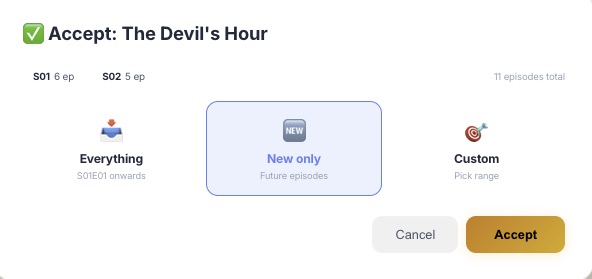
Series acceptance can download the full show, only new episodes, or a custom start season and episode. This prevents wasting bandwidth on episodes already watched elsewhere.
قبول المسلسل يدعم كل الحلقات، الجديد فقط، أو بداية مخصصة بالموسم والحلقة حتى لا يتم تحميل ما لا تحتاجه.
- Season totals are visible before the user commits.
- Custom ranges are saved with the decision and reused by the downloader queue.
- New-only mode supports future catch-up without backfilling old seasons.
- The downloader respects the accepted range, selected variant, and local files already present.
Accepted cards show what has been selected, what is available online, what exists locally, and which source is active.
كروت المقبول تعرض ما تم اختياره، المتاح أونلاين، الموجود على الديسك، والمصدر النشط.
- Local and online counts are shown separately.
- Accepted media can be ordered by latest downloaded episode.
- Card badges expose selected source, rating, year, platform/source label, and episode progress.
- Accepted state is used by downloader, local playback, Plex tracking, and future schedule checks.
The progress line tells the user where the accepted range begins and how much of the series is already represented locally.
سطر التقدم يوضح نقطة بداية التحميل وحالة الحلقات الموجودة محليًا.
- Start points like season/episode are stored with the decision.
- Series with partial local coverage remain visible instead of being treated as complete.
- The badge system avoids counting temporary or failed download artifacts as real episodes.
- This view makes it easy to confirm why a series is waiting, complete, or still downloading.

Each section can be fed by multiple IPTV categories. The header shows readable source labels so the user knows where the content came from.
كل قسم يمكن أن يعتمد على عدة كاتيجوريز من مزود IPTV، والهيدر يعرض أسماء المصادر بوضوح.
- Source labels make provider category IDs understandable.
- Sections can mix sources while keeping the decision and download folder stable.
- Category labels help diagnose why a title appeared in a section.
- Adding or removing a source can be done without editing files manually.
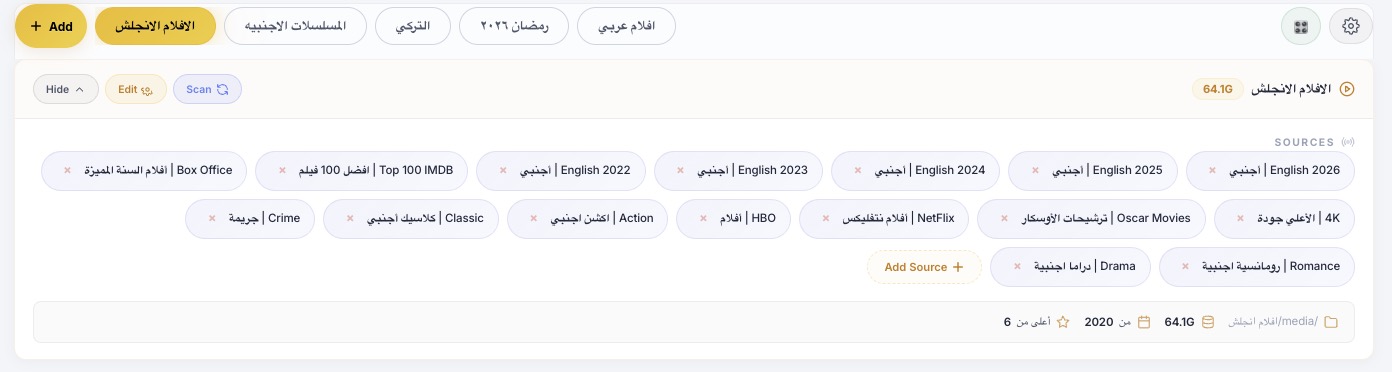
The section header is a control surface: enable/disable, disk usage, source visibility, edit, scan, quick filters, and folder context.
هيدر القسم ليس عنوان فقط؛ هو سطح تحكم فيه تفعيل، حجم، مصادر، تعديل، فحص، وفلاتر سريعة.
- Disk usage is calculated per section.
- Scan runs can be triggered for one section instead of the entire catalog.
- The header exposes min-year, min-rating, source, and folder hints at a glance.
- Collapsed source views keep large sections readable.

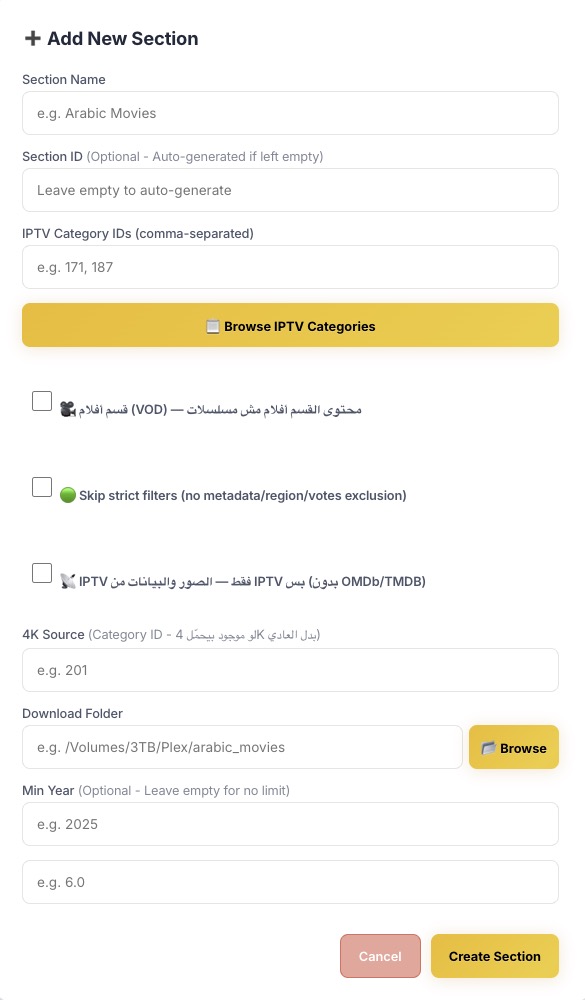
The Add Section modal creates a complete content lane: name, source categories, folder, movie/series mode, filter thresholds, strictness, IPTV-only mode, watched-delete behavior, and quality flags.
نافذة إضافة قسم تنشئ مسار محتوى كامل: اسم، مصادر، فولدر، وضع أفلام/مسلسلات، فلاتر، وقواعد متقدمة.
- Section IDs are stable backend identifiers.
- Download location is stored with the section and reused across queue, discovery, trash, and local playback.
- Min year, rating, and vote thresholds can be set from the beginning.
- Advanced toggles support movie sections, skip-strict review, IPTV-only cover mode, and 4K source marking.
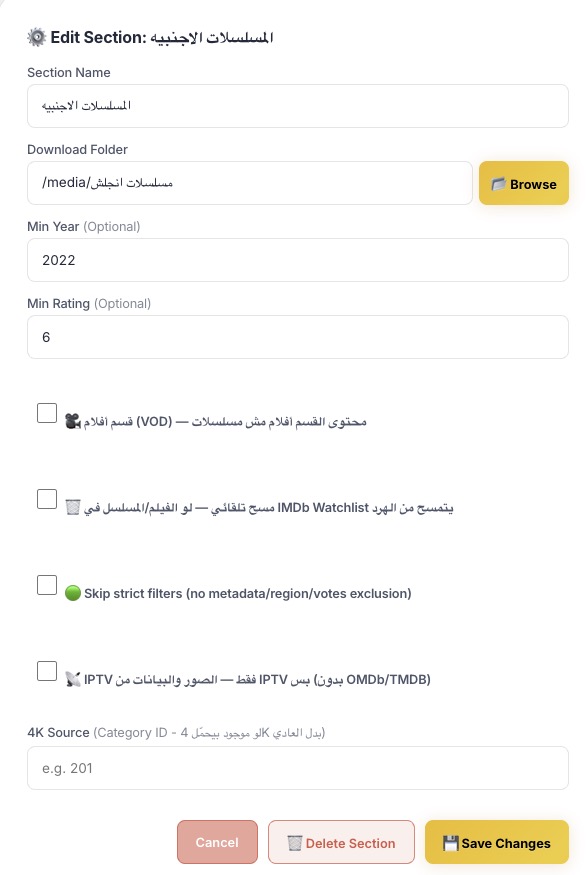
Existing sections can be changed without rebuilding the library. The modal preserves current state and applies updates through section APIs.
يمكن تعديل أي قسم قائم بدون إعادة بناء المكتبة، مع حفظ الحالة وتطبيق التغيير من واجهة الإعدادات.
- Name, folder, filters, mode flags, and source behavior can be changed later.
- Retroactive filtering can release or exclude pending items when thresholds change.
- The app previews destructive section deletion through a separate endpoint before applying it.
- Edits are logged so operational changes remain traceable.
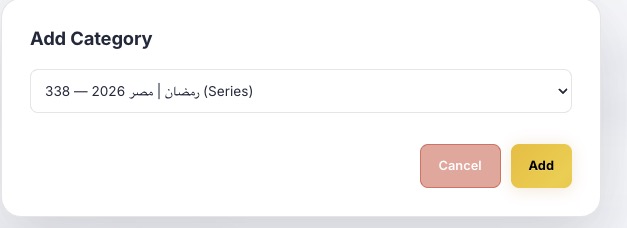
The category picker lets users browse provider categories and add them to a section without needing to remember numeric IDs.
منتقي الكاتيجوريز يسمح بتصفح مصادر المزود وإضافتها للقسم دون حفظ الأرقام يدويًا.
- Categories are fetched from the provider and presented with readable names.
- Movie and series sections use the proper provider action for their type.
- Duplicate source additions are avoided.
- Category changes can be audited through section headers and settings.
The compact dropdown strip keeps daily review fast: sort mode, genre, country, year, source, and group filters are close to the cards.
شريط الفلاتر المختصر يجعل المراجعة اليومية أسرع: ترتيب، نوع، بلد، سنة، مصدر، وتجميع النسخ.
- Dropdown state is tied to the current section and tab.
- Counts are calculated from backend filtered data.
- Filters can be combined to isolate exactly what needs review.
- The UI avoids full-page reloads when filters change.

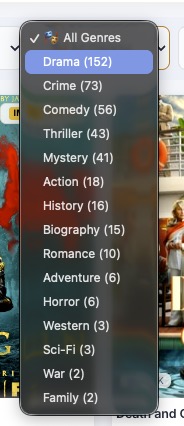
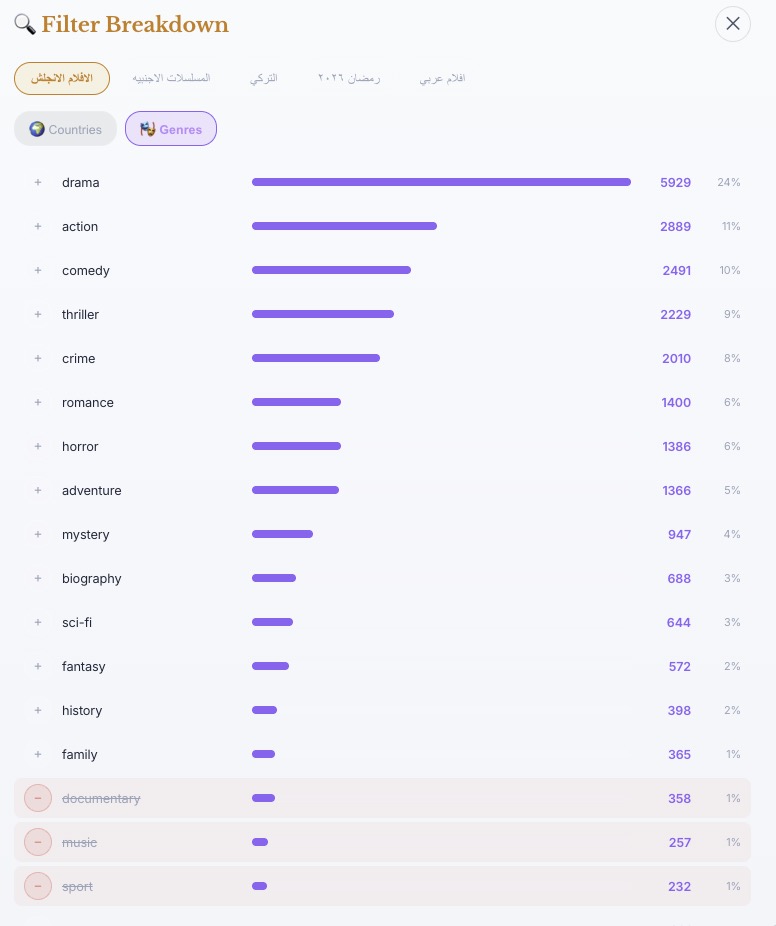
The genre menu shows every genre available in the current slice, including counts, making it useful for audit and cleanup.
قائمة الأنواع تعرض كل نوع موجود في الجزء الحالي مع العدد، وهذا يساعد في المراجعة والتنظيف.
- Counts help identify noisy genres.
- Excluded genres remain traceable through settings and exclusion reasons.
- Genre filters work alongside country, year, source, status, and search.
- The same genre data feeds filter breakdown analytics.
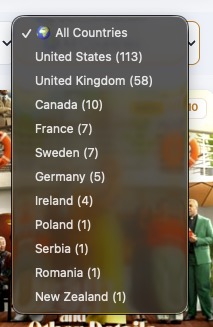
The country menu exposes regional distribution so the user can focus on the libraries they actually watch.
قائمة البلاد تعرض توزيع المحتوى حسب الدولة حتى تركز على المكتبات المطلوبة.
- Country values come from enriched metadata when available.
- Unknown or incomplete metadata remains visible instead of disappearing silently.
- Country exclusions can be global or section-specific.
- Breakdown charts use the same country basis for consistency.
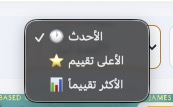
Sort modes let the user scan by recency, quality, popularity, download recency, and other practical review orders.
خيارات الترتيب تسمح بالمراجعة حسب الأحدث، الأعلى تقييمًا، الأكثر تصويتًا، أو آخر تحميل.
- Newest-first supports daily triage.
- Rating and vote sorting help find high-value content quickly.
- Latest-downloaded ordering helps continue accepted series review.
- Sort state is part of the dashboard navigation memory.
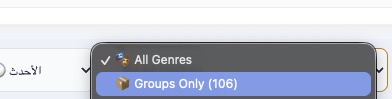
The groups-only mode isolates titles that have multiple sources or variants, which is where manual source choice matters most.
فلتر المجموعات يعرض الأعمال التي لها أكثر من نسخة أو مصدر، وهي الحالات التي تحتاج اختيار يدوي.
- Useful for choosing Netflix/Prime/HBO-style sources when labels exist.
- Supports cleanup of duplicate entries.
- Works with accept, reject group, and chosen-source behavior.
- Helps detect provider catalog noise without scanning the whole dashboard.
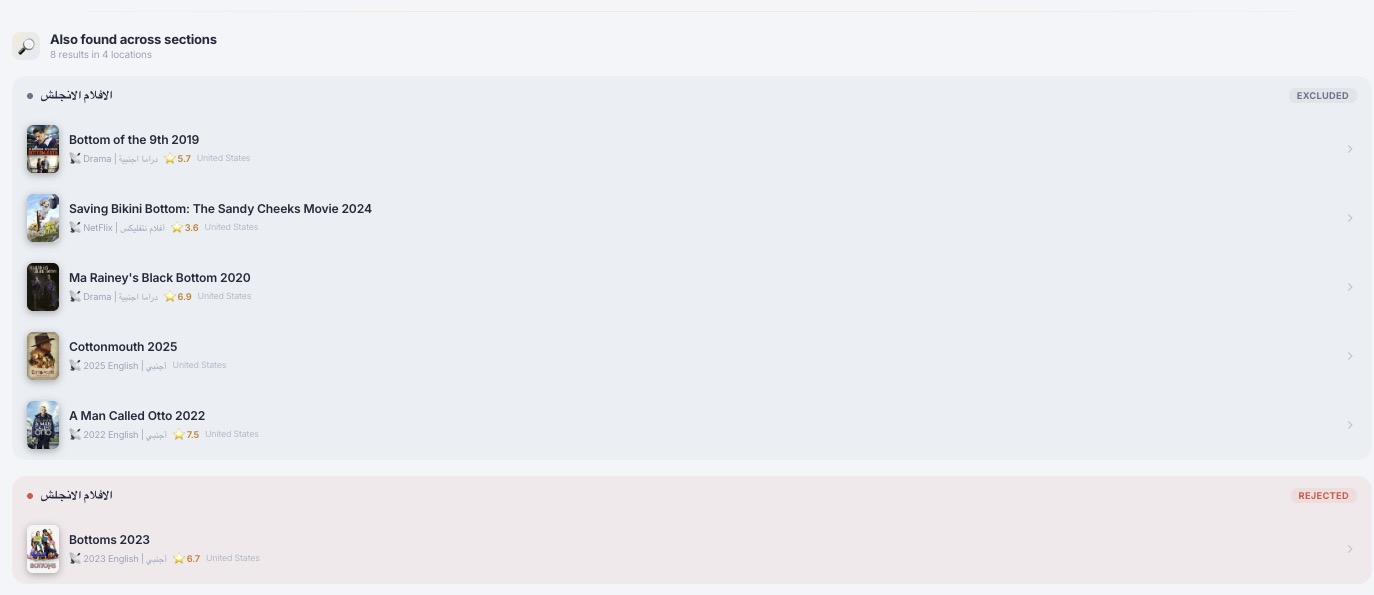
Global search finds titles across every section and reports their current status, not just the visible tab.
البحث الشامل يجد الأعمال في كل الأقسام ويعرض حالتها الحالية، وليس فقط التاب المفتوح.
- Results include thumbnails, section names, status badges, year, rating, and country.
- Search supports direct navigation back into the relevant section.
- Recent searches and suggestions make repeat lookups faster.
- The backend uses indexed/search helpers instead of scanning everything in the browser.
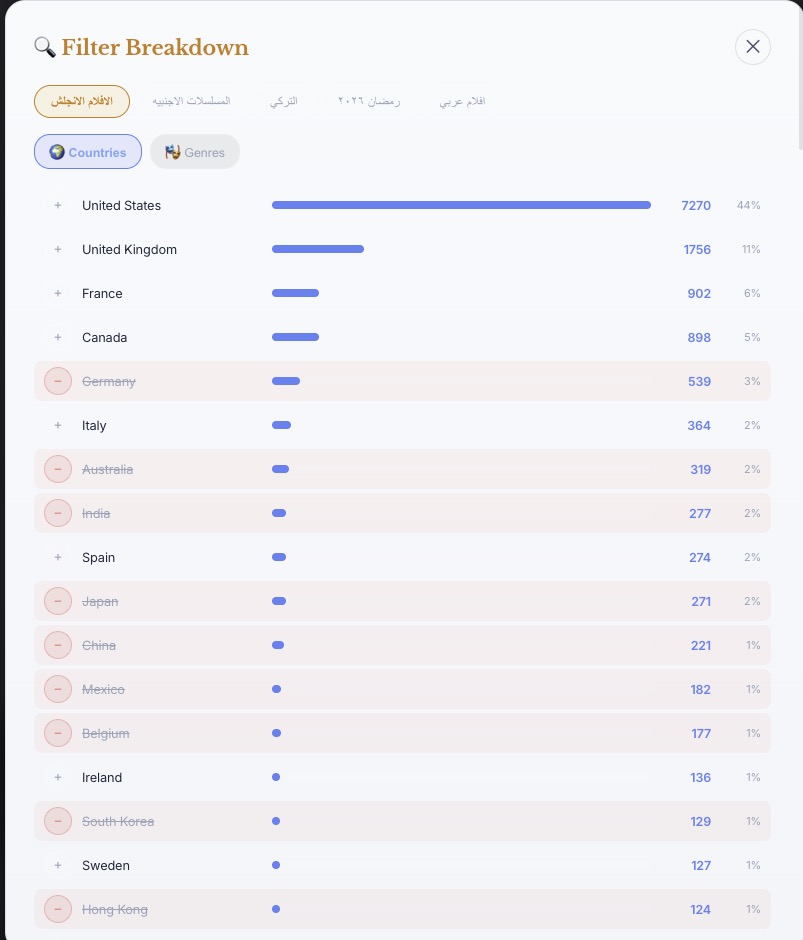
The country breakdown turns metadata into an audit chart. It shows the distribution of content and how exclusion rules affect the catalog.
تحليل البلاد يحول الميتاداتا إلى رسم تدقيقي يوضح توزيع المحتوى وتأثير قواعد الاستبعاد.
- Each section can be analyzed independently.
- Excluded countries are visibly marked.
- The chart helps tune rules before running another sync.
- Breakdowns are also useful for spotting bad metadata or unexpected provider categories.
The genre chart shows which genres dominate a section and which ones are being filtered out.
رسم الأنواع يوضح الأنواع المسيطرة داخل القسم وما يتم استبعاده منها.
- Supports section-level and global review.
- Helps avoid over-filtering valuable content.
- Pairs with settings where genres can be excluded globally or per section.
- The same data supports dashboard dropdown counts.
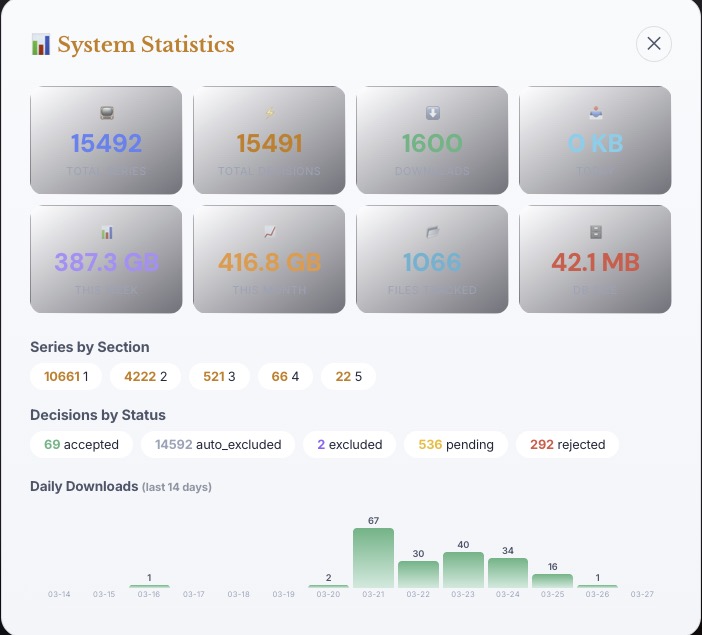
The statistics panel gives operational scale: total media, decisions, downloads, bandwidth, file counts, database size, sections, and recent activity.
لوحة الإحصائيات تعرض حجم النظام: عدد الأعمال، القرارات، التحميلات، الاستهلاك، الملفات، قاعدة البيانات، والنشاط.
- Shows decision breakdown by status.
- Tracks series/movie totals and per-section distribution.
- Includes daily download charts for recent activity.
- Useful for confirming that sync, download, filters, and DB state agree.
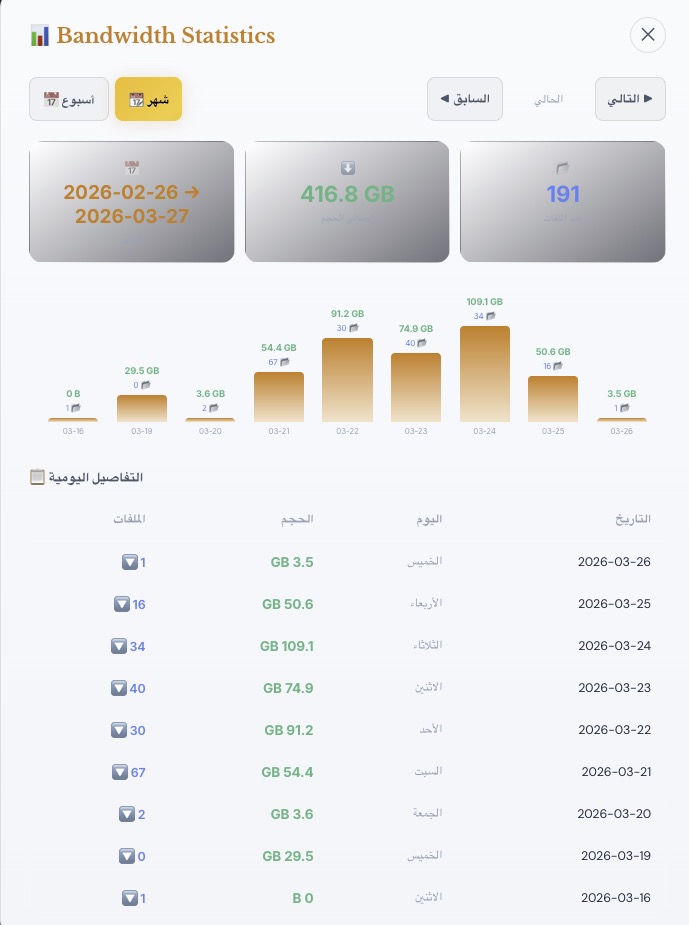
Monthly bandwidth shows how much data the downloader moved and how many files were involved, with daily bars for trend review.
إحصائية الشهر تعرض حجم التحميل وعدد الملفات مع أعمدة يومية لمراجعة الاتجاه.
- Feeds from download history and daily stats.
- Supports daily and monthly limits in settings.
- Makes heavy download days obvious.
- Helps diagnose provider changes, queue spikes, and storage planning.
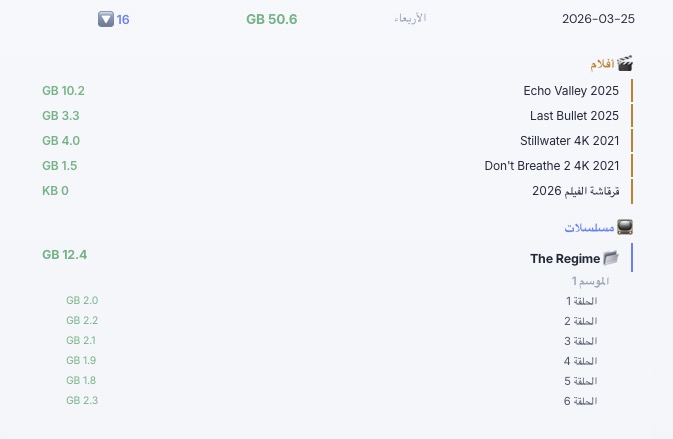
The daily detail panel expands a day into file-level download entries with sizes and names.
تفاصيل اليوم تعرض الملفات التي تم تحميلها في ذلك اليوم مع الاسم والحجم.
- Lets the user audit exactly what consumed bandwidth.
- Pairs with download limits and accepted decisions.
- Useful when a large series or movie batch triggers unexpected usage.
- The data links dashboard state to downloader history.
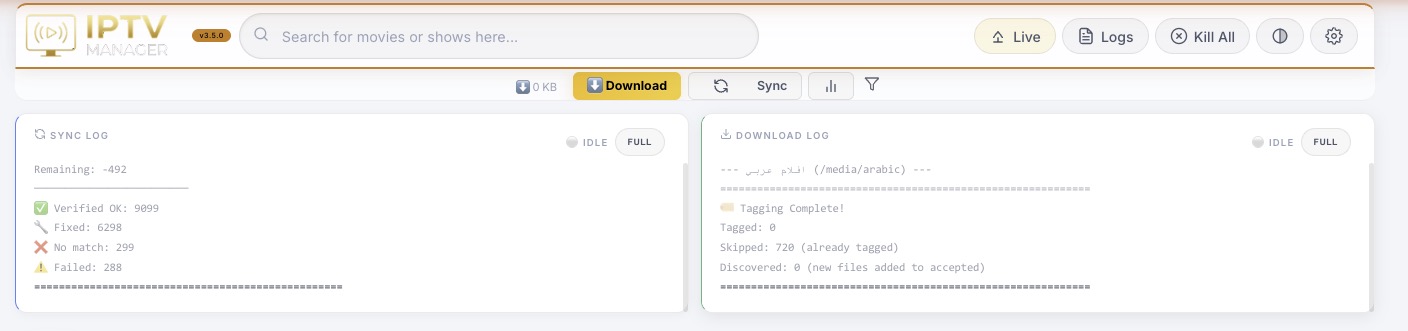
Live logs stream current sync and downloader activity onto the dashboard, so the user does not need to open server files.
اللوجات المباشرة تعرض نشاط المزامنة والتحميل داخل اللوحة بدون فتح ملفات السيرفر.
- Sync status covers category fetch, metadata enrichment, filters, covers, and summaries.
- Download status covers queue building, matching, progress, tagging, and cleanup.
- The panels show idle/running state honestly.
- Polling was optimized to reduce unnecessary CPU load.
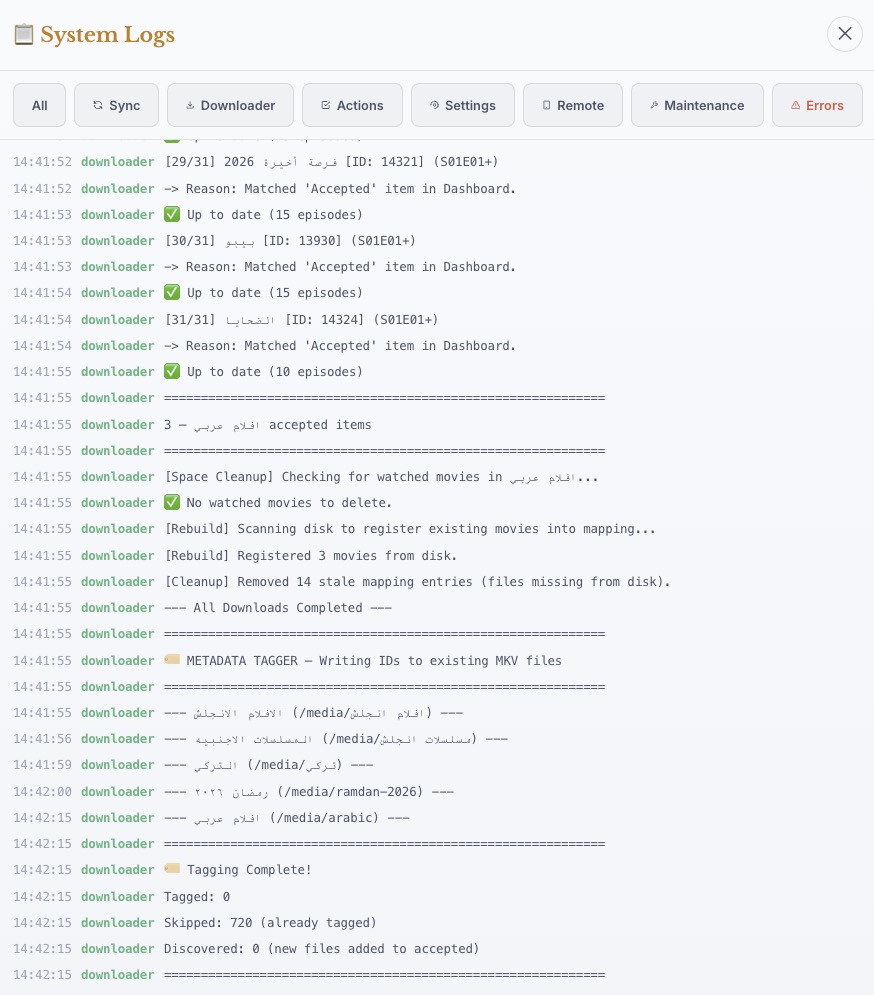
The full system log view exposes longer operational context for troubleshooting downloads, matching, cleanup, and tagging.
لوحة اللوجات الكاملة تعرض سياق أطول لتشخيص التحميل، المطابقة، التنظيف، والتاجينج.
- Separate log tabs keep downloader, sync, covers, web, system, and live activity readable.
- Longer history helps diagnose issues that are missed by the compact live cards.
- Log output is displayed inside the app for remote support workflows.
- The UI avoids flashing while auto-refreshing.
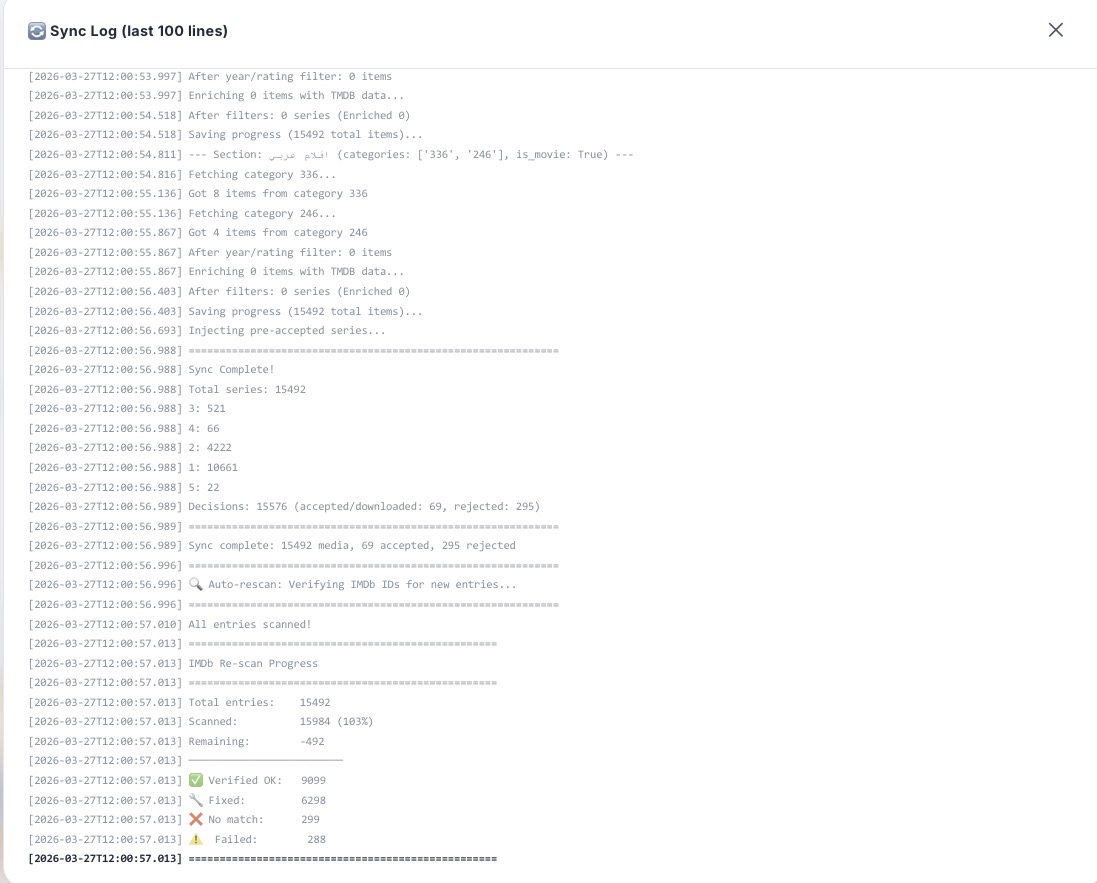
The sync log records full catalog refresh activity: provider fetches, category updates, metadata work, filters, accepted state, and summaries.
لوج المزامنة يسجل تحديث الكتالوج: جلب المزود، الكاتيجوريز، الميتاداتا، الفلاتر، وحالة القرارات.
- Helpful for seeing why new items appeared or disappeared.
- Shows whether a section sync or full sync was running.
- Supports debugging metadata, cover, and filter decisions.
- The sync pipeline uses shared IPTV request gates and cached snapshots to control external calls.
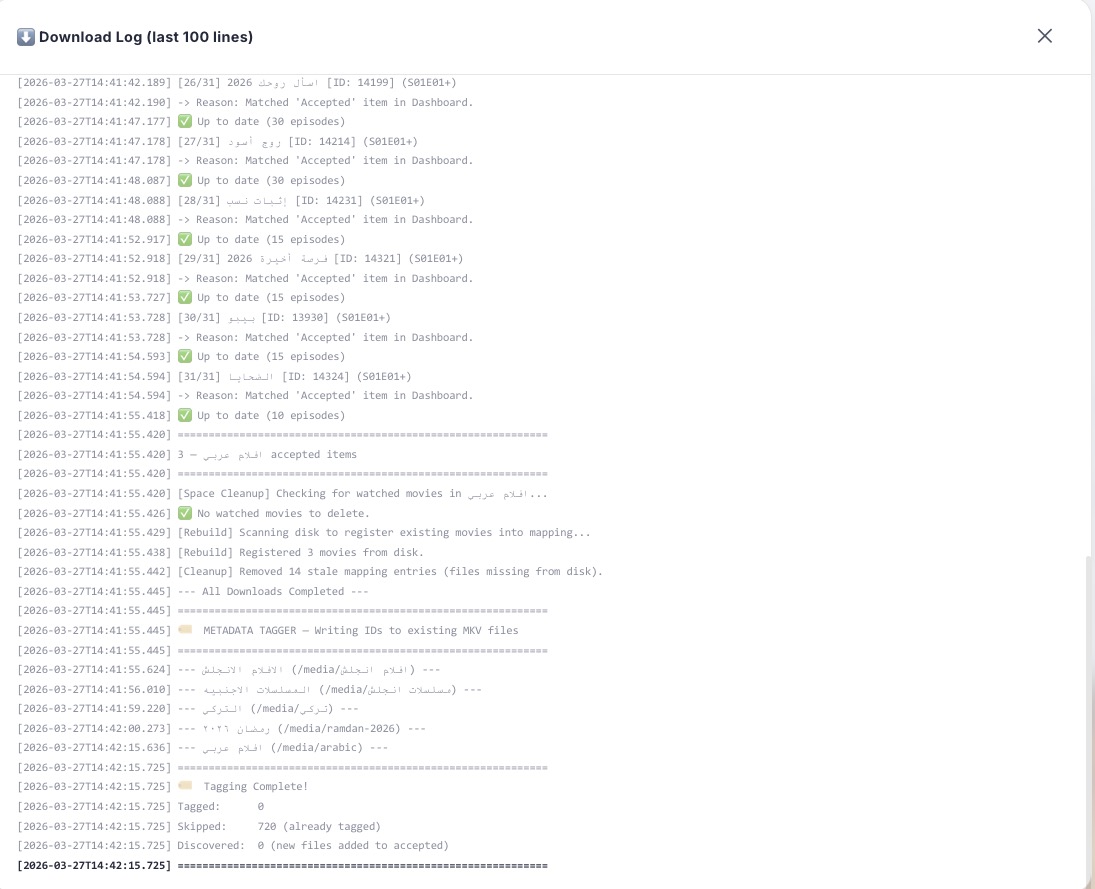
The download log gives the complete queue and file flow: selected items, provider streams, limits, resume, finish state, tagging, and cleanup.
لوج التحميل يعرض مسار الطابور والملفات: العناصر المختارة، الستريم، الحدود، الاستكمال، التاجينج، والتنظيف.
- Makes stalled or skipped downloads explainable.
- Shows smart restart and process-control outcomes.
- Links accepted decisions to actual files.
- Helps verify that local files, DB state, and downloader results match.
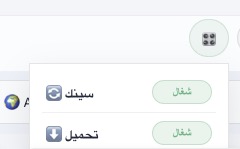
The quick run popover lets the user trigger sync or download immediately instead of waiting for scheduled jobs.
نافذة التشغيل اليدوي تسمح بتشغيل المزامنة أو التحميل فورًا بدل انتظار الجدول.
- Manual Sync refreshes IPTV data and metadata.
- Manual Download builds the accepted queue and starts the downloader.
- Stop and Kill All controls exist in maintenance areas for emergency process control.
- The dashboard reflects running state after the action.
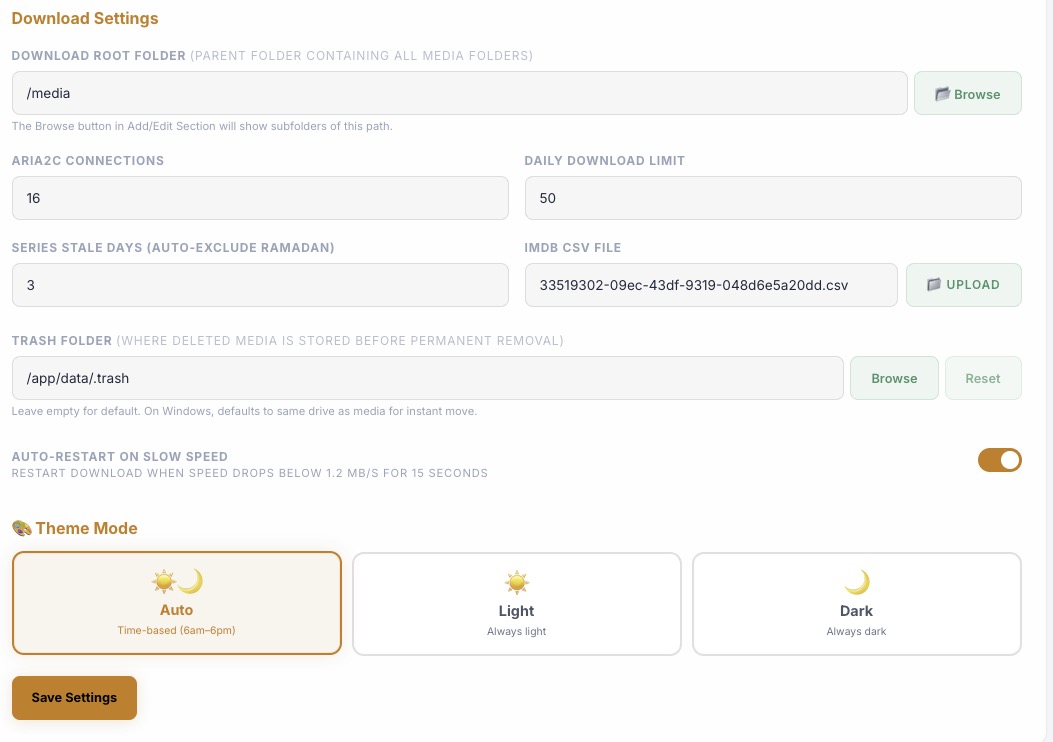
The download settings panel controls the root media folder, aria2c connection count, IMDb CSV import, trash folder, smart restart, speed threshold, and automatic interval.
لوحة إعدادات التحميل تتحكم في فولدر الميديا، اتصالات aria2c، CSV IMDb، المهملات، إعادة التشغيل الذكية، والجدول.
- The folder browser avoids manual text editing when selecting storage.
- aria2c connection count tunes speed per file.
- Smart restart can recover downloads that remain below a configured speed.
- Download interval and limits work together to control background activity.
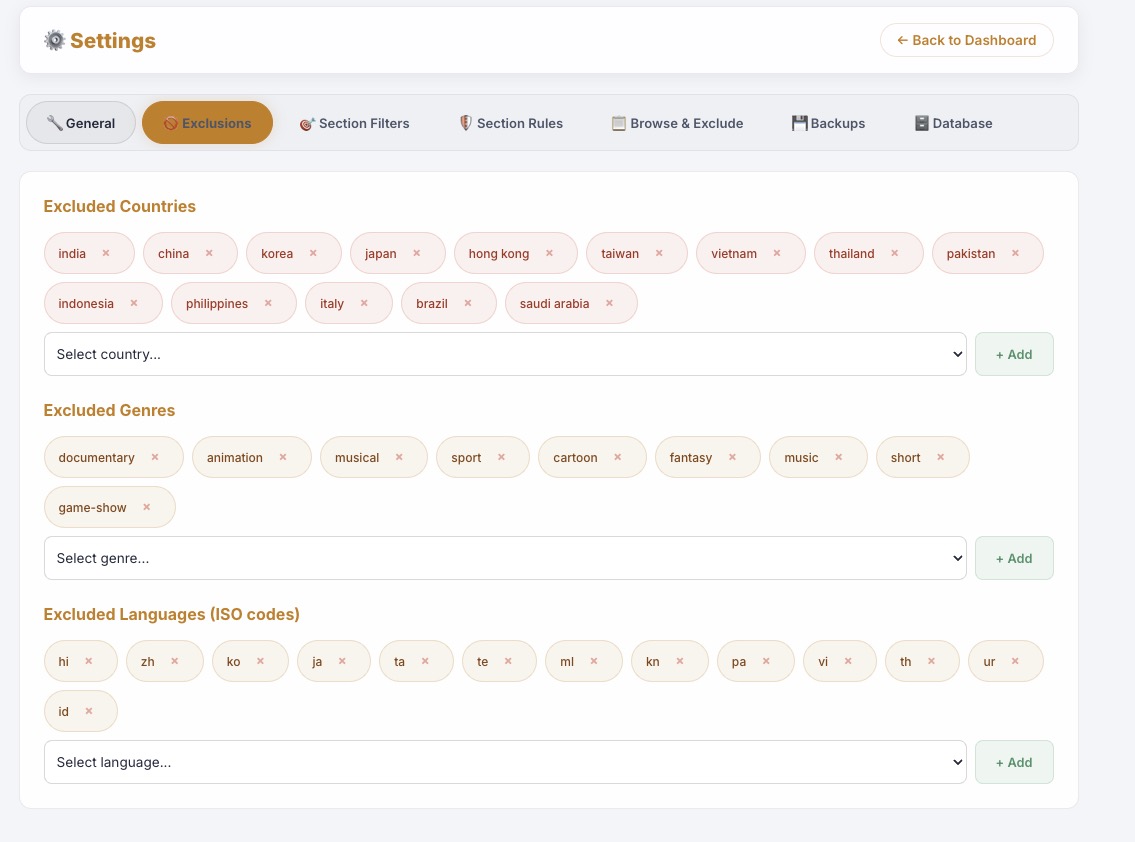
Global exclusions remove catalog noise across every section by country, genre, and language while keeping the reason visible.
الاستبعاد العام يقلل ضوضاء الكتالوج في كل الأقسام حسب البلد والنوع واللغة مع سبب واضح.
- Rules apply retroactively to pending items.
- Excluded items remain searchable and reviewable.
- Global rules can be overridden or refined by section-specific rules.
- The dashboard displays exclusion reasons instead of silently hiding items.
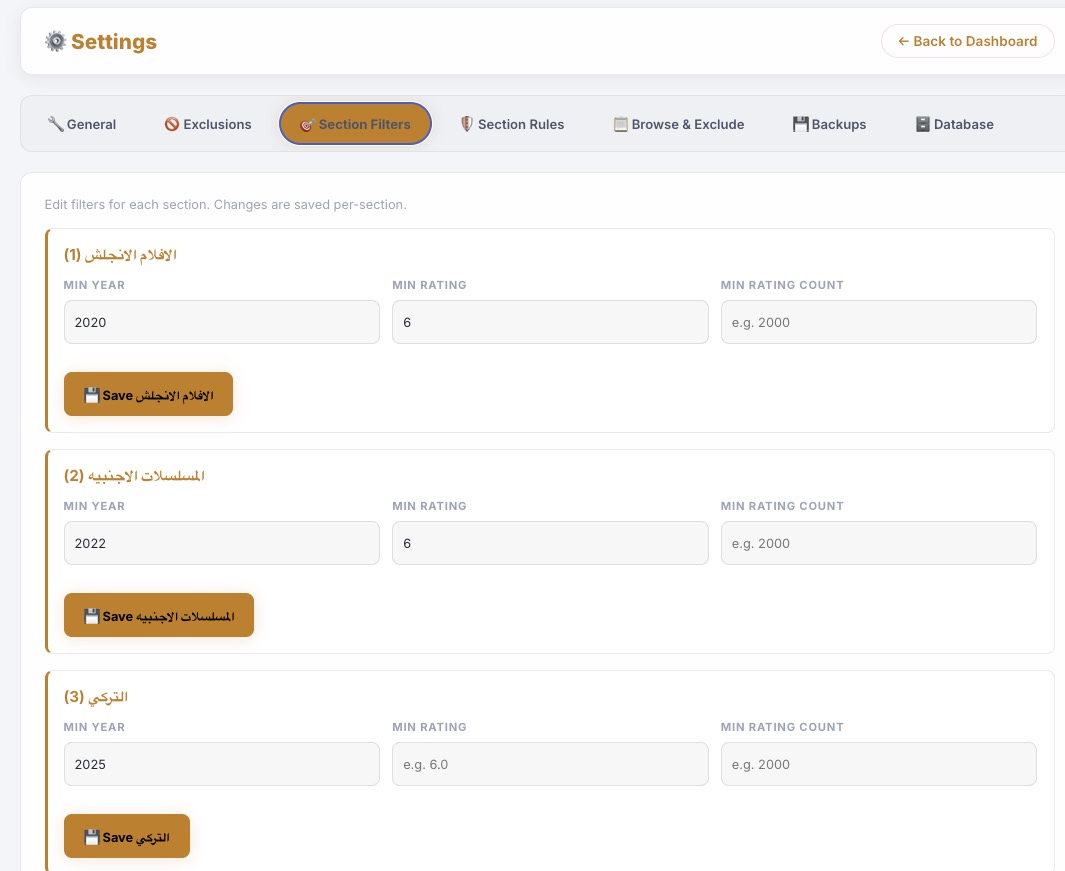
Each section has independent min-year, rating, and vote-count thresholds so one library can be strict while another remains broad.
كل قسم له حدود مستقلة للسنة والتقييم وعدد الأصوات، فتقدر تجعل قسم صارم وآخر واسع.
- Threshold updates can release or exclude pending items.
- Supports different policies for movies, foreign series, Arabic sections, and children sections.
- Min votes helps avoid unknown low-signal titles.
- Filter state is stored in DB-backed section configuration.
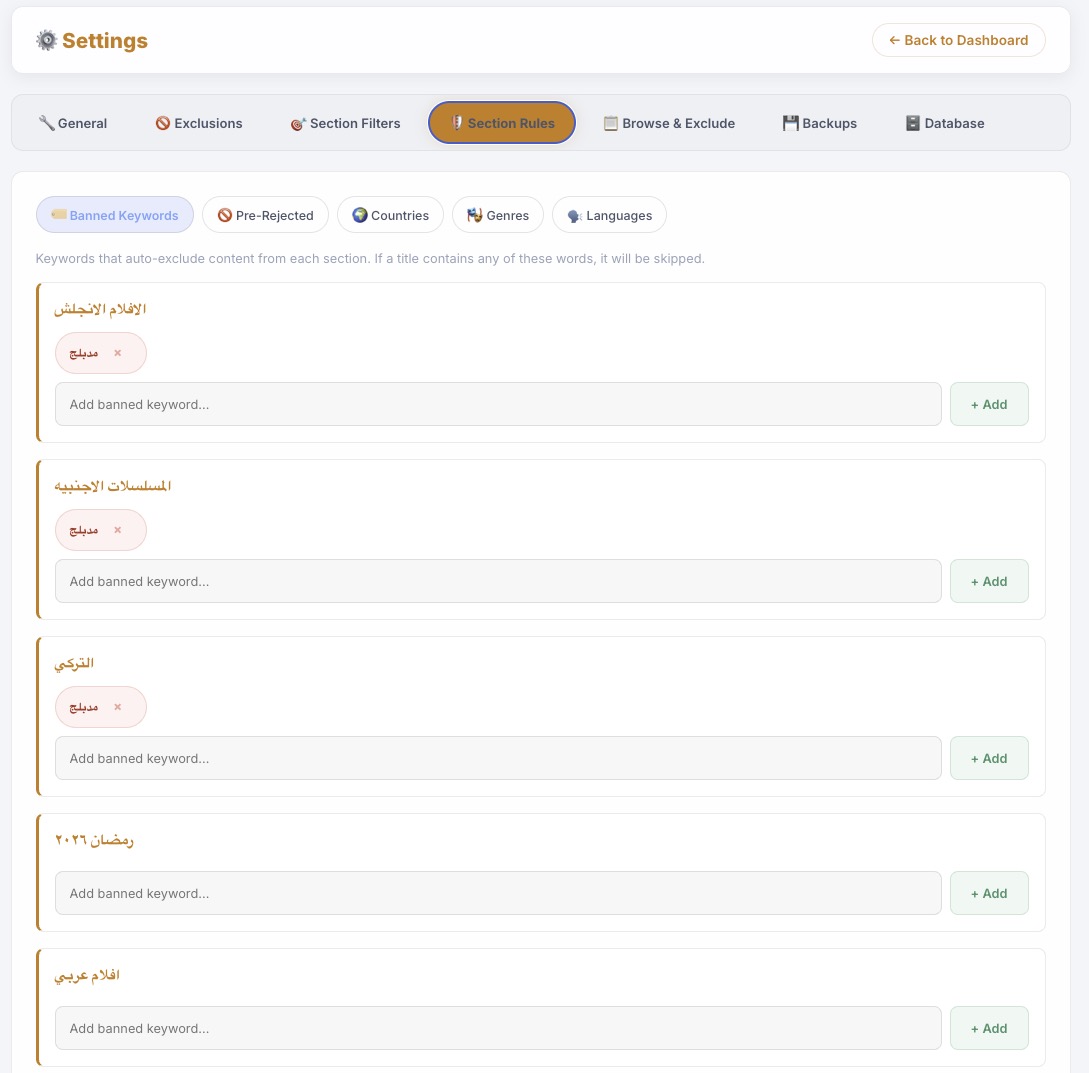
Banned keyword rules exclude titles that match section-specific words or phrases.
قواعد الكلمات المحظورة تستبعد العناوين المطابقة لكل قسم.
- Useful for dubbed, cam, duplicate language, or provider naming noise.
- Rules are per-section, not one global blunt rule.
- Changes run retroactively on pending content.
- Matched items retain a reason so the rule can be audited later.
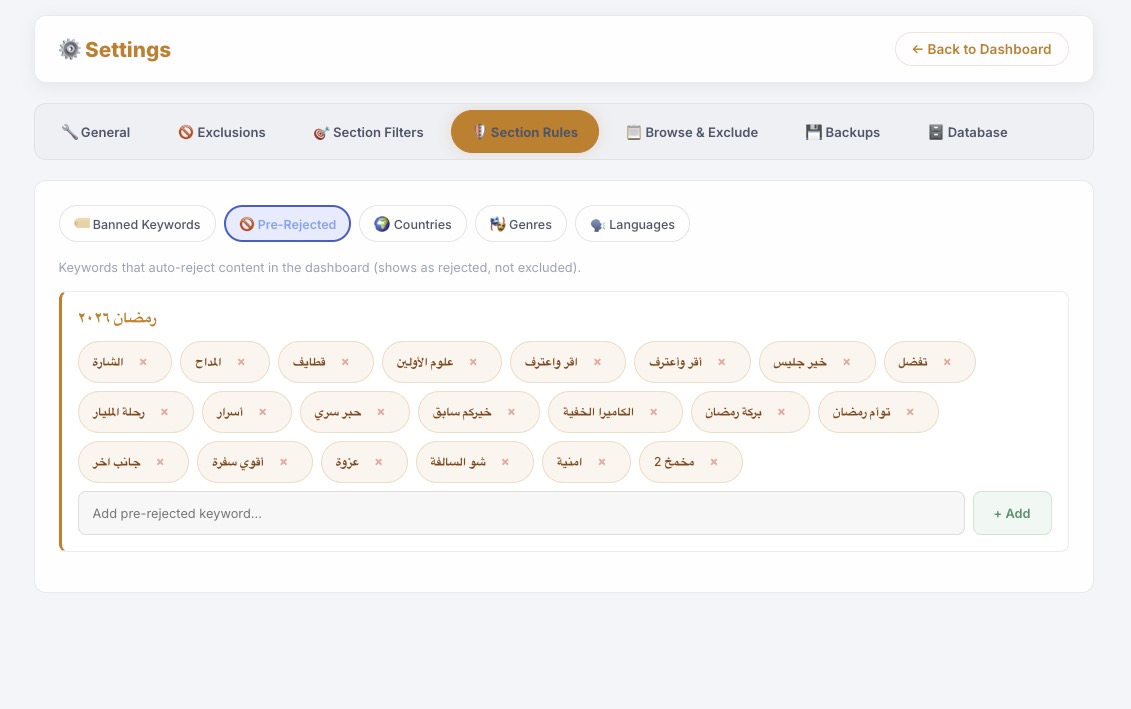
Pre-rejected keywords are stronger than normal exclusions: matching items go to Rejected state directly.
الكلمات المرفوضة مسبقًا أقوى من الاستبعاد؛ العناصر المطابقة تنتقل إلى حالة الرفض مباشرة.
- Useful for titles the user never wants in a specific section.
- Keeps the Rejected tab as an intentional decision record.
- Can be tuned independently from global country/genre/language rules.
- Rules are logged when updated.
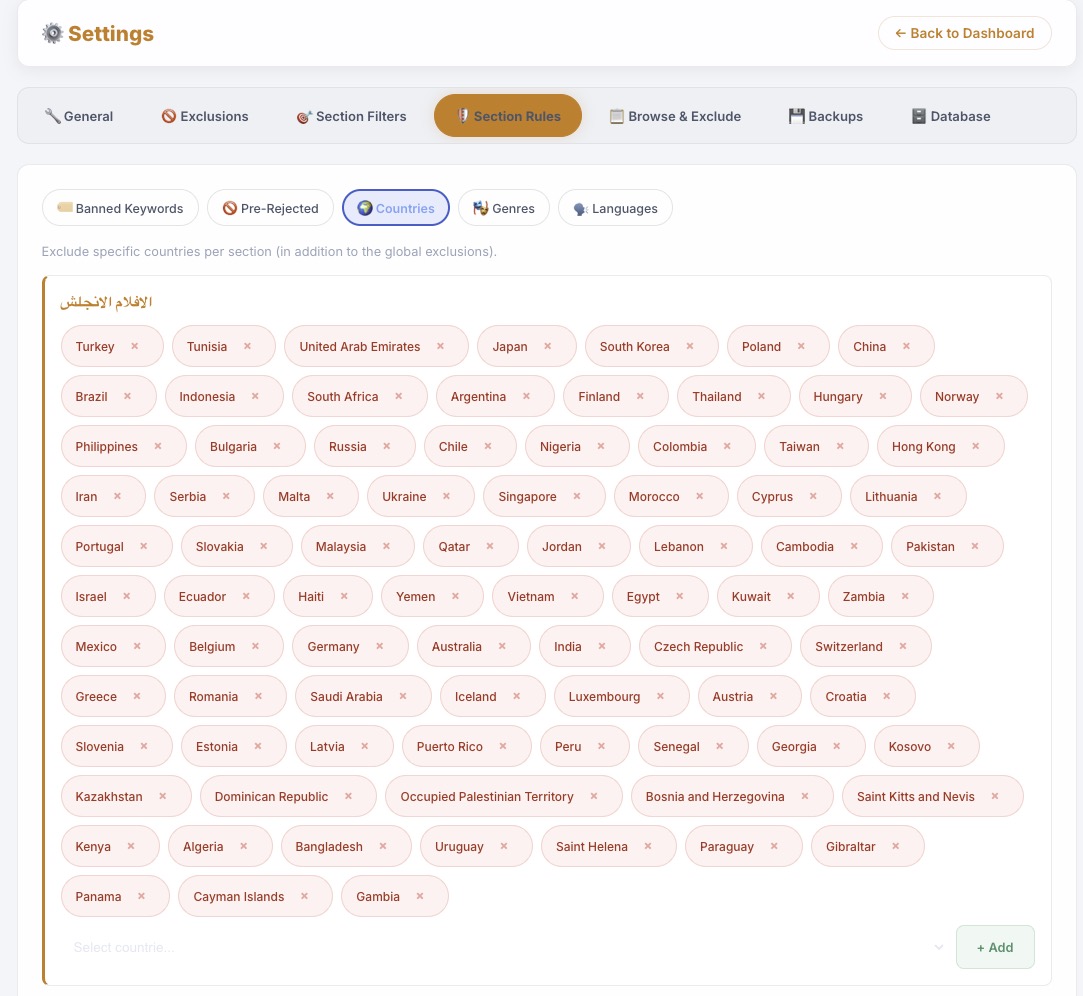
Per-section country rules let one section allow a region while another excludes it.
قواعد البلاد لكل قسم تسمح بسياسة مختلفة من قسم لآخر.
- Country, genre, language, and year rules can be section-specific.
- This prevents a global rule from damaging specialized libraries.
- Breakdown charts help choose values before saving.
- Retroactive application keeps old pending rows aligned with new rules.
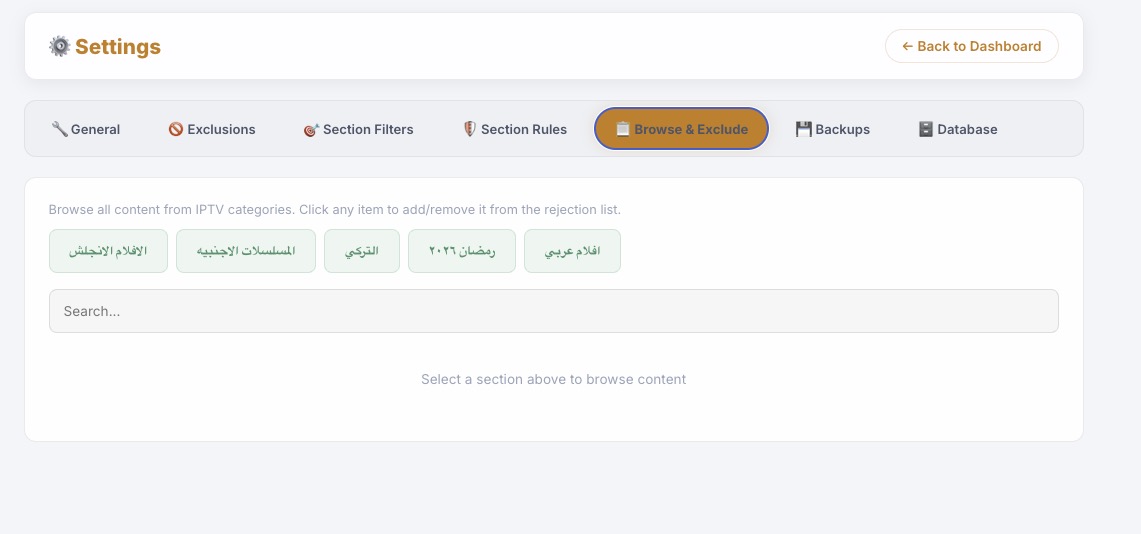
Browse & Exclude is a visual provider browser for reviewing items directly from Settings.
Browse & Exclude هو متصفح مرئي لمراجعة محتوى المزود من داخل الإعدادات.
- Pick a section and review its source catalog.
- Search provider items without leaving settings.
- Reject or exclude obvious noise quickly.
- Covers are reused when already cached in the local DB.
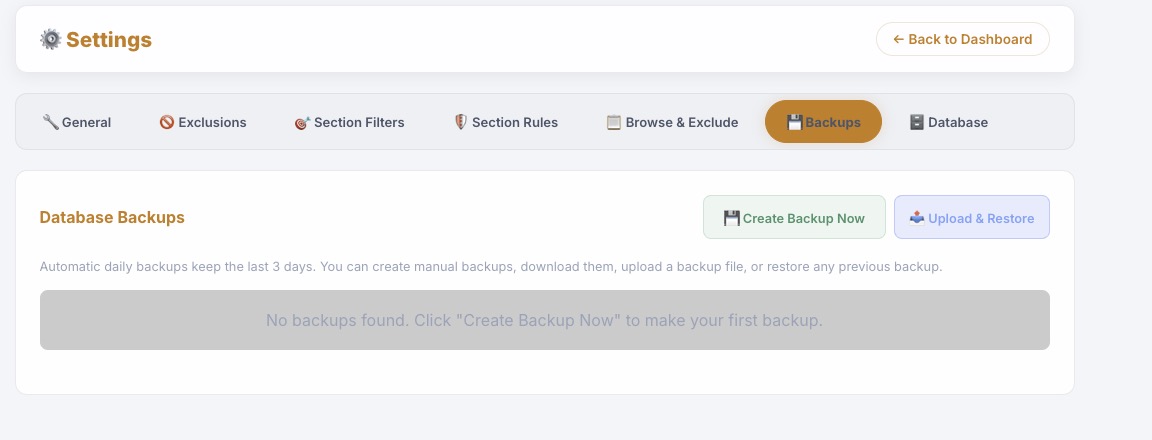
The backup panel creates, lists, restores, uploads, downloads, and deletes database backups from the UI.
لوحة النسخ الاحتياطي تنشئ وتعرض وتسترجع وترفع وتحمل وتحذف نسخ قاعدة البيانات من الواجهة.
- Manual backups can be created before risky changes.
- Restore actions create a safety copy first.
- Automatic retention keeps recent daily backups.
- Backup history is visible without shell access.
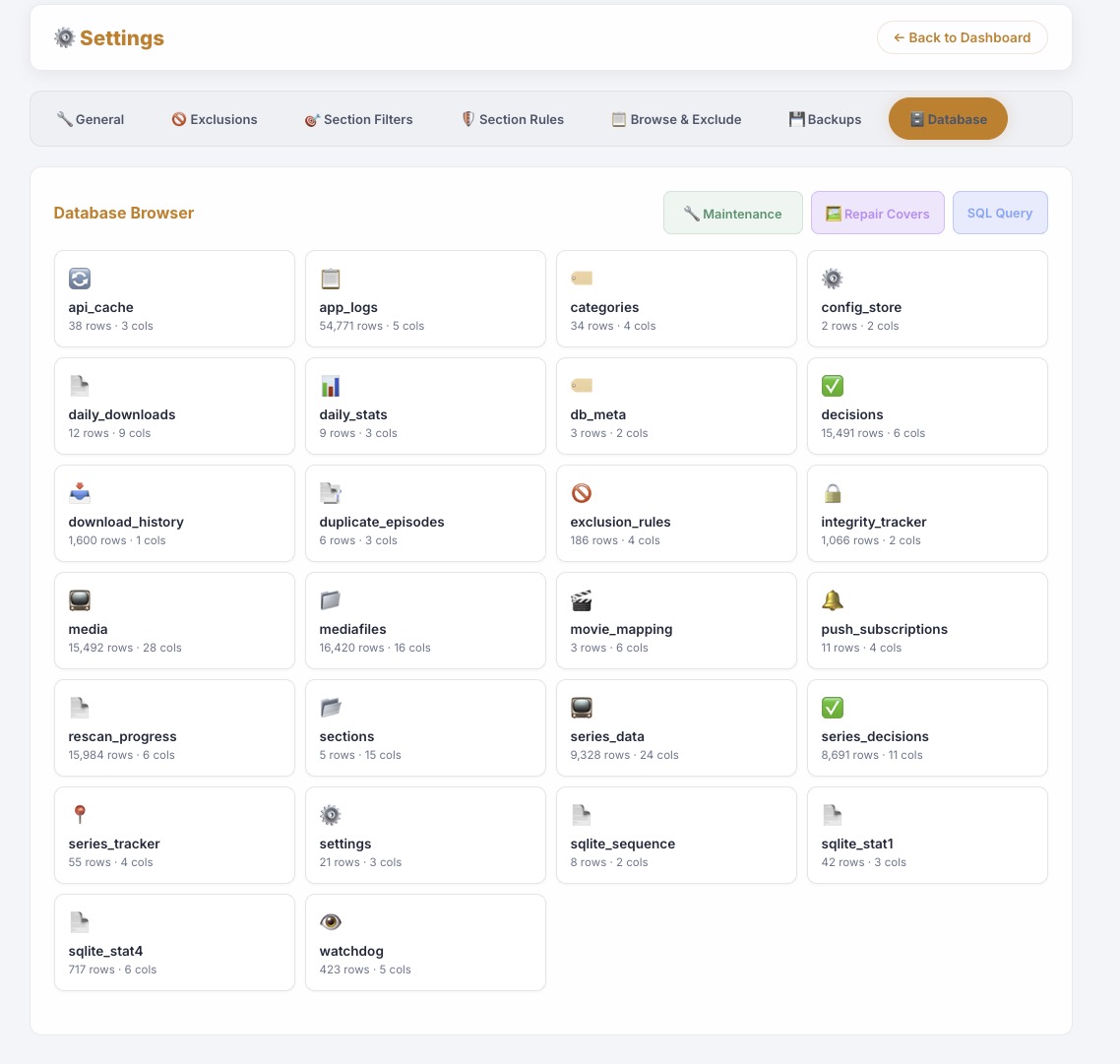
The admin database browser exposes tables, counts, pagination, search, maintenance, controlled SQL, and row-level inspection.
متصفح قاعدة البيانات الإداري يعرض الجداول، الأعداد، الصفحات، البحث، الصيانة، SQL، وفحص الصفوف.
- Shows normalized tables for media, decisions, downloads, logs, trash, tracking, discovery, and settings.
- Maintenance can optimize the DB.
- Cover repair can be launched from admin tools.
- The browser is a diagnostic surface, not the normal settings backend.
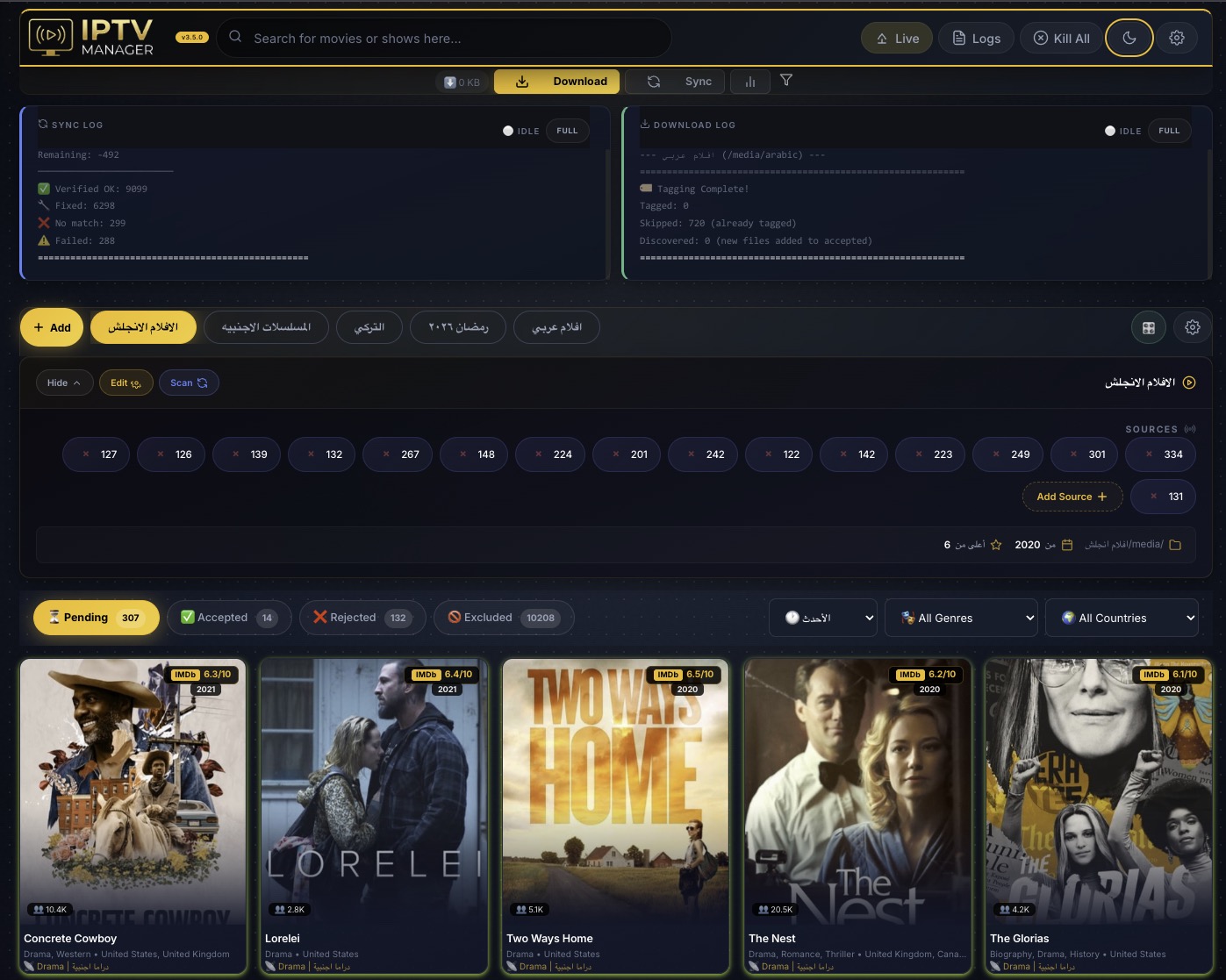
Light, dark, and automatic modes cover the dashboard, settings, modals, cards, charts, overlays, and admin panels.
الوضع الفاتح والداكن والأوتوماتيك يغطي اللوحة، الإعدادات، النوافذ، الكروت، الرسوم، ولوحات الإدارة.
- Theme mode is saved as a setting.
- Holiday themes can temporarily overlay the base mode.
- Mobile and desktop share the same theme system.
- Cards, badges, charts, and settings controls were tuned for contrast.
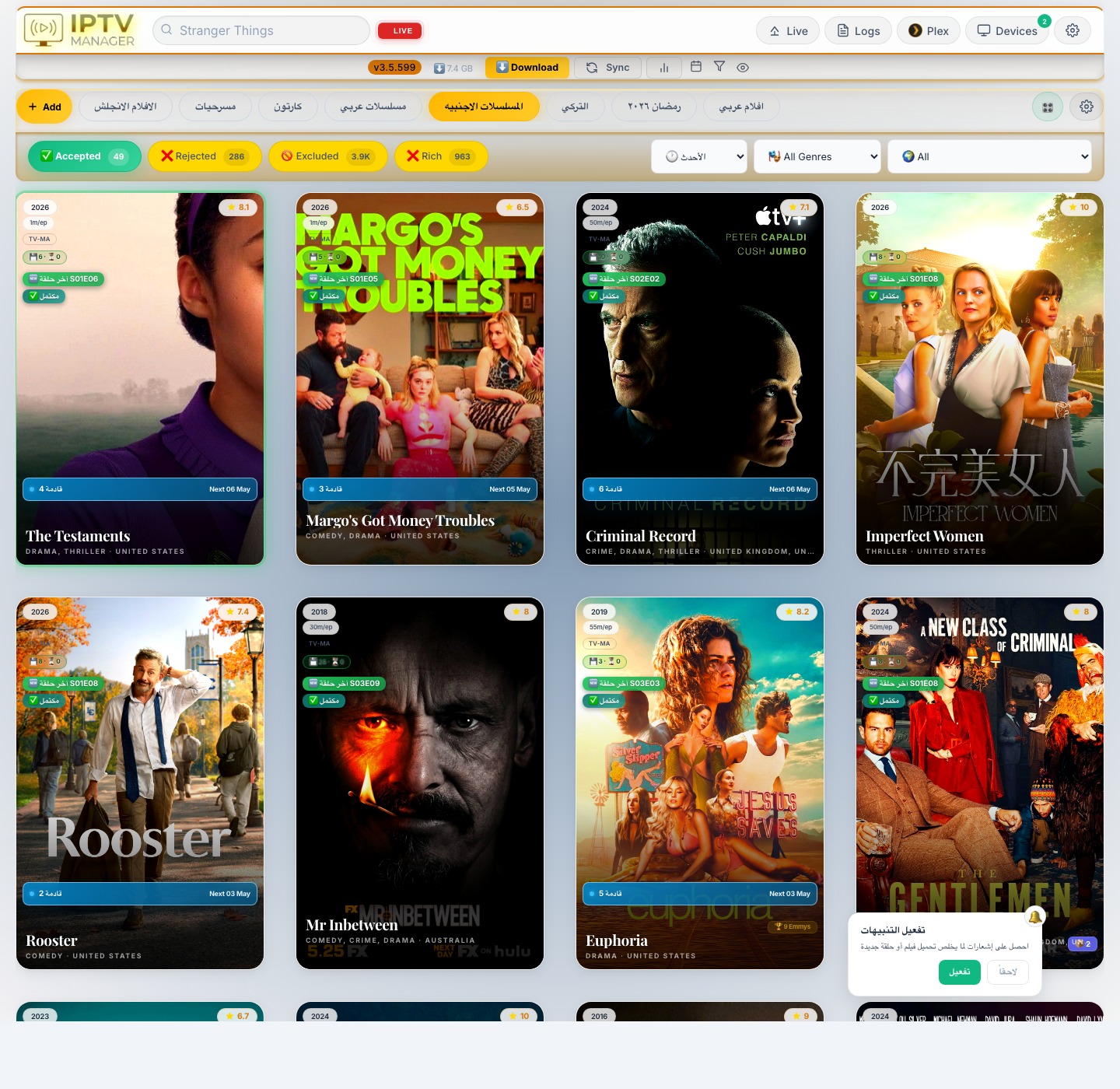
The series status bar summarizes the active view with compact counts and state markers.
شريط حالة المسلسلات يلخص العرض الحالي بأعداد وعلامات مختصرة.
- Designed for dense scanning without opening every card.
- Works with Accepted and other state tabs.
- Counts are tied to backend status state.
- Useful when large sections need quick triage.

Accepted cards can show future episode signals when schedule data says episodes exist but should not yet be downloaded or reclaimed.
كروت المقبول يمكن أن تعرض مؤشرات الحلقات المستقبلية عندما تؤكد بيانات الجدول أنها لم تحن بعد.
- Separates local count, online count, and future count.
- Prevents unaired episodes from being treated as missing failures.
- Feeds Plex reclaim safety so future content blocks premature cleanup.
- Schedule support is controlled by the Plex/future episode settings path.
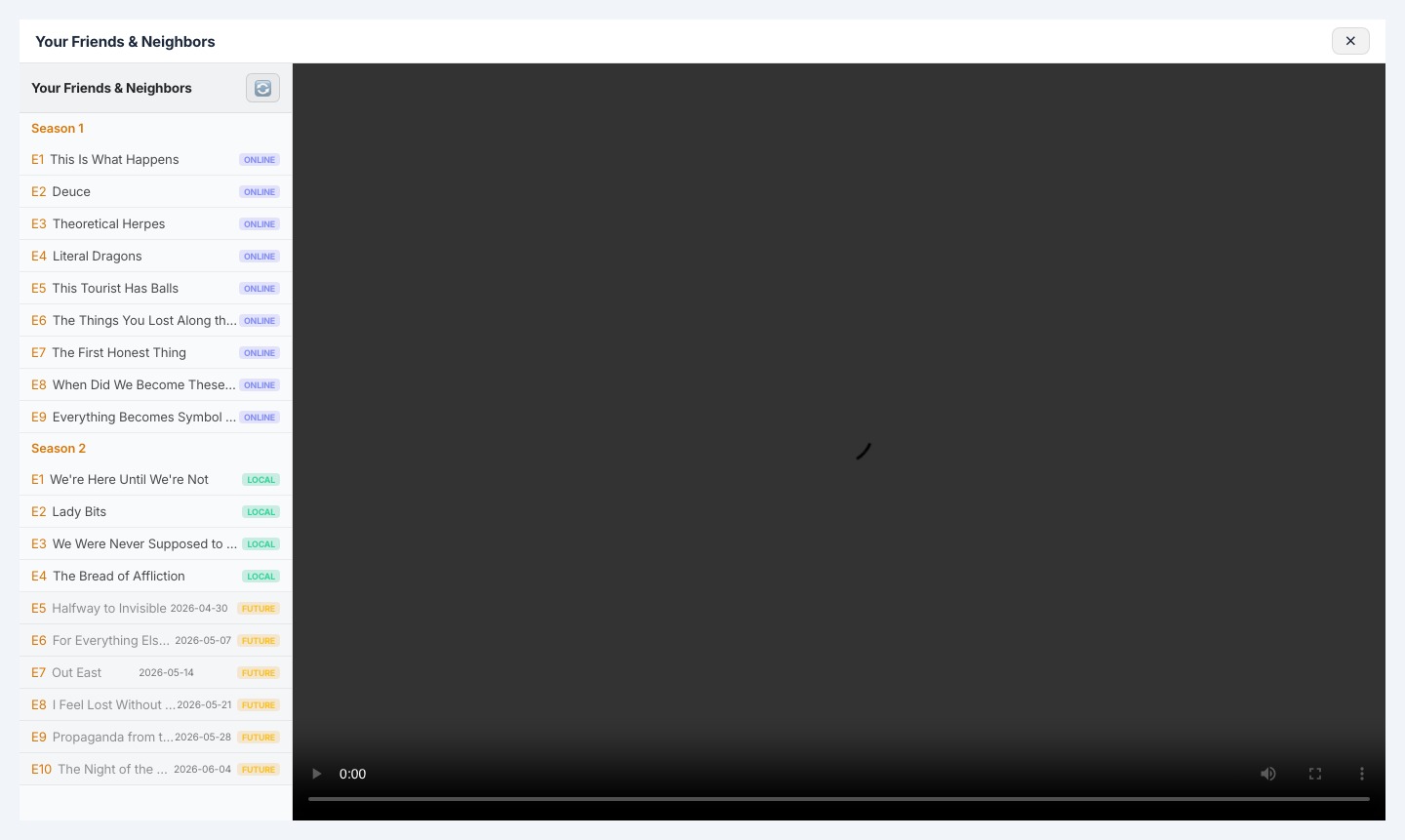
The VOD episode view distinguishes local, online, missing, watched, and future episodes inside one list.
عرض حلقات VOD يميز بين المحلي، الأونلاين، الناقص، المشاهد، والمستقبلي في قائمة واحدة.
- Future rows are visible but not treated as downloadable now.
- Local-first episode resolution keeps browser playback fast.
- The cache can refresh provider episode catalogs on demand.
- The same catalog supports badges, watchlist, and accepted cards.
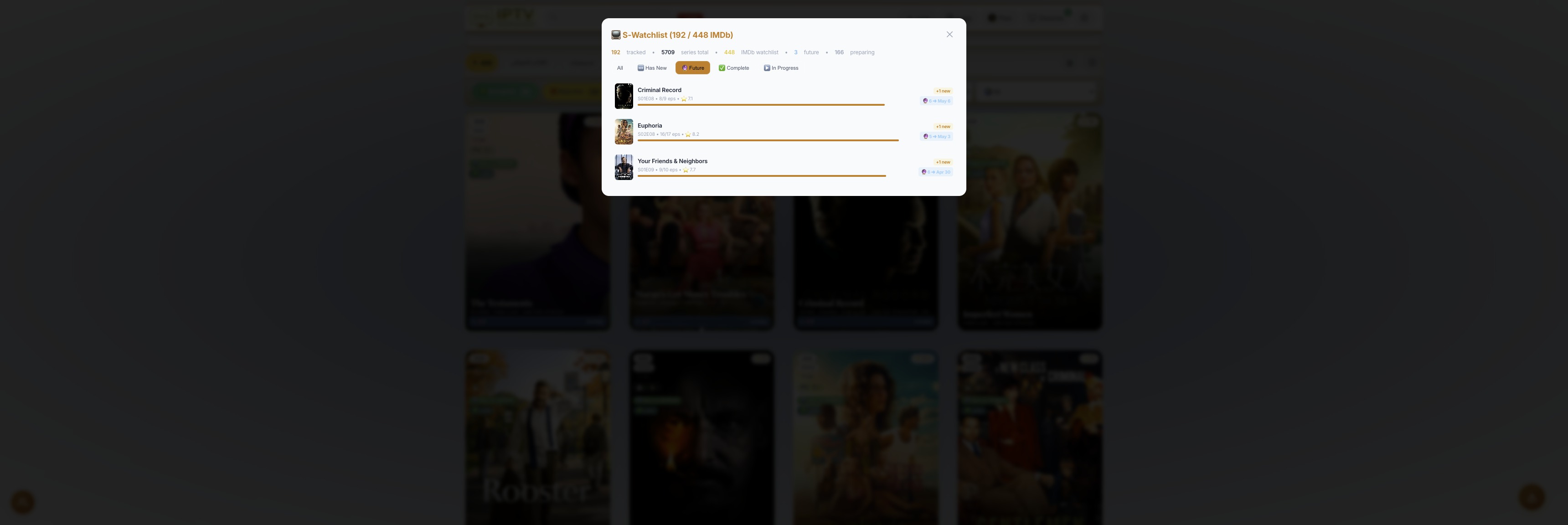
The S-Watchlist panel tracks series progress and can filter items with upcoming/future episodes.
لوحة S-Watchlist تتابع تقدم المسلسلات وتفلتر الأعمال التي لها حلقات قادمة.
- Shows watched progress and future availability together.
- Helps decide what to keep tracking even if all aired episodes are done.
- Works with IMDb watchlist coverage and excluded-new workflows.
- Future filters prevent manual hunting through accepted sections.
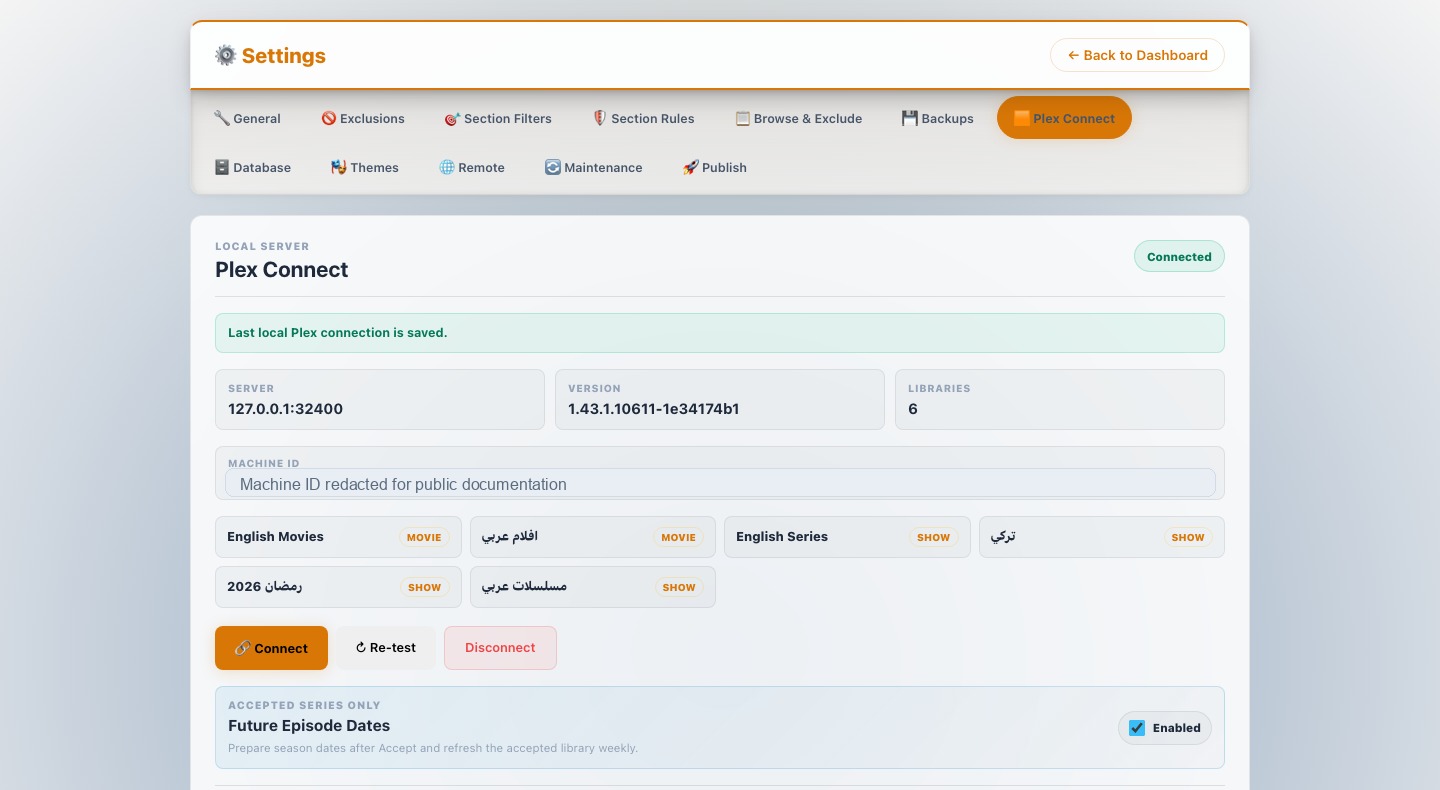
Plex Connect links local Plex libraries to IPTV sections, refreshes watch activity, and controls the future episode date feature.
Plex Connect يربط مكتبات Plex بالأقسام، يحدث نشاط المشاهدة، ويتحكم في ميزة مواعيد الحلقات القادمة.
- Connect, re-test, disconnect, library discovery, and user refresh are managed from Settings.
- User interest per section affects reclaim and tracking decisions.
- Future date refresh supports Accepted, VOD, Watchlist, and Plex reclaim safety.
- The published capture is cropped/redacted to show the feature without exposing private operational values.
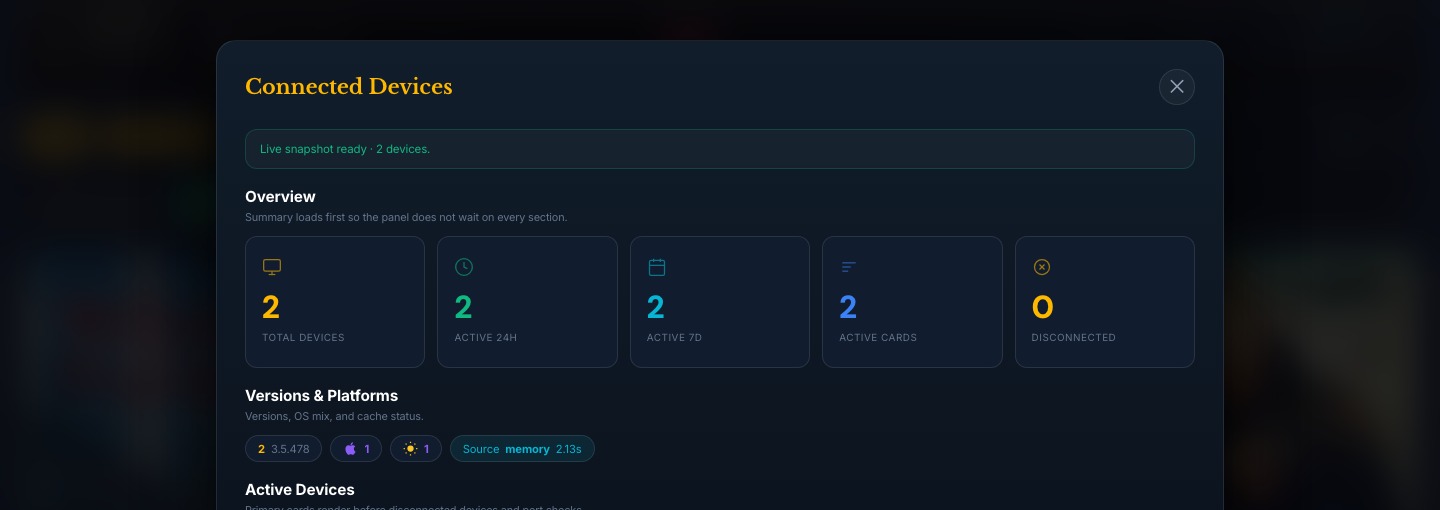
The Connected Devices panel summarizes client health, versions, active/disconnected counts, update state, and repair readiness.
لوحة الأجهزة المتصلة تلخص صحة العملاء، الإصدارات، المتصل والمنقطع، حالة التحديث، وجاهزية الإصلاح.
- Telemetry groups devices by version, OS, platform, and history.
- Overview cards show fleet state before opening per-device detail.
- The full admin panel includes command relay and repair actions for authorized maintenance.
- The public capture is cropped to overview metrics only.
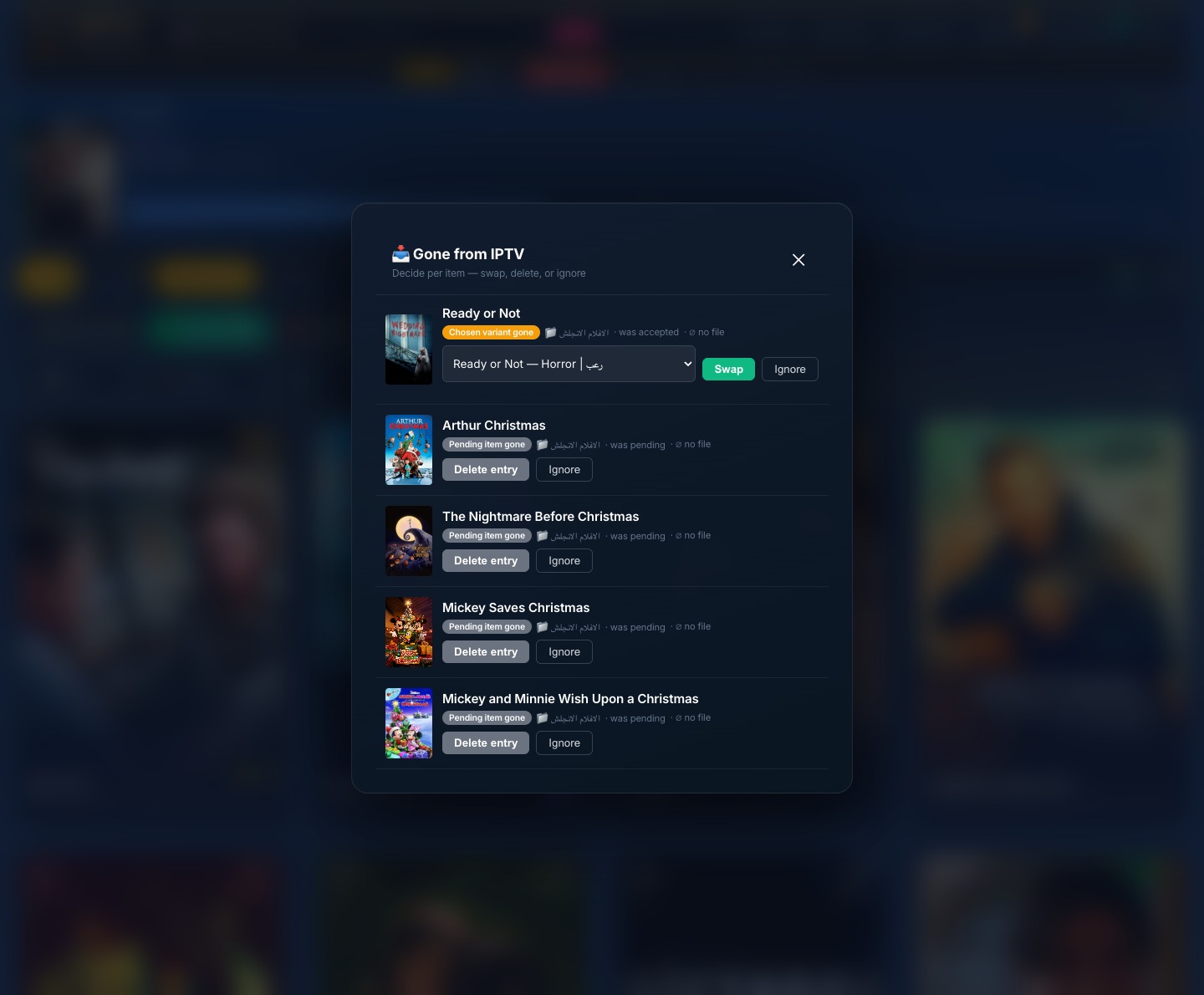
The Gone inbox is a user-driven review queue for items that disappeared from the provider catalog.
Gone inbox هو صندوق مراجعة للعناصر التي اختفت من كتالوج المزود.
- Each item can be swapped to a replacement, sent through trash, or ignored.
- Silent auto-delete was replaced with explicit user choice.
- The inbox protects local files and accepted decisions from provider churn.
- It integrates with disk discovery, trash metadata, and identity safeguards.
The settings screen is split into focused panels. This list follows the current Settings partials and JavaScript modules inspected from the source tree.
| Panel | What It Controls | التفاصيل |
|---|---|---|
| General - IPTV Connection | Server/domain field, primary account fields, second account option, connection test, domain resolver, IMDb watchlist URL | إعداد الاتصال الأساسي، حساب إضافي للسرعة، اختبار الاتصال، إيجاد الدومينات، وربط IMDb Watchlist |
| General - Metadata APIs | TMDB field and OMDb field used for posters, ratings, cast, plot, countries, release data, and IDs | حقول خدمات الميتاداتا التي تغذي البوسترات والتقييمات والطاقم والوصف والبلد والتواريخ |
| General - Download Settings | Media root, folder browser, aria2c connections, IMDb CSV import, trash folder, smart restart toggle, speed threshold, automatic download interval | فولدر الميديا، متصفح الفولدرات، اتصالات aria2c، CSV، المهملات، إعادة التشغيل الذكية، والجدول |
| General - Download Limits | Daily files, daily GB, monthly files, monthly GB, and live usage status | حدود يومية وشهرية بعدد الملفات والحجم مع حالة الاستخدام |
| General - Series Stale Detection | Stale-days threshold and section selection for automatic stale-series handling | عدد أيام اعتبار المسلسل قديمًا واختيار الأقسام التي يطبق عليها |
| General - Theme Mode | Auto, light, and dark modes | الوضع الأوتوماتيك والفاتح والداكن |
| Global Exclusions | Countries, genres, and languages applied across all sections | استبعاد عام للبلاد والأنواع واللغات |
| Section Filters | Min year, min rating, min votes per section | حدود مستقلة لكل قسم للسنة والتقييم وعدد الأصوات |
| Section Rules | Banned keywords, pre-rejected keywords, section countries, genres, and languages | كلمات محظورة، كلمات مرفوضة مسبقًا، وقواعد بلاد/أنواع/لغات لكل قسم |
| Browse & Exclude | Visual provider browser for rejecting or excluding items from settings | تصفح مرئي لمحتوى المزود والاستبعاد من داخل الإعدادات |
| Backups | Create, upload, restore, download, delete, and review backup history | إنشاء، رفع، استرجاع، تحميل، حذف، ومراجعة النسخ الاحتياطية |
| Plex Connect | Connect, re-test, disconnect, library discovery, user refresh, per-section interest, and future episode date toggle | ربط Plex، إعادة اختبار، اكتشاف المكتبات، تحديث المستخدمين، اهتمام المستخدم بكل قسم، وتفعيل مواعيد الحلقات القادمة |
| Themes | Holiday theme list, preview, and activation | قائمة ثيمات المناسبات، المعاينة، والتفعيل |
| Remote | Remote access state and support controls for allowed admin workflows | حالة الوصول البعيد وأدوات الدعم للمسارات الإدارية المسموحة |
| Maintenance | Sync interval, manual Sync, Start Download, Stop Download, Kill All, auto-maintenance status | جدول المزامنة، تشغيل يدوي، بدء/إيقاف التحميل، Kill All، وحالة الصيانة التلقائية |
| Publish | Admin release package creation and publish status | إنشاء ونشر حزم التحديث من لوحة الإدارة |
| Database | Table browser, search, pagination, maintenance, controlled SQL, and row inspection | تصفح الجداول، بحث، صفحات، صيانة، SQL مضبوط، وفحص الصفوف |
Browser / PWA
  -> Flask blueprints on Cheroot HTTPS
  -> SQLite WAL + config_store + normalized media tables
  -> Sync pipeline: IPTV API -> TMDB/OMDb/IMDb -> filters -> DB
  -> Download pipeline: accepted decisions -> aria2c -> local media -> metadata/tagging
  -> Playback: direct local, proxy/remux, guarded transcode cache, Plex library use
  -> Recovery: disk discovery, integrity, trash, backups, gone inbox
  -> Operations: logs, telemetry, connected devices, publish, managed runtime/toolchain
| Layer | Role |
|---|---|
| Docker + setup scripts | Supported production deployment, persistent data, SSL/mDNS setup, Windows guided install |
| Flask + Cheroot | Dashboard, APIs, PWA, local playback, settings, admin surfaces |
| SQLite WAL | Media, decisions, sections, categories, downloads, watch state, trash, logs, telemetry, settings |
| Sync package | Provider fetch, API-shape handling, metadata enrichment, cover caching, filters, schedules |
| Downloader package | Queue building, limits, aria2c orchestration, resume, tagging, integrity cooperation |
| Frontend modules | Dashboard cards, search, filters, logs, Plex, devices, settings, live playback, themes |
| Operations layer | Connected devices, support channels, runtime/toolchain updates, release publish verification |
docs/FEATURE_INVENTORY.md- full feature, settings, data, job, and safety-rule inventory.docs/SOURCE_TREE_AUDIT.md- source tree map with route, frontend, DB, sync, downloader, and template files inspected.docs/API_ENDPOINTS.md- generated inventory of 299 route decorators.docs/LAST_MONTH_CHANGELOG.md- last-month build log grouped by date from the source repository.docs/SCREENSHOT_AUDIT.md- screenshot list, OCR result, metadata result, and public-image notes.
- Open
https://iptv.local. - Accept the local certificate prompt once, or install the local CA from
/install-ca. - Open Settings and fill the IPTV connection fields.
- Add metadata service fields if you want richer posters, ratings, cast, plot, and release data.
- Create sections, attach IPTV categories, choose media folders, and set filters.
- Run Sync.
- Review Pending, accept what you want, and let the downloader handle the accepted queue.
- Published screenshots are curated public views; admin-heavy captures are cropped or redacted before publishing.
- Settings are stored through
config_store; the normalizedsettingstable is compatibility support. - Media removal goes through Trash so restore metadata remains available.
- IDs crossing DB/config/UI boundaries are compared as strings.
- OMDb is treated as authority when an IMDb ID exists.
- Docker-first remains the supported production workflow.
If the project saves you time, bandwidth, or frustration, support helps continued development:
MIT License - free to use, modify, and distribute.