GRBL controller application with G-Code visualizer written in Qt.
I'm using a Raspberry-PI 3b with a small touchscreen as the controller for my GRBL based CNC mill. I have used cncjs and looked at a few of the others (bCNC, UGS, maybe a few more). cncjs will barely run on the PI with a gig of RAM and an 8 gig sd card. The others also seemed to need a lot of compute resources for a really simple job of machine control and sending g-code to the mill.
Changes from upstream denvi/Candle
- Added support for WHB04B pendant (https://a.co/d/ac5HEBN)
- Added simple macro processor inspired by cncjs macros, nowhere as sophisticated as the script/macro support in the 'Experimental' branch, but still good for xyz-probing and others.
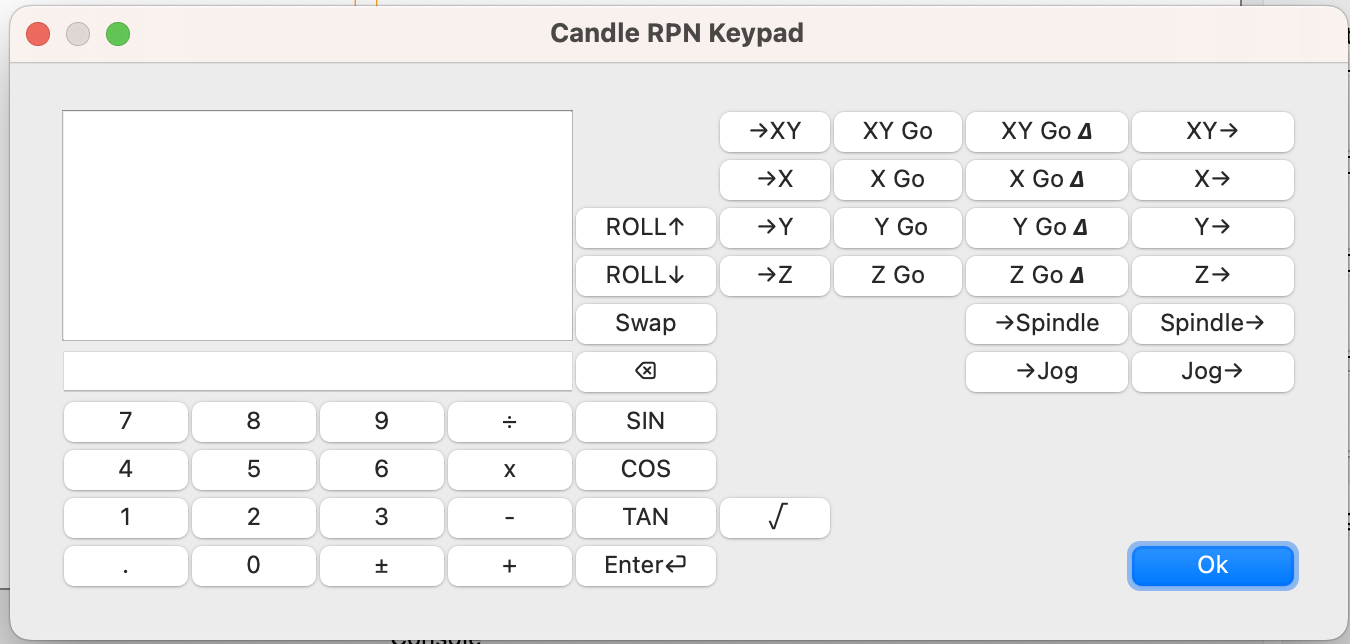
- Added RPN calculator / keypad, inspired by CNCjs "shopfloor tablet" ui
- Added macro script for XYZ Probe
- Probe, Safe, and User commands can be read from a file
- Save settings when the settings dialog closes rather than when the app finally exists
- switched Work Coordinates to QLCDNumber (like Candle2)
- moved the User 1,2,3,4 buttons into the Control area
- Added XYZ-probe and RPN keypad buttons to the Control area
- merged in changes from a few of PR's in denvi/Candle
- fedya/master (preference paths on mac/linux)
- garuma/tcp-support (connect over TCP)
- dorkable-forkable/yoiang-MacOS (macOS fixes)
Some of this is a work in progress, use only at your own risk. I don't merge to the master branch until I have tested in some way on my own machine, but it's not a full regression test.
The to-do list:
- look at frmmain.ui alternatives, something more suited to a small screen Candle2 looks promising, as does the Experimental branch.
- I've only implemented the display, jogging and a couple keys for the WHB04B-4. There is really a lot more it can do.
- Add more %directives to the macro pre-processor (like %message-box)
- The button arrangement on RPN keypad doesn't feel right. I need to use it a bit more to see how to arrange the keys.
- look more at Experimental branch. One catch is that QScript doesn't build for RPI3 by default, so I'll need to re-build Qt with diferent compiler optimizations. QScript is interesting, but it also seems much more complicated than what I need for simple macros.
- Save RPN Calc's stack in frmMain class so the data persists.
- Controlling GRBL-based cnc-machine via console commands, buttons on form, numpad, or pendant.
- Monitoring cnc-machine state.
- Loading, editing, saving and sending of G-code files to cnc-machine.
- Visualizing G-code files.
- Qt5 (including libqt5opengl5 and libqt5serialport5, on raspbian this is a separate apt-install)
- macOS/Linux (probably windows with a bit of effort)
- x86, arm - Apple Silicon, Intel, Raspberry PI, probably others
- Graphics card with OpenGL 2.0 support
- 120 MB free storage space
Qt 5.4.2 (with MinGW/GCC compiler??)
Currently the following keys are mapped:
- Axis selector and Step selector
- Rotary jog knob
- Reset button will send a Grbl Unlock
- FN+Reset sends Grbl Reset
- M-Home sends machine homing
- FN+W-Home sends XYZ probe macro
- Safe-Z sends Safe macro
- Stop sends a stop command (same as stop in the Jog panel)
Macro support inspired by cncjs macro support and roughly follows that
syntax. Probe commands and User Commands as saved through the
Settings panel are processed through the macro processor. When the
macro processing is active, all g-code lines are first sent to the
processor for evaluation or variable expansion. Lines that start
with a % character are evaluated as follows.
- First the lines are checked against keywords for special functions
- If a keyword is not matched, the line is sent to the math parser for variable assignment and mathematical expressions
Lines that do not start with a % character are evaluated for
variable expansion. Any sequence like %{var} is expanded to the
value of var variable in the expression parser.
This line will add a variable PLATE_THICKNESS to the parser with a
value of 5.0;
%PLATE_THICKNESS = 5
These lines send g-code with variable expansion applied to
PROBE_DISTANCE, PROBE_FEEDRATE_A, and PROBE_FEEDRATE_B
; Probe rear, slight right
G38.2 X1 Y%{PROBE_DISTANCE} F%{PROBE_FEEDRATE_A}
G1 Y-1 F%{PROBE_FEEDRATE_B} ; back off a bit
The xyz-probe.txt file in the examples directory shows a cncjs macro
converted for use with Candle.
The RPN keypad is inspired by the cncjs "shopfloor tablet" UI. This version has the RPN Calculator, but also allows you to perform the following operations on each of the X, Y, or Z axis, as well as the XY axis (pops two numbers from the stack):
- Set Work position for axis
- Jog to absolute position
- Jog to relative position
- Push position to stack
It also allows control of the spindle speed and the jog feed rate.
Source only.
Candle works with CNC controlled by GRBL firmware, many problems can be solved by using proper version of GRBL, using proper configuration.
Please read GRBL wiki:
- GRBL v0.9-: https://github.com/grbl/grbl/wiki
- GRBL v1.1: https://github.com/gnea/grbl/wiki
"Candle" main window:
