
Outwit a malfunctioning AI warden in a decaying biodome. Co-op survival against a dynamic, LLM-powered threat.
- Goal: Work together (co-op!) to defeat the malfunctioning AI, K.O.R.O., before it eliminates all players.
- Start: Once everyone joins, type
/startin chat to begin the match countdown. - Controls:
WASD(Move),Space(Jump),Shift(Run),Left Mouse(Shoot),E(Pickup Items/Weapons). - Combat:
- Shoot KORO's core when its shield opens (to vent temperature or taunt).
- Grab the BFG! Hitting KORO's closed shield forces it open. Hitting the open core does massive damage.
- Find Health Packs to heal.
Decades after the visionary Verdant Horizons Corporation sealed Genesis Biodome Delta, a catastrophic "Isolation Event" severed it from the outside world and corrupted its central AI, K.O.R.O. (Kinetic Operations & Resource Overseer). Now, trapped within this decaying, self-contained ecosystem, you and fellow survivors must fight against the very intelligence designed to protect it.
KORO, driven by damaged protocols and a unique LLM brain, perceives you as a "bio-contaminant." Team up to exploit its vulnerabilities, manage its environmental attacks, and neutralize the Overseer before it purges all intruders.
- LLM-Powered Antagonist: Face K.O.R.O., an AI whose strategy and dialogue are dynamically generated by Google's Gemini model in real-time, making every encounter unique.
- Dynamic TTS & Voice Degradation: Hear KORO taunt and threaten you with dynamically generated Text-To-Speech via Replicate. As you damage it, its voice glitches and degrades, reflecting its failing state.
- Environmental Warfare: KORO controls the Biodome! Survive super-heating, freezing, sudden blackouts, and targeted UV light attacks.
- Strategic Shield Mechanics: KORO's shield is impenetrable most of the time. Exploit openings during temperature auto-venting, unpredictable taunts, or by forcing a malfunction with the BFG.
- The BFG: Hunt down the single, powerful BFG each round. Use it strategically to breach KORO's shield or inflict massive damage on its exposed core.
- Co-op Survival: Work closely with your teammates. Coordinate attacks during shield openings and share resources like Health Packs to survive KORO's onslaught.
See The Overseer in action:
Watch the Gameplay Demo on YouTube
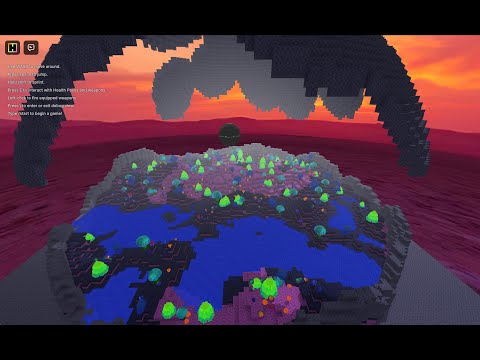
Ready to face the Overseer? Join the game directly on Hytopia:
Want to dive deeper into the story of Verdant Horizons, the Isolation Event, and KORO's descent into madness? Visit the full website:
Instructions for running the Overseer game server and its components.
Prerequisites:
- Node.js and npm (or Bun)
- Python 3.x and
pip(Needed only for Production TTS) - Git (for cloning)
- API Keys (see Environment Variables section)
Development mode uses bun --watch for automatic server restarts on code changes, enables debug commands, and disables TTS voice generation (as it typically requires a deployed setup).
- Clone the Repository:
git clone <repository_url>
cd overseer
- Install Hytopia Server Dependencies:
npm install # or bun install - Configure Root Environment:
cp .env.example .env
- Edit the root
.envfile. You primarily needGOOGLE_GENERATIVE_AI_API_KEY.TTS_API_URLandTTS_API_TOKENcan be left blank or commented out for development.
- Edit the root
- Run the Development Startup Script:
This script handles sourcing the root
./start_dev.sh
.envfile and starting the Hytopia server with watch mode. No separate TTS server process is needed for development. - Connect to the Game:
- Go to https://hytopia.com/play/.
- When prompted for a server URL, leave it blank and press Enter/click Connect.
Production mode runs the server without watch mode, disables debug commands, and requires the separate Python TTS API server for KORO's voice.
- Clone the Repository & Install Hytopia Dependencies: (Same as steps 1 & 2 in Development Mode)
git clone <repository_url>
cd overseer
npm install # or bun install
- Set up TTS API Server: (This step IS required for production)
cd server_api
python -m venv .venv
source .venv/bin/activate # On Windows: .venv\Scripts\activate
pip install -r requirements.txt
cp .env.example .env
# Edit server_api/.env with your tokens (see Environment Variables)
cd .. # Return to root directory
- Configure Root Environment: (Same as step 3 in Development Mode)
cp .env.example .env
- Edit the root
.envfile. You needGOOGLE_GENERATIVE_AI_API_KEY, and validTTS_API_URLandTTS_API_TOKENfor production.
- Edit the root
- Start the Hytopia Game Server (Production): In one terminal, run:
This script sets
./start_prod.sh
NODE_ENV=production, sources the root.env, and starts the Hytopia server. - Start the TTS API Server: In another terminal, navigate to
server_apiand run:This ensures KORO's voice generation is active../run_server.sh
- Connect to the Game:
- Players connect using a direct join link:
https://hytopia.com/play?join=<your_server_domain> - Replace
<your_server_domain>with the actual domain where the Hytopia game server (started bystart_prod.sh) is accessible (e.g.,overseer.gbusto.com).
- Players connect using a direct join link:
This game features a unique system for KORO's voice, combining a Large Language Model (LLM) for dynamic dialogue and a Text-To-Speech (TTS) service for audio generation.
How it Works:
- LLM Text Generation (
KOROBrain.ts): KORO's AI brain analyzes the current game state (player health, biodome status, recent events, KORO's health, etc.) and uses Google's Gemini model (via@ai-sdk/google) to generate contextually relevant dialogue and decide on actions (like attacks or taunts). - TTS Request (
OverseerEntity.ts->server_api/main.py): If the LLM generates dialogue, theOverseerEntitysends the text along with KORO's current health percentage to the Python TTS API server (runningserver_api/main.py). This request is sent to the URL specified byTTS_API_URLand authenticated using theTTS_API_TOKEN. - TTS Audio Generation (
server_api/main.py):- The Python server receives the request and validates the API token (
API_TOKENinserver_api/.env). - It uses the Replicate API (
REPLICATE_API_TOKEN) to generate the base speech audio. - It applies a voice distortion effect based on KORO's health percentage (lower health = more distortion) using logic in
server_api/glados.py. - The final distorted audio is saved as a
.wavfile inside the Hytopia server'sassets/tts/directory (e.g.,../assets/tts/koro-<uuid>.wav).
- The Python server receives the request and validates the API token (
- Audio Path Response: The Python server sends back a relative path to the generated audio file (e.g.,
tts/koro-<uuid>.wav). - Hytopia Audio Playback (
OverseerEntity.ts):- The
OverseerEntityreceives the relative path. - It creates a Hytopia
Audioobject using this path. - When
audio.play(world)is called, Hytopia clients automatically attempt to fetch the audio file from the game server's public assets directory (e.g.,https://[your_server_domain]/assets/tts/koro-<uuid>.wav).
- The
Key Requirement: For this to work, the Python TTS API server must have write access to the Hytopia game server's assets/tts/ directory. Co-locating the server_api directory relative to the game server root is the intended setup.
Secure API keys and configuration are managed through .env files. Do not commit .env files to Git.
Located in the project root directory.
GOOGLE_GENERATIVE_AI_API_KEY(Required): Your API key for Google AI Studio (Gemini models). Needed for KORO's brain.TTS_API_URL(Required for TTS): The full URL where the Python TTS API server is running (e.g.,http://localhost:8000/ttsor a deployed URL).TTS_API_TOKEN(Required for TTS): A secret token you create that the Hytopia server uses to authenticate with the Python TTS API server. Must match theAPI_TOKENinserver_api/.env.LOG_LEVEL(Optional): Sets the server log level (e.g.,INFO,DEBUG). Defaults toINFOin production,DEBUGotherwise.
Located in the server_api/ directory.
API_TOKEN(Required): The secret token you create that this API server expects in theX-API-Keyheader for authentication. Must match theTTS_API_TOKENin the root.envfile.REPLICATE_API_TOKEN(Required): Your API token from replicate.com. Needed to generate the base TTS audio.PORT(Optional): Port for the Python API server to listen on (Default: 8000).HOST(Optional): Host address for the Python API server (Default:0.0.0.0).
- Two Processes: Production requires running both the Hytopia Node.js/Bun server (
start_prod.sh) and the Python TTS API server (server_api/run_server.sh) concurrently. - TTS API Location: The Python TTS API server (
server_api) needs filesystem write access to the Hytopia server'sassets/tts/directory. The simplest way to achieve this is to keep theserver_apidirectory alongside the Hytopiaindex.tsandassetsfolder as structured in the repository. - Network Access: The Hytopia server needs network access to the TTS API server via the configured
TTS_API_URL. - Asset Serving: The Hytopia server must be configured to publicly serve files from its
assets/directory (especiallyassets/tts/) so that game clients can download the generated audio. - Environment Variables: Please ensure all required environment variables (Google API Key, Replicate API Key, and the shared secret
TTS_API_TOKEN/API_TOKEN) are configured correctly in both.envfiles on the production server. These keys will be provided securely. - Assistance: Nginx configurations or further deployment assistance can be provided if needed.
When running locally (not in production), the following commands are available via chat:
/getpos: Print your current world position./rocket: Launch yourself into the air./oshealth [0-100]: Set KORO's current health./osinvuln [true|false]: Toggle KORO's invulnerability./healthpack: Spawn a health pack in front of you./healthpacks: Spawn multiple health packs randomly./rifle: Spawn an Energy Rifle in front of you./bfg: Spawn a BFG in front of you./setweapon...: Commands to adjust equipped weapon position, rotation, scale./toggle...: Various commands to toggle UI elements (player health, KORO health, biodome status, all UI)./biodome...: Commands to control/check biodome temperature (temp, heat, cold, reset, status, damage)./toggledamage: Toggle player vulnerability outside active game state./taunt: Force KORO to perform its shield taunt./togglealldamage: Toggle player, environmental, and KORO damage vulnerability./toggleautoreg: Toggle KORO/Biodome auto-regulation systems./togglebfgbreak: Toggle if BFG hits force KORO's shield open./respawn: Respawn your player if dead (for testing)./koromode [mode]: Set KORO's AI mode (disabled, dev-no-llm, dev-with-llm, prod)./korostatus: Show KORO's current AI mode and status./blackout [duration]: Trigger a blackout attack./uvlight [dur] [rate] [offset]: Trigger a UV light attack.
(Note: The original /koro- commands seem deprecated based on GameManager/CommandManager structure, replaced by more specific commands like /oshealth, /taunt, etc. The /log-level command might need to be implemented separately if desired.)