If you use netctl or another network manager which doesn't provide any good tray icon or if you want something more native than nm-applet, this is for you.
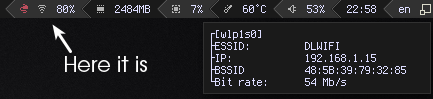
First of all you should clone repository in your awesome config directory
git clone git@github.com:pltanton/net_widgets.git ~/.config/awesome/net_widgets
Then, paste this in your 'rc.lua'
local net_widgets = require("net_widgets")
Create widget by
net_wireless = net_widgets.wireless({interface="wlp1s0"})After that just place net_wireless wherever you want. You can also change widget update timeout. By default it is timeout=5, interface=wlan0

To create widget put in rc.lua
net_wired = net_widgets.indicator({
    interfaces  = {"enp2s0", "another_interface", "and_another_one"},
    timeout     = 5
})
By default interfaces={"enp2s0"}, timeout=5

8.8.8.8). Set showconnected to true if you're extra precautionary about your internet connection and don't mind seeing a green check mark almost all the time.
net_internet = net_widgets.internet({indent = 0, timeout = 5})You can change font to monospace by font option.

Set popup_signal=true.
Just set onclick argument, for example
net_wireless = net_widgets.wireless({interface   = "wlp3s0",
onclick = terminal .. " -e sudo wifi-menu" }) Just set widget argument as false to get table or some widget layout to change default layout, for example
net_wireless = net_widgets.wireless({interface   = "wlp3s0",
                                     widget = false, })
or
net_wireless = net_widgets.wireless({interface   = "wlp3s0",
                                     widget = wibox.layout.fixed.vertical(), })
By default widget = wibox.layout.fixed.horizontal()
Just set indent
net_wireless = net_widgets.wireless({interface   = "wlp3s0",
                                     indent = 0, })
or
net_wireless = net_widgets.wireless({interface   = "wlp3s0",
                                     indent = 5, })
By default indent = 3
Helpful if the widget is placed on the bottom bar and you want the pop-up to appear near the widget rather than on top of the screen.
net_wireless = net_widgets.wireless({interface   = "wlp3s0",
                                     popup_position = "bottom_right" })