The PyTorch implementation based on DPTN model
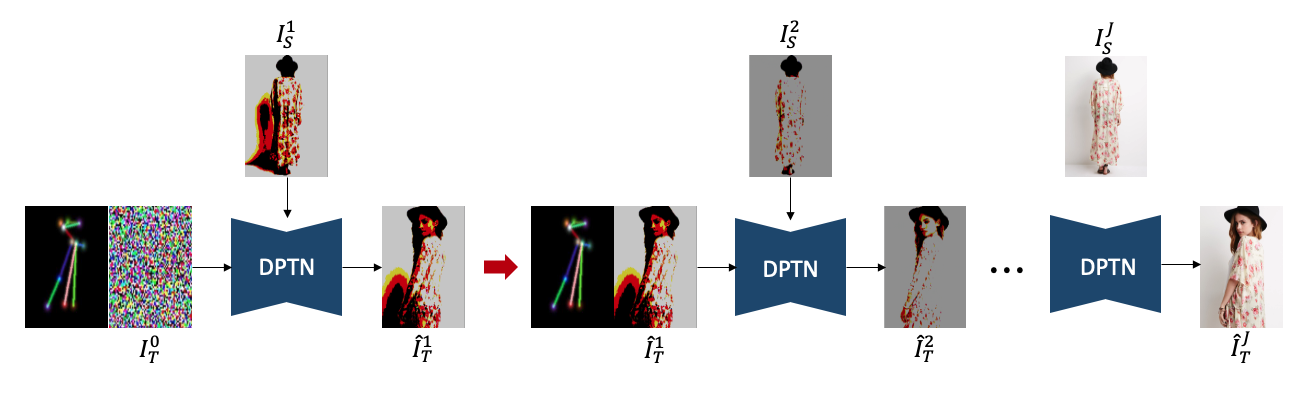
Generating complex and fine-grained textures in one step is very challenging, often leading to poor results.
We propose a step-by-step approach, starting from generating images with coarse-grained textures and progressively moving to fine-grained images.
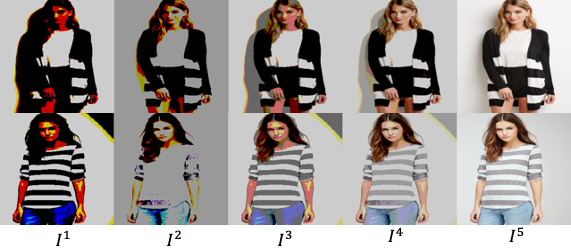
- discritize constant
$d_j∈{1, 2, ⋯255}$ :$d_j>d_(j+1)$
-
$j^{th}$ coarse-grained Image$I^j$ can be described$I^j=Q^j∙d_j$ -
$Q^j$ and$R^j$ represent $j^{th}$the quotient and remainder, respectively.
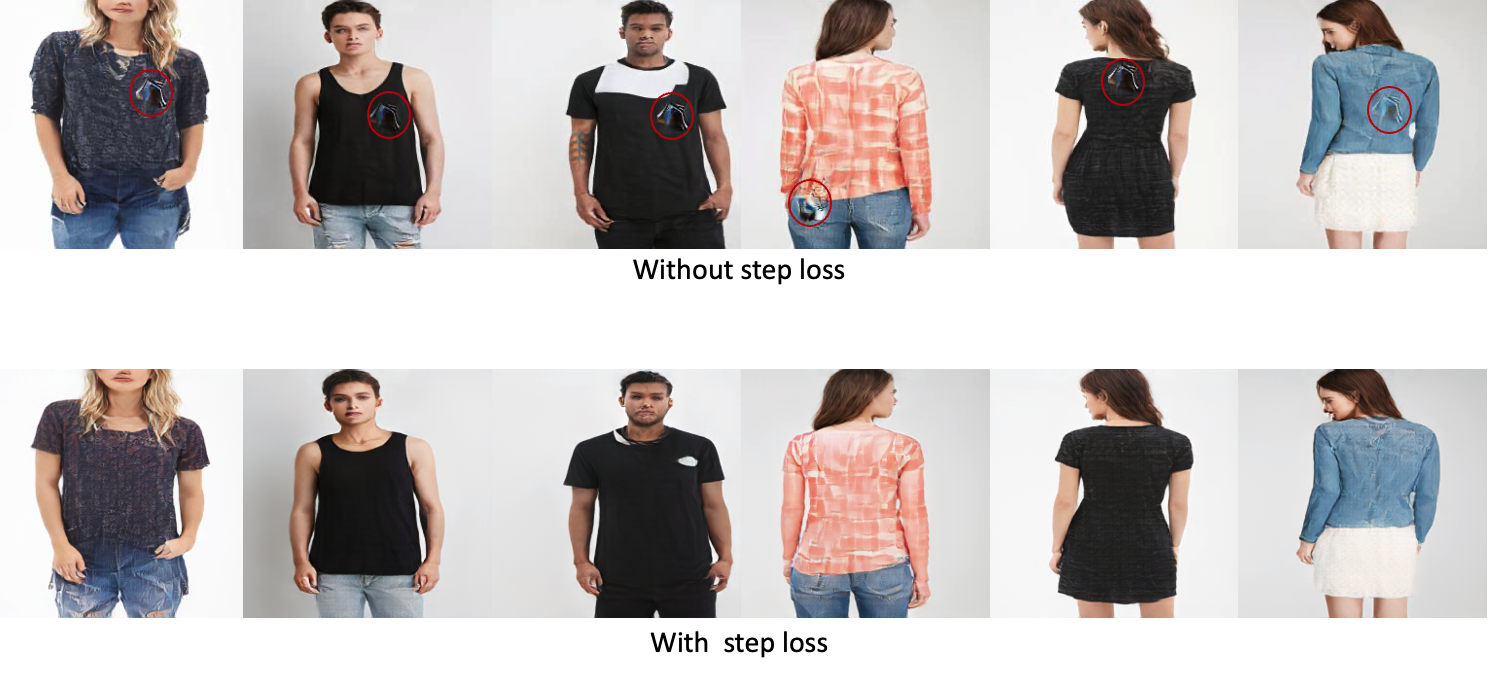
Building upon the framework of Auxiliary Classifier GAN (ACGAN) (PMLR 2017), we have incorporated an additional training process: the step prediction loss. This enhancement aims to stabilize the training phase.
- Step Prediction Loss: This added component mitigates a common issue in the original ACGAN framework. Without step prediction, the Discriminator often struggles to accurately determine which step of image generation should be executed. This confusion can lead to the generation of artifacts, such as image cracking. By integrating step prediction loss into the training process, we enhance the Discriminator's ability to more accurately guide the generation process, thereby reducing the occurrence of artifacts.
This modification to the ACGAN framework not only stabilizes the training process but also improves the overall quality of the generated images.
- Python 3
- PyTorch 1.7.1
- CUDA 10.2
# 1. Create a conda virtual environment.
conda create -n DPTN_step python=3.8
conda activate DPTN_step
conda install -c pytorch pytorch=1.7.1 torchvision cudatoolkit=11.3

pip install -r requirements.txt-
Download
img_highres.zipof the DeepFashion Dataset from In-shop Clothes Retrieval Benchmark. -
Unzip
img_highres.zip. You will need to ask for password from the dataset maintainers. Then rename the obtained folder as img and put it under the./dataset/deepfashiondirectory. -
We split the train/test set following GFLA. Several images with significant occlusions are removed from the training set. Download the train/test pairs and the keypoints
pose.zipextracted with Openpose by runing:cd scripts ./download_dataset.shOr you can download these files manually:
- Download the train/test pairs from Google Drive including train_pairs.txt, test_pairs.txt, train.lst, test.lst. Put these files under the
./dataset/deepfashiondirectory. - Download the keypoints
pose.rarextracted with Openpose from Google Driven. Unzip and put the obtained floder under the./dataset/deepfashiondirectory.
- Download the train/test pairs from Google Drive including train_pairs.txt, test_pairs.txt, train.lst, test.lst. Put these files under the
-
Run the following code to save images to lmdb dataset.
python -m scripts.prepare_data \
--root ./dataset/deepfashion \
--out ./dataset/deepfashion
This project supports multi-GPUs training. The following code shows an example for training the model with 256x176 images using 4 GPUs.
CUDA_VISIBLE_DEVICES=0,1,2,3 python -m torch.distributed.launch \
--nproc_per_node=4 \
--master_port 1234 train.py \
--id $name_of_your_experiment \
--netG dptn \
--batchsize 20 \
--num_workers 10 \-
Run the following code to evaluate the trained model:
CUDA_VISIBLE_DEVICES=0,1,2,3 python -m torch.distributed.launch \
--nproc_per_node=4 \
--master_port 1234 test.py \
--id $name_of_your_experiment \
--save_id $save_folder \
--netG dptn \
--batchsize 20 \
--num_workers 10 \
--simple_test
eval_step.py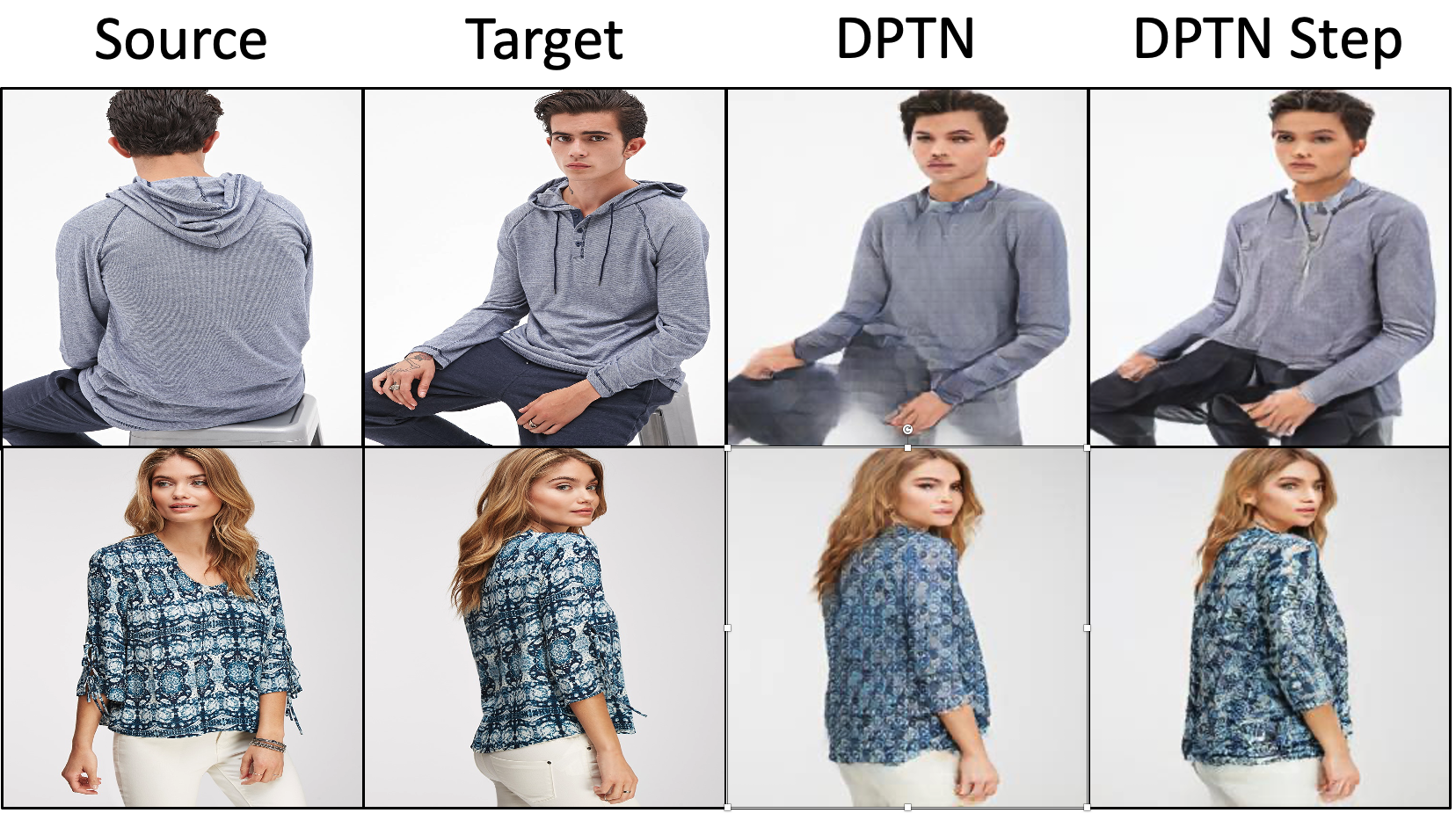
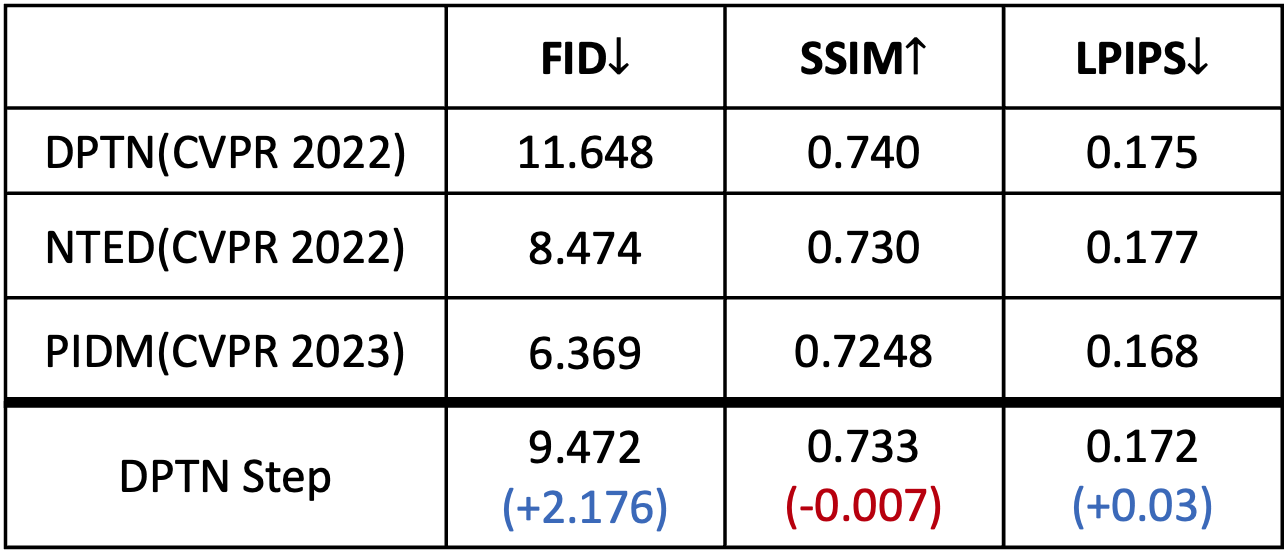
Proposed training scheme can generate more detailed texture results than DPTN (baseline).
- Achieved much lower FID score than DPTN

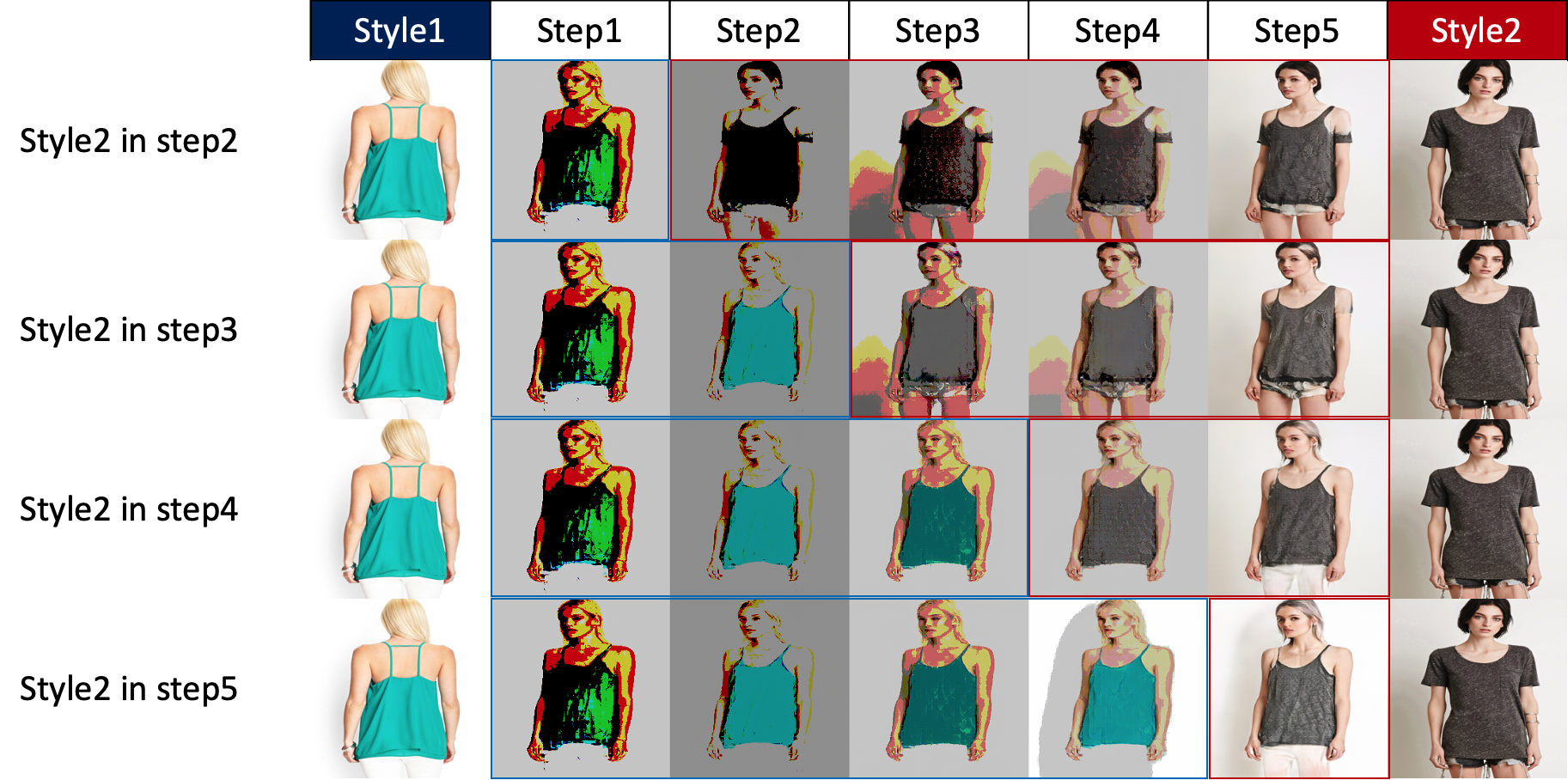
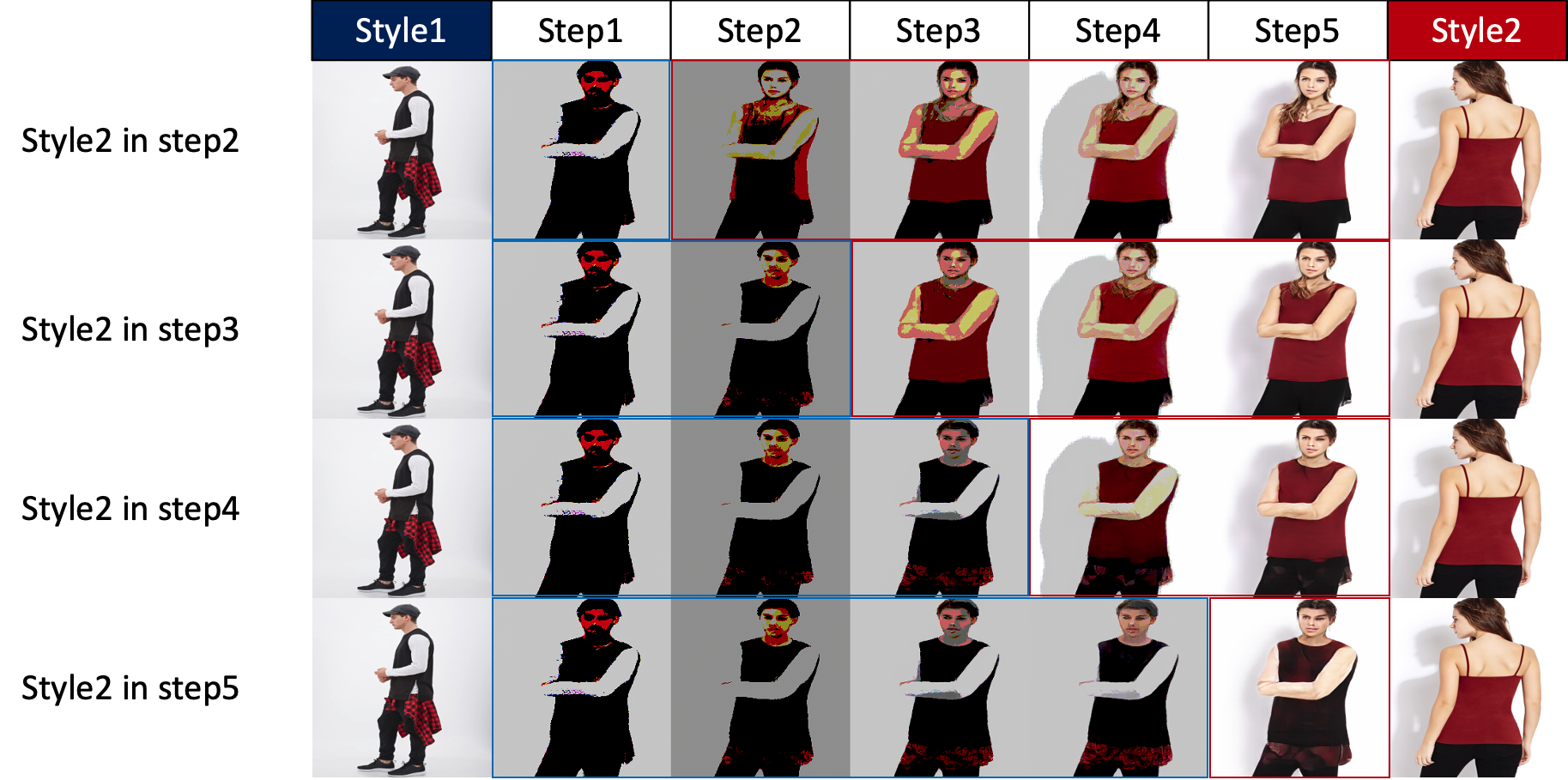
We can mix styles without any additional processes, simply by inputting different style images at different steps.
This experiment reveals that in the initial steps, the synthesis primarily involves detailed styles (such as hair, gender, facial features, etc.), and as we progress to the later steps, more universal styles (like clothing color, etc.) are integrated into the synthesis.