ODTReportingJavaMainListFieldAdvancedTable
Loop for fields in table row with FieldsMetadata is the easiest mean to generate table row from a Java object collection, because when you design your report with MS Word you need not to write some loop script (Freemarker, Velocity....): XDocReport use FieldsMetadata to generate loop script with lazy mode.
Loop for fields in table row with FieldsMetadata is the better solution for a secretary who wish design the report.
However Loop for fields in table row with FieldsMetadata mean is limited if you wish generate more powerful report like :
- manage a color for odd/even row in a table :
[- manage #Manage_a_table_in_a_loop a table in a loop) (ex : loop for developers and generate a table to display roles per developer):

[Advanced Table is the mean where you write loop script (Freemarker, Velocity) in the report. This mean is more powerful than ODTReportingJavaMainListFieldInTable FieldsMetadata) but more complex to write because you must learn Freemarker or Velocity.

Loop for fields in table row with script is the better solution for a developer who wish design the report by customizing the table.
Since XDocReport 0.9.2, XDocReport provides @before-row and @after-row features to insert template engine script before/after a table row.
To manage loop, XDocReport use template engine script. Loop for fields use syntax of the template engine. For instance if you wish generate list of name of developers you can write that with Velocity :
#foreach($d in $developers)
  $d.Name
#end
And write that with Freemarker :
[developers as d](#list)
  ${d.name}
[```

Problem with loop for table row is that it's not possible to set the start/end directive loop of the template engine before and after the table row with MS Word.

## Solution: use @before-row @after-row

To resolve the previous problem, XDocReport provides 2 tokens :

 - *@before-row*_SCRIPT_ : if a MergeField which is inserted in a table cell, contains at first this token, XDocReport will move the _SCRIPT_ before the row. For instance with Velocity you can write :
@before-row#foreach($d in $developers)
And write that with Freemarker :
@before-row#list developers as d
- *@after-row**SCRIPT* : if a MergeField which is inserted in a table cell, contains at first this token, XDocReport will move the *SCRIPT* before the row. For instance with Velocity you can write :
@after-row#end
And write that with Freemarker :
@after-row[```
If you don't like the notation @before-row and @after-row, you can customize it with FieldsMetadata. Here a sample to use @row instead of @before-row and @/row instead of @after-row :
FieldsMetadata metadata = new FieldsMetadata();
metadata.setBeforeRowToken("@row");
metadata.setAfterRowToken("@/row");

IXDocReport report = ...
report.setFieldsMetadata(metadata);
}}}

After that you can write :
@row#foreach($d in $developers) @/row#end
instead of writing :
@before-row#foreach($d in $developers) @after-row#end
## UseCases
You can find following samples in the [http://code.google.com/p/xdocreport/downloads/list odtandvelocity-*-sample.zip](/#list]) and [odtandfreemarker-*-sample.zip](http://code.google.com/p/xdocreport/downloads/list) or see the odt report [ODTTableWithoutFieldsMetadataWithVelocity.odt](http://xdocreport.googlecode.com/git/samples/fr.opensagres.xdocreport.samples.odtandvelocity/src/fr/opensagres/xdocreport/samples/odtandvelocity/ODTTableWithoutFieldsMetadataWithVelocity.odt) and [ODTTableWithoutFieldsMetadataWithFreemarker.odt](http://xdocreport.googlecode.com/git/samples/fr.opensagres.xdocreport.samples.odtandfreemarker/src/fr/opensagres/xdocreport/samples/odtandfreemarker/ODTTableWithoutFieldsMetadataWithFreemarker.odt).
### Simple loop for table row
If you wish generate **simple table row** of Developer (without FieldsMetadata) :
[You must write this report if you wish use Velocity :
(http://wiki.xdocreport.googlecode.com/git/screenshots/ODTAdvancedTableSimpleTable.png))
Here Velocity scripts used in this sample :
Each Velocity scripts must be inserted in a Mergefield. After XDocReport processing, you will do that:
#end
Here Freemarker scripts used in this sample :
@before-rowdevelopers as d | ${d.lastName} | ${d.mail} ${d.name} | | @after-row[| |
Each Freemarker scripts must be inserted in a Mergefield. After XDocReport processing, you will do that:
[```
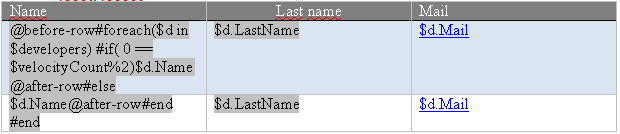
If you wish generate odd/even color for table row of Developer :
 (/#list])
The table contains 2 rows (a blue and white row) which are displayed or not according the row index.
You must write this report if you wish use Velocity :
[Here Velocity scripts used in this sample :
------------------------------------------------------------------------
@before-row#foreach($d in $developers) #if( 0 == $velocityCount%2) | $d.LastName   | $d.Mail
$d.Name                                                            |               |
@after-row#else                                                    |               |
------------------------------------------------------------------------
$d.Name                                                            | $d.LastName   | $d.Mail
@after-row#end #end                                                |               |
------------------------------------------------------------------------
Each Velocity scripts must be inserted in a Mergefield. The Velocity if condition :
#if( 0 == $velocityCount%2)
is used to check if row is odd or even and generate the blue or white row. After XDocReport processing, you will do that:
#foreach($d in $developers) #if( 0 == $velocityCount%2)
------------------------------------------------------------------------
$d.Name         | $d.LastName   | $d.Mail
------------------------------------------------------------------------
#else
------------------------------------------------------------------------
$d.Name         | $d.LastName   | $d.Mail
------------------------------------------------------------------------
#end #end
Here Freemarker scripts used in this sample :
------------------------------------------------------------------------
@before-row[#list developers as d](http://wiki.xdocreport.googlecode.com/git/screenshots/ODTAdvancedTableOddEvenReport.png)) [d_index % 2 == 0](#if) | ${d.lastName}   | ${d.mail}
${d.name}                                                 |                 |
@after-row[|                 |
------------------------------------------------------------------------
${d.name}                                                 | ${d.lastName}   | ${d.mail}
@after-row[/#if](#else])[|                 |
------------------------------------------------------------------------
Each Freemarker scripts must be inserted in a Mergefield. The Freemarker if condition :
[#if d_index % 2 == 0](/#list])
is used to check if row is odd or even and generate the blue or white row. After XDocReport processing, you will do that:
[developers as d](#list) [d_index % 2 == 0](#if)
------------------------------------------------------------------------
${d.name} | ${d.lastName} | ${d.mail}
------------------------------------------------------------------------
[------------------------------------------------------------------------
${d.name} | ${d.lastName} | ${d.mail}
------------------------------------------------------------------------
[/#if](#else])[```
### Manage a table in a loop
If you wish generate *a table in a loop* (ex : loop for developers and generate a table to display roles per developer) :
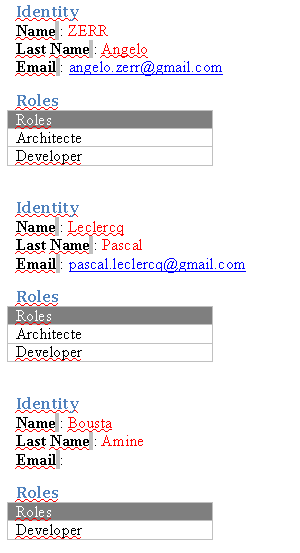(/#list])
You must write this report if you wish use Velocity :
[Here Velocity scripts used in this sample :
#foreach($d in $developers)
Identity Name : $d.Name Last Name : $d.LastName Email : $d.Mail Roles
#end
After XDocReport processing, you will do that:
#foreach($d in $developers)
Identity Name : $d.Name Last Name : $d.LastName Email : $d.Mail Roles
#end #end
Here Freemarker scripts used in this sample :

Identity
Name :
@before-rowd.roles as r ${r.name} @after-row[------------------------------------------------------------------------
After XDocReport processing, you will do that:
Identity
Name :
Roles d.roles as r