Ultimate YouTube Playback Speed Controller
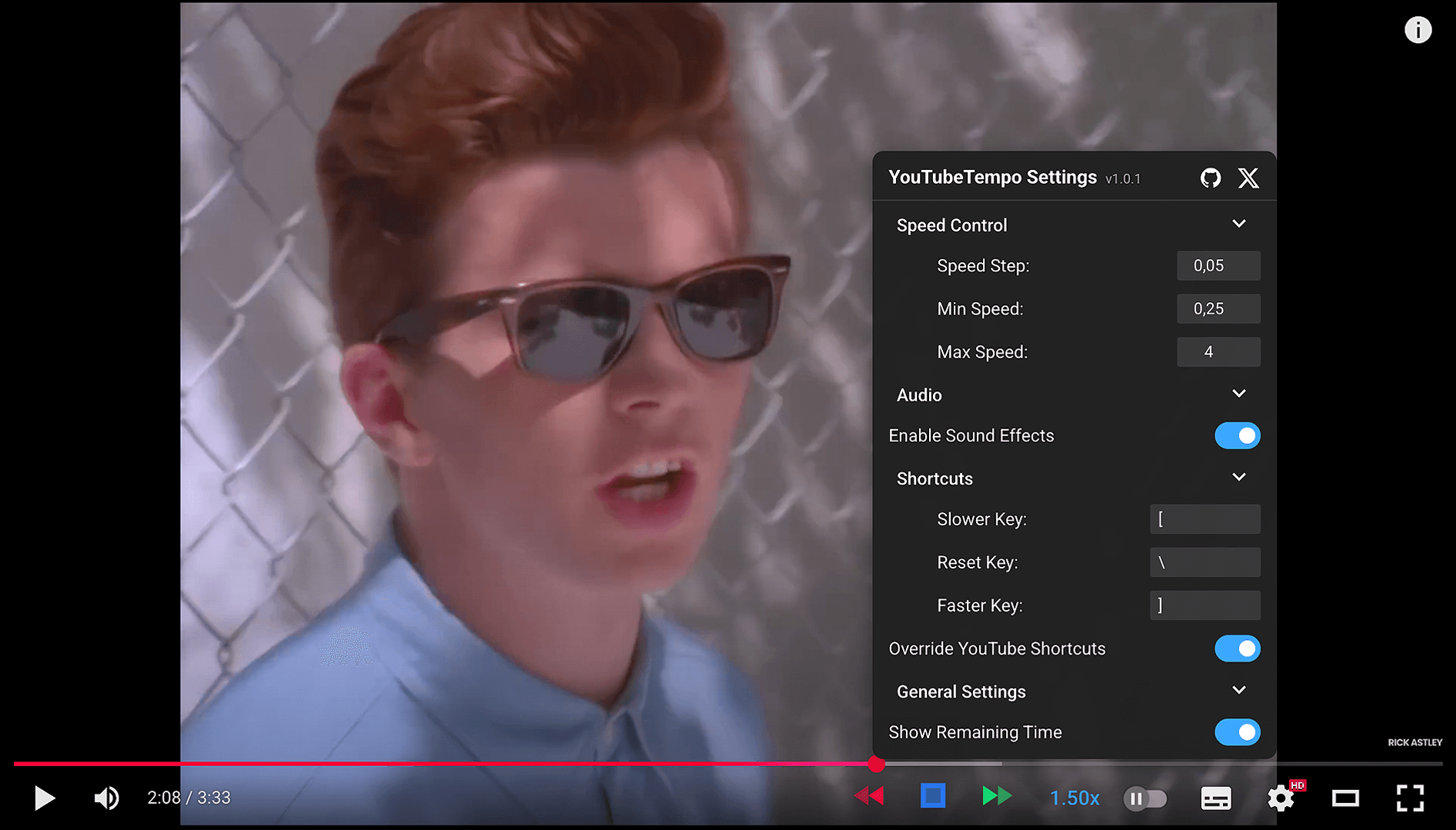




Take complete control of YouTube playback with fully customizable speed controls, keyboard shortcuts, and a clean, accessible interface designed for performance.
- Custom Speed Steps: Set your preferred increment from 0.01x to 0.5x.
- Wide Playback Range: Freely adjust speed from as low as 0.1x up to 16.0x.
- Instant Visual Feedback: The speed indicator changes color to reflect the current playback rate.
- Playback Memory: Remembers and automatically applies your last-used speed setting for new videos.
- Personalize Your Keys: Assign any key for slowing down, speeding up, or resetting playback speed.
- Sensible Defaults: Comes pre-configured with
[(slower),](faster), and\(reset). - Override Mode: Optionally prevent your shortcuts from triggering YouTube's default actions.
- Mouse-Free Control: Manage playback speed without ever leaving the keyboard.
- Seamless Design: The controls are designed to perfectly match YouTube's native player aesthetic.
- Accessible: Built with ARIA attributes for screen reader compatibility.
- Collapsible Settings Menu: Access all options in a clean, non-intrusive popup menu.
- Audio Feedback: Enable or disable subtle sound effects for speed adjustments.
| Method | Description | Link |
|---|---|---|
| 🟢 Greasyfork | Recommended |  |
| 📁 GitHub | Latest version |  |
Install a userscript manager first:



1. 🎬 Navigate to any YouTube video
2. 🔍 Look for YouTubeTempo controls next to volume slider
3. ⚡ Use speed control buttons (◀ slower, ▶ faster) to adjust speed
4. ⚙️ Click speed indicator to open settings
| Key | Action | Status |
|---|---|---|
[ |
Decrease Speed | ✅ Customizable |
] |
Increase Speed | ✅ Customizable |
\ |
Reset to 1.0x | ✅ Customizable |
| Click Speed | Open Settings | 🔒 Fixed |
🎛️ Speed Settings
- Speed Step: Increment size (0.01x - 0.5x)
- Min Speed: Lowest allowed speed (0.1x - 1.0x)
- Max Speed: Highest allowed speed (1.0x - 16.0x)
🎨 General & UI Settings
- Remaining Time: Show time left calculation
- Color Indicators: Speed-based color coding
❌ YouTubeTempo not appearing
- 🔄 Refresh the YouTube page
- ✅ Check if userscript manager is enabled
- 🔍 Verify script is installed and active
- 🔒 Try incognito/private browsing mode
⚡ Speed not changing
- 🎬 Click directly on the video player
- 🔍 Check for extension conflicts
- 🔄 Disable and re-enable the script
- 🎯 Ensure video player has focus
⌨️ Keyboard shortcuts not working
- ⚙️ Enable "Override YouTube Shortcuts" in settings
- 🔍 Check for shortcut conflicts
- 🎯 Ensure video player has focus
- 🔄 Try refreshing the page
| Browser | Support | Notes |
|---|---|---|
 |
✅ Full | Recommended |
 |
✅ Full | Excellent |
 |
✅ Full | Supported |
 |
✅ Full | Supported |
 |
✅ Full | Supported |
We welcome contributions! Here's how you can help:



- 🐛 Report bugs via GitHub Issues
- 💡 Suggest features via GitHub Issues
- 🔧 Submit pull requests for fixes and improvements
- 📖 Improve documentation and help others
- 🌍 Help with translations for your language
This project is licensed under the GPL-3.0 License





Thanks to YouTube for the amazing platform • Userscript community for inspiration • All contributors who make this project better
Made with ❤️ by Hasan Beder
⭐ Star this repo if you find it useful!