
Automatically encode videos to AV1 at the best quality-to-size ratio, using VMAF to find the optimal settings for each file.
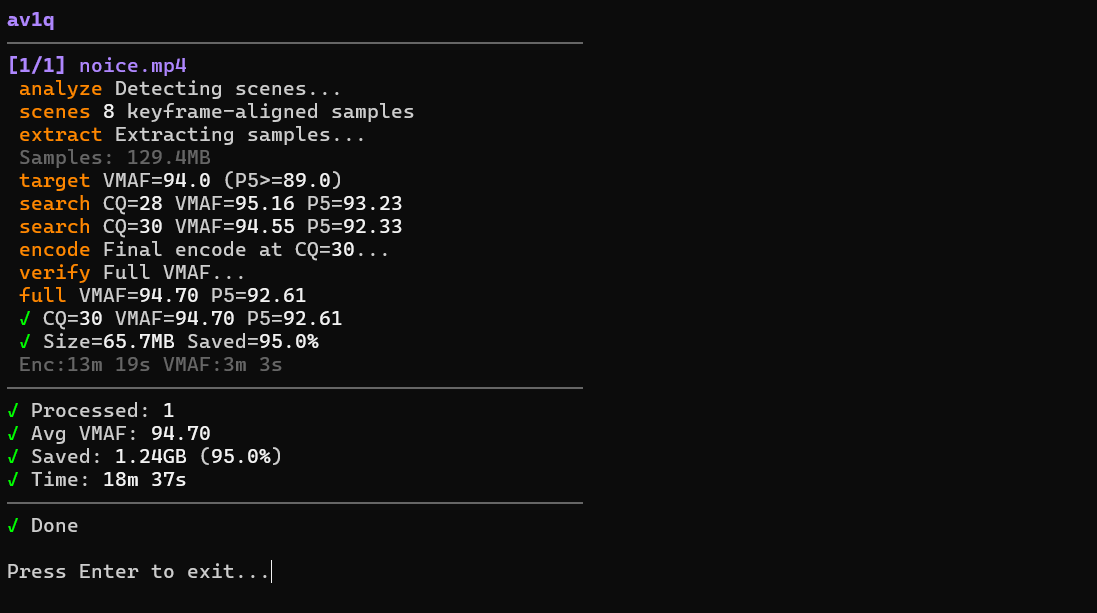
Drop videos into a folder, run the script, and each file gets encoded to AV1 at a quality level that hits a target VMAF score. Instead of guessing CRF values or doing manual test encodes, the tool figures it out for you.
- Detects scenes and extracts short representative samples from complex parts of the video
- Searches for the optimal CQ by encoding only the samples — not the full file — and measuring VMAF after each attempt
- Encodes the full video at the chosen CQ, then verifies the final VMAF score matches the target
- Adjusts automatically if the full encode doesn't meet quality thresholds (mean VMAF and P5 floor)
- VMAF-targeted encoding — hits a perceptual quality target instead of using a fixed CRF
- Resolution-aware defaults — auto-selects VMAF targets (94 for HD, 93 for SD, 90 for 4K)
- Bitrate floors — per-resolution minimum bitrates (1 Mbps 720p, 1.5 Mbps 1080p, 2.5 Mbps 1440p, 4 Mbps 2160p, 8 Mbps 4320p) prevent VMAF-misleading low-bitrate encodes
- Scene-based sampling — fast quality estimation without encoding the whole file during search
- P5 safety floor — ensures even the worst frames meet a minimum quality
- HDR & color preservation — carries over color primaries, transfer, matrix, and range
- 10-bit output by default, film grain synthesis included
- Hardware-accelerated decoding — CUDA, D3D11VA (Windows), VideoToolbox (macOS), VAAPI (Linux)
- File-based caching — skips re-analysis and re-measurement on subsequent runs
- Batch processing with recursive subdirectory support
- Cross-platform — Windows, macOS, Linux
- Python 3.8+
- ffmpeg and ffprobe in PATH, built with:
libsvtav1(SVT-AV1 encoder)libvmaf(VMAF quality metrics)
Most ffmpeg builds from gyan.dev (Windows) or BtbN (Linux/Windows) include both. On macOS: brew install ffmpeg.
- colorama for Windows terminal colors (
pip install colorama). Works without it.
Basic — processes all videos in ./Video Input, outputs to ./AV1 Output:
python av1q.py
Custom directories:
python av1q.py -i /path/to/videos -o /path/to/output
Override quality target and encoding speed:
python av1q.py --vmaf 95 --preset 6
| Flag | Default | Description |
|---|---|---|
-i, --input |
./Video Input |
Input directory |
-o, --output |
./AV1 Output |
Output directory |
--vmaf |
Auto by resolution | Target VMAF score |
--preset |
4 |
SVT-AV1 preset (0-10, lower = slower + better) |
--min-cq |
18 |
Minimum CQ (highest quality bound) |
--max-cq |
38 |
Maximum CQ (lowest quality bound) |
--film-grain |
24 |
Film grain synthesis level (0-50) |
--samples |
8 |
Number of sample segments for estimation |
--no-10bit |
— | Disable forced 10-bit encoding |
--no-recurse |
— | Don't process subdirectories |
--overwrite |
— | Re-encode even if output exists |
--dry-run |
— | Find optimal CQ but skip final encoding |
The script uses an adaptive search (similar to Newton's method) to converge on the right CQ value in 2-4 iterations rather than brute-forcing every option:
- Analyze — scene detection identifies visually distinct segments; frame complexity analysis ranks them
- Sample — the most complex scenes are extracted as short clips and concatenated
- Search — the sample is encoded at CQ 28, VMAF is measured, and the next CQ is estimated from the slope of quality-vs-CQ. The search estimates a bitrate ceiling from measured data (using the +-6 CRF = 2x bitrate rule, refined with actual measurements) to avoid jumping past the bitrate floor. When the bitrate floor is the binding constraint rather than VMAF, the search switches to bitrate targeting mode — testing additional sample CQs to compute the exact decay rate for the content and interpolating to the CQ that hits the floor. Repeats until the target is bracketed
- Encode — full video is encoded at the best CQ found
- Verify — full-file VMAF is measured. If it falls short, CQ is stepped down and re-encoded (up to 3 attempts)
- P5 safety — if the 5th percentile VMAF (worst frames) is below the floor, CQ is stepped down further
- Bitrate floor — if the output bitrate falls below the per-resolution minimum, CQ is stepped down until the floor is met
Files that end up larger after encoding are automatically deleted.
MIT