
카톡 1:1 메시지 자동 발송 프로그램
https://gitlab.com/Whackur/kakaoautomsgsender
기본적인 소스는 위의 소스를 참고하였습니다. 훌륭한 아이디어를 제공해 주신 Whackur 님께 감사드립니다.
- 메시지 내용은 msg.txt 파일의 내용으로만 전송 하도록 변경.
- 친구 검색 개수 입력 삭제 (자동으로 마지막 친구 목록 확인)
- 이미지 전송이 가능하도록 기능 추가.
> git clone https://github.com/hwantage/autoKakaoSender.git

> python -m pip install --upgrade pip
> pip3 install opencv-contrib-python==4.6.0.66
> pip install opencv-python
> pip install pyperclip
> pip install pyautogui
> pip install numpy
- msg.txt 파일에 메시지 작성
- 이미지를 전송하려면 msg.jpg 파일로 저장
- 이미지를 전송하지 않으려면 msg.jpg 삭제
> python autoKakao.py
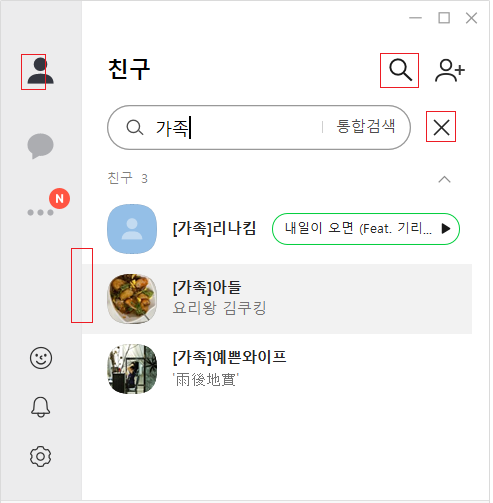
카카오톡의 테마 변경이나 아이콘 변경 등 이미지 변경사항 발생시 프로그램 오류 발생.
변경된 상태에 따라 img 폴더의 이미지를 다시 캡처해야 함.
- PC 카톡 실행 후 아래의 빨간색 부분을 캡처(Shift+Window+S)하여 img 폴더에 저장


[파이썬 업무자동화] 04.카카오톡 메세지를 자동으로 보내보자!
Welcome to PyAutoGUI's documentation! - PyAutoGUI documentation