


terminaltask is a keyboard-driven task manager that runs directly in your terminal. It provides a clean, minimal interface for capturing, reviewing, and updating tasks without leaving the command line.
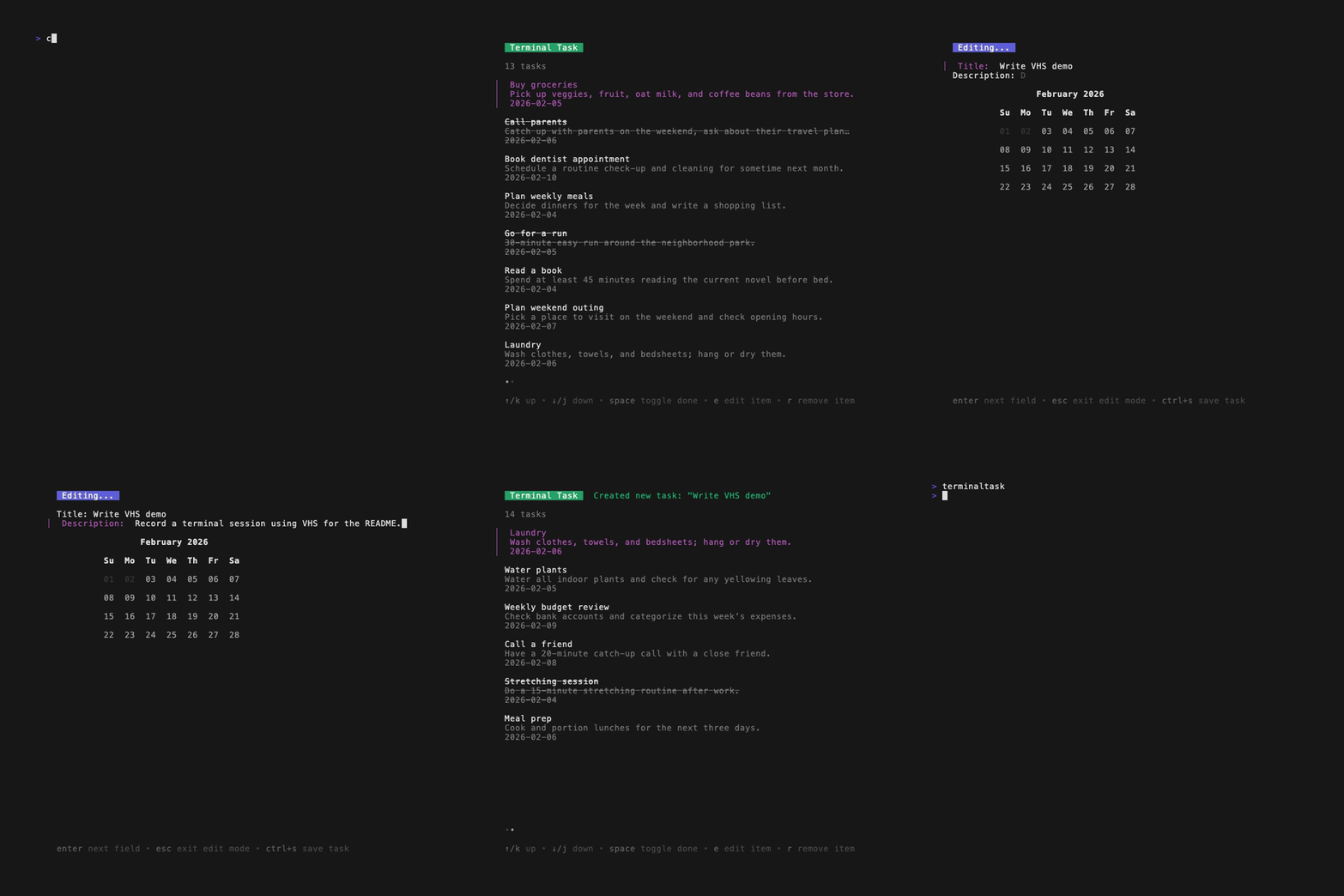
- Task management: Create, edit, delete, and mark tasks as completed.
- List view: Navigate through tasks with a focused, scrollable list.
- Keyboard first: Drive everything with keys – no mouse required.
- Date picker: Set due dates via a keyboard-driven date picker.
- Inline help: Toggle contextual help with key bindings in both list and edit views.
- Themed UI: Uses
lipglossand other Charm libraries for a pleasant terminal UI.
You can install terminaltask using Homebrew via the tap:
brew tap jacobdanielrose/homebrew-tap
brew install --cask terminaltask
After installation, macOS may block the app the first time you try to run it because it is from an unidentified developer.
If this happens, open System Settings → Privacy & Security, scroll down to the security section, and explicitly allow terminaltask to run. Once approved, you can launch it normally from your terminal.
Ensure you have Go installed (version 1.20 or higher is recommended).
-
Clone the repository:
git clone https://github.com/jacobdanielrose/terminaltask.git cd terminaltask -
Build the application using the Makefile:
make build
./bin/terminaltask
You can also download pre-built binaries from the GitHub releases page:
Download the appropriate archive for your OS, extract it, and run the binary from your terminal.
-
Navigation:
- Use arrow keys or
j/kto move through the task list. - Press
nto create a new task. - Press
eto edit the currently selected task. - Press
spaceto toggle a task as completed. - Press
escto exit edit mode. - Press
ctrl+cat any time to quit.
- Use arrow keys or
-
Editing:
- Text input fields for title and description.
- bubble-datepicker (thanks EthanEFung!) for selecting task due dates.
- Use
enterto move between fields. - When the date picker is focused, press
tabto move focus from the year/month header down to the calendar, andshift+tabto move focus back up to the header. - Press
ctrl+sto save changes. - Press
escto exit the edit menu without saving.
-
Shortcuts:
?to toggle the help menu and view key bindings in the list view.ctrl+oto toggle the help menu and view key bindings in the edit view.
This project uses Go’s standard testing tools.
-
Run all tests:
make test -
Run tests with coverage (-cover):
make cover -
Generate a coverage profile:
make coverage
Continuous integration runs the test suite and updates coverage on every push and pull request.
This project is actively developed. Some planned enhancements include:
- Expanding test coverage across core packages (
internal/task,internal/store,internal/app). - Filtering out completed tasks.
- Filtering by description.
- Synchronizing with an external CalDAV server.
If you have ideas for improvements or new features, feel free to open an issue or reach out at jacobdanielrose@protonmail.com.
Contributions are welcome! Please fork the repository and submit a pull request with your changes.
Tests are appreciated where practical, especially for core behavior in the task model, storage, and app update logic.
This project is licensed under the GNU General Public License. See the LICENSE file for details.
For questions or support, please feel free to open an issue on GitHub.