
In this project I used Python to scrape and clean Hellacopters' discography. After that, this data was used for a data visualization in Tableau.
🔎 1) First of all, let's search for the Wikipedia page containing a table with a list of all albums released by the band.
These are the first 3 list items on Wikipedia:
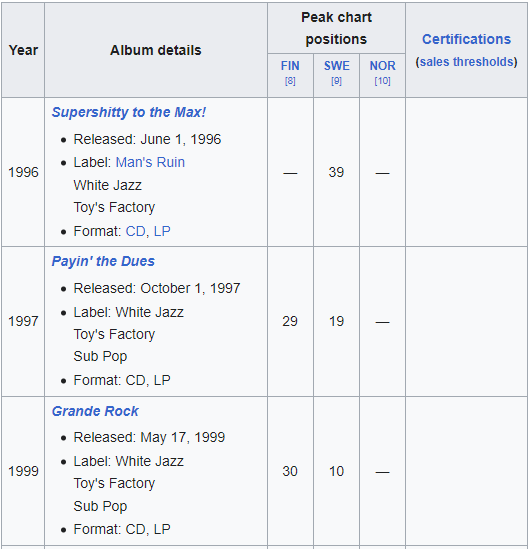
✂️ 2) To scrape this content I will use BeautifulSoup and Pandas libraries. I also need to save this as a csv file.
import pandas as pd
import requests
from bs4 import BeautifulSoup

# make the request
wikiurl = 'https://en.wikipedia.org/wiki/The_Hellacopters_discography#Singles'
table_class="wikitable plainrowheaders"
response = requests.get(wikiurl)

# parse data
soup = BeautifulSoup(response.text, 'html.parser')
indiatable=soup.find('table', {'class':"wikitable"})

# read html
df = pd.read_html(str(indiatable))

# convert list to dataframe
df = pd.DataFrame(df[0])

# saving dataframe as csv file
df.to_csv(r'C:\Users\jaque\Projects\hellacopters-scrap\discography.csv', index=False, header=True)
🧹 3) With the csv file ready, let's read it and drop some columns that won't be used. The columns are:
- Peak chart positions (FIN, SWE, NOR)
- Certifications
import pandas as pd

# read the csv file
df = pd.read_csv('discography.csv')

# creating a variable to define which columns to drop
columns_to_drop = ["Certifications(sales thresholds)",
           "Peak chart positions",
           "Peak chart positions.1",
           "Peak chart positions.2"]
df.drop(columns_to_drop, inplace=True, axis=1) # drop the columnsdf.drop(index=df.index[0], axis=0, inplace=True)✍️ 5) The field names are not correct. Let's rename the columns removing blank spaces and making the labels lowcase.
df.columns = ['year', 'album']So far, this is my output:
>>> df.head()
#    year                                              album
# 1  1996  Supershitty to the Max! Released: June 1, 1996...
# 2  1997  Payin' the Dues Released: October 1, 1997 Labe...
# 3  1999  Grande Rock Released: May 17, 1999 Label: Whit...
# 4  2000  High Visibility Released: October 16, 2000 Lab...
# 5 2002 By the Grace of God Released: September 18, 20...- Note that the album field has some additional information such as release date. I will not use this info, so let's clean it!
Now, I have to clean the content from the column "album", because it was like this:
"Grande Rock Released: May 17, 1999 Label: White Jazz Toy's Factory Sub Pop Format: CD
The only information I need is the album name, which is "Grande Rock". Consequentely, every content after " Released:" won't be necessary, and I need to delete it.
1) For this, I will use split() function to separate the "album" column into 2 columns: album and details.
df[['album','details']] = df['album'].str.split(' Released',expand=True)df.drop('details', inplace=True, axis=1)✨ And this is my final output:
>>> df.head()

#    year                    album
# 1  1996  Supershitty to the Max!
# 2  1997          Payin' the Dues
# 3  1999              Grande Rock
# 4  2000          High Visibility
# 5  2002      By the Grace of God
With this dataset, I developed a dataviz on Tableau. This is the link, if you want to check it: Tableau Hellacopters timeline