Overview
ACDB is an acronym for "Aircraft Checklist Database Builder." I wrote the program to help users create interactive TTS checklists for Axis and Ohs (AAO).
As described in Lorby "Axis and Ohs" for Microsoft Flight Simulator Documentation, "AAO has a hard coded [sic] feature to run interactive checklists. Checklists are RPN script files with a special format" (p. 93). An example is given for the A320 Before Start checklist.
<Macro Name="FOSPEAK">VOICE:Microsoft Zira Desktop) (VOICERATE:0) (VOICEVOLUME:75) (SPEAK</Macro>
(@FOSPEAK:Before start checklist) (WAIT:4000)
[](@FOSPEAK:fueling)
[0] (@FOSPEAK:checked)
[](@FOSPEAK:chocks)
[0] (@FOSPEAK:removed)
[](@FOSPEAK:traffic cones)
[0] (@FOSPEAK:clear)
[](@FOSPEAK:A P U)
[0] (@FOSPEAK:checked on)
[](@FOSPEAK:A P U bleed)
[0] (@FOSPEAK:checked on)
[](@FOSPEAK:external power)
[0] (@FOSPEAK:disconnected)
[](@FOSPEAK:doors)
[0] (@FOSPEAK:closed)
[](@FOSPEAK:beacon)
[0] (@FOSPEAK:checked on)
(WAIT:1500) (@FOSPEAK:before start checklist complete, pushback is next)
In addition to the checklist scripts (one checklist per aircraft), a control script is needed to call each checklist in order when required.
Although the script files are not complicated, they can be tedious to write. One has to ensure that each line carefully follows the format that AAO expects. If an error is made, the script will fail to run correctly, and the results are unpredictable.
ACDB eliminates that tedium and makes it easy to create the checklist and control scripts that AAO needs. Let's take a quick look at the user interface.
There are two main windows in ACDB: the control data editor and the checklist data editor.

The control data editor is the first window to open when the program is executed. Its purpose is to collect and display the data used to build the control script described above. To learn more about this window, go to Using the Control Data Editor.
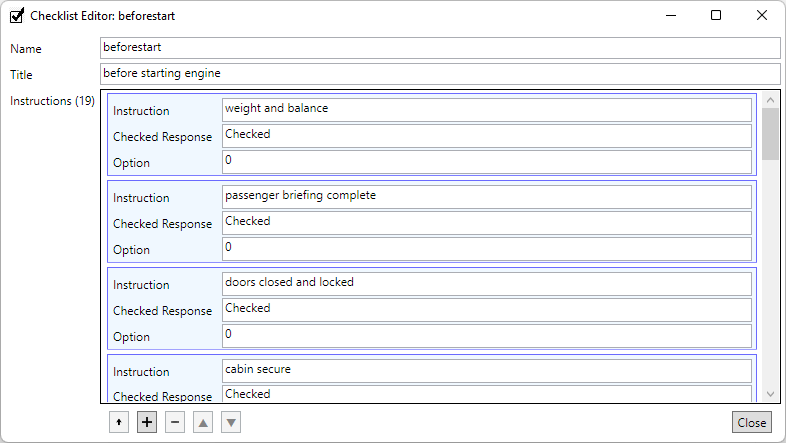
The checklist data editor is the second main window in ACDB. This window opens when you click the "Open" button on any of the checklist items in the control data editor list at the bottom of the window. Similar to the control data editor, this editor collects data used to build the checklist scripts described above. Learn more about this window at Using the Checklist Data Editor.