Batch solid boolean operations using native SketchUp Pro tools.
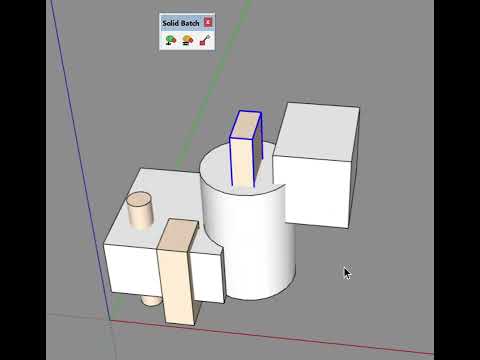
When designing technical parts for 3D printing in SketchUp, a common workflow is to build up complex shapes from simple volumes — boxes, cylinders, extrusions — then combine them using boolean operations at the end of each design stage or at the very end. Manually running union and subtract on dozens of objects one by one is tedious and time-consuming. Solid Batch automates this: select all your solids, click once, and the plugin unions the bases and subtracts the tools in a single batch operation.
- Combine All (Union) — Select multiple solids, automatically union all base solids then subtract color-marked objects. Single undo step.
- Combine All (Shell) — Same workflow using Outer Shell instead of Union (merges overlapping volumes into one shell).
- Automatic circle and arc restoration — Native boolean operations break circles and arcs into individual segments. Solid Batch detects and welds them back into single-click selectable curves at the end of every Combine All.
- Set Subtract Color — Pick a color from a selected object to mark which solids should be subtracted during Combine All operations.
- Set Repair Options — Configure the circle/arc restoration behavior: auto-repair toggle, "large object" edge threshold (above which restoration can be skipped for performance), and minimum segments for arc detection (tradeoff between catching short arcs and avoiding false positives).
All operations use SketchUp Pro's native boolean engine for maximum reliability.
- SketchUp Pro (2017 or later) — the native boolean methods (
union,outer_shell,subtract) are Pro-only features. - Circle and arc restoration requires SketchUp 2020.1+ (
Entities#weld). On older versions, batch operations work normally but restoration is silently skipped.
- Download
solid_batch.rbzfrom the Releases page - In SketchUp: Window > Extension Manager > Install Extension
- Select the
.rbzfile - The toolbar and menu appear under Extensions > Solid Batch
- Paint the objects you want to subtract with a specific color (e.g. red)
- Use Set Subtract Color to register that color
- Select all your solids (bases + tools)
- Click Combine All (Union) or Combine All (Shell)
- Done — one solid, one undo step
- User Manual (English)
- Manuel utilisateur (Francais)
- Functional Specification (English)
- Specification fonctionnelle (Francais)
Uses the native boolean operations built into SketchUp Pro.
MIT License — see LICENSE.md
Operations booleennes par lot sur les solides, utilisant les outils natifs de SketchUp Pro.
Lors de la conception de pieces techniques pour l'impression 3D dans SketchUp, une methode courante consiste a construire des formes complexes a partir de volumes simples — boites, cylindres, extrusions — puis a les combiner par operations booleennes a la fin de chaque etape ou tout a la fin du design. Executer manuellement les unions et soustractions sur des dizaines d'objets un par un est fastidieux et chronophage. Solid Batch automatise tout cela : selectionnez tous vos solides, un seul clic, et le plugin fusionne les bases et soustrait les outils en une seule operation.
- Combine All (Union) — Selectionnez plusieurs solides, fusionne automatiquement les solides de base puis soustrait les objets marques par couleur. Une seule etape d'annulation.
- Combine All (Shell) — Meme principe avec Outer Shell au lieu de Union (fusionne les volumes en une seule coque).
- Restauration automatique des cercles et des arcs — Les opérations booléennes natives cassent les cercles et les arcs en segments individuels. Solid Batch les détecte et les reconstitue en courbes sélectionnables en un clic à la fin de chaque Combine All.
- Set Subtract Color — Choisissez une couleur depuis un objet selectionne pour marquer les solides a soustraire.
- Set Repair Options — Configurer la restauration des cercles et arcs : toggle auto-repair, seuil "gros objet" en edges (au-dessus duquel la restauration peut être ignorée pour la performance), et nombre minimum de segments pour la détection des arcs (compromis entre détection des arcs courts et évitement des faux positifs).
Toutes les operations utilisent le moteur booleen natif de SketchUp Pro pour une fiabilite maximale.
- SketchUp Pro (2017 ou plus recent) — les methodes booleennes natives (
union,outer_shell,subtract) sont exclusives a la version Pro. - La restauration des cercles et arcs nécessite SketchUp 2020.1+ (
Entities#weld). Sur les versions antérieures, les opérations batch fonctionnent normalement mais la restauration est silencieusement ignorée.
- Telecharger
solid_batch.rbzdepuis la page Releases - Dans SketchUp : Window > Extension Manager > Install Extension
- Selectionner le fichier
.rbz - La barre d'outils et le menu apparaissent sous Extensions > Solid Batch
- Peindre les objets a soustraire avec une couleur specifique (ex. rouge)
- Utiliser Set Subtract Color pour enregistrer cette couleur
- Selectionner tous vos solides (bases + outils)
- Cliquer sur Combine All (Union) ou Combine All (Shell)
- Termine — un seul solide, un seul Ctrl+Z
- User Manual (English)
- Manuel utilisateur (Francais)
- Functional Specification (English)
- Specification fonctionnelle (Francais)
Utilise les operations booleennes natives de SketchUp Pro.
MIT License — voir LICENSE.md