This is a Max for Live MIDI Tool Generator for building house-style drum beats for Ableton Live Drum Racks.
Watch an overview of how to use it:
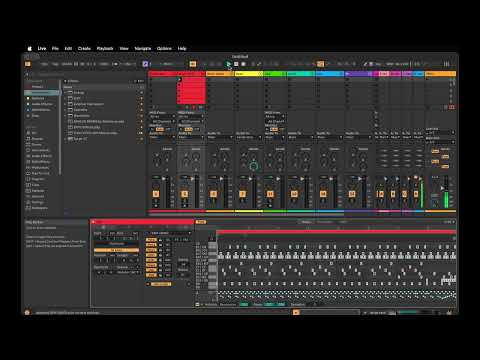
Download the SRM-DB002.amxd file from this repo. Save it to the ~/Music/Ableton/User Library/MIDI Tools folder. If you don't have the MIDI Tools folder in your user library, you can create that folder.
When editing a MIDI clip in Live, select the "MIDI Generative Tools" view (to the left of the clip).
I recommend that you set your clip length to 8 bars before using the generator. You can use shorter clips, but you won't get as much variation in the rhythm.
When you first use the generator, you will need to set the notes for each drum. The settings should be preserved from that point forward. It is recommended that you use one note mapping across all your drum racks. If every drum rack you use has different note mappings (e.g. snare is on C#1 for one kit and G2 for another), you will find the generator tedious to use, since you will need to remap the drums every time you switch racks.
After entering the notes for each drum, you can adjust parameters:
- density: how many notes will be generated per bar for "non-foundational" drums like percussion
- bounce: how much the algorithm favors the 16th notes between the 8th notes
You can disable note generation for specific drums by clicking the enable/disable toggle button for that drum. If you are happy with the pattern generated for a given drum, but you want to generate new patterns for other drums, you can lock the drum by clicking the lock button to the right of the enable/disable button.
Click the apply button to generate a beat. Curate your beat by locking drums that you are satisifed with and applying again. Repeat until you have a beat you are happy with.
Saving of state in this device is a total hack. State is really important to preserve, because it is not practical to remap the drums every time you load the generator.
Ideally, state would be saved with the set. That way you add a drum rack to a set, map your drums once, save the set as a template, and then any sets created from this template would have the drum rack and the correct drum mappings.
You could have another template with a different drum rack and different note mappings.
Of course, if you have two drum racks with different note mappings in the same set, this model would not work so well. In a perfect world, the generator Max for Live device would "belong" to a given track, and the state could be saved with that track. But I don't think generators work like that.
At any rate, I wanted to save state with the Live set, so I tried using "parameter enable" on the controls in the generator. My assumption was that the values of the fields would be automatically stored in the set.
But as far as I could tell, the settings were not stored or retrieved.
This could be my poor understanding of Max for Live or a misreading of the documentation.
What I ultimately settled on was writing to a JSON file that sits next to the device's amxd file. So if your amxd file is here:
Macintosh HD:/Users/USERNAME/Music/Ableton/User Library/MIDI Tools/SRM-DB002.amxd
the JSON file would be written to
Macintosh HD:/Users/USERNAME/Music/Ableton/User Library/MIDI Tools/SRM-DB002.amxd.json
Reading and writing the file was tricky, given the limitations of ECMASript 5 in Max for Live 8.
Attempts to read the file using a File object were not successful.
The only way I was able to read the file was to use a Dict.import_json().
This is where things got really ugly. When I load the device, I saw that every single live.text and live.numbox object in the device was sent an initial value, even though I had unchecked Initial Enable for all of them (maybe there are slight differences in the way MIDI Tools devices are initialized since they don't really belong to the set itself?).
So if I didn't restore my saved settings at the right time, they would be overwritten by the values that were being set automatically.
Further, those values being set were triggering the events that we use to update the internal config, save those values to the state file, and trigger regeneration of the patterns. All of this was very undesireable.
To counter this, I had to build a mechanism to track all of these initialization value sets and ignore them until every live object had gotten its initial value. Once every object had its initial value, I trigger the load settings call, and put the saved values into the objects.
Only after that do we consider ourselves "initialized" and start handling value changes as expected.
I had to debounce the writing of the values to the state file so that rapid changes to values would not thrash the hard drive.
I also debounced the generation of new patterns to reduce wasted computation. It's possible to go into one of the note mappings numboxes and use the arrow keys to make very rapid changes to the values. You don't want each of those dozens of events to trigger a recomputation of the pattern.