Force the traffic of a Firefox container tab to pass through a VPN
On newer version of Firefox, it is possible to use container tabs, which isolate the cookies from the normal tabs. It is a good feature, since by isolating the cookies you can avoid tracking and some types of attacks that could steal your cookies, in addition to being able to log in to multiple accounts on the same website.
Furthermore, it is possible to assign different proxies to be used in different containers using Container proxy.
Then, we can create a docker container with a VPN client and a proxy server running. By doing this, we cab assign our docker proxy to a container tab so that all the traffic of that tab goes through the VPN that is running only inside the docker container.
git clone https://github.com/Nickguitar/VPNTabs
Important note: if your user doesn't have permission to run docker containers you will need to run the scripts with sudo
cd VPNTabs
./build.sh
[Alternative] Building only the docker image
cd VPNTabs
./container-build.sh
cp /path/to/vpn/file ovpn_files/
./setup.sh <your_vpn_file> [portnumber]
[Alternative] Instead using setup.sh You can run your custom script or use docker-compose, here is an example:
docker run -d --rm \
--cap-add=NET_ADMIN \
--device /dev/net/tun \
--sysctl net.ipv6.conf.all.disable_ipv6=0 \
-p 3128:3128 \
-e OVPN_FILE=<YOUR_VPN_FILE_HERE> \
-v <PATH_OF_VPN_FILES_DIRECTORY_HERE>:/ovpn \
squid_openvpn:1.0
The envoriment variable OVPN_FILE is used to know which file should openvpn use
$ netstat -tapeno | grep 3128
tcp     0    0 0.0.0.0:3128       0.0.0.0:*    LISTEN    0   5767579  -  off (0.00/0/0)
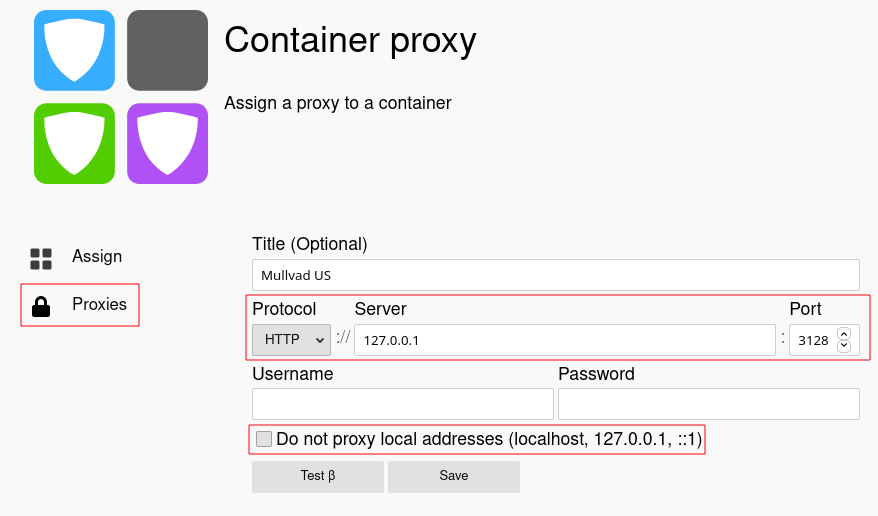
Open Container Proxy, click on "Proxy", set protocol to HTTP, server to 127.0.0.1 and use the port you chose in step 2.3 (the default port is 3128). Also, uncheck the checkbox "Do not proxy local addresses". Then, click "save".
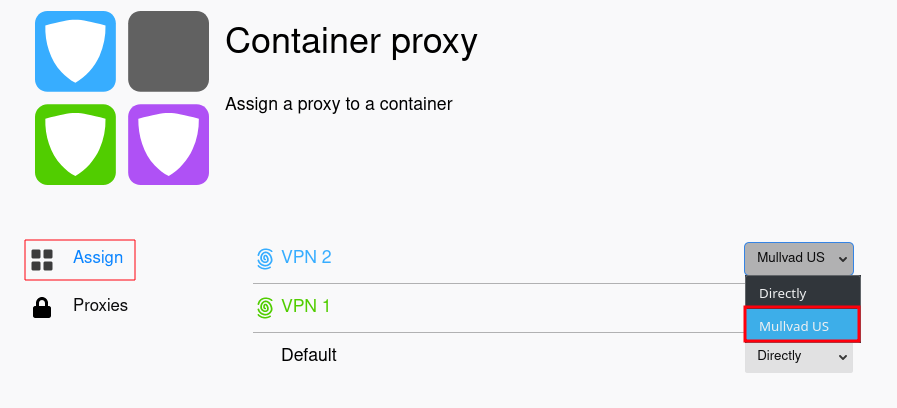
Now, click on "Assign" and change the proxy of the container to the one you've just created.
To use the container tab with VPN, right click the new tab button and choose the container for which you configured the proxy
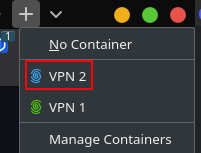
Now every website you access using those container tabs will pass through your local proxy, which points to a docker container whose traffic pass through your VPN. =)
- You can generate as many containers as you want, each one running a different VPN config file. In this way, it is possible to have multiple container tabs, each with a different VPN.
- Note that this doesn't have a kill switch. If your VPN goes down and you access some website within the container tab, your IP will be exposed. It's at your own risk.
- Since the VPN client is running inside a docker container, all your other network traffic isn't being tunneled through the VPN. The only connections going through the VPN are those pointing to the local proxy you've created.