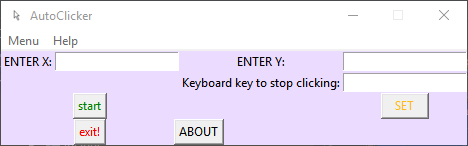
Releases: kai9987kai/AutoClicker
V10.0

AutoClicker V10.0 ships the new Windows installer and the current packaged desktop builds.
Highlights:
- scroll-first tool windows for Photo Clicker, Colour Clicker, Recording Studio, and Sequence Builder
- richer photo and colour presets, cursor-focused region tools, offsets, settle delay, and safer cleanup paths
- stronger recording and sequence editing with duplicate, move, reverse, offset, loop, countdown, and selected-step execution
- refreshed project documentation plus build scripts for producing the packaged executables and installer
Installer: - File: AutoClickerInstaller.exe
- SHA256: 8A6058841C20E36E8A2D660FA512DC4A192E2B2FCDA419D150ACC24D16EBEF00
Auto Clicker V6.0
What a Auto Clicker is?
It spams clicks on the selected Coordinates, We also have a feature that allows for a list of coordinates to be performed and a mega auto clicker that is faster than the base version but is only limited by your computers specs.
Help / How to use the software
1st click on Find Coordinates.
2nd A window with 2 numbers on will open note down the numbers or leave the window open.
3rd Put the 1st number in the enter x field and the second the 2nd number in the entry field.
4th To finish up select whether you want it to spam left clicks or right clicks. To make sure you
don't get stuck clicking enter a failsafe key in the field called 'Keyboard key to stop clicking' if you forget to do this then press ctrl + alt + delete at the same time then select log off.
5th Press start button after that use your custom failsafe key to stop clicking.
Python Modules Requirements:
Keyboard Module (Required)
Pyautogui Module (Required)
win10toast (Optional)
gspread (Optional)
oauth2client (Optional)
For the feedback page you need:
gspread and oauth2client
Contact info:
EMAIL1: kai9987kai@Gmail.com
EMAIL2: kai.piper@aol.com
EMAIL3: kaipiper@kai9987kai.pw
Website: https://kai9987kai.pw/AutoClicker.html
Project links:
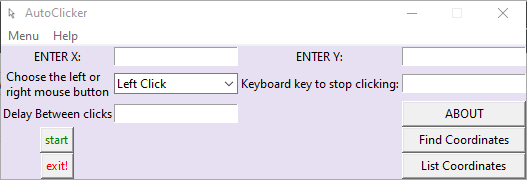
Set the program up how you want it to look
style number 1
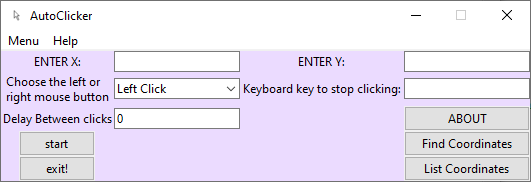
style number 2
Auto Clicker V5.0
What an Auto Clicker is?
It spams clicks on the selected Coordinates, We also have a feature that allows for a list of coordinates to be performed and a mega auto clicker that is faster than the base version but is only limited by your computer specs.
Help / How to use the software
1st click on Find Coordinates.
2nd A window with 2 numbers that are being displayed will open note down the numbers or leave the window open.
3rd Put the 1st number in the enter x field and the second the 2nd number in the entry field.
4th To finish up select whether you want it to spam left clicks or right clicks. To make sure you don't get stuck clicking you will need to enter a failsafe key in the field called 'Keyboard key to stop clicking' if you forget to do this then press ctrl + alt + delete at the same time then select log off.
5th Press start button after that use your custom failsafe key to stop clicking.
Contact info:
EMAIL1: kai9987kai@Gmail.com
EMAIL2: kai.piper@aol.com
Website: https://kai9987kai.github.io/AutoClicker.html
Project links:
style number 1

style number 2
Auto Clicker V4.0
What a Auto Clicker is?
It spams clicks on the selected Coordinates, We also have a feature that allows for a list of coordinates to be performed and a mega auto clicker that is faster than the base version but is only limited by your computers specs.
Help / How to use the software
Press find coordinates then put the first number in x and the second number in y then set a button to stop the clicking and press start
Contact info:
EMAIL1: kai9987kai@Gmail.com
EMAIL2: kai.piper@aol.com
Website: https://kai9987kai.github.io/AutoClicker.html
Project links:
style number 1
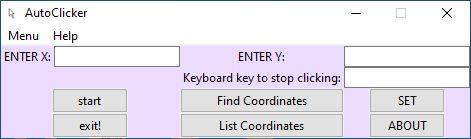
style number 2
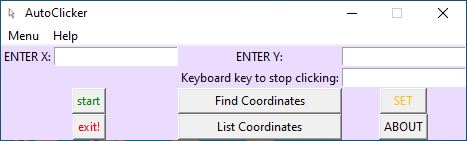
AutoClicker V3.0
What a Auto Clicker is?
It spams clicks on the selected Coordinates, We also have a feature that allows for a list of coordinates to be performed and a mega auto clicker that is faster than the base version but is only limited by your computers specs.
Help / How to use the software
Fist get the mouses X and Y coordinates by using the software linked below or the python script inside the Find Coordinates file inculed with the project.
Contact info:
EMAIL1: kai9987kai@Gmail.com
EMAIL2: kai.piper@aol.com
Website: https://kai9987kai.github.io/AutoClicker.html
Project links:
style number 1
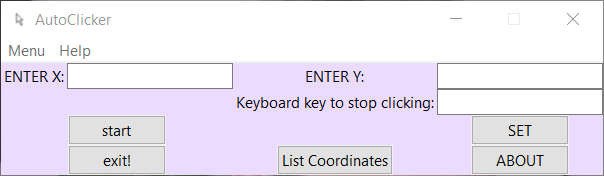
style number 2
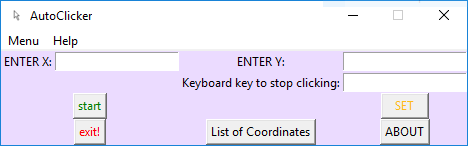
AutoClicker V2.0
What a Auto Clicker is?
It spams clicks on the selected X and Y Coordinates.
Help / How to use the software
Fist get the mouses X and Y coordinates by using the software linked below or the python script inside the Find Coordinates file inculed with the project.
Contact info:
EMAIL1: kai9987kai@Gmail.com
EMAIL2: kai.piper@aol.com
Website: https://kai9987kai.github.io/AutoClicker.html
Project links:
style number 1
style number 2
AutoClicker V1.0
AutoClicker V1.0
It spams clicks on the selected Coordinates.
Contact info:
EMAIL1: kai9987kai@Gmail.com
EMAIL2: kai.piper@aol.com
Project links:
About page