This Shiny application is designed to streamline the analysis of XRF datasets exported from the OLYMPUS VANTA pXRF device using the Geo Chem method. It simplifies complex raw data into a clean, normalized, and insightful format for geochemical analysis.
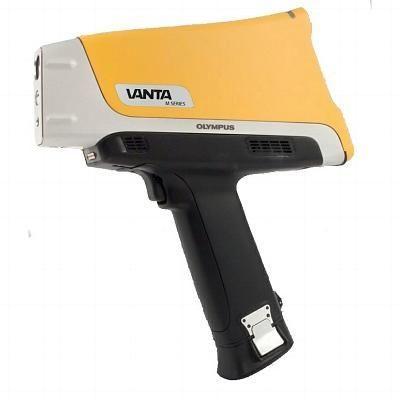
To use this application, you must have the following:
- OLYMPUS VANTA pXRF device for data acquisition.
- Data must be exported using the Geo Chem export method.
Ensure your CSV or XLSX export strictly adheres to the Geo Chem format Specifically:
- The Item Notes column must be consistently labeled as
LAB_ID. - The
LAB_IDvalues should contain both letters and numbers (e.g.,S-101,A-2B) for string-value compatibility and optimal parsing. - If The file is XLSX make sure that the data read is on Sheet 1
This tool is specifically tailored to parse OLYMPUS VANTA pXRF Geo Chem databases, focusing on selectively retaining element compositions and item IDs for downstream analysis.
The application guides you through a sequential data processing workflow across four main tabs:
This is your initial loading and pre-filter stage.
- Load Data: Use the input feature to upload your Geo Chem CSV file.
- Initial Filtering: Apply basic filters by Sample Name and the Analysis Method used to narrow down the dataset.
This tab presents a cleaned and refined dataset ready for analysis.
- Automatic Cleanup: Only the essential
LAB_IDs and element concentration columns are retained. - Processing Switches (Sidebar): Use the switches in the sidebar to:
- Drop Zero Columns: Automatically remove element columns where the sum of readings is 0 (i.e., elements that were not detected).
- Normalize Data: Apply normalization to the remaining element readings for comparative analysis.
- Manual Element Removal: You can remove additional unwanted element columns by deselecting them from the Input Selection in the sidebar.
This is the individual sample inspection stage.
- Individual Item Filtering: Select individual
LAB_IDitems from the dropdown to view their specific readings and analytics. - Interactive Visualizations: Review table showing the composition for the selected sample(s).
This final tab aggregates your key findings and handles data output.
- Aggregated Results: Displays a summary of the
LAB_IDitems and their analytics that you selected and finalized in the Analytics tab. - Analytics Selection (Sidebar): Choose the specific type of analytics (e.g., summary statistics, specific ratios) you wish to include in the final report via the Input Select tab in the sidebar.
- Saving Data: When the Save button is clicked, the application exports a compilation of:
- The final, processed reading values.
- The selected analytics results.
- The original Raw Data table.
- The cleaned Subset Data table.
This repository utilizes two main branches:
master: This is the stable branch currently used for critical lab work. Do not push directly to this branch.experimental: Please push all new features, bug fixes, and development changes to theexperimentalbranch. Pull requests will be reviewed and merged intomasterafter validation.