CI/CD SPRING BOOT PIPELINE PROJECT
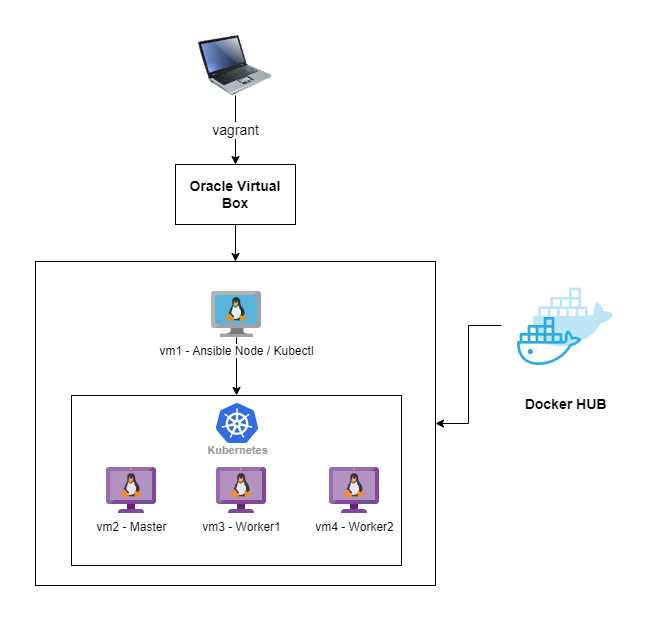
ENVIRONMENT
PIPELINE
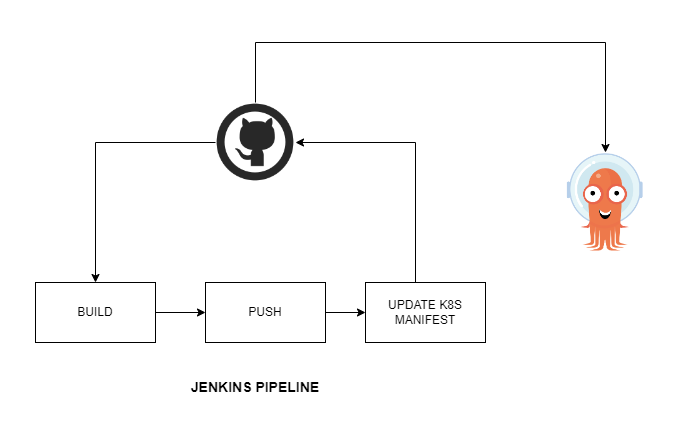
In this project we will build spring boot hello world app, with Jenkins, it deploy to k8s cluster with argoCD which is deployed on oracle virtual platform.
stage-1 When jenkins build triggered it will download source code from github and build it with maven and create artifact which is a jar file,
stage-2 Second stage kaniko will build docker image according to Dockerfile, and when the build finishes kaniko will begin tagging and pushing image to DockerHub.
stage-3 Last stage is kubernetes deploy, when build and push succesfuly finished, Jenkins will change the image tag in deployment file which located in github repo, then argocd will be triggered from that change and will start to deployment new version of deployment. We can check blue-green deployment and promote to new version if everything is ok.
Tech Stack





Phase 1 -- Setup Virtual Environment
Virtual enviroment created with oracle virtual box via vagrant file. According to vagrant file we will create below 4 virtual machines.
-
Control node: We will use it to control other machines via ansible and for k8s cluster via kubectl.
-
Master Node: Master role for k8s cluster
-
Worker Node: Worker1 role for k8s cluster
-
Worker Node: Worker2 role for k8s cluster
With vagrant up command starting to build machines.

vagrant status command checkig status of machines, all seems ready.

Connecting to control node with command vagrant ssh controlz

Connection to controlz node is succesfull, now we will start to configure ssh keys for ansible to connect machines.
Phase 2 -- Configure SSH keys
ssh-keygen command will create key.

Before ssh-copy-id command we are going to connect each node ( vagrant
ssh command ) and change /etc/ssh/sshd_config PasswordAuthentication
no to yes, because of prevent public key error due tossh-copy-id command.

Then we are restarting sshd service with sudo systemctl restart sshd.service
Now we are starting to copy generated key to all nodes with ssh-copy-id
command

Connect each node and press yes to add shh key.
Phase 3 -- Configuring Ansible and Createing k8s cluster with kubespray
First we will clone kubespray repo and installing Python libraries.
git clone <https://github.com/kubernetes-sigs/kubespray.git>
cd kubespray ; sudo pip3 install -r requirements.txt

Creating ansible inventory file according to setup one master two worker node.

To check inventory file is correct we will use simple ansible ping command.
ansible -i inventory/my-cluster/hosts.ini -m ping all

Now its time to build our k8s cluster.
ansible-playbook -i inventory/my-cluster/hosts.ini cluster.yml --become --become-user=root

Phase 4 -- Installing Kubectl and Helm to Controller Node
We are installing kubectl according to instructions at
https://kubernetes.io/docs/tasks/tools/

When the installation is complete we check nodes with kubectl get pods and we are getting error because of we dont have conf file of
cluster. Then we will connect master ssh vagrant@node1 node and copy
/etc/kubernetes/admin.conf file to our contorller node path
~/.kube/conf

Now we check again kubectl get nodes

kubectl get pods -A

Success!!
Now its time to install Helm. We are installing helm according to instructions at https://helm.sh/docs/intro/install/

We are checking helm installation with helm version
Phase 5 -- Installing Jenkins with helm and installing kubernetes plugin to Jenkins.
helm repo add jenkins https://charts.jenkins.io
helm repo update
helm upgrade \--install myjenkins jenkins/Jenkins

Jenkins installation is complete now its time to get admin passowrd.
kubectl exec --namespace default -it svc/myjenkins -c Jenkins \-- /bin/cat /run/secret/additional/chart-admin-password

When I check the Jenkins pod, relaised that it gives error because of there is no persistentVolume, so I created hostpath volume for Jenkins with below yaml.
Yaml for pv Jenkins

kubectl get pods

Jenkins login

Now we will install Jenkins kubernetes plugin

Configuring Cloud and adding kubernetes.
 We will use pod template to build and push our image

We have created a basic Freestyle Jenkins job to check everything is ok.

Freestyle Jenkins job finishes succesfully

Phase 6 -- Writing pipeline and checking kaniko as a kubernetes pod
Firs we will create docker secret at kubernetes to pull our images from docker hub.
kubectl create secret docker-registry dockercred --docker-server=https://index.docker.io/v1/ --docker-username=**kocagoz** --docker-password= dckr_pat****** --docker-email=kocagoz@gmail.com>
create secret

We will check is Kaniko working so, I created a simple Kaniko Pod, created pod with kubectl apply -f kaniko.yaml


As a result kaniko succesfully push image to dockerhub.

Now we will write our pipeline, but first we have to create credentianls for github.

Not its time to write Jenkins pipeline

When we run pipeline job we get *succses message and image pushed to dockerhub and k8s manifest changed at github.

Phase 7 -- Installing argocd and writing deployment yaml files.
First we will install argocd
kubectl create namespace argocd
kubectl apply -n argocd -f <https://raw.githubusercontent.com/argoproj/argo-cd/stable/manifests/install.yaml>

Argocd installation is complete now we will gather admin password
kubectl -n argocd get secret argocd-initial-admin-secret -o jsonpath=\"{.data.password}\" \| base64 -d; echo

We need to create argo project for our deployment.
kubectll apply -f application.yaml

We will enter argo via browser.

Lets check our app.

Project details.

Now we can install argo cd roolout plugin accrding to link https://argoproj.github.io/argo-rollouts/installation/
check argocd rollout cli is working.
kubectl argo rollouts version
kubectl-argo-rollouts: v1.3.2+f780534
cli is working, check rollout status current app.
kubectl argo rollouts get rollout case-deployment


Now its time to check our spring app from browser, we used nodeport 300055,

To make new roolout we will start our jenkins job and it will change image tag when the pipeline is succes, then argocd will be triggered and it will create blue version of app.

blue version of our app is deployed. Lets check is it working from nodeport 30056.

👍 blue version is working, now promote new version via.
kubectl argo rollouts promote case-deployment
rollout 'case-deployment' promoted

We have prometed to image version 20
thanks your for reading. 👍