Interactive lunchbox planner app for busy working parents!
KidsCart is made to tackle three main challenges faced by working parents by:
- Making it easy and quick to find good/healthy lunbox receipes for kids
- Making it easy to manually compile lunchbox receipes into shopping list and organise them for future reuse
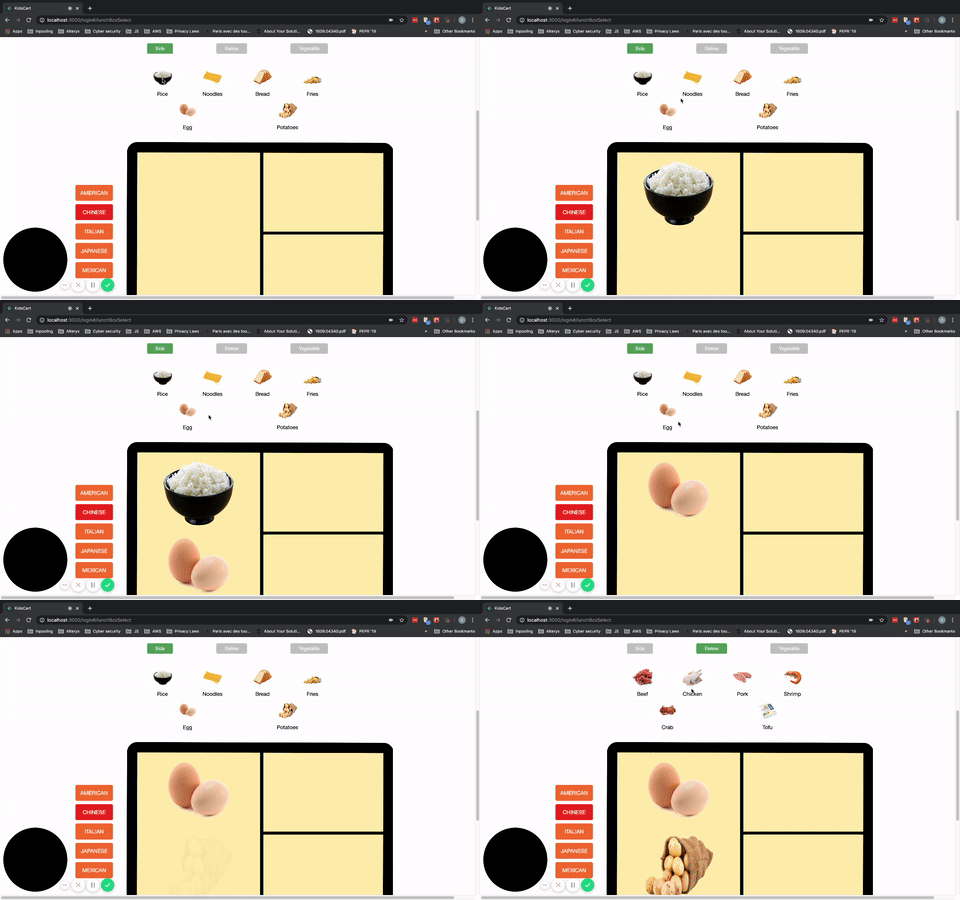
- Allowing you to visualize how a normal receipe fits into lunchbox and edit it with an interactive interface
KidsCart has:
- an interactive interface for choosing lunchbox preferences;
- tailored receipes are automatically generated based on user's preferences;
- user can add, replace, edit, delete, and create their lunchbox with ease.
The KidsCart app is built with the MERN stack (MongoDB, Express, React, and Node.js). It features a back-end HTTP API used for retrieving user records in conjunction with client side rendering with React/Redux. Node.js and Express are used for backend routing. Considering the low-latency and scalability, we chose MongoDB as the database and Mongoose to manage schemas and queries.
-
Backend
- Express (the main framework)
- Mongoose (to connect and interact with MongoDB)
- Passport (for authentication)
- Passport-jwt (for JSON web tokens)
- JsonWebToken (to generate the tokens)
- Body-parser (to parse data from requests)
- Bcryptjs (for securing the password with hashing and salting)
- Validator (for database validations)
- Nodemon for watching the changes and updating instantly
-
Frontend
- React with Redux for state management
- Axios for sending HTTP requests
- Styling and animations done with CSS
Media query
- we used media query throughout the whole application to ensure front-end user experience even with small screens.
@media only screen and (max-width: 370px) {
  .grid-container {
      grid-template-columns: 100%;
  }
}

@media only screen and (min-width: 371px) and (max-width: 720px) {
  .grid-container {
      grid-template-columns: 50% 50%;
  }
}

@media only screen and (min-width: 721px) and (max-width: 868px) {
  .grid-container {
      grid-template-columns: 33.3% 33.3% 33.3%;
  }
}

@media only screen and (min-width: 869px) {
  .grid-container {
      grid-template-columns: 25% 25% 25% 25%;
  }
}
JavaScript Promise/Async/Await and Mongoose aggregate method
- We utilised JavaScript Promise/Await/Async to fetch children's matched meals based on preference.
- We utilised Mongoose aggregate method to fetch randomly 5 meals that match with preference.
router.get('/:child_id/matching-meals', async (req, res) => {
  const child = await Child.findById( req.params.child_id );
  const childCategoryRe = "(" + child.category.join(")|(") + ")";
  console.log(childCategoryRe);
  const re = new RegExp(childCategoryRe, "i");
  const select_meals = await Meal.aggregate([
     { $match: { category: re } },
     { $sample: { size: 5 } }
  ])

  res.status(200).json(select_meals);
})Search
- Our search function allows users to search for lunchbox receipes without being logged in, as well as search for meals to replace pre-generated ones.
- The search function is case insensitive and users can search by category or key words.
Food preference selection
- Users can choose their favorite food category with specific ingredients through an interactive User Interface.
- Users fill out information on each child and add food preference to those profiles
SelectedReceipes
- Based on preference, lunchbox receipes will be automatically generated for each child.
- Users can add new recipes from their search, and replace or delete pre-generated meals as desired.
Profile and summary
- Users can add more or delete child forms
- Users can create their user profile
- Users can see the summary of their selected meals, and can see the detail of each meal through links.
Here are the features we plan to work on in the future:
- Edit and create a new lunch box receipe by the user
- Compiled shopping list
- Integration with Instacart
We made the food preference selection an interactive feature. In order to accomplish this, we used JavaScript to manipulate the HTML elements.

We have four models where we store the date for meal receipes, user account, user's children, and selected meals. In the selected meals collection, we only store the mealID that points to the meal receipes collection instead of storing redundant meal receipe data. The structure is quite flexible and can face future scalability.

Contributors: Xiaowen Ling, Linda Liu, Ian Dechow, and Dan Li