PromptSupport
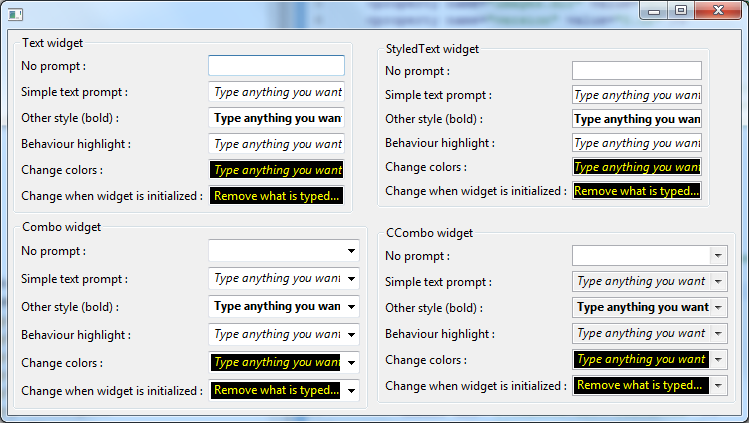
See http://designinginterfaces.com/Input_Prompt for a description of the Input Prompt pattern or http://msdn2.microsoft.com/en-us/library/aa511494.aspx#prompts for guidelines of how to use prompts in Windows Vista.
This work is inpired by the project XSwingX (http://code.google.com/p/xswingx/) by Peter Weishapl.
Just invoke
PromptSupport.setPrompt("Prompt Text", control);
Where control is an instance of a Text, a StyledText, a Combo or a CCombo widget.
By default, the prompt text will be hidden, when the text component is focused:
This behavior can be customized with the PromptSupport.setFocusBehavior() method. The prompt text can be hidden or highlighted when the widget gets the focus (and no text is entered), as indicated in the screenshots below.
| FocusBehavior.HIDE_PROMPT | FocusBehavior.HIGHLIGHT_PROMPT |
|---|---|
 |
 |
The font of the prompt text by default is the same as the text component's font, but sometimes you want the prompt text to be different. You can make the prompt text plain, bold, italic, or both bold and italic with the PromptSupport.setFontStyle() method.
|SWT.NONE|SWT.ITALIC|SWT.BOLD|SWT.BOLD|SWT.ITALIC|
|:-----------|:-------------|:-----------|:----------------------|
|


By default, the color used for the prompt text is the text component's disabled text color, but yout can change this with the PromptSupport.setForeground() method. PromptSupport.setForeground(Color.RED) gives you:

You can also set a background color for the promp by calling PromptSupport.setBackground().
An example called PromptSupportSnippet.java is located in the directory src/test/java/org/mihalis/opal/promptSupport.
This example is also available here : https://github.com/lcaron/opal/blob/master/src/test/java/org/mihalis/opal/promptSupport/PromptSupportSnippet.java