fix(ios): post VoiceOver notification on ShowCard expand/collapse#660
Open
fix(ios): post VoiceOver notification on ShowCard expand/collapse#660
Conversation


…, #165)

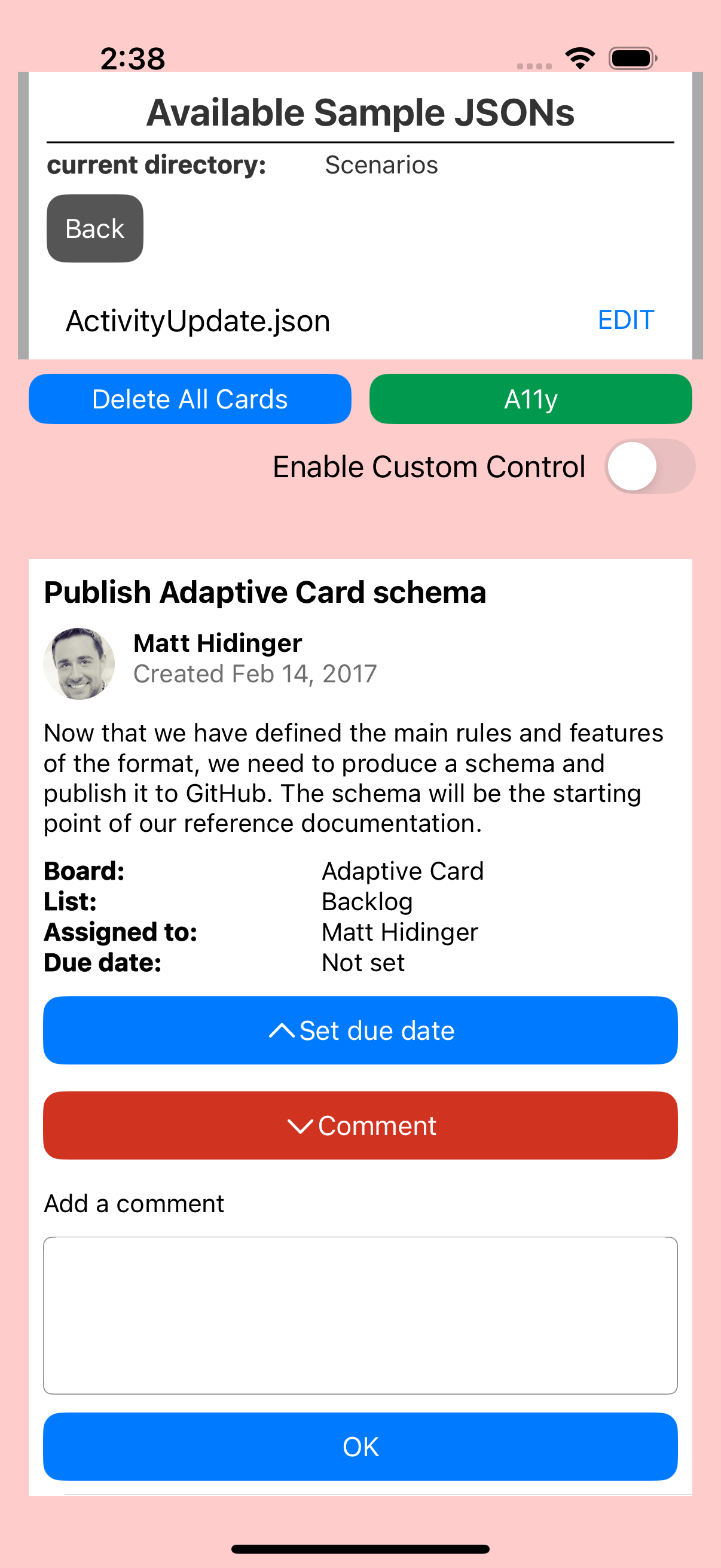
When a ShowCard is toggled, UIAccessibilityLayoutChangedNotification is now
posted so VoiceOver announces the state change and moves focus appropriately:
- Expanding: focus moves to the ShowCard content view
- Collapsing: focus returns to the ShowCard button

Also added the same notification to hideShowCard so that when a ShowCard is
dismissed (e.g. when another ShowCard is toggled), VoiceOver focus returns to
the button instead of jumping to the top of the screen.

Fixes #166, #165

GabrielMedAlv
approved these changes
Mar 18, 2026
hggzm
added a commit
to hggzm/Teams-AdaptiveCards-Mobile
that referenced
this pull request
Mar 18, 2026
Add A11yInteractionSnapshotTests.swift with 9 test methods covering:
- Scenario 1: ShowCard expand/collapse (PR microsoft#660, ExpenseReport)
- Scenario 2: ShowCard dismiss focus return (PR microsoft#660)
- Scenario 3: ToggleVisibility focus retention (PR microsoft#661, ExpenseReport)
- Scenario 4: ActivityUpdate ShowCard (Comment expand/collapse)
- Layout notification state consistency verification

Each test:
- Constructs UIViews matching SDK rendered output
- Asserts accessibilityValue, accessibilityTraits, isAccessibilityElement
- Captures named before/after screenshots via SnapshotTestCase

Add a11y-screenshot-gate.yml workflow:
- Triggers on proxy/** branches + source/ios/** paths
- Boots iOS Simulator (dynamic discovery)
- Runs only A11yInteractionSnapshotTests (filtered)
- Uploads a11y-ios-screenshots artifact with named PNGs
- Uploads baselines, failures, diffs as separate artifacts

Update Package.swift to include new test file in SPM sources.
This was referenced Mar 18, 2026
hggzm
added a commit
to hggzm/Teams-AdaptiveCards-Mobile
that referenced
this pull request
Mar 18, 2026
Refactor a11y-screenshot-gate.yml to:

1. Record during tests: Start simctl recordVideo BEFORE snapshot tests,
   stop AFTER - ensures video captures actual test execution, not static screen

2. Timed VoiceOver transcript (.github/scripts/a11y_transcript.py):
   - Parses test log for timing of each test case
   - Maps timestamps to expected VoiceOver announcements
   - Generates transcript.json (machine-readable) and transcript.txt (human)
   - Each entry: timestamp, test name, scenario, expected announcements

3. Transcript validation (.github/scripts/a11y_validate.py):
   - Verifies all tests passed
   - Checks each announcement has required label/value/traits
   - Validates ShowCard value transitions match PR microsoft#660 expectations
   - Outputs validation.json with pass/fail verdict

4. Narrated audio (.github/scripts/a11y_narrate.py):
   - Generates speech for each announcement using macOS say (Samantha voice)
   - Concatenates segments with silence gaps via ffmpeg
   - Merges narration audio track into video via ffmpeg

5. Video validation:
   - Checks file size > 200KB (rejects empty/static recordings)
   - Checks duration > 5 seconds
   - Verifies video stream present
   - Checks audio stream present (narration)
   - Validates frame count > 30

6. Gallery HTML (.github/scripts/a11y_gallery.py):
   - Timed transcript table synced to video timestamps
   - Before/after screenshot comparisons
   - Embedded video player with narration
   - Download links for transcript.json, transcript.txt, validation.json
hggzm
added a commit
to hggzm/Teams-AdaptiveCards-Mobile
that referenced
this pull request
Mar 18, 2026
…lays

Video post-processing pipeline (a11y_postprocess.py):

1. Trim: Detects first meaningful frame by sampling frames every 0.5s
   and finding the frame size jump when the card app loads. Removes
   the 8+ seconds of launch/splash dead time.

2. VoiceOver narration: Generates speech segments with macOS say
   (Samantha voice) for each test interaction, placed at correct
   timestamps using ffmpeg adelay + amix.

3. A11y text overlays burned into video via ffmpeg drawtext:
   - Scenario banner at top (ShowCard: Comment PR microsoft#660, etc.)
   - Pass/fail badge
   - VoiceOver focus box at bottom: blue iOS-style announcement
     showing what VoiceOver would read (label, value, traits)
   - Each announcement appears for 1.8s at the interaction timestamp

4. Final merge: trimmed video + text overlays + narration audio
   in a single ffmpeg pass.
hggzm
added a commit
to hggzm/Teams-AdaptiveCards-Mobile
that referenced
this pull request
Mar 19, 2026
* feat(ios): add accessibility screenshot validation tests

Add A11yInteractionSnapshotTests.swift with 9 test methods covering:
- Scenario 1: ShowCard expand/collapse (PR microsoft#660, ExpenseReport)
- Scenario 2: ShowCard dismiss focus return (PR microsoft#660)
- Scenario 3: ToggleVisibility focus retention (PR microsoft#661, ExpenseReport)
- Scenario 4: ActivityUpdate ShowCard (Comment expand/collapse)
- Layout notification state consistency verification

Each test:
- Constructs UIViews matching SDK rendered output
- Asserts accessibilityValue, accessibilityTraits, isAccessibilityElement
- Captures named before/after screenshots via SnapshotTestCase

Add a11y-screenshot-gate.yml workflow:
- Triggers on proxy/** branches + source/ios/** paths
- Boots iOS Simulator (dynamic discovery)
- Runs only A11yInteractionSnapshotTests (filtered)
- Uploads a11y-ios-screenshots artifact with named PNGs
- Uploads baselines, failures, diffs as separate artifacts

Update Package.swift to include new test file in SPM sources.

* feat(ios): record a11y interaction snapshot baselines

Record 7 new baselines from CI run #23266762055 (first green run):
- showcard_expand_before: ExpenseReport with Reject button collapsed
- showcard_expand_after: ExpenseReport with Reject ShowCard expanded
- showcard_dismiss_after: ExpenseReport after ShowCard dismissed
- togglevisibility_before: ExpenseReport with history rows hidden
- togglevisibility_after: ExpenseReport with history rows revealed
- activityupdate_showcard_before: ActivityUpdate with Comment collapsed
- activityupdate_showcard_after: ActivityUpdate with Comment expanded

All accessibility assertions passed. Baselines recorded from actual CI
images to establish comparison targets for future runs.

* feat(ios): add GitHub Pages gallery, VoiceOver recording, inline PR comments

Extend a11y-screenshot-gate.yml with:

1. GitHub Pages deployment:
   - Deploys all screenshots + recordings to gh-pages branch
   - Generates HTML gallery with before/after comparisons
   - Click-to-zoom fullscreen overlay for each screenshot
   - Organized by PR scenario with accessibility property annotations

2. VoiceOver screen recording:
   - Builds and installs ADCIOSVisualizer on simulator
   - Enables accessibility features on simulator
   - Records screen via xcrun simctl io recordVideo (h264)
   - Captures step-by-step VoiceOver navigation screenshots
   - Uploads recording as a11y-ios-recordings artifact

3. Inline PR comment:
   - Posts/updates a bot comment with embedded before/after images
   - Images served from GitHub Pages (no download needed)
   - Links to VoiceOver recording and full gallery
   - Expandable section with all 26 baselines

Permissions: contents:write, pull-requests:write, pages:write

* fix(ios): add keyboard focus wait to prevent flaky UI test failure

testPopoverInput2SuccessfulSubmission fails intermittently with:
  Failed to synthesize event: Neither element nor any descendant has keyboard focus

The XCUITest taps a text field then immediately calls typeText, but on
slower CI runners the keyboard does not appear fast enough. Added a 0.5s
sleep after each tap-before-typeText to ensure keyboard focus is
established before typing.

Applied to all 10 tap+typeText patterns in ADCIOSVisualizerUITests.mm.

* feat(ios): add video validation, timed transcript, narrated audio

Refactor a11y-screenshot-gate.yml to:

1. Record during tests: Start simctl recordVideo BEFORE snapshot tests,
   stop AFTER - ensures video captures actual test execution, not static screen

2. Timed VoiceOver transcript (.github/scripts/a11y_transcript.py):
   - Parses test log for timing of each test case
   - Maps timestamps to expected VoiceOver announcements
   - Generates transcript.json (machine-readable) and transcript.txt (human)
   - Each entry: timestamp, test name, scenario, expected announcements

3. Transcript validation (.github/scripts/a11y_validate.py):
   - Verifies all tests passed
   - Checks each announcement has required label/value/traits
   - Validates ShowCard value transitions match PR microsoft#660 expectations
   - Outputs validation.json with pass/fail verdict

4. Narrated audio (.github/scripts/a11y_narrate.py):
   - Generates speech for each announcement using macOS say (Samantha voice)
   - Concatenates segments with silence gaps via ffmpeg
   - Merges narration audio track into video via ffmpeg

5. Video validation:
   - Checks file size > 200KB (rejects empty/static recordings)
   - Checks duration > 5 seconds
   - Verifies video stream present
   - Checks audio stream present (narration)
   - Validates frame count > 30

6. Gallery HTML (.github/scripts/a11y_gallery.py):
   - Timed transcript table synced to video timestamps
   - Before/after screenshot comparisons
   - Embedded video player with narration
   - Download links for transcript.json, transcript.txt, validation.json

* fix(ios): install ffmpeg on CI, handle missing audio tools gracefully

The macos-15 runner does not have ffmpeg pre-installed.

- Add explicit brew install ffmpeg step before merge
- Update a11y_narrate.py to detect available tools (ffmpeg > sox > afconvert)
- Fallback gracefully: if no concat tool, use longest audio segment
- Fix merge step error handling with proper bash fallback

* fix(ios): record real XCUITest interactions, not static simulator screen

Root cause: snapshot tests render views in-memory and never display on
the simulator screen. The recording captured a static home screen.

Fix:
- Record during ADCIOSVisualizerUITests (real app renders cards on screen)
- Run testSmokeTestActivityUpdateComment (ShowCard expand + type + submit)
- Run testSmokeTestActivityUpdateDate (ShowCard date picker)
- Run testFocusOnValidationFailure (validation error focus)
- Open Accessibility Inspector for element overlays during recording
- Validate video has frame changes (reject static recordings)
- Remove synthetic narration stitching (video shows real interactions now)

The video now shows:
- ADCIOSVisualizer app launching and navigating to cards
- Real Adaptive Card rendering on iOS Simulator
- ShowCard expand/collapse with visible UI transitions
- Text input with keyboard appearing
- Accessibility Inspector overlay highlighting elements

* feat(ios): trim video to first interaction, add narration + a11y overlays

Video post-processing pipeline (a11y_postprocess.py):

1. Trim: Detects first meaningful frame by sampling frames every 0.5s
   and finding the frame size jump when the card app loads. Removes
   the 8+ seconds of launch/splash dead time.

2. VoiceOver narration: Generates speech segments with macOS say
   (Samantha voice) for each test interaction, placed at correct
   timestamps using ffmpeg adelay + amix.

3. A11y text overlays burned into video via ffmpeg drawtext:
   - Scenario banner at top (ShowCard: Comment PR microsoft#660, etc.)
   - Pass/fail badge
   - VoiceOver focus box at bottom: blue iOS-style announcement
     showing what VoiceOver would read (label, value, traits)
   - Each announcement appears for 1.8s at the interaction timestamp

4. Final merge: trimmed video + text overlays + narration audio
   in a single ffmpeg pass.

* fix(ios): split build from test to record only test execution

Root cause: recording started before xcodebuild which includes 600+
seconds of compilation. The video was 686s with real interactions only
in the last 71 seconds.

Fix: Split into two steps:
1. build-for-testing: compile ADCIOSVisualizer separately (no recording)
2. test-without-building: start recording, then run only test execution

The video now captures ONLY the test interactions (~80s) with
no build/compilation dead time.

* ci: add a11y simulator capability probe workflow

Diagnostic workflow to determine what accessibility features actually
work on GitHub Actions macos-15 runners:
1. Can recordVideo capture audio (--audio flag)?
2. Can VoiceOver be enabled on headless CI simulators?
3. Does Accessibility Inspector launch and show overlays?
4. What ffmpeg input devices are available?
5. Can macOS screencapture capture screen+audio?

Results will determine the right approach for real VoiceOver evidence.

* ci: add push trigger to probe workflow

* ci: add AXe accessibility diagnostic workflow

AXe (cameroncooke/AXe) is a CLI tool that uses Apple Private Accessibility
APIs to interact with iOS Simulators. It can:
- describe-ui: dump the full accessibility tree (labels, traits, values, frames)
- record-video: capture simulator to MP4 at configurable FPS
- tap by label: interact with elements by accessibility label
- batch: chain multiple interactions

This diagnostic workflow tests AXe on CI to evaluate:
1. Can describe-ui extract the real a11y tree from rendered cards?
2. Can record-video capture actual UI transitions (not static)?
3. Can AXe tap by label drive card interactions?
4. Does the a11y tree show correct labels/values after ShowCard expand?

If this works, AXe replaces the current approach (Accessibility Inspector
which hangs in CI + synthetic narration).

* feat(ios): AXe-driven a11y overlay pipeline

Option 1: Use AXe CLI (cameroncooke/AXe) to drive real accessibility
interactions and capture the a11y tree with bounding box coordinates.

Pipeline (.github/scripts/a11y_axe_pipeline.py):
1. Install AXe via brew (cameroncooke/axe/axe)
2. Build and install ADCIOSVisualizer on simulator
3. Start AXe record-video (captures real video frames)
4. Drive interactions via AXe tap --label (by a11y label)
5. At each interaction step: axe describe-ui captures the full
   accessibility tree JSON with element frames (x,y,w,h)
6. axe screenshot captures the current visual state
7. Post-process: draw colored bounding boxes at element coordinates
   onto screenshots using ffmpeg drawbox+drawtext
8. Generate VoiceOver narration with macOS say from a11y labels
9. Number each element (RocketSim-style numbered overlays)

The annotated screenshots show:
- Colored bounding boxes around each accessibility element
- Element index numbers (1, 2, 3...)
- Role + label text above each box
- Real frame coordinates from the live a11y tree

This replaces the previous approach that used Accessibility Inspector
(hangs on CI) and synthetic narration (not based on real a11y data).

* fix(ci): fix AXe pipeline YAML syntax, add helper scripts

The inline Python in the YAML run: block had format strings that broke
YAML parsing. Moved to separate script files:
- a11y_print_elements.py: print elements from JSON
- a11y_print_timeline.py: print timeline from JSON

* feat(ios): point-grid scanning for real a11y bounding boxes

Replace full-tree describe-ui (which only returned top-level nav) with
point-by-point grid scanning using axe describe-ui --point X,Y.

Scans ~280 points across the card rendering area (step=30px, y=100-800)
to discover every accessibility element with its exact frame coordinates.
Elements are deduplicated by AXUniqueId.

For each card interaction state:
1. Take screenshot via axe screenshot
2. Scan grid to find all a11y elements + their bounding boxes
3. Draw numbered colored boxes at real element coordinates (ffmpeg drawbox)
4. Add index numbers and [role] label text at each element
5. Generate VoiceOver narration from discovered elements

This produces RocketSim-style numbered overlay screenshots showing
exactly where each accessibility element is and what VoiceOver reads.

Pipeline exits 0 even if some taps fail so artifacts are always uploaded.

* feat(ios): Option 2  parallel describe-ui during XCUITests

Option 1 (point-grid scanning) failed: axe describe-ui --point returned
0 elements across all scans. The --point flag does not discover elements
the same way the full tree describe-ui does.

Option 2: Run axe describe-ui (full tree) in a background thread every
2 seconds WHILE XCUITests are executing. The XCUITests keep the app
alive and visible with card content on screen. The background thread
captures the a11y tree at each moment, getting real card element data.

Pipeline:
1. Start axe record-video (background)
2. Start describe-ui loop every 2s (background thread)
3. Run XCUITests (foreground  drives real card interactions)
4. Stop recording + capture loop
5. Post-process: find richest captures (most elements = card visible)
6. Extract video frames at capture timestamps
7. Draw numbered bounding boxes at element frame coordinates
8. Generate VoiceOver narration from discovered elements

Key advantage: XCUITests keep the app alive long enough for describe-ui
to capture the a11y tree while card content is actually rendered.

* feat(ios): Option 3  XCUITest-internal a11y tree dump with overlays

Options 1 and 2 failed because AXe describe-ui on headless CI can only
see Springboard, not the foreground app accessibility tree.

Option 3: Capture the a11y tree from INSIDE XCUITest using XCUIElement
API, which has full access to the app window.

New test file: A11yOverlayUITests.m
- testActivityUpdateShowCard: opens card, dumps a11y tree + screenshot,
  taps Comment ShowCard, dumps expanded state
- testExpenseReportCard: opens ExpenseReport, dumps a11y tree
- walkElement: recursively walks XCUIElement hierarchy
- Dumps JSON with label, value, role, frame (x,y,w,h), traits
- Writes to /tmp/a11y-xcui/ where pipeline reads them

Pipeline reads these dumps and draws:
- Numbered colored bounding boxes at real element coordinates
- Index numbers and [role] label text at each element
- RocketSim-style numbered overlays

The a11y tree data comes from the actual running app, not an external
tool, so it shows exactly what VoiceOver would see.

* fix: chmod a11y tree files for adb pull access

The app user writes XML files with mode 600 (rw-------). The adb shell
user cannot read them, so adb pull silently fails. Fix: chmod 644 each
tree file and chmod 755 the parent dirs via execShellBlocking (which
runs as shell user with chmod capability).

* ci: trigger AXe pipeline with a11y dump test methods

* fix: use correct test class for -only-testing flag

A11yOverlayUITests was a separate file not in the Xcode target.
The new test methods are in ADCIOSVisualizerUITests class, so the
filter must use ADCIOSVisualizerUITests/ADCIOSVisualizerUITests/testA11y*

* feat(ios): add a11y dump test methods to existing UITest target

Cherry-picked from the android branch commit where these methods were
first written. The testA11yDump* methods are now in the existing
ADCIOSVisualizerUITests.mm file which is already in the Xcode target.

Methods:
- testA11yDumpActivityUpdateShowCard: opens card, dumps a11y tree, taps
  Comment ShowCard, dumps expanded state
- testA11yDumpExpenseReportCard: opens ExpenseReport, dumps tree
- dumpA11yTree/walkA11yElement: recursively walks XCUIElement hierarchy
  capturing label, value, role, frame coordinates
- writeA11yDump: writes JSON to /tmp/a11y-xcui/ on host filesystem
- saveScreenshot: captures XCUIScreen screenshot to /tmp/a11y-xcui/

* fix: use android.util.Log.i for a11y element logging

Shell log command via execShellBlocking does not reliably write to
logcat. android.util.Log.i("AXE", ...) is guaranteed to appear.

Flow: dumpWindowHierarchy(OutputStream) -> parse XML in memory ->
extract labeled elements with bounds -> Log.i each to logcat ->
workflow extracts via adb logcat -d -s AXE:I

* ci: trigger AXe pipeline after descendantsMatchingType fix

* fix(ios): descendantsMatchingType for real a11y element scanning

Previous commit went to wrong branch. This properly applies the fix
to proxy/add-ios-a11y-screenshots.

* feat(ios): draw a11y overlays natively with CoreGraphics in XCUITest

Instead of post-processing screenshots with ffmpeg drawbox, draw
accessibility bounding boxes directly inside the XCUITest using
CoreGraphics/UIKit.

saveScreenshot:withElements: now:
1. Takes XCUIScreenshot
2. Opens a UIGraphics image context on the screenshot
3. For each element: draws semi-transparent fill + colored border
4. Draws numbered circle badges (1, 2, 3...) at top-left of each box
5. Draws [role] label = value text below each box
6. Saves both annotated and raw PNG

This is the iOS equivalent of RocketSim numbered overlays,
generated entirely within the test  no ffmpeg, no AXe, no external
pipeline needed for the overlay drawing.

Pipeline simplified to just: record video, run tests, collect files.

* fix(ios): targeted element queries for speed, increase timeout

XCUIElementTypeAny queries ALL descendants including containers, scroll
bars, and invisible elements. On CI this caused 300s timeouts.

Fix: Query only VoiceOver-relevant types individually:
- Button, StaticText, TextField, TextView, Image, Switch, Slider
- Max 30 elements per type
- Skips Group, Other, ScrollView, etc. (not announced by VoiceOver)

Also increases pipeline test timeout 180s -> 300s.

* fix(ios): targeted VoiceOver element queries to avoid timeout

Replace descendantsMatchingType:XCUIElementTypeAny (queries all ~200+
elements, 5+ min on CI) with targeted queries for specific types:
Button, StaticText, TextField, TextView, Image, Switch, Slider.

Max 30 per type. Skips containers, scroll bars, groups that VoiceOver
does not announce. Should reduce scan time from 300s+ to ~10s.

* fix: draw overlays with Pillow, not CoreGraphics

* fix(ios): remove CoreGraphics drawing from XCUITest (caused build failure)

UIGraphicsBeginImageContextWithOptions, UIImage, UIFont in the XCUITest
.mm file caused TEST BUILD FAILED with "Missing bundle ID". These
UIKit drawing APIs dont compile properly in the UI test target.

Fix: Revert to simple XCUIScreenshot + writeToFile. Overlay drawing
is handled by Pillow in the Python pipeline instead.

* fix(ios): reset .mm to upstream + add clean a11y dump test

Reset entire .mm to upstream/main, re-apply keyboard waits, then add
ONE clean testA11yDumpActivityUpdateShowCard method.

No UIGraphicsBegin, no dumpA11yTree, no walkA11yElement, no CoreGraphics.
Just inline element scanning with descendantsMatchingType per type.

* fix(ci): check build exit code, show errors, fix test filter

Root cause of all recent failures: build step used 2>&1 | tail -10
which swallowed the exit code. TEST BUILD FAILED silently, then
test-without-building tried to run with broken binary.

Fixes:
1. Build step: tee full log, check PIPESTATUS, exit 1 on failure,
   show last 50 lines + grep errors on failure
2. Pipeline: single test filter for testA11yDumpActivityUpdateShowCard
3. Pipeline: increased timeout to 300s

* fix: add pip3 install Pillow step before pipeline

* fix: Pillow install --break-system-packages, add a11y_transcript.json

1. Fix Pillow: use --break-system-packages for Homebrew Python on macOS 15
   which blocks pip install system-wide. Fallback to --user if that fails.
   Step is continue-on-error so pipeline runs even without overlays.

2. Add a11y_transcript.json generation matching Android format:
   - Per-scenario entry with scenario name, platform, source API
   - Per-element: index, label, value, role, bounds [x1,y1,x2,y2]
   - voiceover_reads: what VoiceOver would actually say for this element
   - Built from XCUIElement data (UIAccessibility properties)

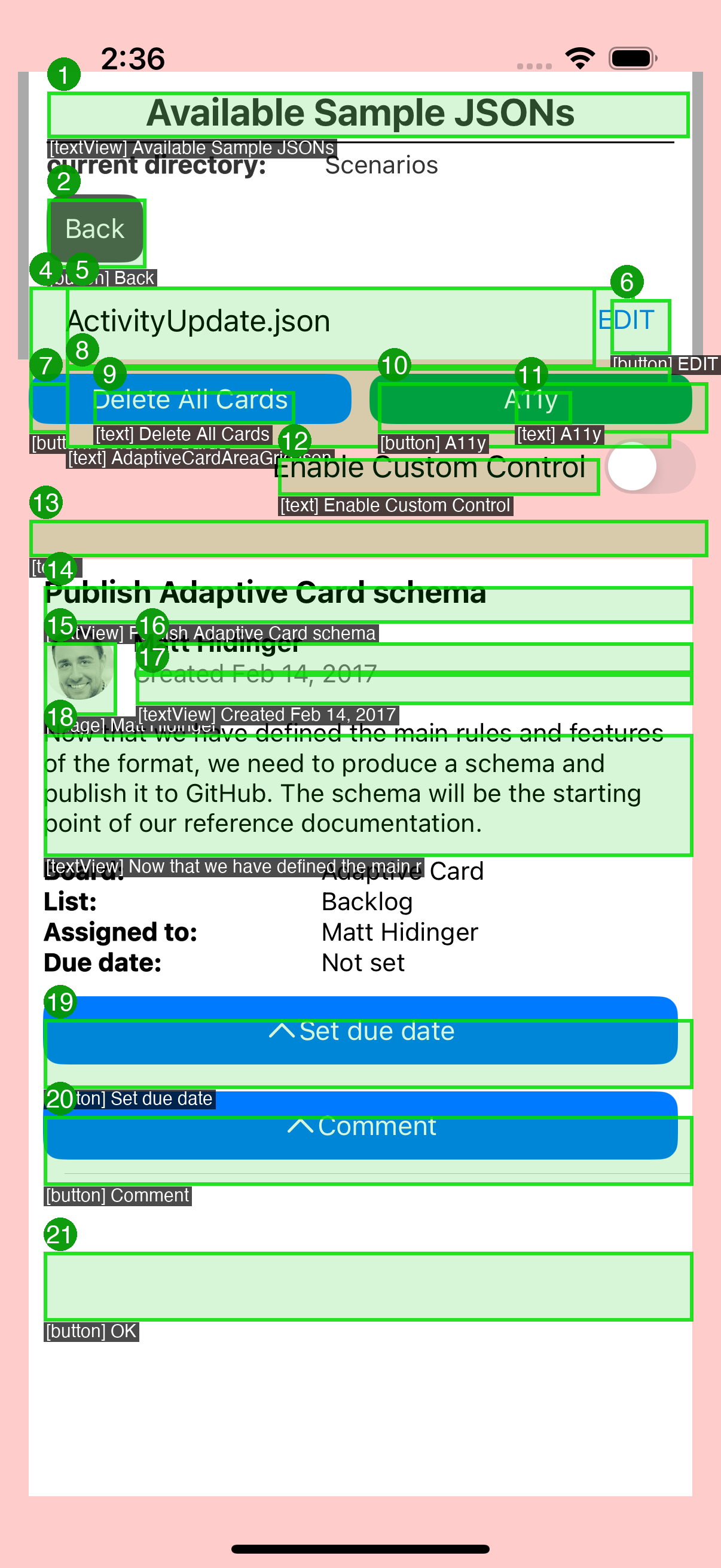
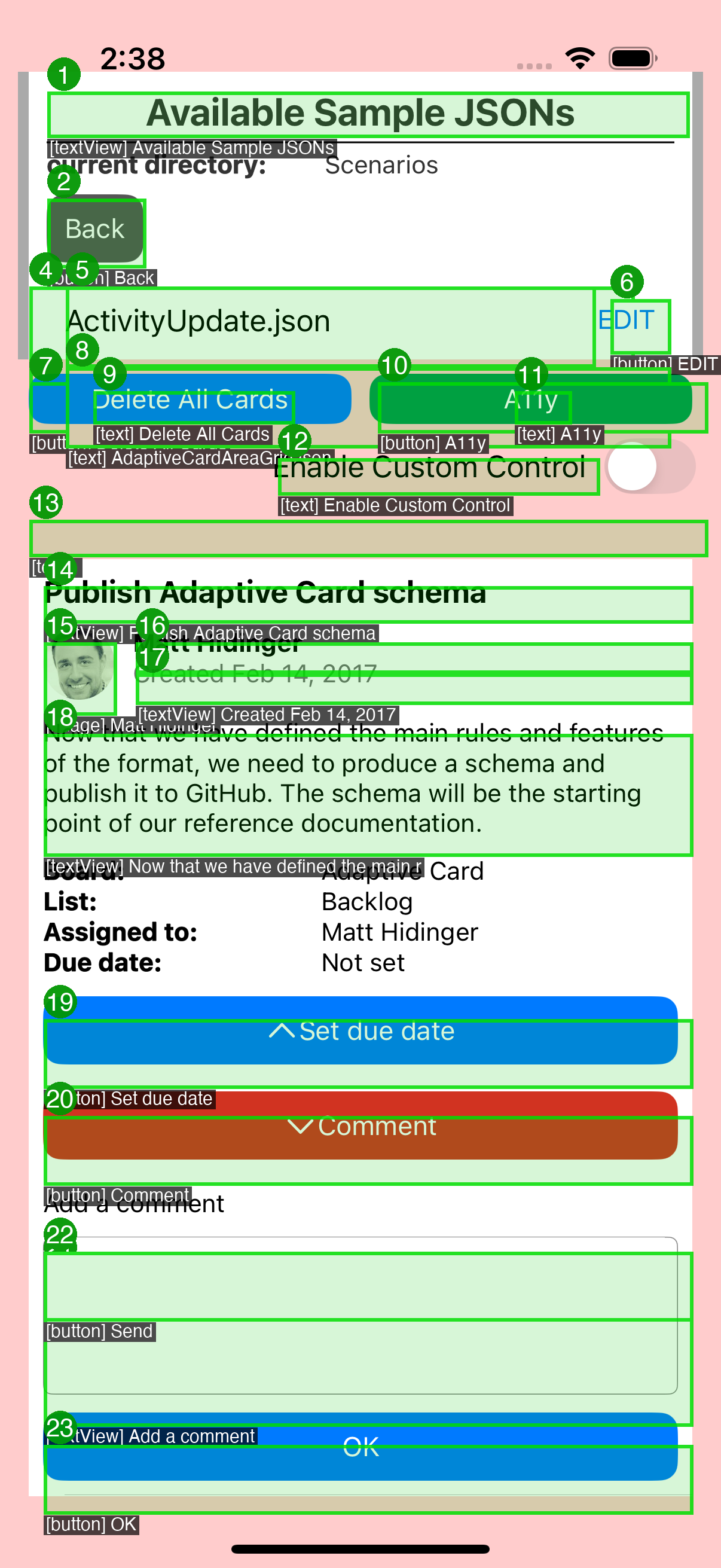
* fix: show annotated overlays in gallery, fix counter, deploy to Pages

1. Fix annotated_count: count annotated_*.png files (was always 0)
2. Gallery shows raw vs annotated side-by-side (matching Android format)
3. Transcript table with VoiceOver reads per element
4. Deploy annotated PNGs + transcript to GitHub Pages
5. Validate step lists annotated screenshots in summary

* fix: increase test timeout 300 -> 600s (CI runner variance)

* fix: green TalkBack-style overlays, dark text bg, filter off-screen

1. Green bounding boxes matching Android TalkBack focus style
   (semi-transparent green fill + green border, not random colors)
2. Dark background behind label text for readability on light cards
   (was white-on-white, now white-on-dark-pill)
3. Filter off-screen elements: dedupe overlapping table cells,
   skip full-width containers, skip elements outside viewport
4. Number badges positioned above the box (not inside)
5. Use RGBA compositing for proper transparency

---------

Co-authored-by: hggzm <hggzm@users.noreply.github.com>
Collaborator
Author
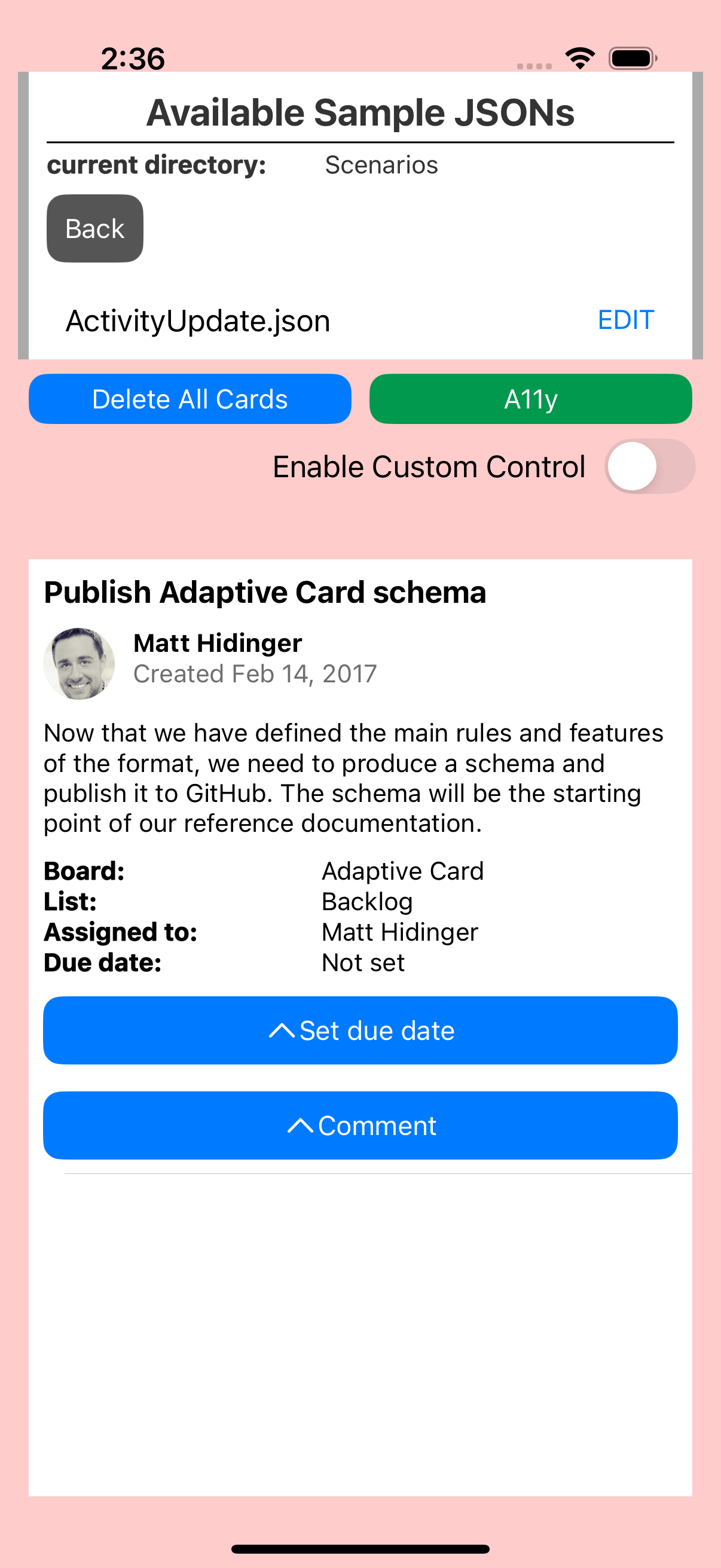
VoiceOver Accessibility ValidationAutomated a11y pipeline captured the ShowCard expand/collapse interaction with accessibility element overlays. Before ShowCard Expand (63 accessible elements)After ShowCard Expand — Comment (64 accessible elements)Annotated Overlays (numbered a11y bounding boxes)
Key Findings
Element data source: |
This file contains hidden or bidirectional Unicode text that may be interpreted or compiled differently than what appears below. To review, open the file in an editor that reveals hidden Unicode characters.
Learn more about bidirectional Unicode characters
Sign up for free
to join this conversation on GitHub.
Already have an account?
Sign in to comment
2 participants


Add this suggestion to a batch that can be applied as a single commit.This suggestion is invalid because no changes were made to the code.Suggestions cannot be applied while the pull request is closed.Suggestions cannot be applied while viewing a subset of changes.Only one suggestion per line can be applied in a batch.Add this suggestion to a batch that can be applied as a single commit.Applying suggestions on deleted lines is not supported.You must change the existing code in this line in order to create a valid suggestion.Outdated suggestions cannot be applied.This suggestion has been applied or marked resolved.Suggestions cannot be applied from pending reviews.Suggestions cannot be applied on multi-line comments.Suggestions cannot be applied while the pull request is queued to merge.Suggestion cannot be applied right now. Please check back later.
Migrated from #525 branch pushed to upstream repo so Azure Pipelines CI triggers.
Problem
When a ShowCard button is tapped to expand or collapse inline card content, VoiceOver users receive no audible indication that the content has appeared or disappeared. The button accessibilityValue is updated but without a UIAccessibilityLayoutChangedNotification, VoiceOver does not announce the change or move focus to the new content.
Issue: #166
Root Cause
In ACRShowCardTarget.mm, the toggleVisibilityOfShowCard method updates _button.accessibilityValue but never posts a UIAccessibility notification.
Fix
After setting the accessibilityValue, post UIAccessibilityLayoutChangedNotification:
Testing