The official PHP PDO extension for Mimer SQL
- PHP 8.1+
- Mimer SQL v11.0+
apt install php-devor equivalent
- PHP
- Installation on Unix Systems
- PHP for Windows
- Manual PHP Installation on Windows
- Building for Windows
- PDO
- pickle
Using pickle
php pickle.phar install --source https://github.com/mimersql/pdo_mimerCheck out the releases to download library files for Windows (64-bit only). Releases include files for both NTS and TS versions for PHP versions 8.1+.
git clone https://github.com/mimersql/pdo_mimer && cd pdo_mimer
phpize
./configure
make
make installInstall Visual Studio 2019. Use the image below as a reference.
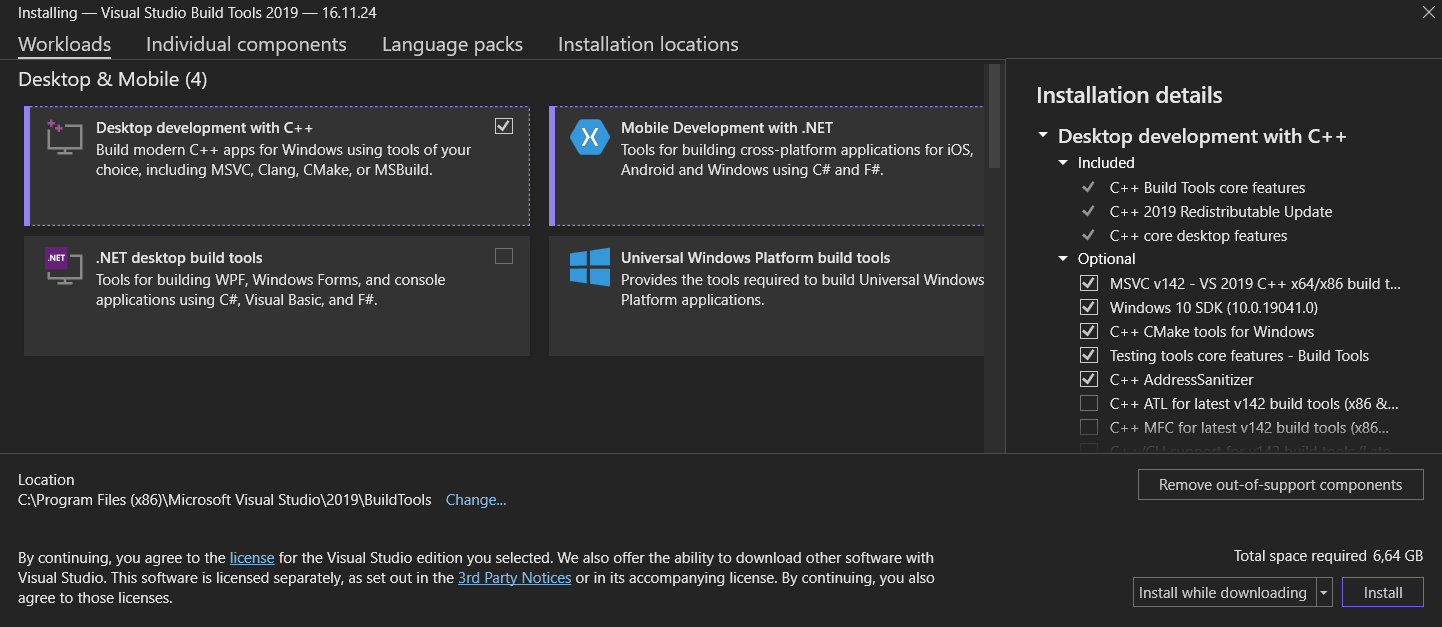
Unpack the PHP SDK development pack. This guide will use C:\php-8.2.3-devel-vs16-x64, replace this with the path to the directory of the unpacked files.
The PHP SDK binary tools enable us to build the PDO Mimer extension.
git clone https://github.com/php/php-sdk-binary-tools C:\php-sdk-binary-tools && cd C:\php-sdk-binary-tools
git checkout php-sdk-2.2.0 -b php-sdk-2.2.0
.\phpsdk-vs16-x64.bat
phpsdk_buildtree pdo_mimer
git clone https://github.com/mimersql/pdo_mimer && cd pdo_mimer
C:\php-8.2.3-devel-vs16-x64\phpize.bat
configure --with-pdo-mimer
nmake
nmake install
⚠️ Note
- The developers of the PHP SDK Binary Tools recommend having the
php-sdk-binary-toolsdirectory as close toC:\as possible, with no spaces in the path name.- This method only seems to work with non-thread-safe versions of PHP. For thread-safe versions, one must build PDO Mimer with the PHP source code simulataneously.
- Use
--with-prefixand the path to a PHP installation to install thepdo_mimerlibrary directly to the extensions directory.If you get any errors indicating
mimapi64.libormimerapi.hnot found, add the following options while configuring:
--with-extra-libsand the path to a Mimer SQL installation lib directory (eg.C:\Program Files\Mimer SQL Experience 11.0\dev\lib\amd64)--with-extra-includesand the path to a Mimer SQL installation include directory (eg.C:\Program Files\Mimer SQL Experience 11.0\dev\include)
Ensure the pdo_mimer shared library is installed in the extensions folder, /path/to/php/ext. The library file is named differently depending on the platform:
| OS | Filename |
|---|---|
| Windows | php_pdo_mimer.dll |
| Linux | pdo_mimer.so |
| MacOS | pdo_mimer.dylib |
Enabling the extension can be done in different ways:
- add
extension=pdo_mimerto yourphp.iniconfig - use
php -dextension=pdo_mimer
$ php -m | grep mimer
pdo_mimer$ php -a
Interactive shell
php > $db = new PDO('mimer:dbname=db', 'user', 'pass');
php > var_dump($db->query('SELECT * FROM SYSTEM.ONEROW')->fetchAll());
array(1) {
[0]=>
array(2) {
["M"]=>
string(1) "M"
[0]=>
string(1) "M"
}
}
php > void PDOStatement::mimerAddBatch();- Used on a prepared statement
- When using placeholders, all parameters must be bound with values before calling
mimerAddBatch - Should not be used after the last
bindValue()orbindParam(), see example below
$users = [
    [1, 'John Smith'],
    [2, 'Jane Doe'],
];

$stmt = $db->prepare('INSERT INTO customers (id, name) VALUES (?, ?)');

foreach ($users as $i => [$id, $name]) {
    $stmt->bindValue(1, $id, PDO::PARAM_INT);
    $stmt->bindValue(2, $name, PDO::PARAM_STR);

    if ($i != array_key_last($users)) // do not execute if on last item
        $stmt->mimerAddBatch();
}

$stmt->execute();
⚠️ Note:Running
$stmt->mimerAddBatch();on the last item will throw an exception:
-24103 Incomplete set of input parameters when executing a statement or opening a cursor