


A curated collection of simple, standalone HTML + CSS + JavaScript projects you can download, customize, and remix.
Everything here is designed to be copy‑paste friendly, with minimal dependencies.
Option A — Download everything
- Click “Code” → “Download ZIP” on the GitHub repo.
- Unzip and open any
index.htmlfile in your browser. - Tweak the HTML/CSS/JS to fit your needs.
Option B — Grab one project
- Navigate to the folder you want in this repository.
- Download only the files in that folder (right‑click → Save link as).
- Open the HTML in your browser and edit.
Option C — GitHub Pages (recommended)
- Fork this repo (or use it as a template).
- Push to your GitHub account.
- In your repo: Settings → Pages → Source:
main→/root. - Your projects will be live at
https://<your-username>.github.io/<repo>/...
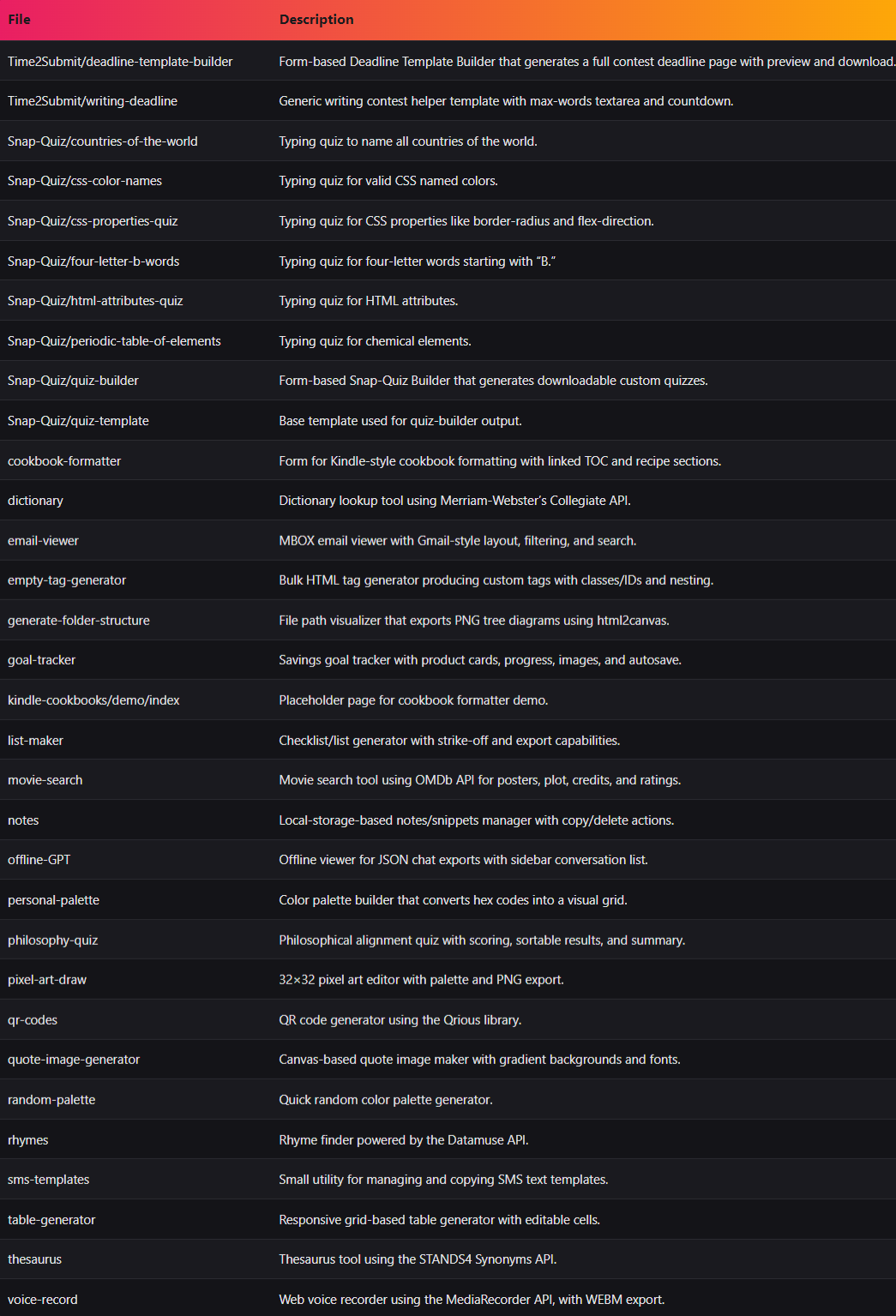
Below is an auto‑generated index from the current files. If a project is missing a description, you can improve it by adding a <meta name="description"> tag or an <h1> with a meaningful summary in its HTML.
- Change colors & fonts: tweak values in the
:rootCSS custom properties or the.cssfile in the same folder. - Swap copy/content: edit text inside the HTML. Keep the structure, replace the words.
- Add images: place your images in the same folder and reference them with a relative path (e.g.
./hero.png). - Disable features: comment‑out or remove event listeners in the JS files.
- Mobile tweaks: use CSS media queries (e.g.
@media (max-width: 640px)). - Accessibility: ensure sufficient color contrast, add
alttext to images, and use semantic HTML elements.
project-name/
├── index.html        # the main entry point
├── styles.css        # styles (or inline in HTML)
├── script.js         # optional interactive behavior
└── assets/           # optional images, fonts, etc.
Got a fix, a feature, or a brand‑new mini‑project?
- Fork this repo and create a branch:
git checkout -b feature/your-idea - Add your project in its own folder (see layout above).
- Include a short README.md inside your folder with: purpose, features, how to use, and license note.
- Open a Pull Request describing your changes and screenshots/GIFs if relevant.
Please read the CODE_OF_CONDUCT.md and CONTRIBUTING.md before submitting.
Unless otherwise noted inside a project folder, this repository is released under the MIT License.
You can use these projects in personal or commercial work with attribution preferred but not required. See LICENSE.