This repository was archived by the owner on Jun 8, 2025. It is now read-only.
feather
Important Links to get the Feather Board with the ESP8266 running with Blynk:
- https://learn.adafruit.com/adafruit-feather-huzzah-esp8266
- http://docs.blynk.cc/#hardware-set-ups-esp8266-standalone
Make sure you use the Arduino IDE version 1.6.5!
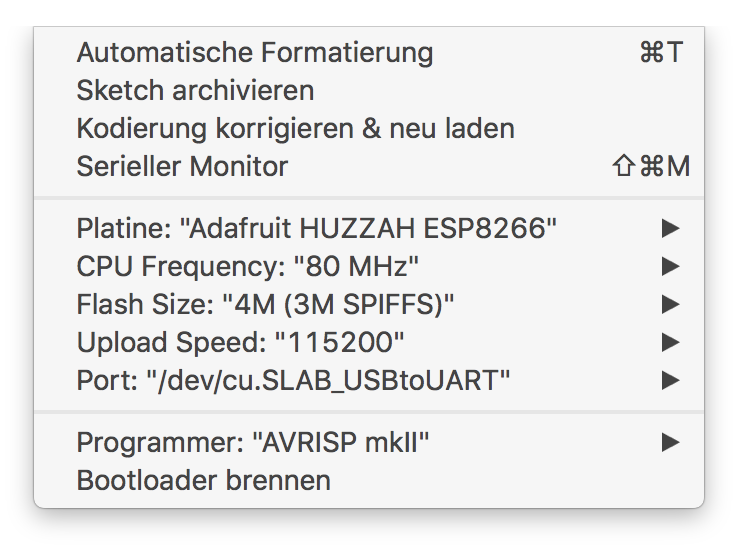
After installing the board spec for the ESP8266 select the target board as follows:
/**************************************************************
 * Blynk is a platform with iOS and Android apps to control
 * Arduino, Raspberry Pi and the likes over the Internet.
 * You can easily build graphic interfaces for all your
 * projects by simply dragging and dropping widgets.
 *
 *   Downloads, docs, tutorials: http://www.blynk.cc
 *   Blynk community:            http://community.blynk.cc
 *   Social networks:            http://www.fb.com/blynkapp
 *                               http://twitter.com/blynk_app
 *
 * Blynk library is licensed under MIT license
 * This example code is in public domain.
 *
 **************************************************************
 * This example runs directly on ESP8266 chip.
 *
 * You need to install this for ESP8266 development:
 *   https://github.com/esp8266/Arduino
 *
 * Please be sure to select the right ESP8266 module
 * in the Tools -> Board menu!
 *
 * Change WiFi ssid, pass, and Blynk auth token to run :)
 *
 **************************************************************/

//#define BLYNK_DEBUG
#define BLYNK_PRINT Serial    // Comment this out to disable prints and save space
#include <ESP8266WiFi.h>
#include <BlynkSimpleEsp8266.h>

// You should get Auth Token in the Blynk App.
// Go to the Project Settings (nut icon).
char auth[] = "<auth token from your app here>";

void setup()
{
  Serial.begin(9600);
  Blynk.begin(auth, "the wifi name", "the wifi passcode");
}

void loop()
{
  Blynk.run();
}