Kluris turns your AI agents into a subject matter expert that never sleeps and never quits.
When your best engineer sleeps, Kluris doesn't. When they leave, Kluris stays.
🎥 New here? Take the guided tour at kluris.io — install, first brain, agent workflows, multi-brain, git collaboration, and the MRI visualization, end to end.
Kluris gives every AI agent on your team shared knowledge -- architecture, decisions, conventions, learnings -- so they work like an SME who knows your entire codebase, not a generic assistant starting from scratch every time.
Knowledge is stored in a brain: a git-backed repo of structured markdown that agents read, search, and apply automatically. The human and agent curate the brain together -- the agent proposes what to document, the human reviews and approves every piece.
A brain is a pre-digested summary your agent reads instead of the raw files. Without it, the agent crawls the whole repo (and every sibling repo it needs context from) on every new chat. With a brain, it loads one compact snapshot and jumps straight to the neuron it needs.
Without kluris — illustrative cold-start on a medium repo:
tree + README + CLAUDE.md         ~3,000 tokens
grep for related symbols          ~2,000 tokens
read 4-8 relevant files           ~15,000 tokens
read 2-3 sibling-project files    ~8,000 tokens
                                  ─────────────
                                  ~28,000 tokens just to orient
With kluris — same task, brain-backed:
kluris wake-up --json snapshot    ~1,200 tokens (brain.md + lobes + recent + glossary)
kluris search "<query>" --json    ~400 tokens   (ranked hits with snippets)
read 1-2 matching neurons         ~1,500 tokens
                                  ─────────────
                                  ~3,100 tokens — ~9x less context burned on orientation
Rough estimates, not a benchmark — actual numbers depend on repo size, agent, and prompt style. The shape holds: the brain replaces a wide crawl with a targeted lookup. Savings compound the more projects you touch. Agents that would have re-read five repos' worth of source per morning read one brain snapshot instead -- same answers, a fraction of the context window, which means more room for the actual work.
- Wikis and Notion are for humans. Agents can't read them, search across them, or write back. A brain is markdown in git -- AI-native.
- CLAUDE.md is per-project and per-tool. A brain sits above all your projects and works with every AI agent on the team.
- Agent memory is agent-controlled -- the agent decides what to keep. A brain is human-curated -- you decide what goes in, review every entry, and correct anything that's wrong.
One brain serves all your projects. Every agent reads the same knowledge. Version-controlled, human-curated, shared across the entire team.
Kluris lives in two places. Knowing which is which makes everything else click.
| Surface | Prompt | Where you type it | What it is | Examples |
|---|---|---|---|---|
| Terminal | $ kluris … |
Your shell — bash, zsh, fish, PowerShell | The kluris Python CLI |
kluris create, kluris dream, kluris push, kluris mri, kluris doctor |
| AI agent | > /kluris … |
Inside your coding agent — Claude Code, Cursor, Windsurf, Codex, Copilot, Gemini CLI, Kilo, Junie | The per-brain slash-command skill Kluris keeps refreshed automatically | /kluris learn …, /kluris remember …, /kluris search …, /kluris what …, /kluris implement …, /kluris fix … |
Throughout this README:
- Code blocks labelled
```bashor tagged "In your terminal" are meant for the shell. They start with$(or>on Windows PowerShell). - Code blocks tagged "Inside your AI coding agent" are meant for Claude Code / Cursor / Windsurf / Codex / Copilot / Gemini / Kilo / Junie. They start with
/kluris.
Every command you'll see below belongs to exactly one of these two surfaces.
In your terminal — install the kluris CLI with pipx. Pick your OS:
macOS:
brew install pipx && pipx ensurepathLinux:
python3 -m pip install --user pipx && pipx ensurepathWindows:
pip install pipx && pipx ensurepathThen restart your terminal and:
pipx install klurisIn your terminal — create your first brain:
kluris doctor        # check prerequisites
kluris create        # interactive wizard -- name, type, location, git
Then, inside your AI coding agent (Claude Code, Cursor, Windsurf, …) — open any project directory and use /kluris:
> /kluris learn everything about this service
The agent analyzes your code and walks you through each finding one at a time. You see a small preview before anything is written, and you approve, edit, or skip every piece.
On the first /kluris call of a session, the agent runs kluris wake-up --json
through its shell to load a compact snapshot of the brain: the brain.md body,
lobes with neuron counts, the 5 most recently updated neurons, the full glossary,
and any deprecation warnings. That's enough context for the agent to decode
jargon and avoid citing superseded neurons without touching the filesystem
again for the rest of the session. You never call it manually. The agent
refreshes the snapshot after mutating commands (/kluris remember,
/kluris learn, kluris dream, kluris push) or direct brain-file edits.
If you want to see what the agent sees, run it yourself in your terminal:
kluris wake-up            # pretty text
kluris wake-up --json     # machine-readable
kluris wake-up --brain X # target a specific brain when more than one is registeredEach registered brain installs as its own slash command. With one brain
registered, that command is /kluris. With two or more, each brain installs
as /kluris-<name> (e.g. /kluris-acme, /kluris-personal). Every per-brain
skill is bound to exactly one brain — the agent never has to guess which one
you mean.
CLI commands prompt interactively when 2+ brains are registered:
- Fan-out commands (
dream,push,status,mri) show[1] acme [2] personal [3] all. Pick a single brain or apply to every brain. - Single-brain commands (
wake-up,neuron,lobe) show[1] acme [2] personal(noalloption).
Pass --brain NAME to skip the picker, or --brain all on fan-out commands
to act on every brain at once. Scripts and CI must always pass --brain
because non-TTY contexts disable the picker — set KLURIS_NO_PROMPT=1 to
force non-interactive mode even from a TTY (useful for wrappers like Claude
Code that inherit a terminal but cannot block on prompts).
In your terminal:
kluris clone git@github.com:team/brain.git    # fetch from a git remote and register
kluris register ~/brains/acme-sme             # register a brain that is already on disk
kluris register ~/Downloads/acme-sme.zip      # unpack a brain zip and register it
Use clone when the brain lives at a git remote. Use register when a
teammate handed you a zip, the brain is sitting in a backup folder, or the
brain is already on disk for any other reason. Directory registration is
in-place -- Kluris does not copy or move the source. Zip registration
extracts into ~/<zip-basename> by default, or --dest <path> if you want
it elsewhere.
Inside your AI coding agent (Claude Code, Cursor, Windsurf, …) — open any
project directory and use /kluris. The agent analyzes your code and walks
you through each finding. You review, edit, and approve before anything is
written.
> /kluris learn the API endpoints and data model
> /kluris learn the Docker and deployment setup
> /kluris learn everything about this service
The agent starts with a preview before writing. You can change the target lobe, edit the content, add context the code doesn't show, or skip.
Inside your AI coding agent:
> /kluris remember we chose raw SQL over JPA for query complexity
> /kluris remember all timestamps must be TIMESTAMPTZ
> /kluris remember from this session
> /kluris create a decision record about the auth architecture
> /kluris create an incident report for the January outage
/kluris remember from this session is the sweep variant — the agent
replays the current chat, pulls out everything that belongs in the brain,
and walks you through each proposed neuron one at a time (approve, edit,
or skip). Use it at the end of a pairing session instead of re-typing every
decision as its own remember.
Inside your AI coding agent:
> /kluris search auth flow
> /kluris search Docker setup
> /kluris what do we know about the auth flow?
> /kluris implement the new endpoint following our conventions
> /kluris fix the token refresh -- use brain knowledge
> /kluris use brain knowledge and codebase and let's write a spec for OAuth sign-in
> /kluris use brain knowledge and codebase and let's implement auth
The agent reads the brain first, then works on the task. If your code contradicts a documented decision, it flags the conflict. Prefixing with "use brain knowledge and codebase" tells the agent to ground the work in both surfaces — the decisions and conventions in the brain and the actual current shape of the code — before writing a spec or changing a line. It's the right posture for anything non-trivial.
Inside your AI coding agent:
> /kluris review this brain and create more synapses
> /kluris review this brain for gaps and stale neurons
The agent reads across every neuron, spots connections you never wrote
down, and proposes new synapses — one by one, with approve-all or
one-by-one flow. Handy after a learn binge or a big merge.
In your terminal:
kluris dream         # regenerate maps, fix links, validate structure
kluris branch        # show, switch, or create branches
kluris push          # commit and push to the current branch
kluris pull          # pull remote changes for the current branch
kluris status        # brain tree, neuron counts, recent changes
kluris mri # generate visualization, prints the link to open in your browserWhen a decision is superseded, mark the old neuron instead of deleting it -- the history is valuable. Add these optional frontmatter fields to the old neuron:
---
status: deprecated
deprecated_at: 2026-04-01
replaced_by: ./use-clerk.md
---
kluris dream reports four kinds of deprecation warnings (non-blocking):
active_links_to_deprecated: an active neuron'srelated:points at a deprecated one -- update the link to point at the replacement.deprecated_without_replacement: a deprecated neuron has noreplaced_by-- add one so readers have a migration path.replaced_by_missing:replaced_bypoints at a file that doesn't exist.replaced_by_not_active:replaced_bypoints at something that isn't an active neuron (another deprecated neuron, or a non-neuron file likemap.md).
Agents see a deprecation_count summary via kluris wake-up and the full
list via kluris dream --json. They flag affected topics when asked.
acme-brain/
├── kluris.yml              # Local config (gitignored -- your agents, branch)
├── brain.md                # Root lobes directory (auto-generated)
├── glossary.md             # Domain terms (hand-edited)
├── README.md               # Usage guide
├── projects/
│   ├── map.md              # Lobe index (auto-generated)
│   └── btb-core/
│       ├── map.md
│       ├── data-model.md   # <- neuron
│       └── auth-flow.md    # <- neuron
├── infrastructure/
│   ├── map.md
│   ├── docker-builds.md    # <- neuron
│   └── environments.md     # <- neuron
└── knowledge/
    ├── map.md
    └── use-raw-sql.md      # <- neuron (a decision record)
Folders are lobes (knowledge regions). Files are neurons (knowledge
units). Links between neurons are synapses. Auto-generated map.md files
keep everything navigable.
Run kluris mri to generate a self-contained HTML file that renders the whole
brain as an interactive map — lobes as coloured clusters, neurons as nodes,
synapses as the lines between them. Click any neuron to open its rendered
markdown and related-neuron tabs.
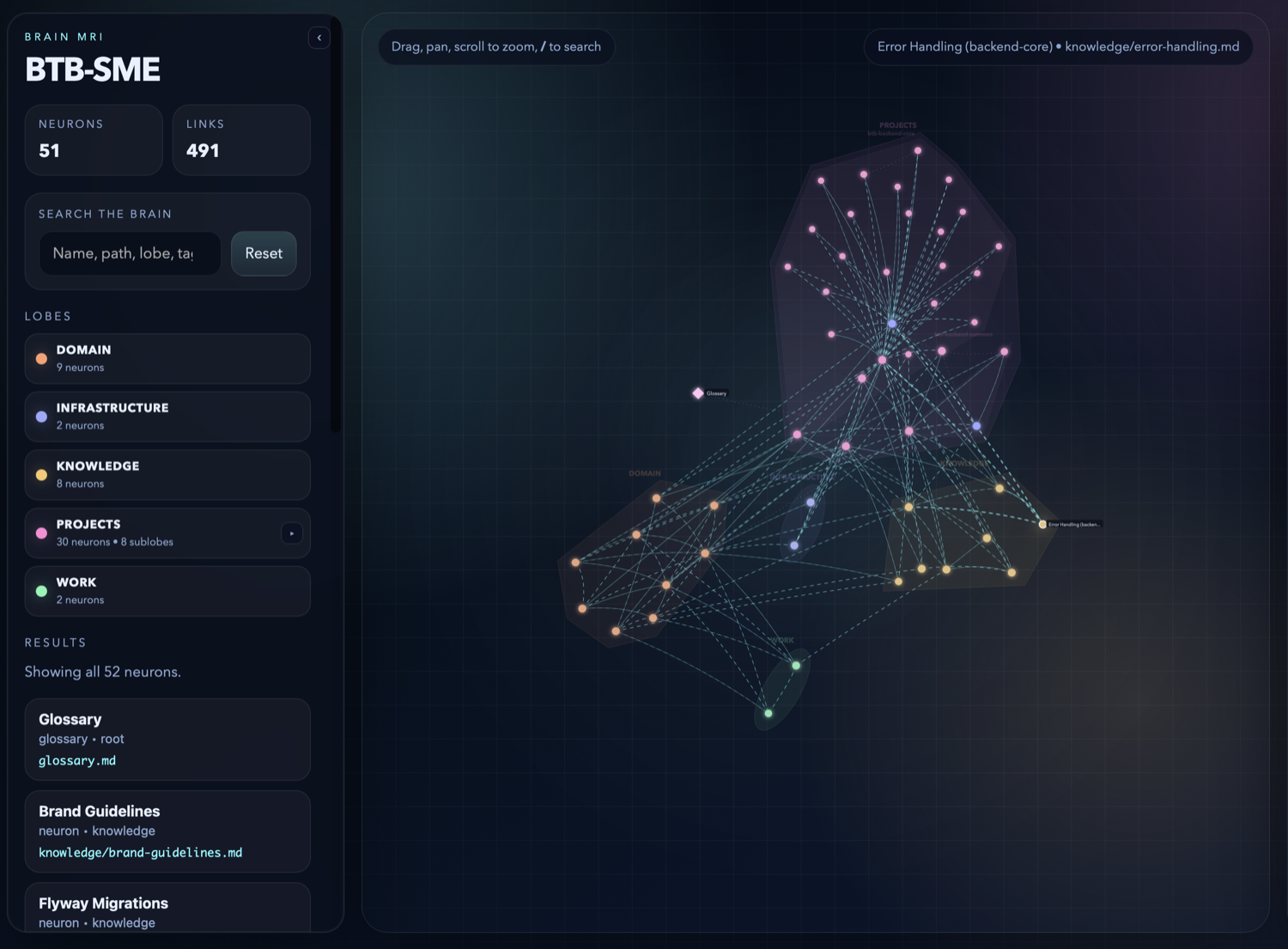
The HTML file is yours — no server, no account, no external calls. Commit it to the brain repo, email it, drop it in Slack.
Types determine the initial folder structure. After creation, every brain works the same -- all commands are available regardless of type. You can add or remove lobes freely after creation.
For a group of projects/services that share knowledge. Example: a platform with 3 backends, a frontend, and shared infrastructure.
| Lobe | What goes in it |
|---|---|
projects/ |
Per-project sub-folders -- APIs, data models, setup, conventions |
infrastructure/ |
Hosting, CI/CD, Docker, deployment, environments, env vars |
knowledge/ |
Decisions, learnings, troubleshooting tips, domain expertise |
The projects/ lobe nests deeper -- one sub-folder per project:
projects/
├── map.md
├── btb-core/
│   ├── map.md
│   ├── auth-flow.md
│   └── endpoints/
│       ├── map.md
│       └── post-auth-login.md
├── btb-frontend/
│   ├── map.md
│   └── state-management.md
└── btb-summon/
    └── map.md
Project neurons link to infrastructure neurons for deployment details and environments -- never duplicate infra content across lobes.
For an individual developer's knowledge -- projects, tasks, and notes.
| Lobe | What goes in it |
|---|---|
projects/ |
Sub-folder per project: branches, status, TODOs |
tasks/ |
Current priorities, blockers, in-progress work |
notes/ |
Daily notes, ideas, learnings |
For product management -- requirements, features, and user research.
| Lobe | What goes in it |
|---|---|
prd/ |
Requirements, user stories, acceptance criteria |
features/ |
Sub-folder per feature: specs, status, feedback |
ux/ |
User research, personas, journey maps, wireframes |
analytics/ |
Metrics, KPIs, experiment results |
competitors/ |
Competitive analysis, market positioning |
decisions/ |
Product decisions and rationale |
For research projects -- literature, experiments, and findings.
| Lobe | What goes in it |
|---|---|
literature/ |
Papers, articles, summaries, key findings |
experiments/ |
Hypotheses, methodology, results |
findings/ |
Synthesized insights, conclusions |
datasets/ |
Data sources, schemas, access notes |
tools/ |
Research tools, scripts, environments |
questions/ |
Open questions, hypotheses to test |
Empty -- build your own structure from scratch.
- Terminal —
kluris createcreates a brain (interactive wizard) - Terminal — Kluris refreshes the
/kluris(or/kluris-<name>) skill automatically - Terminal — optional companions add embedded specmint workflows per brain
- Inside your AI coding agent — open any project and use
/kluris; the agent becomes an SME - Agent and human curate the brain together — you review and approve every entry
- Terminal —
kluris dreammaintains brain structure - Terminal —
kluris mrivisualizes the brain
Kluris has two surfaces — the terminal CLI and the slash commands you type inside your AI coding agent. Here they are side by side.
Run these in bash, zsh, fish, or PowerShell. They handle setup, git, maintenance, and anything the agent calls internally.
| Command | What it does |
|---|---|
kluris create |
Create a new brain (interactive wizard) |
kluris clone <url> |
Clone a brain from git |
kluris register <path-or-zip> |
Register an existing brain on disk, or extract a brain zip and register it |
kluris list |
List registered brains |
kluris status |
Brain tree, neuron counts, recent changes |
kluris search <query> |
Ranked search across neurons, glossary, brain.md (--lobe, --tag, --limit, --json) |
kluris wake-up |
Compact brain snapshot for agent session bootstrap — includes brain_md, glossary, deprecation (--json) |
kluris companion add specmint-core|specmint-tdd |
Opt a brain into an embedded companion playbook |
kluris companion remove specmint-core|specmint-tdd |
Remove a companion opt-in from a brain |
kluris dream |
Regenerate maps, fix links, validate structure |
kluris branch [name] |
Show, switch, or create a git branch (--list to see all) |
kluris push |
Commit and push to the current branch |
kluris pull |
Pull remote changes for the current branch |
kluris mri |
Visualize the brain (opens in browser by default) |
kluris remove <name> |
Unregister a brain (keeps files on disk) |
kluris doctor |
Check prerequisites, refresh agent skills, and refresh companion playbooks after pipx upgrade kluris. Pass --no-refresh to skip writes. |
kluris help |
Show command help |
All CLI commands support --json for machine-readable output.
Type these inside Claude Code, Cursor, Windsurf, GitHub Copilot, Codex, Gemini CLI, Kilo, or Junie. With one brain registered the slash command is /kluris; with multiple brains each installs as /kluris-<name>. Examples below use /kluris for clarity.
| Pattern | What the agent does |
|---|---|
/kluris learn <topic> |
Analyzes your code and proposes neurons one at a time (you approve each) |
/kluris remember <fact> |
Captures a decision as a neuron in the right lobe |
/kluris remember from this session |
Sweeps the current chat and proposes neurons for everything worth keeping |
/kluris search <term> |
Searches the brain for a topic |
/kluris what do we know about ... |
Answers a question grounded in the brain |
/kluris review this brain |
Audits the brain — proposes new synapses, flags gaps and stale neurons |
/kluris use brain knowledge and codebase and let's ... |
Grounds spec-writing or implementation in both the brain and the actual code |
/kluris implement <task> |
Implements a task following your brain's conventions |
/kluris fix <bug> |
Fixes a bug using brain knowledge, flags any conflicts |
/kluris create a decision |
Creates a decision-record neuron |
/kluris create an incident |
Creates an incident-report neuron |
/kluris create a runbook |
Creates a runbook neuron |
/kluris open <file> |
Opens a neuron and reads it |
/kluris deprecate <file> |
Marks a neuron as deprecated |
Agent patterns are free-form — say it naturally. Under the hood the agent calls kluris search for lookups and kluris wake-up for the session bootstrap, but you never type those yourself when using the slash command.
Each brain has a kluris.yml that is gitignored -- it's your local config,
not shared. Each team member can have different settings.
name: my-brain
description: my-brain knowledge base
git:
commit_prefix: "brain:"| Term | Meaning |
|---|---|
| Brain | Git repo of shared team knowledge |
| Lobe | Folder / knowledge region |
| Neuron | Single knowledge file |
| Synapse | Link between neurons (bidirectional) |
| Map | map.md -- auto-generated lobe index |
| MRI | Interactive brain visualization |
| Dream | Brain maintenance -- regenerate maps, update dates, auto-fix safe issues, validate remaining links |
Claude Code, Cursor, Windsurf, GitHub Copilot, Codex, Gemini CLI, Kilo Code, Junie
Kluris is the brain. Specmint turns a feature request into a persistent spec built from deep research and iterative interviews. Pair them and the research phase starts half-done — grounded in your code and the knowledge your team already agreed to.
Inside your AI coding agent:
> /kluris let's spec out adding OAuth sign-in with GitHub
The /kluris skill sees this is multi-step work and follows the embedded
specmint playbook. Phase 1a reads your codebase. Phase 1b consults the brain.
Phase 2 asks only the questions neither can answer. Phase 3 writes a spec
where every decision references a neuron.
Two flavors — both installable per brain as Kluris companions:
| Companion | What it is |
|---|---|
specmint-core |
Spec-first workflow — Research · Interview · Spec · Implement |
specmint-tdd |
Same forge flow with strict TDD — a failing test before any implementation |
Companions ship inside the kluris Python package. Enabling one copies only
its SKILL.md into ~/.kluris/companions/<name>/SKILL.md and adds a short
reference snippet to that brain's generated Kluris skill.
Enable for one brain:
kluris companion add specmint-core --brain my-brain
kluris companion add specmint-tdd --brain my-brain
Enable for every registered brain:
kluris companion add specmint-core --brain all
kluris companion add specmint-tdd --brain all
More at specmint.io.
MIT