



PimpMyString is an iOS/OSX wrapper around NSAttributedStrong. It has the advantage of being strongly typed while NSStringAdditions are not.
- iOS 8.0+
- OSX 10.9
Carthage is a decentralized dependency manager that automates the process of adding frameworks to your Cocoa application.
You can install Carthage with Homebrew using the following command:
$ brew update
$ brew install carthage
To integrate PimpMyString into your Xcode project using Carthage, specify it in your Cartfile:
github "notbenoit/PimpMyString" >= 1.1.0
CocoaPods is a dependency manager for Cocoa projects.
CocoaPods 0.36 adds supports for Swift and embedded frameworks. You can install it with the following command:
$ gem install cocoapodsTo add PimpMyString to your project, add this line to your Podfile :
pod 'PimpMyString', '~> 1.1.0'- Simply add the
PimpMyString.xcodeprojto your workspace and add the appropriate framework (iOS/OSX) as a dependency of your project. - You can also build the framework and directly link it to your target.
Just import PMS in your source file, and call the StringTuner(s) you need. A sample code worth a thousand words (taken from the example playgrounds) :
import PMS

let string = "Hello PMS !"

let stringTuner = pms_underline(UIColor.redColor(), .StyleDouble)
    >>> pms_fgColor(UIColor.purpleColor())
    >>> pms_bgColor(UIColor.blackColor())
    >>> pms_font(UIFont.boldSystemFontOfSize(24))
    >>> pms_fgColor(UIColor.orangeColor(), range: NSMakeRange(0, 1))
    >>> pms_strikeThrough(UIColor.greenColor().colorWithAlphaComponent(0.5), NSUnderlineStyle.StyleSingle)
    >>> pms_skew(0.3)
    >>> pms_stroke(UIColor.brownColor(), 4)
    >>> pms_effectLetterPress()

let attributedString = stringTuner(NSAttributedString(string: string))

// Do whatever you want with the attributed string.
label.attributedText = attributedString
All attributes will be processed from left to right.
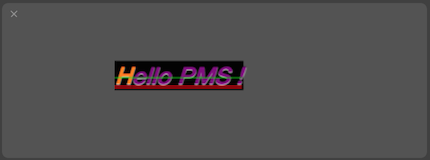
Ok, I'm not an artist, but whatever....
Initial version
PimpMyString is released under the New BSD License. See LICENSE for details.