


- About
- Prerequisites
- Getting Started
- Installation
- Endpoints
- Running the Tests
- End to End Testing
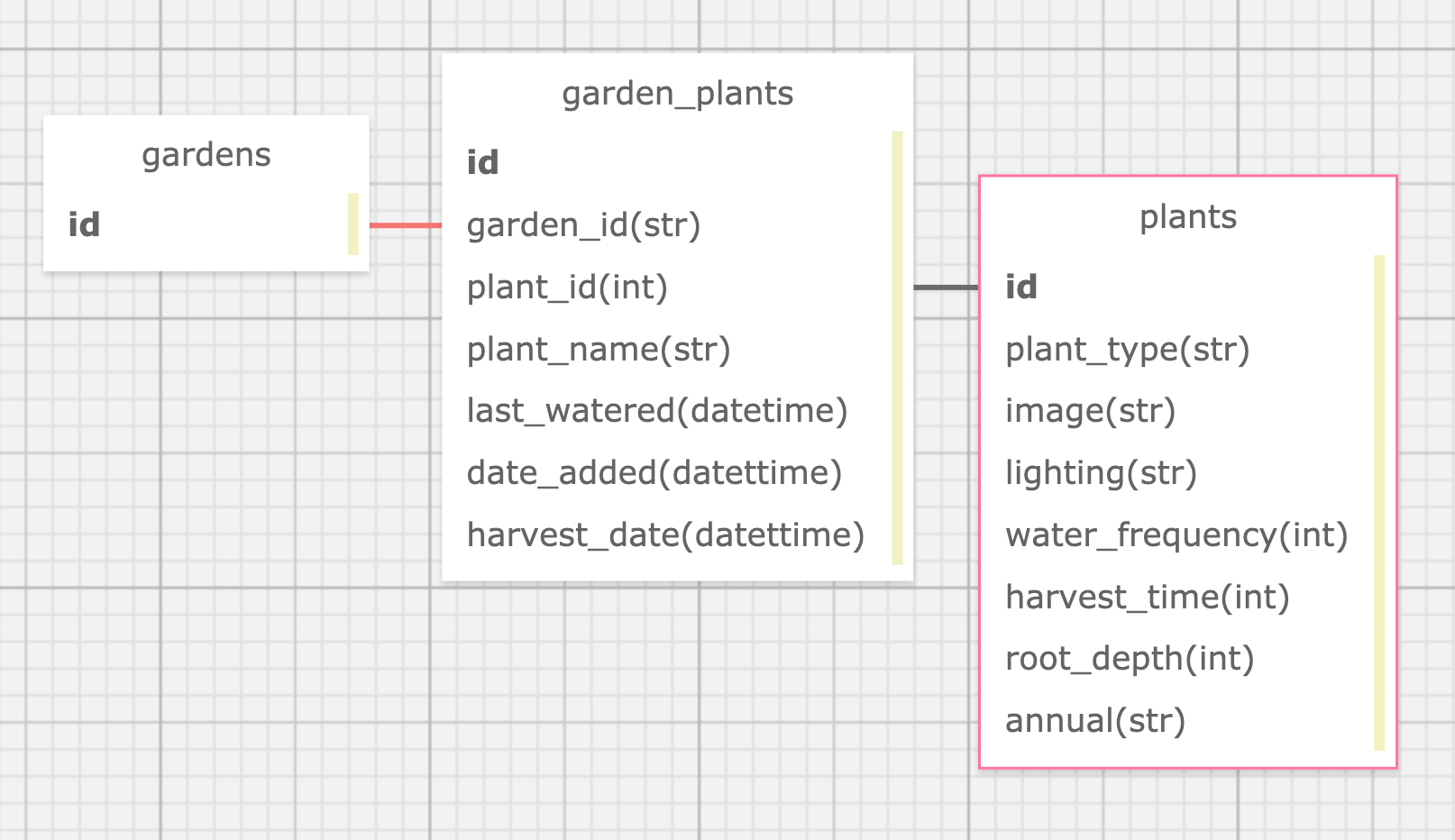
- Database Layout
- Built With
- Contributors
Oh Crop! Back-End is an API built using Python and Flask. This API was created to send plant information to the Oh Crop! front end (written in React Native) via RESTful endpoints. You can view the front end repository here. This API uses a PostgreSQL database and has full CRUD functionality for adding plants into gardens. It was built following TDD and agile processes over a period of 14 days, you can view the project board here.
Click here to see the application in use!
You will need to have the following in order to run this app on your local machine.
Pip 20.1.1
Python3 3.8.4
Flask 1.1.2
Follow the steps below to get you a copy of the project up and running on your local machine for development and testing purposes.
-
Clone this repo onto your local machine
-
Run the following commands in your terminal to get the code up and running on your local machine
- Make sure to run each of these without the $
$ pip install -r requirements.txt
$ alembic upgrade head
Follow the steps below to view this app locally
Step 1: Start up your virtual environment by running the following command - Make sure you have completed the steps in the getting started section
$ . venv/bin/activate
Step 2: Start the local rails server by running the following command
$ flask run
Step 3: View the website locally by visiting http://localhost:5000/
Note: All of the endpoints in the endpoint section can be run locally
Here are some end points and request response examples to get you started.
Motivational message
This is the home page endpoint with some sample text to ensure that the app is working as expected
https://oh-crop-be.herokuapp.com/api/v1/
All Plants
This endpoint returns all plant object in the database
Request:
https://oh-crop-be.herokuapp.com/api/v1/plants/

Response:
{
    "id": 1,
    "image": "https://skitterphoto.com/photos/skitterphoto-1901-default.jpg"
},
{
    "id": 2,
    "image": "https://cdn.pixabay.com/photo/2019/05/29/19/04/tomatoes-4238247_960_720.jpg"
},
{
    "id": 3,
    "image": "https://live.staticflickr.com/2591/3816942238_e669d597f7_w.jpg"
},
{
    "id": 4,
    "image": "https://storage.needpix.com/rsynced_images/jalapeno-2053130_1280.jpg"
},
{
    "id": 5,
    "image": "https://storage.needpix.com/rsynced_images/dill-2826179_1280.jpg"
},
{
    "id": 6,
...
Meet a Random Plant
This endpoint returns a random plant from the database
Request:
https://oh-crop-be.herokuapp.com/api/v1/plants/meet

Response:
{
    "id": 15,
    "plant_image": "https://c1.peakpx.com/wallpaper/736/669/216/appetite-avacado-avo-avocado-wallpaper-preview.jpg",
    "plant_type": "Avocado"
}
Get Plant by ID (Plant Info)
This endpoint requires an ID to be passed in and it will return information about that plant
Request:
https://oh-crop-be.herokuapp.com/api/v1/plants/2

Response:
{
  "days_between_water": 3,
  "days_to_harvest_from_seed": 50,
  "id": 2,
  "lifecycle": "Perennial",
  "lighting": "Full Sun",
  "plant_image": "https://cdn.pixabay.com/photo/2019/05/29/19/04/tomatoes-4238247_960_720.jpg",
  "plant_type": "Cherry Tomato",
  "root_depth_in": 12
}
Note: Add a plant ID to the end. In the example above the plants ID is 2
Plant Search
This endpoint requires a query parameter of q and will return any plants that even partially match the search term provided. This search is case insensitive.
Request:
https://oh-crop-be.herokuapp.com/api/v1/plants/search?q=tomato

Response:
[
    {
        "id": 1,
        "plant_image": "https://skitterphoto.com/photos/skitterphoto-1901-default.jpg",
        "plant_type": "Better Boy Tomato"
    },
    {
        "id": 2,
        "plant_image": "https://cdn.pixabay.com/photo/2019/05/29/19/04/tomatoes-4238247_960_720.jpg",
        "plant_type": "Cherry Tomato"
    },
    {
        "id": 3,
        "plant_image": "https://live.staticflickr.com/2591/3816942238_e669d597f7_w.jpg",
        "plant_type": "Roma Tomato"
    }
]
Note: will need to pass query params: {q: (search term)}
Note: Search term is not case sensitive and will search within all plant types
Plants in Garden
This endpoint returns all plants you have in your garden, you can use the POST endpoint below to add a plant to your garden
Request:
https://oh-crop-be.herokuapp.com/api/v1/garden

Response:
[
  {
    "id": 32,
    "plant_name": "Regina"
  },
  {
    "id": 33,
    "plant_name": "Hillary"
  },
  {
    "id": 34,
    "plant_name": "Sebastian"
  },
  {
    "id": 35,
    "plant_name": "Arnold"
  }
]
Garden Plant Profile Page
This endpoint returns a show page for a plant that is in your garden. It has specific information about the plant including its name and when it was last watered and when it will be ready to be harvested (if applicable).
Request:
https://oh-crop-be.herokuapp.com/api/v1/garden/plants/5

Response:
{
  "date_added": "Sun, July 26, 2020",
  "days_until_harvest": 74,
  "days_until_next_water": 3,
  "gardenplant_id": 5,
  "harvest_date": "Fri, October 09, 2020",
  "image": "https://live.staticflickr.com/2591/3816942238_e669d597f7_w.jpg",
  "last_watered": "Sun, July 26, 2020",
  "plant_name": "Melissa",
  "plant_type": "Roma Tomato"
}
Note: The ID at the end of this endpoint is the gardenplant id not the plant's id!
Add Plant to Garden
Request:
https://oh-crop-be.herokuapp.com/api/v1/garden?plant_id=4&plant_name=Terry

Response:
{
  "garden_id": 1,
  "garden_plant_id": 10,
  "harvest_date": "Sat, October 24, 2020",
  "plant_id": 4,
  "plant_name": "Terry"
}
Note: will need to pass query params for the ID of the plant being added being added and the unique name the user will assign to the plant: {plant_id: 4, plant_name: Terry}
Water Your Plant
This endpoint allows you to water your plant. It changes the last_watered to today and tells you when you will need to water next
Request:
https://oh-crop-be.herokuapp.com/api/v1/garden/water?garden_plant_id=10

Response:
{
  "id": 10,
  "last_watered": "Sun, July 26, 2020",
  "name": "Terry",
  "next_water": "Tue, July 28, 2020",
  "plant_type": "Jalapeno Peppers",
  "water_frequency": 2
}
Delete a plant from your garden
This endpoint allows a user to delete a plant from their garden
https://oh-crop-be.herokuapp.com/api/v1/garden/plants/6

Response:
{
  "gardenplant_id": 7,
  "plant_name": "Tim"
}
Note: will need to pass query params for the ID of the garden_plant (This can be obtained from the id in the add a plant to a garden ednpoint above): {garden_plant_id: 53}
To run the entire test suite on your local machine run the following command
$ pytest
To run a specific test file run the following command
$ python3 <file_path>
Note: Your file path may look something like tests/test_endpoint.py
These tests were written to check that the API endpoints were working as well as checking that the correct data is returned. Edge cases were also tested, for example we tested that when adding a plant to a garden the date_to_harvest is calculated, but if the plant is not one that can be harvested (ex. a cactus) it should return null.
API Test Example
def test_api_can_add_plant_to_garden(self):
    zeke = Plant(plant_type='Cherry Tomato',image='jim_photo.jpg',lighting='Full Sun',water_frequency=3,harvest_time=50,root_depth=12,annual="Annual")
    agatha = Plant(plant_type='Roma Tomato',image='agatha_photo.jpg',lighting='Full Sun',water_frequency=2,harvest_time=60,root_depth=12,annual="Annual")
    dan = Plant(plant_type='Cactus',image='cactus_dan.jpg',lighting='Full Sun',water_frequency=7,harvest_time=None,root_depth=8,annual="Annual")
    db.session.add_all([zeke, agatha, dan])
    db.session.commit()

    harvest_date = (datetime.now() + timedelta(days=50))
    parsed_harvest_date = harvest_date.strftime("%a, %d %b %Y")
    res = self.client().post('/api/v1/garden?plant_id=1&plant_name=Ezekiel')
    self.assertEqual(res.status_code, 201)
    self.assertIn("Ezekiel", str(res.data))
    self.assertIn("{} 00:00:00 GMT".format(parsed_harvest_date), str(res.data))
def test_api_can_add_plant_to_garden_with_no_harvest_date(self):
    zeke = Plant(plant_type='Cherry Tomato',image='jim_photo.jpg',lighting='Full Sun',water_frequency=3,harvest_time=50,root_depth=12,annual="Annual")
    dan = Plant(plant_type='Cactus',image='cactus_dan.jpg',lighting='Full Sun',water_frequency=7,harvest_time=None,root_depth=8,annual="Annual")
    db.session.add_all([zeke, dan])
    db.session.commit()

    res = self.client().post('/api/v1/garden?plant_id={}&plant_name=Marjorie'.format(dan.id))
    self.assertEqual(res.status_code, 201)
    self.assertIn("Marjorie", str(res.data))
    self.assertIn("null", str(res.data))
- Flask - The web framework used
- SQLAlchemy - The object relational mapper used
View the Front-End repositoryhere