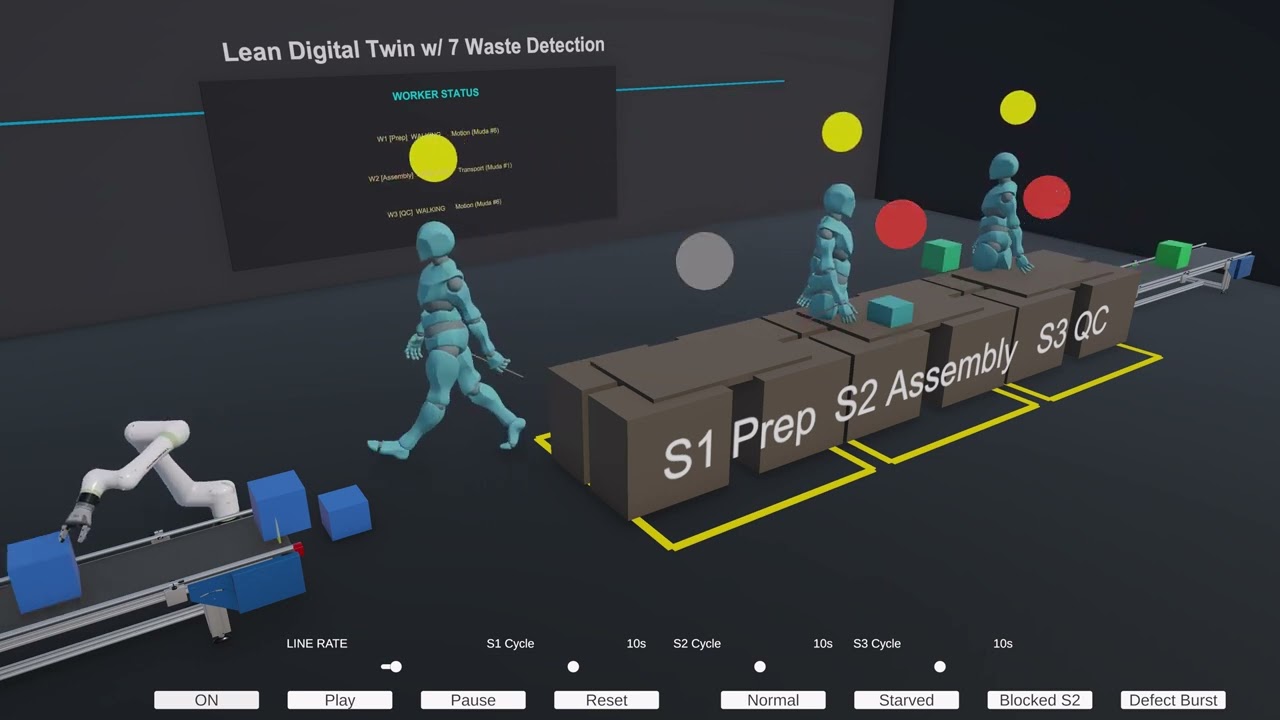
LeanTwin is an interactive simulation of a production cell built in Unity. Drop parts onto a conveyor, watch workers move between stations, and see waste light up in real time as takt times slip, inventory piles up, or defects roll off the line. Tune parameters with sliders, load preset scenarios, and build intuition for the seven wastes of lean manufacturing -- all without stopping a real factory.
Quick start: Open the project in Unity 6000.4.0f1, load
Assets/LeanCell/Scenes/LeanCell.unity, and press Play.

Youtube Video
| Feature | Description | |
|---|---|---|
| 🏭 | Run a production cell | A 6-axis robot feeds a conveyor that carries parts through three workstations staffed by NavMesh-driven workers |
| 📊 | Track KPIs live | Throughput, WIP, defect rate, cycle times, and bottleneck detection update on a heads-up dashboard |
| 🚨 | See waste as it happens | A color-coded overlay scores all seven TIMWOOD wastes -- Transport, Inventory, Motion, Waiting, Overproduction, Over-processing, Defects |
| 🎛️ | Tune every parameter | Takt time, defect rate, per-station cycle times -- adjust with sliders and watch the cell respond |
| ⏱️ | Control time | Play, pause, reset. A simulation clock tracks elapsed time and takt beats |
flowchart LR
    Source["Source(takt)"] --> Robot["Robot(6-axis)"]
    Robot --> Conveyor["Conveyor"]
    Conveyor --> Sensor["Sensor"]
    Sensor --> Workers["Workers1-2-3"]
    Workers --> Stations["Stations1-2-3"]
    Stations --> Sink["Conveyor(sink)"]

    Workers -. waste events .-> WT["WasteTracker(7 TIMWOOD wastes)"]
    Stations -. waste events .-> WT

    style Source fill:#4CAF50,color:#fff
    style Robot fill:#2196F3,color:#fff
    style Conveyor fill:#FF9800,color:#fff
    style Sensor fill:#9C27B0,color:#fff
    style Workers fill:#00BCD4,color:#fff
    style Stations fill:#FF5722,color:#fff
    style Sink fill:#607D8B,color:#fff
    style WT fill:#F44336,color:#fff
The simulation is event-driven. A central event bus (LeanCellEvents) decouples all systems -- MU lifecycle, station processing, worker movement, waste detection, and UI -- so each component subscribes only to what it needs.
Invoke-based polling (InvokeRepeating) is used instead of Update() for compatibility with the realvirtual industrial-simulation framework.
LeanTwin/Assets/LeanCell/
  Scenes/         LeanCell.unity          -- main simulation scene
  Scripts/
    Core/         LeanCellManager          -- central orchestrator & parameters
                  CellOrchestrator         -- MU flow state machine (7 states)
                  LeanCellEvents           -- event bus
                  SimulationClock          -- time & takt tracking
    Devices/      RobotController          -- 6-axis Fanuc with pick/place poses
                  WorkStation              -- processing, progress bar, safety lines
                  WorkerController         -- NavMesh pathfinding & state machine
                  SourceTaktController     -- takt-driven MU generation
    Waste/        WasteTracker             -- TIMWOOD detection & scoring
                  WasteEvent               -- event data (type, severity, color)
                  WasteVisualizer          -- post-processing overlay
    UI/           DashboardController      -- KPI rail
                  ControlPanel             -- sliders & buttons
                  KeyboardShortcuts
    Config/       ScenarioPreset           -- ScriptableObject presets
  Data/           4 preset assets (ScriptableObjects)
| Dependency | Version | Purpose |
|---|---|---|
| Unity | 6000.4.0f1 | Engine |
| Universal Render Pipeline | 17.4.0 | Rendering & post-processing (waste overlay) |
| AI Navigation | 2.0.11 | NavMesh for worker pathfinding |
| Input System | 1.19.0 | Keyboard shortcuts & controls |
| Timeline | 1.8.11 | Animation sequencing |
| Recorder | 5.1.5 | Capturing simulation footage |
| Visual Scripting | 1.9.10 | Visual scripting support |
| TextMesh Pro | (bundled) | UI text rendering |
| realvirtual | (Assets) | Industrial automation framework -- Source, Sink, MU, Drive, Sensor, Fixer, signal management |
| NaughtyAttributes | (Assets) | Inspector enhancements |
| IngameDebugConsole | (Assets) | Runtime debug overlay |
| MCP for Unity | (Packages) | Model Context Protocol integration |
- Clone the repo
git clone https://github.com/olaafrossi/LeanDigitalTwin.git
- Open in Unity Hub -- select Unity 6000.4.0f1 or later
- Open the scene --
Assets/LeanCell/Scenes/LeanCell.unity - Press Play
- Experiment -- use the control panel to swap presets, drag sliders, and toggle the waste overlay
This project is licensed under the MIT License.