Python library for converting astronomical FITS images into beautiful color or grayscale images.

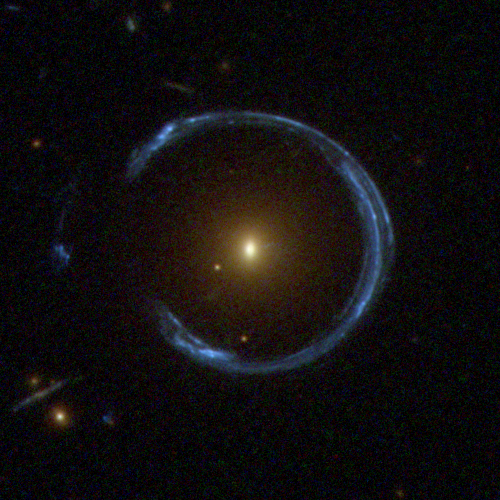
Cosmic Horseshoe gravitational lens imaged by Hubble WFC3
RGB composite using filters F475W (blue), F606W (green), and F814W (red)
Try it!

pip install trilogyOr from source:
git clone https://github.com/oliveirara/trilogy.git
cd trilogy
pip install -e .from trilogy import Trilogy
trilogy = Trilogy(
images="galaxy.fits",
outname="galaxy"
)
img = trilogy.save() # Saves galaxy.pngfrom trilogy import Trilogy
trilogy = Trilogy(
images={
"R": ["i_band.fits"],
"G": ["r_band.fits"],
"B": ["g_band.fits"]
},
outname="galaxy_rgb"
)
img = trilogy.save() # Saves galaxy_rgb.pngtrilogy = Trilogy(
images="galaxy.fits",
outname="galaxy_adjusted",
noiselum=0.10, # Lower = darker background (0.05-0.5)
satpercent=0.0001 # Lower = less saturation (0.0001-0.01)
)trilogy = Trilogy(
images={"R": ["r.fits"], "G": ["g.fits"], "B": ["b.fits"]},
outname="colorful",
colorsatfac=1.5 # >1 boosts colors, <1 reduces
)| Parameter | Default | Range | Effect |
|---|---|---|---|
noiselum |
0.15 | 0.05-0.5 | Background brightness (lower = darker) |
satpercent |
0.001 | 0.0001-0.01 | % of pixels to saturate (lower = more detail) |
colorsatfac |
1.0 | 0.5-2.0 | Color saturation (RGB only, >1 = more vivid) |
Image too dark?
noiselum=0.25        # Increase background brightness
satpercent=0.005     # Allow more saturation
Image too bright/washed out?
noiselum=0.08        # Decrease background brightness
satpercent=0.0001    # Preserve more highlights
Colors too weak? (RGB only)
colorsatfac=1.5 # Boost color saturationtrilogy = Trilogy(
images={"R": [...], "G": [...], "B": [...]},
noiselums={
"R": 0.20, # Brighter red channel
"G": 0.15, # Balanced green
"B": 0.10 # Darker blue channel
}
)# Average multiple exposures
trilogy = Trilogy(
images=["exposure1.fits", "exposure2.fits", "exposure3.fits"],
combine="average"
)
# Or sum them
trilogy = Trilogy(
images=["exp1.fits", "exp2.fits"],
combine="sum"
)from trilogy import Trilogy, TrilogyConfig
config = TrilogyConfig(
noiselum=0.12,
satpercent=0.0005,
colorsatfac=1.3,
samplesize=2000,
combine="average"
)
trilogy = Trilogy(images=my_images, config=config)By default, trilogy automatically adjusts problematic parameters. To use exact values:
trilogy = Trilogy(
    images="galaxy.fits",
    noiselum=0.147,      # Will use exactly this value
    satpercent=0.000823,
    auto_adjust=False    # Disable auto-adjustment
)
Use auto_adjust=False when:
- Replicating results from papers/publications
- You've manually fine-tuned parameters visually
- You need specific parameter values
Trilogy works seamlessly in notebooks:
from trilogy import Trilogy

t = Trilogy(images="galaxy.fits", noiselum=0.15)
img = t.run()  # Returns PIL Image, displays automatically
See examples/with_notebook/notebook.ipynb for complete examples.
The examples/ directory contains real FITS data from various surveys:
- cosmic_horseshoe/ - HST WFC3 RGB composite
- single_band/ - Grayscale examples (CS82, CFHTLenS, DES)
- multiple_bands/ - RGB examples (HSC, KIDS, Legacy Survey, RCSLenS)
- with_notebook/ - Jupyter notebook examples
Each example includes a example.py script you can run:
cd examples/cosmic_horseshoe
python example.pyimages: str, list, or dict - Input FITS file(s)indir: Path - Input directory (default: current directory)outdir: Path - Output directory (default: current directory)outname: str - Output filename without extension
noiselum: float - Noise luminosity 0-1 (default: 0.15)noiselums: dict - Per-channel noise luminositysatpercent: float - Percentage of pixels to saturate (default: 0.001)colorsatfac: float - Color saturation factor (default: 1.0)noisesig: float - Noise sigma for output (default: 1.0)noisesig0: float - Noise sigma for measurement (default: 2.0)correctbias: bool - Correct for background bias (default: False)
combine: "average" or "sum" - How to combine multiple images (default: "average")samplesize: int - Sample region size for determining scaling (default: 1000)stampsize: int - Processing stamp size (default: 1000)maxstampsize: int - Maximum stamp size (default: 6000)bscale: float - Multiply all pixel values (default: 1.0)bzero: float - Add to all pixel values (default: 0.0)
auto_adjust: bool - Automatically adjust problematic parameters (default: True)noise: float - Manual noise level (overrides automatic detection)saturate: float - Manual saturation level (overrides automatic)invert: bool - Invert luminosity (default: False)legend: bool - Add filter legend to RGB images (default: False)
- Standard FITS (
.fits) - Compressed FITS (
.fits.gz,.fits.fz) - Multi-extension FITS (specify with
image.fits[1]) - Automatic extension detection
- Python >= 3.11
- astropy >= 6.1.7
- numpy >= 2.2.4
- pillow >= 11.2.1
- scipy >= 1.15.2
trilogy = Trilogy(images=..., noiselum=0.25, satpercent=0.005)trilogy = Trilogy(images=..., noiselum=0.08, satpercent=0.0001)trilogy = Trilogy(images=..., colorsatfac=1.5)The auto-adjustment system is helping you avoid problematic values. To use exact values:
trilogy = Trilogy(images=..., your_params, auto_adjust=False)- Check that FITS files have data (not empty)
- Try increasing
noiselumandsatpercent - Verify FITS extension if using multi-extension files
Trilogy automatically handles NaN (Not a Number) and Inf pixels:
✅ Smart NaN handling:
- NaN/Inf pixels are set to 0 (black) in output
- Statistics calculated only from valid pixels
- Warning displayed if >10% of pixels are NaN
- No crashes or numerical errors from NaN pixels
Example output:
⚠️ Warning: 50.0% of pixels are NaN/Inf
Recommendation:
- Images with >50% NaN pixels will appear mostly black
- Use quality filtering before processing (e.g.,
filter-empty-cutouts.py) - Consider cropping to regions with valid data
Why NaN pixels occur:
- Edge effects from mosaicking/reprojection
- Missing detector data
- Masked pixels in processed images
- Image cutouts extending beyond original field
- Lupton's Algorithm: http://www.astro.princeton.edu/~rhl/PrettyPictures/
- Original Trilogy: https://www.stsci.edu/~dcoe/trilogy/
- ASCL Entry: https://ascl.net/1508.009
If you use trilogy in your research, please cite:
@MISC{2012ascl.soft08009C,
  author = {{Coe}, D.},
  title = "{Trilogy: Image composition software}",
  keywords = {Software},
  year = 2012,
  month = aug,
  eid = {ascl:1508.009},
  pages = {ascl:1508.009},
  archivePrefix = {ascl},
  eprint = {1508.009},
  adsurl = {https://ui.adsabs.harvard.edu/abs/2012ascl.soft08009C},
}See LICENSE file.
Contributions are welcome! Please open an issue or pull request on GitHub.