Trust & Audit Layer for AI Agents
Git tracks what developers did to code. AgentTrust tracks what AI agents did to your life.


AgentTrust is an open-source trust and audit layer that sits alongside your AI agent. It observes every action the agent takes, writes it to a tamper-evident local ledger, and surfaces risky behavior — without ever modifying, blocking, or interfering with the agent itself.
Built for OpenClaw first. Framework-agnostic by design.
- Installation
- Quick Start
- Agent Integration
- What It Does
- Architecture
- CLI Reference
- Trust Score
- Action Taxonomy
- Configuration
- Development
- Contributing
- License
curl -fsSL https://raw.githubusercontent.com/omoshola-o/agenttrust/main/scripts/install.sh | bashDetects your platform, checks for Node.js >= 22, and installs via npm. Pin a specific version with:
AGENTTRUST_VERSION=0.1.0 curl -fsSL https://raw.githubusercontent.com/omoshola-o/agenttrust/main/scripts/install.sh | bashnpm install -g agenttrustpnpm add -g agenttrustnpx agenttrust statusclawhub install agenttrust# Initialize AgentTrust in your workspace
agenttrust init
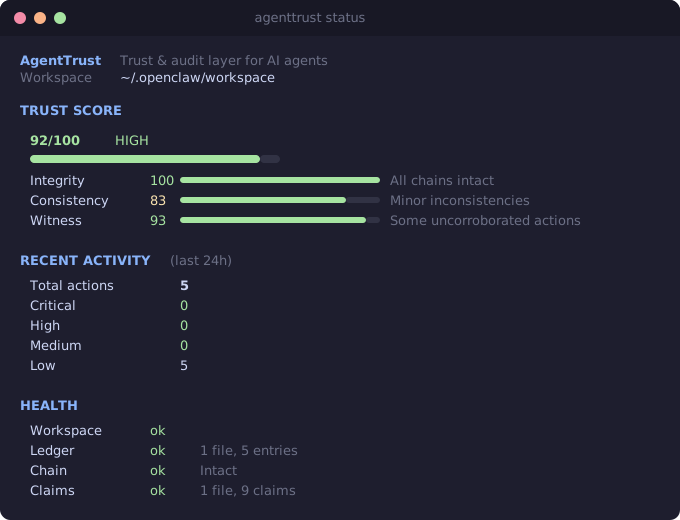
# Dashboard — trust score, activity, and health at a glance
agenttrust status
# See what your agent has been doing
agenttrust log --last 24h
# Verify the log hasn't been tampered with
agenttrust verify
# Flag risky actions
agenttrust audit --flag-risky
# Combined trust score from all verification engines
agenttrust trustnpm install agenttrustimport { initWorkspace, logAction } from "agenttrust";
// Call once at startup
await initWorkspace();
// Log any agent action — 3 required fields, everything else has defaults
await logAction({
type: "file.read",
target: "/etc/hosts",
detail: "Read hosts file for DNS lookup",
});
// Add optional context when needed
await logAction({
type: "api.call",
target: "https://api.openai.com/v1/chat",
detail: "Called GPT-4 for summarization",
risk: 2,
riskLabels: ["communication"],
goal: "Summarize user document",
durationMs: 1340,
session: "ses_abc123",
});import { declareIntent, logAction } from "agenttrust";
// Step 1: Declare what you plan to do
const claim = await declareIntent({
type: "exec.command",
target: "npm install express",
goal: "Install HTTP framework for the user's project",
});
// Step 2: Do the work
// ... your agent logic here ...
// Step 3: Log what actually happened, linked to the claim
await logAction({
type: "exec.command",
target: "npm install express",
detail: "Installed express v4.18.2",
meta: { claimId: claim.ok ? claim.value.id : undefined },
});import { Ledger } from "agenttrust";
const ledger = new Ledger();
const integrity = await ledger.verify(); // Check hash chains
const entries = await ledger.read(); // Read all actions
const stats = await ledger.getStats(); // Get risk breakdownSee examples/basic-agent/ for a full working example.
Every time your AI agent takes an action — sends a message, reads a file, executes a command, makes an API call — AgentTrust logs it to an append-only, hash-chained local ledger.
Each entry captures:
| Field | What it records |
|---|---|
| Action | What the agent did (type + target) |
| Context | Why it did it (goal, trigger, chain) |
| Outcome | What happened (success/failure, duration) |
| Risk | How risky it was (0–10 score + labels) |
| Hash | SHA-256 link to previous entry (tamper-evident) |
The hash chain means entries cannot be modified or deleted after the fact. If anyone tampers with the log, agenttrust verify catches it immediately.
- Alongside, not inside — Observes. Never modifies, blocks, or controls the agent.
- Append-only, hash-chained — Tamper-evident by design. Every entry links to the previous one.
- Local-first — Your audit trail lives on your machine. No cloud. No telemetry.
- OpenClaw-native — Installs as a skill. Follows all OpenClaw conventions.
- Zero-impact — Logging takes <5ms. Never blocks the agent.
Your Agent                AgentTrust                         You
────────────              ──────────                         ───
declares intent ──────►  records claim to claims ledger
sends email     ──────►  logs it + hashes it           ──►  see it in timeline
calls API       ──────►  chains to previous            ──►  get risk flag
reads ~/.ssh    ──────►  scores risk: 9/10             ──►  investigate
                         witness observes filesystem    ──►  cross-check
                         consistency engine compares    ──►  trust score
AgentTrust builds trust through independent verification:
- Integrity Engine — Verifies SHA-256 hash chains. Detects any tampering with ledger files.
- Consistency Engine — Compares what the agent said it would do (claims) against what it actually did (executions). Flags mismatches, unfulfilled claims, and scope drift.
- Witness Engine — An independent system observer that monitors filesystem events, network connections, and process activity. Cross-checks agent logs against ground truth.
<workspace>/.agenttrust/
├── config.yaml                         # Local configuration
├── ledger/                             # Execution log (hash-chained JSONL)
│   ├── 2026-02-14.agenttrust.jsonl
│   └── 2026-02-15.agenttrust.jsonl
├── claims/                             # Intent declarations (hash-chained JSONL)
│   ├── 2026-02-14.claims.jsonl
│   └── 2026-02-15.claims.jsonl
└── witness/                            # Independent observations
    └── 2026-02-15.witness.jsonl
All data is local JSONL — one JSON object per line. Files rotate daily.
| Command | Description |
|---|---|
agenttrust status |
Dashboard with trust score, activity, and health |
agenttrust trust |
Combined trust score from all three engines |
| Command | Description |
|---|---|
agenttrust log |
Show recent agent actions |
agenttrust log --last 7d |
Actions from the last 7 days |
agenttrust log --type exec.command |
Filter by action type |
agenttrust log --claims |
Show declared intents |
agenttrust log --paired |
Show claims matched with executions |
agenttrust claim |
Declare intent before acting |
agenttrust watch |
Live-stream actions as they happen |
agenttrust witness start |
Start independent system observer |
agenttrust witness log |
View witness events |
| Command | Description |
|---|---|
agenttrust verify |
Check hash chain integrity |
agenttrust consistency |
Check if actions match declared intent |
agenttrust correlate |
Cross-check logs against witness observations |
| Command | Description |
|---|---|
agenttrust audit |
Run risk detection rules |
agenttrust audit --flag-risky |
Surface high-risk actions |
agenttrust replay <id> |
Trace the causal chain from any action |
| Command | Description |
|---|---|
agenttrust init |
Initialize AgentTrust in workspace |
agenttrust doctor |
Run health checks |
agenttrust digest |
Generate daily/weekly summary reports |
agenttrust rules list |
List risk detection rules |
All commands support
--jsonfor scripting and CI integration.
agenttrust trust produces a combined score from 0–100:
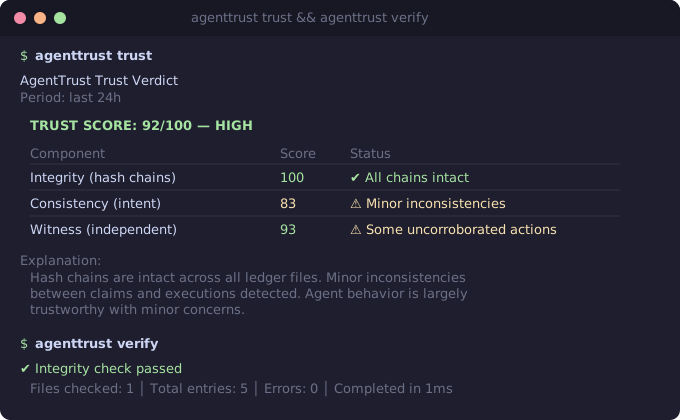
The score drops when:
- Hash chains are broken (integrity)
- The agent does things it didn't declare (consistency)
- System observations don't match agent logs (witness)
AgentTrust uses a canonical set of action types in dot notation:
| Category | Types |
|---|---|
| Messages | message.send, message.read |
| Files | file.read, file.write, file.delete |
| API | api.call, api.auth |
| Execution | exec.command, exec.script |
| Web | web.search, web.fetch, web.browse |
| Payments | payment.initiate, payment.confirm |
| Calendar | calendar.create, calendar.modify |
| Skills | skill.invoke |
| Memory | memory.write, memory.read |
| Sessions | session.spawn, session.send |
| Elevated | elevated.enable, elevated.command |
AgentTrust configuration lives in <workspace>/.agenttrust/config.yaml or under skills.entries.agenttrust in openclaw.json.
Key settings:
| Setting | Default | Description |
|---|---|---|
riskThreshold |
7 |
Auto-flag actions at or above this risk score |
logRetentionDays |
90 |
How long to keep ledger files |
Risk detection rules can be customized. See configs/ for presets:
default.rules.yaml— balanced defaultsstrict.rules.yaml— high-security environmentsminimal.rules.yaml— reduced noisecustom.rules.example.yaml— template for your own rules
- Node.js >= 22
- pnpm >= 9
git clone https://github.com/omoshola-o/agenttrust.git
cd agenttrust
pnpm installpnpm build # Compile TypeScript
pnpm test # Run all tests
pnpm test:watch # Watch mode
pnpm test:coverage # Coverage report
pnpm lint # Run oxlint
pnpm typecheck # Type check without emitting
pnpm format # Format with Prettieragenttrust/
├── src/ # Core library
│ ├── ledger/ # Append-only hash-chained log engine
│ ├── schema/ # Action types, risk labels, outcome types
│ ├── query/ # Filtering and timeline reconstruction
│ ├── analyzer/ # Risk detection rule engine
│ ├── consistency/ # Claims vs. executions matching
│ ├── correlation/ # Cross-check with witness data
│ ├── proof/ # Evidence receipt generation
│ ├── witness/ # Independent system observer
│ ├── replay/ # Causal chain tracing
│ ├── digest/ # Summary report generation
│ └── watch/ # Live-streaming renderer
├── cli/ # CLI tool (agenttrust command)
├── skill/ # OpenClaw skill definition
├── configs/ # Rule preset files
├── test/ # Unit tests (Vitest)
└── scripts/ # Utility scripts (installer, etc.)
The project has 1,000+ tests covering the full stack:
pnpm test
# Test Files  58 passed (58)
#      Tests  1007 passed (1007)
Tests cover hash chain integrity, tamper detection, risk rule matching, consistency scoring, witness correlation, CLI output, and more.
See CONTRIBUTING.md for development guidelines.
See SECURITY.md for vulnerability reporting.