
➜ Maintain multiple versions of your resume
➜ Real time PDF previewer
➜ Drag & drop reordering
Live Demo Link
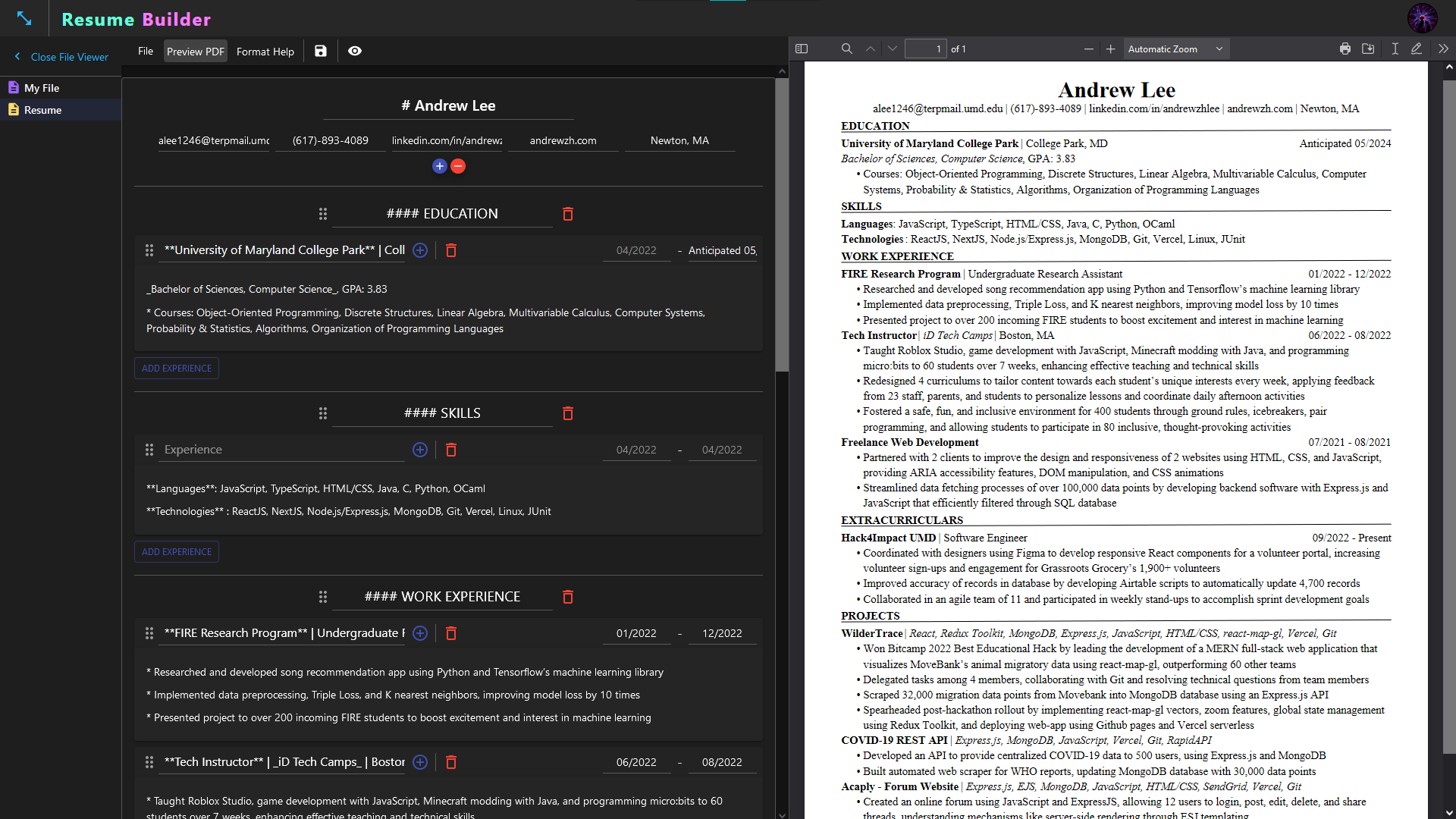
Creating your resume is no easy task. Finding the perfect words to describe yourself and convey your experiences is already time consuming enough.
So why waste time struggling to figure out how to format a resume?
Just bring your creativity, and the Resume Builder will take care of the rest.
- Create & maintain multiple resumes.
- Preview your changes in real time using the PDF previewer.
- Add headings, bullets, and bold/italic text using markdown-like syntax.
- Experiment with different layouts using the drag-and-drop feature.
- Make copies of your resumes to never lose your previous versions.
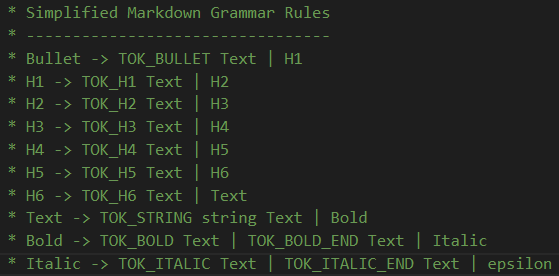
To implement features such as bold/italic text, bullet points, and headers, I wrote a custom markdown lexer & parser. The lexer takes in a string and converts the string into an array of predefined tokens.
The tokens are passed to the parser, where they are converted into an abstract syntax tree (AST). To make this conversion, the parser relies on a set of predefined rules to determine how the AST should be structured. The AST contains all the information required for the PDF generator to create the properly formatted PDF document.
ex: "**Some** Text" =>
    [TOK_BOLD , TOK_STRING, "Some", TOK_BOLD, TOK_STRING, "Text"] =>
    AST: {
        "head": {
            "text": "Some",
            "bold": true,
            "italic": false,
            "bullet": false,
            "heading": "none",
            "next": {
                "text": " Text",
                "bold": false,
                "italic": false,
                "bullet": false,
                "heading": "none",
                "next": null
            }
        }
    }
Building the pdf generator was one of the most challenging aspects of this project. jsPDF provides many tools to position text down to the pixel. However, this meant that many of the higher level features, such as line wrapping, text alignment, page margins, indentation, and line spacing, had to be coded from scratch.
Using next-auth, I implemented signin using the google provider and stored the accounts on my MongoDB database. It is important to ensure user sessions are valid at all times to protect routes & prevent unauthorized access to API endpoints.
One of my goals for this project was to learn many of the features TypeScript has to offer. I created custom types for my resume objects and for my API responses, among other things. This ensured uniformity accross my entire application, preventing incorrently structured data from being used.
While working with different npm packages, I frequently examined their type declaration files to gain a deeper understanding of the packages I used. As a result, I was able to always write highly strictly typed code, instead of resorting to bad practices like using the any type.
|
|
|
Next.js + TypeScript
Database: MongoDB
Authentication: next-auth
API: Express.js / Vercel Serverless Functions
Data Fetching: SWR
PDF generator: jsPDF
Styling Library: MUI
-
PDF generator/parser:
- support multiple pages
- links (
[text](http://a.com)) - images (
)
-
Allow pdfs to be viewed on a public link
- toggle resumes between public/private.
- changes to resume auto pushed to live link (if public)
-
Add ctrl-z/ctrl-y, ctrl-shift-z -> include undo/redo buttons on toolbar
-
MUI skeleton for loading states.
-
Tutorial (some kind of app walk through)
-
Terminal:
- put resume reducer into context, so that commands can be sent from terminal.
(the terminal will probably only work for the current active resume).
(terminal cmds: open files/preview, CRUD for files/headers/sections/etc., save)
- put resume reducer into context, so that commands can be sent from terminal.
-
NPM is required to run this project: Useful Resource
-
Vercel CLI (optional - used to host site on Vercel):
npm i -g vercel
-
MongoDB database: Useful Resource
-
Google Cloud Platform project: Useful Resource
-
Clone the repo
git clone https://github.com/pillious/Resume-Builder.git
-
Install NPM packages
cd Resume-Builder npm install -
Add environmen variables to
.envfile -
Run app locally
npm run dev
-
View app on localhost:3000.

-
Check production build for errors
npm run build
npm start
-
Deploy to Vercel
vercel
vercel --prod