Skip to content

Conversation

@kant
Copy link
Contributor

@kant kant commented Mar 10, 2020

No description provided.

@kant
Copy link
Contributor Author

kant commented Mar 10, 2020

@asmecher Brand new PR. I did it against the Master branch.

@asmecher
Copy link
Member

@kant, the trouble with these pull requests is that they remove the old file and add the new one in separate pull requests (#58 and #78 in this example). Because this doesn't happen within the same pull request, git can't tell that it's actually the same file being moved to a new place, and thus the history of the new file will be disconnected from the history of the old file. Things like pull requests across this change will no longer be possible.

The first pull request (#58) comes from a branch in your fork called patch-5. If you were able to add the deletion of the old README document to that already-existing branch, rather than creating a new branch with the deletion in it (patch-25 in this case, then you would see #58 properly include both the deletion of the old file and the creation of the new one.

@kant
Copy link
Contributor Author

kant commented Mar 11, 2020

@asmecher As minimalist (too much zen readings in my mind) tell me the steps to be done to meet an happy end: if that mission needs obliterate my former PR, I will do. Then submit again a PR with a proposal of deleting the original README enclosed...

@asmecher
Copy link
Member

  1. Go to your fork of tinymce on github.com
  2. Use the "Branch" dropdown to create a new branch (e.g. convert-readme)
  3. Click the README file
  4. Click "Raw"; copy the file contents to the clipboard
  5. Click "Back" to go back to the README file's formatted form
  6. Click the trashcan to delete the file
  7. Commit the change
  8. Click "Create new file"
  9. Name it README.md
  10. Paste the contents from the clipboard
  11. Adjust the contents for Markdown
  12. Commit the changes
  13. Click "Compare and pull request"
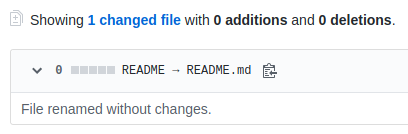
  14. Create the pull request. In my experiment it detected that the file was actually renamed:
    image

@kant
Copy link
Contributor Author

kant commented Mar 11, 2020

Zillions of thanks for your patience and sharing your knowledge, but mostly for your time (a scarce resource). Kudos, Sir!

@asmecher
Copy link
Member

Not a problem, I learned something new too!

@kant
Copy link
Contributor Author

kant commented Mar 13, 2020

@asmecher Everything goes well until point 13. I got this message:
Can’t automatically merge. Don’t worry, you can still create the pull request.
I did a pulll request and got this message (emitted by Github):
This branch has conflicts that must be resolved
Only those with write access to this repository can merge pull requests.
Conflicting files
README
-- End of report --

@asmecher
Copy link
Member

Unfortunately it looks like the github.com web interface doesn't have direct support for rebasing a fork, but there are some directions you can follow here: https://github.com/KirstieJane/STEMMRoleModels/wiki/Syncing-your-fork-to-the-original-repository-via-the-browser

Base automatically changed from master to main February 18, 2021 01:32
Sign up for free to join this conversation on GitHub. Already have an account? Sign in to comment

Labels

None yet

Projects

None yet

Development

Successfully merging this pull request may close these issues.

2 participants