Azure Service Integration
Certificates issued by Acmebot are stored in Azure Key Vault, making them easy to consume from other Azure services. This page links to the relevant Microsoft documentation for common integration targets.
Certificate update behavior differs by service. Some services track the latest Key Vault certificate version automatically, while others require an explicit import or sync step.
- App Service (Web Apps / Functions / Containers)
- Azure Container Apps
- Application Gateway v2
- Front Door (Standard / Premium)
- API Management
- SignalR Service
- Virtual Machines
- Other services
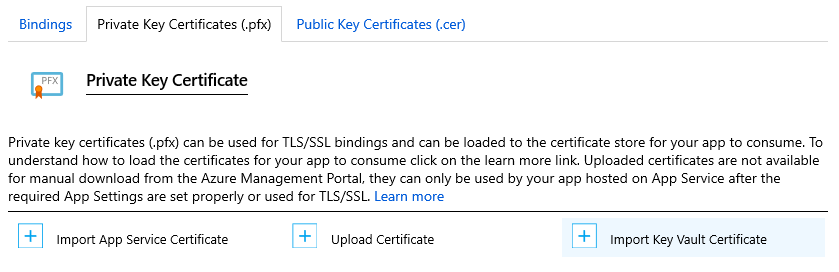
Import the Key Vault certificate from TLS/SSL Settings by choosing Import Key Vault Certificate under Private Key Certificate (.pfx).
After import, App Service checks for newer certificate versions automatically.
Use Key Vault certificate integration to import and rotate certificates for your Container Apps environment.
Application Gateway v2 can reference certificates stored in Key Vault for TLS termination.
When Front Door is configured to use the Latest version of a Key Vault certificate, it can roll forward automatically as newer versions are published.
Use Key Vault-backed certificates for custom domains in Azure API Management.
Use the certificate in Key Vault to configure a custom domain for Azure SignalR Service.
For VM workloads, retrieve the certificate with the Key Vault VM extension or install it through your own provisioning workflow.
- Azure Key Vault VM Extension for Windows - Azure Virtual Machines | Microsoft Learn
- Azure Key Vault VM Extension for Linux - Azure Virtual Machines | Microsoft Learn
- Tutorial: Secure a web server with TLS/SSL certificates - Azure Virtual Machines | Microsoft Learn
You can also export certificates from Key Vault and use them in services outside the built-in Azure integrations.