


It's an extension for Torchbox's Wagtail CMS to help you manage and render multi-level navigation and simple flat menus in a consistent, flexible way.
The current version is compatible with Wagtail >= 1.5, and Python 2.7, 3.3, 3.4 and 3.5.
- Gives you independent control over your root-level main menu items
The MainMenu model lets you define the root-level items for your project's main navigation (or one for each site, if it's a multi-site project) using an inline model MainMenuItem. These items can link to pages (you can append an optional hash or querystring to the URL, too) or custom URLs. The custom URL field won't force you to enter a valid URL either, so you can add things like #request-callback or #signup to link to areas on the active page (perhaps as JS modals).
The site's page tree powers everything past the root level, so you don't have to recreate it elsewhere. And as you'd expect, only links to published pages will appear when rendering.
- Allows you to manage multiple 'flat menus' via the CMS
Have you ever hard-coded a menu into a footer at the start of a project, only for those pages never to come into existence? Or maybe the pages were created, but their URLs changed later on, breaking the hard-coded links? How about 'secondary navigation' menus in headers? Flat menus allow you to manage these kind of menus via the CMS, instead of hard-coding them. This means that the page URLs dynamically update to reflect changes, and making updates is possible without having to touch a single line of code.
In a multi-site project, you can choose to define a new set of menus for each site, or you can define one set of menus for your default site and reuse them for your other sites, or use a combination of both approaches for different menus (see the fall_back_to_default_site_menus option in using the {% flat_menu %} tag to find out more). However you choose to do things, a 'copy' feature makes it easy to copy existing menus from one site to another via the Wagtail admin interface.
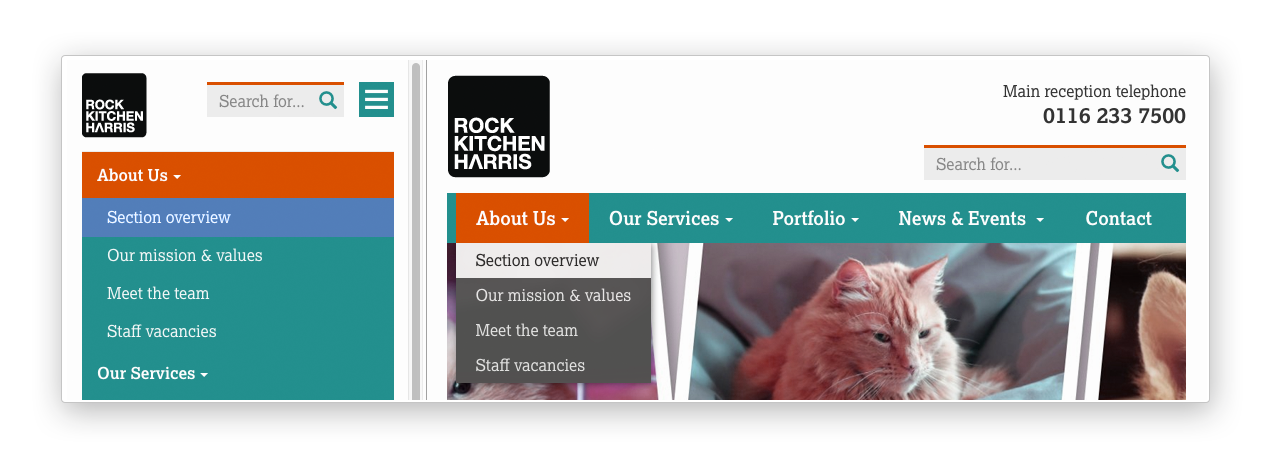
- Provides a solution to key page links becoming just 'toggles' in multi-level drop-downs
Extend the wagtailmenus.models.MenuPage model instead of the usual wagtail.wagtailcore.models.Page to create your custom page types, and gain a couple of extra fields that will allow you to configure certain pages to appear again alongside their children in multi-level menus. Use the menu tags provided, and that behaviour will remain consistent in all menus throughout your site.
No more adding additional pages into the tree. No more hard-coding additional links into templates, or resorting to javascript hacks.
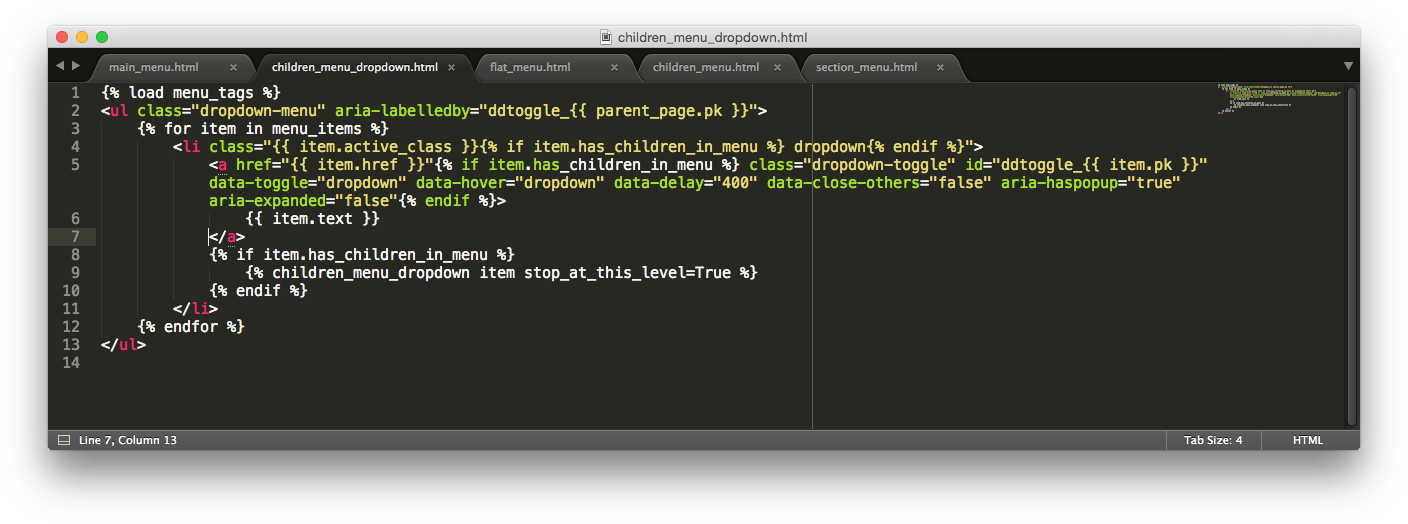
- Provides templates and template tags to render menus consistently
Each tag comes with a default template that's designed to be fully accessible and compatible with Bootstrap 3. Limiting any project to a set of pre-defined templates would be silly though, which is why every template tag allows you to render menus using a template of your choosing. You can also override the templates in the same way as any other Django project... by putting templates of the same name into a preferred location.
-
Install the package using pip:
pip install wagtailmenus. -
Add
wagtail.contrib.modeladmintoINSTALLED_APPSin your project settings, if it's not there already. -
Add
wagtailmenustoINSTALLED_APPSin your project settings. -
Add
wagtailmenus.context_processors.wagtailmenusto thecontext_processorslist in yourTEMPLATESsetting. The setting should look something like this:TEMPLATES = [ { 'BACKEND': 'django.template.backends.django.DjangoTemplates', ' DIRS': [ os.path.join(PROJECT_ROOT, 'templates'), ], 'APP_DIRS': True, 'OPTIONS': { 'context_processors': [ 'django.contrib.auth.context_processors.auth', 'django.template.context_processors.debug', 'django.template.context_processors.i18n', 'django.template.context_processors.media', 'django.template.context_processors.request', 'django.template.context_processors.static', 'django.template.context_processors.tz', 'django.contrib.messages.context_processors.messages', 'wagtail.contrib.settings.context_processors.settings', 'wagtailmenus.context_processors.wagtailmenus', ], }, }, ]
-
Run
python manage.py migrate wagtailmenusto set up the initial database tables.
While wagtailmenus' menu tags will work with your existing page tree and page types, to access some of the app's more powerful features (e.g. item repetition, programmatic manipulation of sub-menu items), you'll likely want to use the MenuPage model as a base for some of your page-type models.
- In any app that defines a new page-type model, open the models file and add
MenuPageto your imports with:from wagtailmenus.models import MenuPage - For any page-types you'd like to become
MenuPagepages, simply sub-class theMenuPagemodel class instead of the defaultwagtail.wagtailcore.models.Page. - Run
python manage.py makemigrationsto create migrations for the apps you've updated. - Run
python manage.py migrateto add apply those migrations.
- Defining your main menu in the CMS
- Using the
{% main_menu %}tag - Defining flat menus in the CMS
- Using the
{% flat_menu %}tag - Using the
{% section_menu %}tag - Using the
{% children_menu %}tag - Using the
{% sub_menu %}tag - Writing your own menu templates
- Repetition of selected pages in sub-menus with
MenuPage - Specific' page instances and performance
- Manipulating sub-menu items for specific page types
- Overriding default behaviour with settings
- Log into the Wagtail CMS for your project (as a superuser).
- Click on Settings in the side menu to access the options in there, then select Main menu.
- You'll be automatically redirected to the an edit page for the current site (or the 'default' site, if the current site cannot be identified). For multi-site projects, a 'site switcher' will appear in the top right, allowing you to edit main menus for each site.
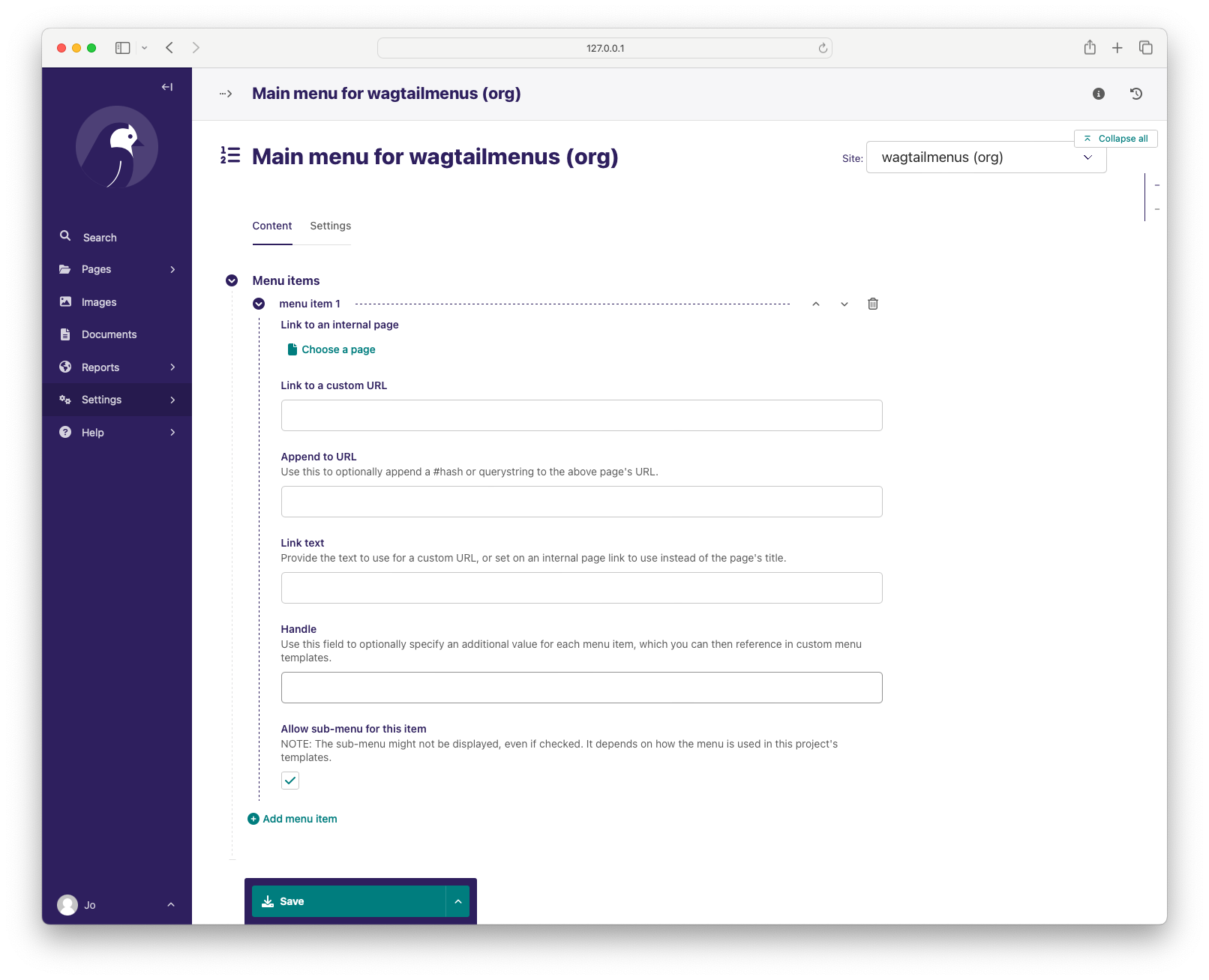
- Use the MENU ITEMS inline panel to define the root-level items. If you wish, you can use the
handlefield to specify an additional value for each item, which you'll be able to access in a custom main menu template. NOTE: Pages need to be published, and have theshow_in_menuscheckbox checked in order to appear in menus (look under the Promote tab when editing pages). - At the very bottom of the form, you'll find the ADVANCED SETTINGS panel, which is collapsed by default. Click on the arrow icon next to the heading to reveal the Maximum levels and Specific usage fields, which you can alter to fit the needs of your project. For more information about specific usage, take a look at the Performance and use of 'specific' pages section below.
- Save your changes to apply them to your site.
- Log into the Wagtail CMS for your project (as a superuser).
- Click on
Settingsin the side menu to access the options in there, then selectFlat menusto access the menu list page. - Click the button at the top of the page to add a flat menu for your site (or one for each of your sites if you are running a multi-site setup).
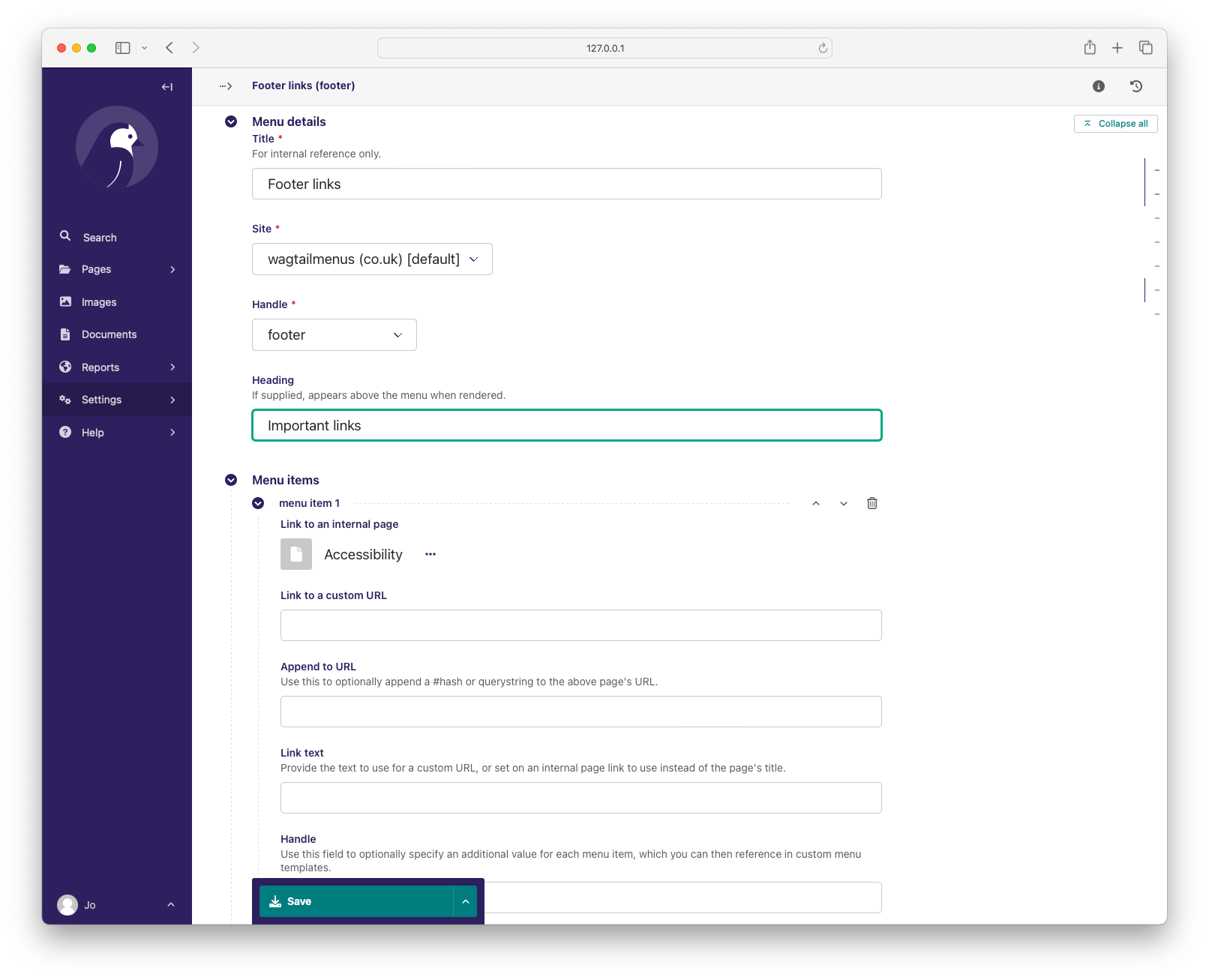
- Fill out the form, choosing a 'unique for site'
handleto reference in your templates. If you know in advance whathandlevalues you'd like to use in your project, and would rather select from a set of pre-defined choices when managing flat menus, take a look at theWAGTAILMENUS_FLAT_MENUS_HANDLE_CHOICESsetting in the overriding default behaviour with settings section. - Use the MENU ITEMS inline panel to define the links you want the menu to have. If you wish, you can use the
handlefield to specify an additional value for each item, which you'll be able to access in a custom flat menu template. NOTE: Pages need to be published and have theshow_in_menuscheckbox checked in order to appear in menus (look under the Promote tab when editing pages). - At the very bottom of the form, you'll find the ADVANCED SETTINGS panel, which is collapsed by default. Click on the arrow icon next to the heading to reveal the Maximum levels and Specific usage fields, which you can alter to fit the needs of your project. For more information about specific usage, take a look at the Performance and use of 'specific' pages section below.
- Save your changes to apply them to your site.
All of the flat menus created for a project will appear in the menu list page (from step 2, above) making it easy to find, update, copy or delete your menus later. As soon as you create menus for more than one site in a multi-site project, the listing page will give you additional information and filters to help manage your menus, like so: 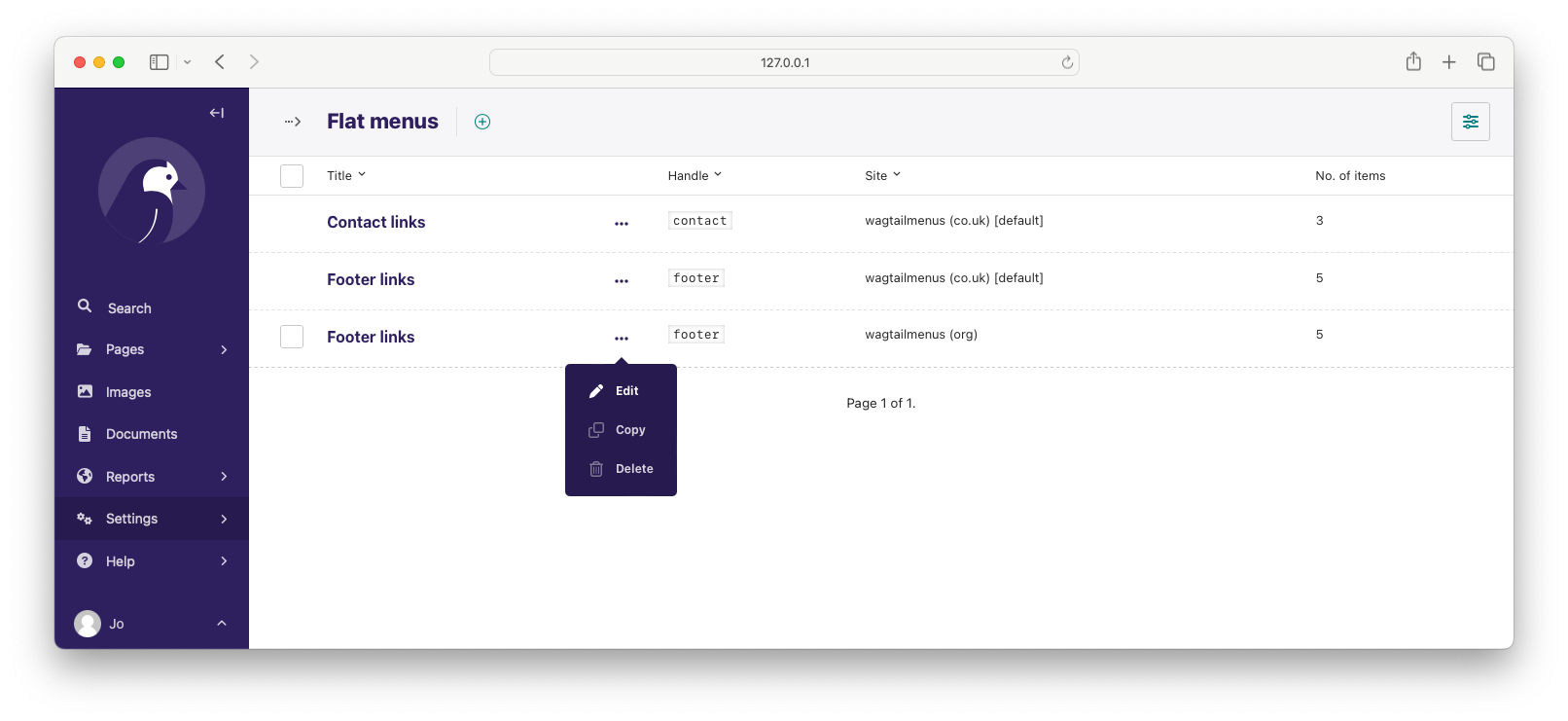
The {% main_menu %} tag allows you to display the MainMenu defined for the current site in your Wagtail project, with CSS classes automatically applied to each item to indicate the current page or ancestors of the current page. It also does a few sensible things, like never adding the 'ancestor' class for a homepage link, or outputting children for it.
- In whichever template you want your main menu to appear, load
menu_tagsusing{% load menu_tags %}. - Add
{% main_menu %}to your template, where you want the menu to appear.
Optional params for {% main_menu %}
show_multiple_levels(default:True): Addingshow_multiple_levels=Falseto the tag in your template is essentially a more descriptive way of addingmax_levelsto1.max_levels(default:None): Provide an integer value to override themax_levelsfield value defined on your menu. Controls how many levels should be rendered (whenshow_multiple_levelsisTrue).use_specific(default:None): Provide a value to override theuse_specificfield value defined on your main menu. Allows you to control how wagtailmenus makes use ofPageQuerySet.specific()andPage.specificwhen rendering the menu, helping you to find the right balance between functionality and performance for your project. Take a look at the Performance and use of 'specific' pages section below to find out more.allow_repeating_parents(default:True): Repetition-related settings on your pages are respected by default, but you can addallow_repeating_parents=Falseto ignore them, and not repeat any pages in sub-menus when rendering multiple levels.apply_active_classes(default:True): The tag will attempt to add 'active' and 'ancestor' CSS classes to the menu items (where applicable) to indicate the active page and ancestors of that page. To disable this behaviour, addapply_active_classes=Falseto the tag in your template. You can change the CSS classes used by addingWAGTAILMENUS_ACTIVE_CLASSandWAGTAILMENUS_ACTIVE_ANCESTOR_CLASSsettings to your project's settings module.template(default:'menus/main_menu.html'): Lets you render the menu to a template of your choosing. You can also name an alternative template to be used by default, by adding aWAGTAILMENUS_DEFAULT_MAIN_MENU_TEMPLATEsetting to your project's settings module.sub_menu_template(default:'menus/sub_menu.html'): Lets you specify a template to be used for rendering sub menus. All subsequent calls to{% sub_menu %}within the context of the section menu will use this template unless overridden by providing atemplatevalue to{% sub_menu %}in a menu template. You can specify an alternative default template by adding aWAGTAILMENUS_DEFAULT_SUB_MENU_TEMPLATEsetting to your project's settings module.
- In whichever template you want your menu to appear, load
menu_tagsusing{% load menu_tags %}. - Add
{% flat_menu 'menu-handle' %}to your template, where you want the menu to appear (where 'menu-handle' is the unique handle for the menu you added).
Optional params for {% flat_menu %}
show_menu_heading(default:True): Passed through to the template used for rendering, where it can be used to conditionally display a heading above the menu.show_multiple_levels(default:True): Flat menus are designed for outputting simple, flat lists of links. But, you can alter themax_levelsfield value on yourFlatMenuobjects in the CMS to enable multi-level output for specific menus. If you want to absolutely never show anything but theMenuItemobjects defined on the menu, you can override this behaviour by addingshow_multiple_levels=Falseto the tag in your template.max_levels(default:None): Provide an integer value to override themax_levelsfield value defined on your menu. Controls how many levels should be rendered (whenshow_multiple_levelsisTrue).use_specific(default:None): Provide a value to override theuse_specificfield value defined on your main menu. Allows you to control how wagtailmenus makes use ofPageQuerySet.specific()andPage.specificwhen rendering the menu, helping you to find the right balance between functionality and performance for your project. Take a look at the Performance and use of 'specific' pages section below to find out more.apply_active_classes(default:False): Unlikemain_menuandsection_menu,flat_menuwill NOT attempt to add 'active' and 'ancestor' classes to the menu items by default, as this is often not useful. You can override this by addingapply_active_classes=trueto the tag in your template.allow_repeating_parents(default:True): Repetition-related settings on your pages are respected by default, but you can addallow_repeating_parents=Falseto ignore them, and not repeat any pages in sub-menus when rendering. Please note that using this option will only have an effect ifuse_specifichas a value of1or higher.fall_back_to_default_site_menus(default:False): When using the{% flat_menu %}tag, wagtailmenus identifies the 'current site', and attempts to find a menu for that site, matching thehandleprovided. By default, if no menu is found for the current site, nothing is rendered. However, iffall_back_to_default_site_menus=Trueis provided, wagtailmenus will search search the 'default' site (In the CMS, this will be the site with the 'Is default site' checkbox ticked) for a menu with the same handle, and use that instead before giving up. The default behaviour can be altered by addingWAGTAILMENUS_FLAT_MENUS_FALL_BACK_TO_DEFAULT_SITE_MENUS=Trueto your project's settings module.template(default:'menus/flat_menu.html'): Lets you render the menu to a template of your choosing. You can also name an alternative template to be used by default, by adding aWAGTAILMENUS_DEFAULT_FLAT_MENU_TEMPLATEsetting to your project's settings module.sub_menu_template(default:'menus/sub_menu.html'): Lets you specify a template to be used for rendering sub menus (if enabled usingshow_multiple_levels). All subsequent calls to{% sub_menu %}within the context of the flat menu will use this template unless overridden by providing atemplatevalue to{% sub_menu %}in a menu template. You can specify an alternative default template by adding aWAGTAILMENUS_DEFAULT_SUB_MENU_TEMPLATEsetting to your project's settings module.
The {% section_menu %} tag allows you to display a context-aware, page-driven menu in your project's templates, with CSS classes automatically applied to each item to indicate the active page or ancestors of the active page.
- In whichever template you want the section menu to appear, load
menu_tagsusing{% load menu_tags %}. - Add
{% section_menu %}to your template, where you want the menu to appear.
Optional params for {% section_menu %}
show_section_root(default:True): Passed through to the template used for rendering, where it can be used to conditionally display the root page of the current section.max_levels(default:2): Lets you control how many levels of pages should be rendered (the section root page does not count as a level, just the first set of pages below it). If you only want to display the first level of pages below the section root page (whether pages linked to have children or not), addmax_levels=1to the tag in your template. You can display additional levels by providing a higher value.use_specific(default:1): Allows you to control how wagtailmenus makes use ofPageQuerySet.specific()andPage.specificwhen rendering the menu, helping you to find the right balance between functionality and performance. Take a look at the Performance and use of 'specific' pages section below for a description of the option values supported. The default value can be altered by adding aWAGTAILMENUS_DEFAULT_SECTION_MENU_USE_SPECIFICsetting to your project's settings.show_multiple_levels(default:True): Addingshow_multiple_levels=Falseto the tag in your template essentially overridesmax_levelsto1. It's just a little more descriptive.apply_active_classes(default:True): The tag will add 'active' and 'ancestor' classes to the menu items where applicable, to indicate the active page and ancestors of that page. To disable this behaviour, addapply_active_classes=Falseto the tag in your template.allow_repeating_parents(default:True): Repetition-related settings on your pages are respected by default, but you can addallow_repeating_parents=Falseto ignore them, and not repeat any pages in sub-menus when rendering. Please note that using this option will only have an effect ifuse_specifichas a value of1or higher.template(default:'menus/section_menu.html'): Lets you render the menu to a template of your choosing. You can also name an alternative template to be used by default, by adding aWAGTAILMENUS_DEFAULT_SECTION_MENU_TEMPLATEsetting to your project's settings module.sub_menu_template(default:'menus/sub_menu.html'): Lets you specify a template to be used for rendering sub menus. All subsequent calls to{% sub_menu %}within the context of the section menu will use this template unless overridden by providing atemplatevalue to{% sub_menu %}in a menu template. You can specify an alternative default template by adding aWAGTAILMENUS_DEFAULT_SUB_MENU_TEMPLATEsetting to your project's settings module.
The {% children_menu %} tag can be used in page templates to display a menu of children of the current page. You can also use the parent_page argument to show children of a different page.
- In whichever template you want the menu to appear, load
menu_tagsusing{% load menu_tags %}. - Use the
{% children_menu %}tag where you want the menu to appear.
Optional params for {% children_menu %}
parent_page: The tag will automatically pick upselffrom the context to render the children for the active page, but you render a children menu for a different page, if desired. To do so, addparent_page=page_objto the tag in your template, wherepage_objis thePageinstance you wish to display children for.max_levels(default:1): Lets you control how many levels of pages should be rendered. For example, if you want to display the direct children pages and their children too, addmax_levels=2to the tag in your template.use_specific(default:1): Allows you to control how wagtailmenus makes use ofPageQuerySet.specific()andPage.specificwhen rendering the menu, helping you to find the right balance between functionality and performance. Take a look at the Performance and use of 'specific' pages section below for a description of the option values supported. The default value can be altered by adding aWAGTAILMENUS_DEFAULT_CHILDREN_MENU_USE_SPECIFICsetting to your project's settings.apply_active_classes(default:False): Unlikemain_menuandsection_menu,children_menuwill NOT attempt to add 'active' and 'ancestor' classes to the menu items by default, as this is often not useful. You can override this by addingapply_active_classes=trueto the tag in your template.allow_repeating_parents(default:True): Repetition-related settings on your pages are respected by default, but you can addallow_repeating_parents=Falseto ignore them, and not repeat any pages in sub-menus when rendering. Please note that using this option will only have an effect ifuse_specifichas a value of1or higher.template(default:'menus/children_menu.html'): Lets you render the menu to a template of your choosing. You can also name an alternative template to be used by default, by adding aWAGTAILMENUS_DEFAULT_CHILDREN_MENU_TEMPLATEsetting to your project's settings module.sub_menu_template(default:'menus/sub_menu.html'): Lets you specify a template to be used for rendering sub menus. All subsequent calls to{% sub_menu %}within the context of the section menu will use this template unless overridden by providing atemplatevalue to{% sub_menu %}in a menu template. You can specify an alternative default template by adding aWAGTAILMENUS_DEFAULT_SUB_MENU_TEMPLATEsetting to your project's settings module.
The {% sub_menu %} tag is used within menu templates to render additional levels of pages within a menu. It's designed to pick up on variables added to the context by the other menu tags, and so can behave a little unpredictably if called directly, without those context variables having been set. It requires only one parameter to work, which is menuitem_or_page, which can either be an instance of MainMenuItem, FlatMenuItem, or Page.
Optional params for {% sub_menu %}
stop_at_this_level: By default, the tag will figure out whether further levels should be rendered or not, depending on what you supplied asmax_levelsto the original menu tag. However, you can override that behaviour by adding eitherstop_at_this_level=Trueorstop_at_this_level=Falseto the tag in your custom menu template.apply_active_classes: By default, the tag will inherit this behaviour from whatever was specified for the original menu tag. However, you can override that behaviour by adding eitherapply_active_classes=Trueorapply_active_classes=Falseto the tag in your custom menu template.allow_repeating_parents: By default, the tag will inherit this behaviour from whatever was specified for the original menu tag. However, you can override that behaviour by adding eitherallow_repeating_parents=Trueorallow_repeating_parents=Falseto the tag in your custom menu template.template(default:'menus/sub_menu.html'): Lets you render the menu to a template of your choosing. You can also name an alternative template to be used by default, by adding aWAGTAILMENUS_DEFAULT_SUB_MENU_TEMPLATEsetting to your project's settings module.use_specific: By default, the tag will inherit this behaviour from whatever was specified for the original menu tag. However, the value can be overridden by passing this option to the {% sub_menu %} tag in your custom menu template. Take a look at the Performance and use of 'specific' pages section below for a description of the option values supported.
The following variables are added to the context by all of the above tags, which you can make use of in your templates:
menu_items: A list ofMenuItemorPageobjects with additional attributes added to help render menu items for the current level.current_level: The current level being rendered. This starts at1for the initial template tag call, then increments each timesub_menuis called recursively in rendering that same menu.current_template: The name of the template currently being used for rendering. This is most useful when rendering asub_menutemplate that callssub_menurecursively, and you wish to use the same template for all recursions.max_levels: The maximum number of levels that should be rendered, as determined by the originalmain_menu,section_menu,flat_menuorchildren_menutag call.allow_repeating_parents: A boolean indicating whetherMenuPagefields should be respected when rendering further menu levels.apply_active_classes: A boolean indicating whethersub_menutags should attempt to add 'active' and 'ancestor' classes to menu items when rendering further menu levels.
Each item in menu_items has the following attributes:
href: The URL that the menu item should link to.text: The text that should be used for the menu item.active_class: A class name to indicate the 'active' state of the menu item. The value will be 'active' if linking to the current page, or 'ancestor' if linking to one of it's ancestors.has_children_in_menu: A boolean indicating whether the menu item has children that should be output as a sub-menu.
Let's say you have an About Us section on your site. The top-level page has content that is just as important as that on the pages below it (e.g. "Meet the team", "Our mission and values", "Staff vacancies"). Because of this, you'd like visitors to be able to access the root page as easily as those pages. But, your site uses drop-down navigation, and the About Us link no longer takes you to that page when clicked... it simply acts as a toggle for hiding and showing its sub-pages:
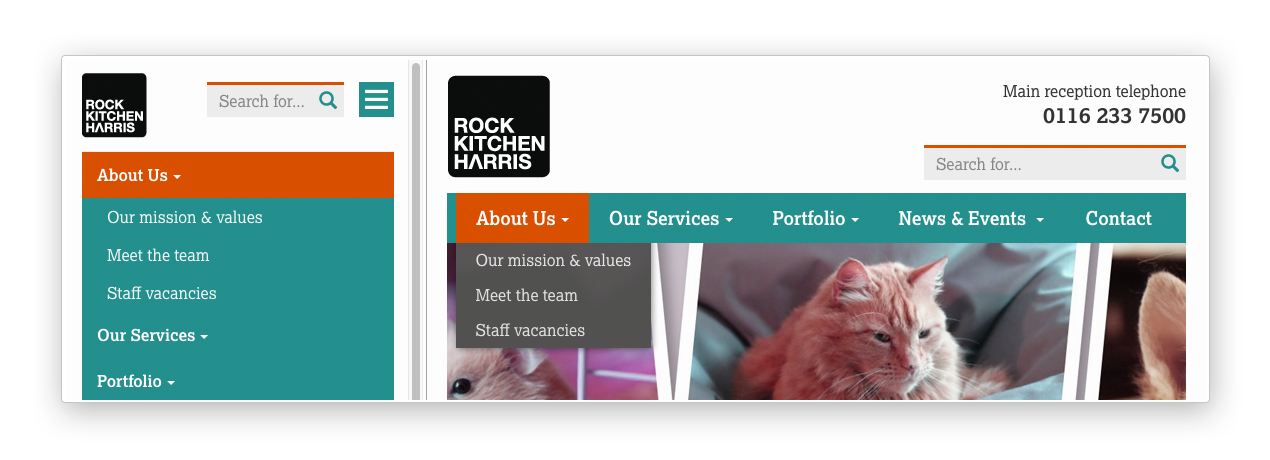
Presuming the About Us page extends wagtailmenus.models.MenuPage:
- Edit that page in the CMS, and click on the
Settingstab. - Uncollapse the ADVANCED MENU BEHAVIOUR panel by clicking the downward-pointing arrow next to the panel's label.
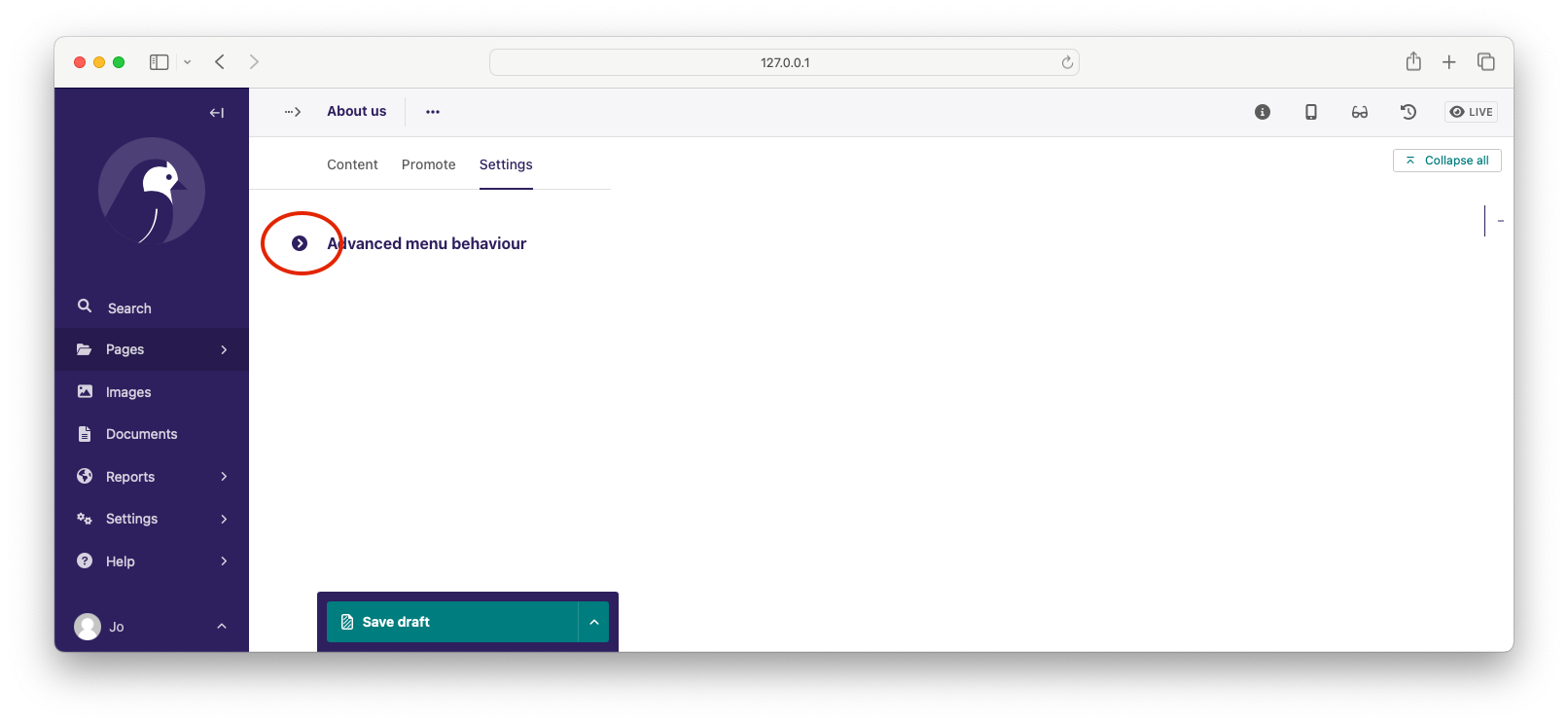
- Tick the Repeat in sub-navigation checkbox that appears, and publish your changes.


Now, wherever the children of the About Us page are output (using one of the above menu tags), an additional link will appear alongside them, allowing the that page to be accessed more easily. In the example above, you'll see "Section overview" has been added to the a Repeated item link text field. With this set, the link text for the repeated item should read "Section overview", instead of just repeating the page's title, like so:
The menu tags do some extra work to make sure both links are never assigned the 'active' class. When on the 'About Us' page, the tags will treat the repeated item as the 'active' page, and just assign the 'ancestor' class to the original, so that the behaviour/styling is consistent with other page links rendered at that level.
Wagtail makes use of a something known in Django as 'multi-table inheritance'. In simple terms, this means that when you create an instance of a custom page type model, the data is saved in two different database tables. All of the standard fields from Wagtail's Page model are stored in one table, and any additional fields from your custom model are saved in another one. It also means that, in order for Django to return 'specific' page type instances (e.g. an EventPage), it needs to fetch and join data from multiple tables; which has a negative effect on performance.
Menu generation is particularly resource intensive, because a menu needs to know a lot of data about a lot of pages (mostly in order to generate URLs correctly for each page). Add a need for 'specific' page instances to that mix (perhaps you need to access mult-lingual field data, or custom fields for outputing additional text, CSS class names or images), and that intensity is understandably greater, as the data will likely be spread over many tables (depending on how many custom page types you are using), needing lots of database joins to put everything together.
Because every project has different needs, wagtailmenus give you some fine grained control over how 'specific' pages should be used in your menus. When defining a MainMenu or FlatMenu in the CMS, the Specfic page use field allows you to choose one of the following options:
OFF(value:0): Use only standardPagemodel data and methods, and make the minimum number of database methods when rendering. If you aren't using wagtailmenu'sMenuPagemodel in your project, don't need to access any custom page model fields in you menu templates, and aren't overridingget_url_parts()or otherPagemethods concerned with URL generation, you should use this option for optimal performance.AUTO(value:1): Only use specific pages when needed forMenuPageoperations (e.g. for 'repeating menu item' behaviour, and manipulation of sub-menu items viahas_submenu_items()andmodify_submenu_items()methods).TOP_LEVEL(value:2): AsAUTO, but will always return 'specific' page instances for your top-level menu items (The pages selected as actual menu items). This is useful if you need to access custom page field values in your menu template for top-level items only (e.g. to add tooltip, help text, section colours or images)ALWAYS(value:3): Fetch and return specific page instances for all pages using as few database queries as possible, so that custom page-type data and methods can be accesssed in your menu template. You'll likely need to use this for multilingual sites (multilingual field values won't be accesible from vanillaPageobjects, you need the page instances to access those), or if you have models that overrideget_url_parts()or otherPagemethods concerned with generating page URLs.
All menu tags accept a use_specific option, allowing you to override any default settings, or the settings applied via the CMS to individual MainMenu and FlatMenu objects. As a value, you can pass in the integer value of any of the above options, e.g. {% main_menu use_specific=2 %}, or the following variables should be available in the context for you to use instead:
USE_SPECIFIC_OFF(value:0) e.g.{% main_menu use_specific=USE_SPECIFIC_OFF %}USE_SPECIFIC_AUTO(value1) e.g.{% main_menu use_specific=USE_SPECIFIC_AUTO %}USE_SPECIFIC_TOP_LEVEL(value2) e.g.{% main_menu use_specific=USE_SPECIFIC_TOP_LEVEL %}USE_SPECIFIC_ALWAYS(value3) e.g.{% main_menu use_specific=USE_SPECIFIC_ALWAYS %}
If you find yourself needing further control over the items that appear in your menus (perhaps you need to add further items for specific pages, or remove some under certain circumstances), you will likely find the modify_submenu_items() (added in 1.3) and has_submenu_items() (added in 1.4) methods on the MenuPage model of interest.
For example, if you had a ContactPage model extended MenuPage, and in main menus, you wanted to add some additional links below each ContactPage - You could achieve that by overriding the modify_submenu_items() and has_submenu_items() methods like so:
from wagtailmenus.models import MenuPage


class ContactPage(MenuPage):
    ...

    def modify_submenu_items(
        self, menu_items, current_page, current_ancestor_ids, current_site,
        allow_repeating_parents, apply_active_classes, original_menu_tag,
        menu_instance=None
    ):
        # Apply default modifications first of all
        menu_items = super(ContactPage, self).modify_submenu_items(
            menu_items, current_page, current_ancestor_ids, current_site,
            allow_repeating_parents, apply_active_classes, original_menu_tag,
            menu_instance)
        """
        If rendering a 'main_menu', add some additional menu items to the end
        of the list that link to various anchored sections on the same page
        """
        if original_menu_tag == 'main_menu':
            base_url = self.relative_url(current_site)
            """
            Additional menu items can be objects with the necessary attributes,
            or simple dictionaries. `href` is used for the link URL, and `text`
            is the text displayed for each link. Below, I've also used
            `active_class` to add some additional CSS classes to these items,
            so that I can target them with additional CSS
            """
            menu_items.extend((
                {
                    'text': 'Get support',
                    'href': base_url + '#support',
                    'active_class': 'support',
                },
                {
                    'text': 'Speak to someone',
                    'href': base_url + '#call',
                    'active_class': 'call',
                },
                {
                    'text': 'Map & directions',
                    'href': base_url + '#map',
                    'active_class': 'map',
                },
            ))
        return menu_items

    def has_submenu_items(self, current_page, allow_repeating_parents,
    		          original_menu_tag, menu_instance=None):
        """
        Because `modify_submenu_items` is being used to add additional menu
        items, we need to indicate in menu templates that `ContactPage` objects
        do have submenu items in main menus, even if they don't have children
        pages.
        """
        if original_menu_tag == 'main_menu':
            return True
        return super(ContactPage, self).has_submenu_items(
            current_page, allow_repeating_parents, original_menu_tag,
            menu_instance)
These change would result in the following HTML output when rendering a ContactPage instance in a main menu:
<li class=" dropdown">
<a href="/contact-us/" class="dropdown-toggle" id="ddtoggle_18" data-toggle="dropdown" aria-haspopup="true" aria-expanded="false">Contact us <span class="caret"></span></a>
<ul class="dropdown-menu" aria-labelledby="ddtoggle_18">
<li class="support"><a href="/contact-us/#support">Get support</a></li>
<li class="call"><a href="/contact-us/#call">Speak to someone</a></li>
<li class="map"><a href="/contact-us/#map">Map & directions</a></li>
</ul>
</li>You can also modify sub-menu items based on field values for specific instances, rather than doing the same for every page of the same type. Here's another example:
from django.db import models
from wagtailmenus.models import MenuPage

class SectionRootPage(MenuPage):
    add_submenu_item_for_news = models.BooleanField(default=False)

    def modify_submenu_items(
        self, menu_items, current_page, current_ancestor_ids, current_site,
        allow_repeating_parents, apply_active_classes, original_menu_tag='',
        menu_instance=None
    ):
        menu_items = super(SectionRootPage,self).modify_menu_items(
            menu_items, current_page, current_ancestor_ids, current_site,
            allow_repeating_parents, apply_active_classes, original_menu_tag,
            menu_insance)

        if self.add_submenu_item_for_news:
            menu_items.append({
                'href': '/news/',
                'text': 'Read the news',
                'active_class': 'news-link',
            })
        return menu_items

    def has_submenu_items(self, current_page, allow_repeating_parents,
                          original_menu_tag, menu_instance=None):

        if self.add_submenu_item_for_news:
            return True
        return super(SectionRootPage, self).has_submenu_items(
            current_page, allow_repeating_parents, original_menu_tag,
menu_instance)You can override some of wagtailmenus' default behaviour by adding one of more of the following to your project's settings:
WAGTAILMENUS_FLAT_MENUS_HANDLE_CHOICES(default:None): Can be set to a tuple of choices in the standard Django choices format to change theFlatMenu.handletext field into a select field with fixed choices when adding, editing or copying aFlatMenuin Wagtail's admin area.WAGTAILMENUS_ADD_EDITOR_OVERRIDE_STYLES(default:True): By default, wagtailmenus adds some additional styles to improve the readability of the forms on the menu management pages in the Wagtail admin area. If for some reason you don't want to override any styles, you can disable this behaviour by setting toFalse.WAGTAILMENUS_ACTIVE_CLASS(default:'active'): The class added to menu items for the currently active page (when using a menu template withapply_active_classes=True)WAGTAILMENUS_ACTIVE_ANCESTOR_CLASS(default:'ancestor'): The class added to any menu items for pages that are ancestors of the currently active page (when using a menu template withapply_active_classes=True)WAGTAILMENUS_MAINMENU_MENU_ICON(default:'list-ol'): Use this to change the icon used to representMainMenuin the Wagtail admin area.WAGTAILMENUS_FLATMENU_MENU_ICON(default:'list-ol'): Use this to change the icon used to representFlatMenuin the Wagtail admin area.WAGTAILMENUS_SECTION_ROOT_DEPTH(default:3): Use this to specify the 'depth' value of a project's 'section root' pages. For most Wagtail projects, this should be3(Root page = 1, Home page = 2), but it may well differ, depending on the needs of the project.WAGTAILMENUS_GUESS_TREE_POSITION_FROM_PATH(default:True): When not using wagtail's routing/serving mechanism to serve page objects, wagtailmenus can use the request path to attempt to identify a 'current' page, 'section root' page, allowing{% section_menu %}and active item highlighting to work. If this functionality is not required for your project, you can disable it by setting this value toFalse.WAGTAILMENUS_FLAT_MENUS_FALL_BACK_TO_DEFAULT_SITE_MENUS(default:False): The default value used forfall_back_to_default_site_menusoption of the{% flat_menu %}tag when a parameter value isn't provided.WAGTAILMENUS_DEFAULT_MAIN_MENU_TEMPLATE(default:'menus/main_menu.html'): The name of the template used for rendering by the{% main_menu %}tag when atemplateparameter value isn't provided.WAGTAILMENUS_DEFAULT_FLAT_MENU_TEMPLATE(default:'menus/flat_menu.html'): The name of the template used for rendering by the{% flat_menu %}tag when atemplateparameter value isn't provided.WAGTAILMENUS_DEFAULT_SECTION_MENU_TEMPLATE(default:'menus/section_menu.html'): The name of the template used for rendering by the{% section_menu %}tag when atemplateparameter value isn't provided.WAGTAILMENUS_DEFAULT_CHILDREN_MENU_TEMPLATE(default:'menus/children_menu.html'): The name of the template used for rendering by the{% children_menu %}tag when atemplateparameter value isn't provided.WAGTAILMENUS_DEFAULT_SUB_MENU_TEMPLATE(default:'menus/sub_menu.html'): The name of the template used for rendering by the{% sub_menu %}tag when atemplateparameter value isn't provided.WAGTAILMENUS_DEFAULT_SECTION_MENU_MAX_LEVELS(default:2): The maximum number of levels rendered by the{% section_menu %}tag when amax_levelsparameter value isn't specified.WAGTAILMENUS_DEFAULT_CHILDREN_MENU_MAX_LEVELS(default:1): The maximum number of levels rendered by the{% children_menu %}tag when amax_levelsparameter value isn't specified.WAGTAILMENUS_DEFAULT_SECTION_MENU_USE_SPECIFIC(default:USE_SPECIFIC_AUTO): Controls how 'specific' pages objects are fetched and used during rendering of the{% section_menu %}tag when theuse_specificparameter value isn't supplied.WAGTAILMENUS_DEFAULT_CHILDREN_USE_SPECIFIC(default:USE_SPECIFIC_AUTO): Controls how 'specific' pages objects are fetched and used during rendering of the{% children_menu %}tag when theuse_specificparameter value isn't supplied.
Want to contribute to wagtailmenus? We'd be happy to have you! You should start by taking a look at our contributor guidelines