
Sparrow VPS is a simplified Virtual Private Server (VPS) system designed to streamline the deployment process for web applications directly from GitHub repositories. This platform automates the containerization and deployment workflow, making it easy for developers to get their projects up and running.
The system is built on a microservices architecture, with distinct services for handling authentication, repository management, containerization, and deployment. These services work together to provide a seamless user experience.
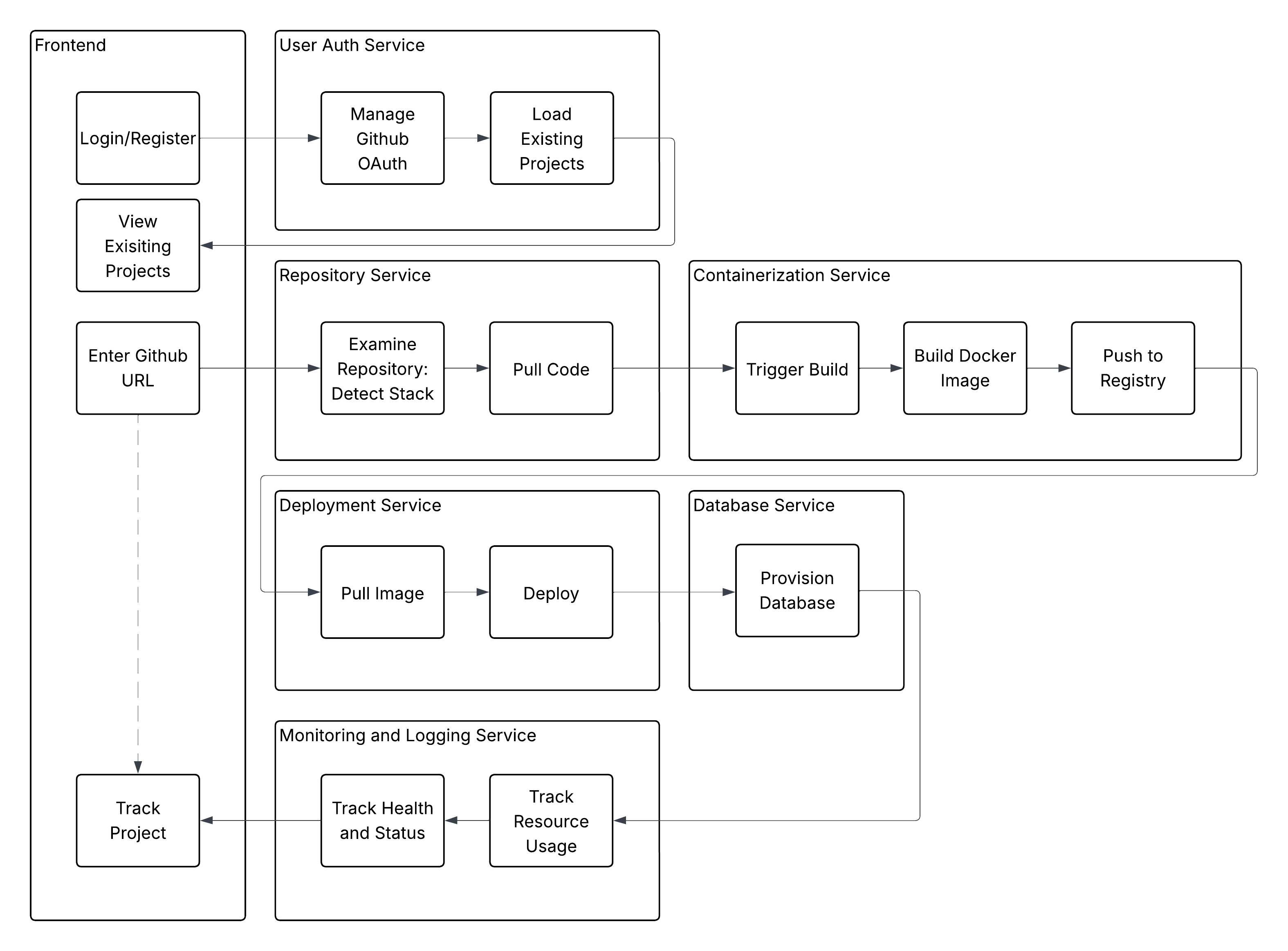
- Frontend: A Vue.js single-page application that provides the user interface for managing projects.
- OAuth Service: Handles user authentication via GitHub OAuth and manages user data.
- Repo Service: Clones and analyzes GitHub repositories to detect the project stack.
- Containerization Service: Builds Docker images from the repository code and pushes them to a container registry.
- Deployment Service: Deploys the containerized application to a Kubernetes cluster.
- Monitoring Service: Tracks the health and resource usage of deployed applications using Prometheus and Grafana.
- GitHub Integration: Log in with your GitHub account to access and deploy your repositories.
- Automated Dockerfile Generation: The system automatically generates a Dockerfile based on the detected project stack (e.g., JavaScript/Node.js, Python).
- Kubernetes Deployment: Applications are deployed as pods within a Kubernetes cluster, ensuring scalability and resilience.
- CI/CD Pipeline: Includes a Jenkinsfile for continuous integration and deployment, automating the build and push process for all microservices.
- Live Previews: Preview the generated Dockerfile before building the image.
- Project Dashboard: View and manage your deployed projects from a central dashboard.
To get the project running locally, you'll need to have Minikube and Docker installed
- Clone the repository:
git clone https://github.com/r3dacted42/sparrow-vps.git cd sparrow-vps - Configure the secrets as described in the
kubernetesREADME.md - Run the deployment script: This script will start Minikube if it isn't already running, apply the necessary Kubernetes resources and add the
sparrow-vps.localentry to/etc/hosts./start_services.sh
- Once the services are running, you can access the frontend at
http://sparrow-vps.local
- Login: Open your browser and navigate to the application URL. Log in using your GitHub account.
- Add a Project: Click on "Add Project" and provide the URL of the GitHub repository you want to deploy.
- Configure Workflow: Select the appropriate workflow for your project (e.g., JavaScript) and fill in the required details like build commands and environment variables.
- Build and Deploy: The system will clone the repository, build a Docker image, and deploy it.
- View Your Project: Once deployed, you can view your running application and manage it from the projects dashboard.


- Current deployment strategy does not allow for routing or serving static assets. A different ingress URL strategy similar to a sub-domain combined with predictable pathnames may be required.
- Docker image pushing needs bare username and password for DockerHub, which is unsafe. A better approach may be to use a registry service for the user projects.
- The database service needs to be implemented, there is no support for databases as of now.
- Better project management and logging needs to be implemented.