Instantly slim down PDFs in your browser, powered by Ghostscript.
- Python 3.9+ with
pip - Ghostscript available on your
PATH
- macOS:
brew install ghostscript - Ubuntu/Debian:
sudo apt install ghostscript - Windows: Download the latest MSI from ghostscript.com/download/gsdnld.html, install it, then add the install directory (usually
C:\Program Files\gs\gs10.x\bin) to yourPATH.
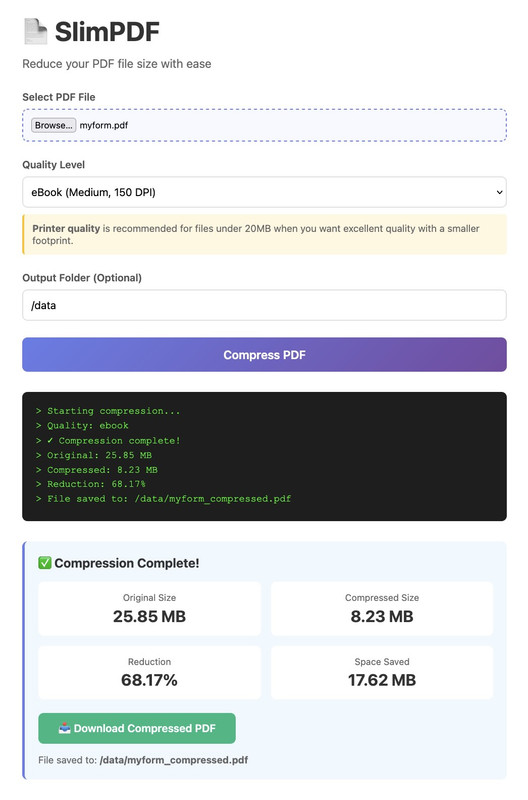
- Sleek single-page UI with live console output and result stats.
- Config-driven defaults so the browser view matches backend behavior.
- Built on Flask + Ghostscript for predictable, high-quality compression.
python3 -m venv venv
source venv/bin/activate
pip install -r requirements.txtpython main.pyThen open http://localhost:5000 in your browser.
Build the container image (installs Python, Flask, and Ghostscript):
docker build -t slim-pdf .Then run it, publishing port 5000 and (optionally) binding a host folder where compressed PDFs should be copied:
mkdir -p ./compressed-pdfs
docker run --rm -p 5000:5000 \
  -v "$(pwd)/compressed-pdfs:/data" \
  -e DEFAULT_OUTPUT_PATH=/data \
  slim-pdf
Open http://localhost:5000 and use the web UI. The temporary upload directory lives inside the container (/tmp/pdf_uploads), while the mounted /data folder receives the final compressed PDFs if you provide an output path in the UI.
Port already in use? macOS Control Center and other background apps sometimes grab port 5000. Just map a different host port while keeping the container port 5000, e.g.
docker run --rm -p 8080:5000 …and browse to http://localhost:8080.
Set the app once per shell and disable the auto reloader if you prefer a single process:
export FLASK_APP=main
flask run --no-reload
# or in PowerShell
$env:FLASK_APP = "main"; flask run --no-reloadconfig.py centralizes every tunable application parameter:
APP_NAME,APP_SUBTITLE– text displayed on the landing page.UPLOAD_FOLDER,MAX_CONTENT_LENGTH– upload handling options.DEFAULT_OUTPUT_PATH,DEFAULT_QUALITY– default form values.QUALITY_OPTIONS,QUALITY_HINT_TEMPLATE– quality selector metadata.
Adjust them or override with environment variables (UPLOAD_FOLDER, DEFAULT_OUTPUT_PATH) to fit your environment. The Flask app reads them on startup, and the UI template consumes the values so the web page stays in sync with the backend defaults.
- Upload a PDF.
- Pick a Ghostscript quality preset (Printer is the recommended balance).
- Optionally change the folder where the compressed copy is copied.
- Click Compress PDF and wait for the stats/download link to appear.
- Bundle a sample PDF and lightweight test harness for automated regression checks.
- Surface compression logs/errors in the UI toast instead of only in the console.
- Provide presets for common Ghostscript parameter combinations beyond the built-in
-dPDFSETTINGS.
