
Live Demo: https://rennyhoang.github.io/zen-type/
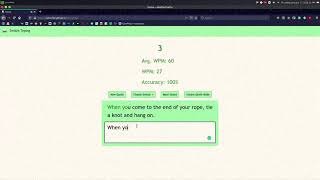
Switch Typing is an application that allows you to practice your typing speed and accuracy. WPM/Accuracy is calculated in real time as you're typing, sounds of different mechanical switches can accompany you as you're typing, and there is an instant death mode that allows you to practice your accuracy.
- Minimalistic Interface
- More than 2000 quotes using the Quotable API
- Switch between the sounds of Cherry MX Red, Blue, and Brown as you're typing
- Sounds are nearly lag free with the inclusion of howler js
- Toggle Instant Death Mode on to focus on perfecting your accuracy
-
HTML: Controls the navbar/header of the site, displays stats for the user, including a timer, Average WPM, WPM, and Accuracy. Below the stats contain buttons that allow users to interact with the page; allowing the user to grab a new quote, change/mute the sound played with keypresses, and toggle Instant death mode.
-
CSS: The theme of the site centers around green/floral white. Flex displays are used to display the column of stats and the row of buttons.
-
JS: Bootstrap is used to control dropdowns, and howler is used to play sounds (even while other sounds are still playing). In order to render a new quote, I grab the quote from Quotable and split the quote into multiple spans containing each character. This was done so that I could iterate over both the user input and the quote to compare them both. If a letter from the input is wrong, I add the class of "incorrect" to the corresponding character in the quote and likewise for correct inputs. If death mode is turned on, then a new quote is rendered with every incorrect input.
-
The timer is created using the current date and subtracting it from the date grabbed upon loading the page, and the HTML is updated using the setInterval function.
-
The Average WPM is the average of an array containing every WPM when the user is at the end of a given quote. The WPM is calculated by counting every character the user has typed, and dividing it by 5 (to get the word count) then dividing the word count by the number of minutes elapsed (timer / 60)
-
The Accuracy is calculated by marking every character inputted as correct/incorrect and dividing the number of correct characters by the number of total characters.
- Bootstrap for CSS
- howler js for sound
- Quotable's API for quotes