Firmware upgrade
- Programming utility KitraFirmwareUpgrade_VX.out builded for Artik5
- Firmware you want to program (Kitra_VX.bin)
- No application using Kitra520 serial must be running
Check the main repository if you miss something.
Warning: If your Kitra520 board has a firmware version 0, it may be unsafe to upgrade the firmware because when going into bootloader mode Kitra shutdowns Artik too fast, without allowing a safe power down. New versions have a 20 seconds delay to allow a power off, but if a process is stuck an unsafe shutdown may happend even with new firmware version. What can happend is a very rare file system corruption, so backup your data before doing any update. If that happended you can re-flash your rootfs via fastboot/usb, check reflash fedora via fastboot
-
Copy the Kitra_VX.bin and KitraFirmwareUpgrade_VX.out binaries on Artik, using ssh or ftp.
-
Run
chmod +x KitraFirmwareUpgrade_VX.out
./KitraFirmwareUpgrade_VX.out /dev/ttySAC3
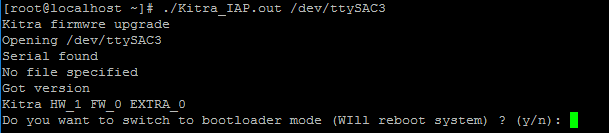
You will get the current firmware verison and will be asked to reboot the system to go into bootloader mode. Shutdown is already perfomed by the application.
-
Press 'y' and ENTER
-
Wait the reboot to finish and log into the shell again
-
Close again any application that may be using the Kitra serial
-
Run
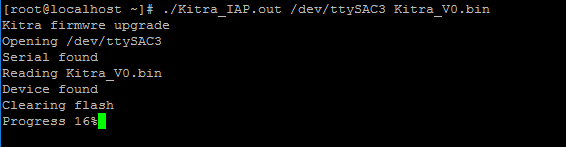
./KitraFirmwareUpgrade_VX.out /dev/ttySAC3 Kitra_VX.bin
-
If you see "Update done reboot the system and kitra" that means that the upgrade was successuful
-
Shutdown Artik
-
Power off Kitra with a long press (10s) on the user button
-
Restart Kitra with a short press (2s) on the user button
I do not hear any beep during Kitra power off
That's normal, the bootloader does not handle the buzzer.
I do not hear any beep after the update
The upgrade failed or you are still in bootloader mode.
How can i go out from bootloader mode?
Shutdown Artik, Kitra and restart Kitra with a short press on the user button. If Kitra has a valid firmware programmed it will run that, if not it will stay in bootloader mode.
Products and specifications discussed herein are for reference purposes only. All information discussed herein is provided on an "AS IS" basis, without warranties of any kind. This document and all information discussed herein remain the sole and exclusive property of Rush Up. No license of any patent, copyright, mask work, trademark or any other intellectual property right is granted by one party to the other party under this document, by implication, estoppel or other-wise. Rush Up products are not intended for use in life support, critical care, medical, safety equipment, or similar applications where product failure could result in loss of life or personal or physical harm, or any military or defense application, or any governmental procurement to which special terms or provisions may apply. For updates or additional information about Rush Up products, contact Rush Up office. All brand names, trademarks and registered trademarks belong to their respective owners. Rush Up is a trademark of FAE srl and FAE++ srl.