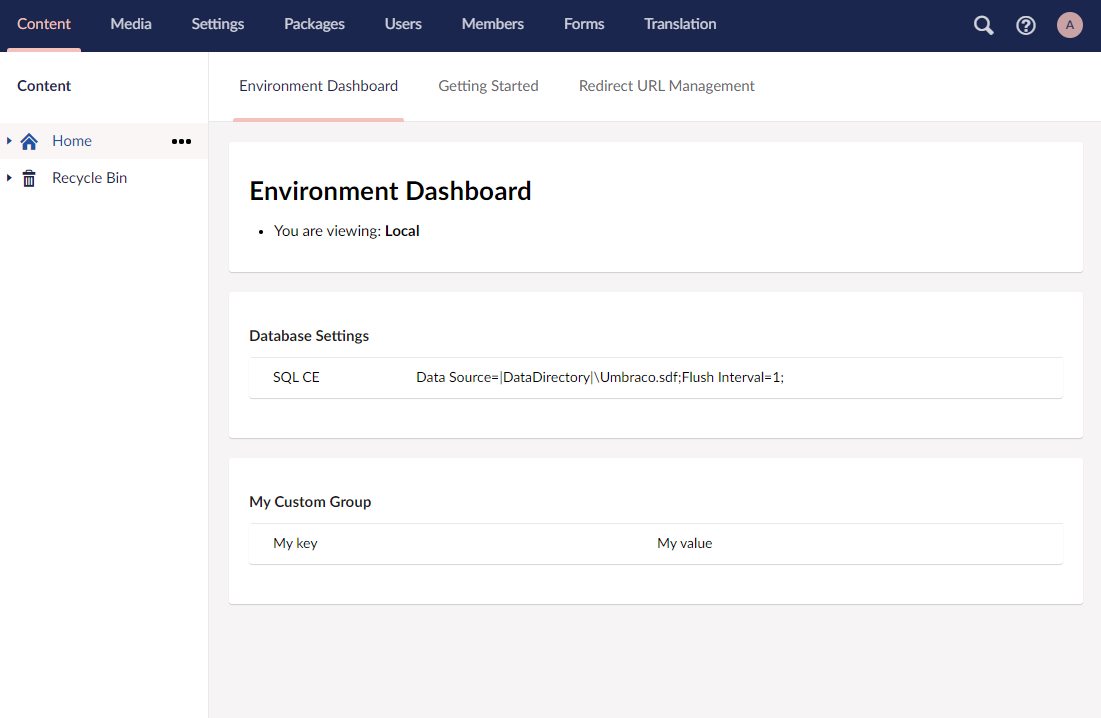
A simple dashboard for displaying environment specific information.
- Displays the environment (eg. dev, qa, uat, prod) on dashbaord and browser tab
- Ability to register any environment specific information to be displayed
- Built-in providers display server and database information
- Ability to extend using custom providers

Nuget Package: Install-Package Our.Umbraco.EnvironmentDashboard
using Our.Umbraco.EnvironmentDashboard.Core;
using Umbraco.Core.Composing;

public class MyDemoComposer : IUserComposer
{
	public void Compose(Composition composition)
	{
		composition.AddEnvironmentDashboard(environments =>
		{
			environments
				.AddEnvironment("Local", "environmentdashboard.localhost")
				.AddEnvironment("Dev", "environmentdashboard-dev.azurewebsites.net")
				.AddEnvironment("QA", "environmentdashboard-qa.azurewebsites.net")
				.AddEnvironment("UAT", "uat-mydomain.com", "environmentdashboard-uat.azurewebsites.net")
				.AddEnvironment("Prod", "mydomain.com", "environmentdashboard-prod.azurewebsites.net");
		});
	}
}
You may wish to specify environments only via an AppSetting which can be transformed by your Continuous Integration & Continuous Deployment Pipeline. Simply add the following AppSetting to your web.config.
<add key="EnvironmentDashboard" value="The Environment Name" />
using Our.Umbraco.EnvironmentDashboard.Core;
using Our.Umbraco.EnvironmentDashboard.Core.Detectors;
using Umbraco.Core.Composing;

public class MyDemoComposer : IUserComposer
{
	public void Compose(Composition composition)
	{
		// Environment can be set via the AppSetting "EnvironmentDashboard"
		composition.AddEnvironmentDashboard(new AppSettingEnvironmentDetector());
	}
}
Visually, each FactFamily is a table, while a Fact is a row in the table. A FactFamily is a collection of Fact objects. Each Fact holds a key/value pair.
- DatabaseServerFactFamilyProvider
- Shows DB server name, and DB name
- ServerInformationFactFamilyProvider
- Shows machine name, and uptime
Add the following to your Environment registration. FactFamilyProviders can be chained!
using Our.Umbraco.EnvironmentDashboard.Core.Providers;
composition.AddEnvironmentDashboard(...)
	.Append<DatabaseServerFactFamilyProvider>()
	.Append<ServerInformationFactFamilyProvider>();
You can add your own groups of information in the Environment Dashboard. Simply create a class which implements IFactFamilyProvider, and register it like the built-in providers.
Implement IFactFamilyProvider.
Note: You can use the environment parameter to return information which is different in each environment.
using Our.Umbraco.EnvironmentDashboard.Core.Detectors;
using Our.Umbraco.EnvironmentDashboard.Core.Models;
using Our.Umbraco.EnvironmentDashboard.Core.Providers;

public class MyExampleFactFamilyProvider : IFactFamilyProvider
{
	public MyExampleFactFamilyProvider()
	{ }

	public FactFamily Build(string environment)
	{
		if (environment == EnvironmentDetectorBase.UnknownEnvironment)
		{
			return new FactFamily("Environment is unknown, so we're not showing anything!");
		}

		var factFamily = new FactFamily("Umbraco Says...");

		if (environment == "Prod")
		{
			factFamily.Pairs.Add(new Fact("Hi five.", "You ROCK!"));
		}
		else
		{
			factFamily.Pairs.Add(new Fact("Sea", "Bass!"));
		}
		return factFamily;
	}
}
Regsiter the same way as the built-in providers.
composition.AddEnvironmentDashboard(...)
	.Append<MyExampleFactFamilyProvider>();
The sky is the limit. Here are some suggestions for custom providers:
- Azure Search index
- Azure Storage Account
- Relevant App Settings
In this example:
- Registering Environments by Domain
- Add built-in FactFamilyProviders
- Add custom FactFamilyProvider
using Our.Umbraco.EnvironmentDashboard.Core;
using Our.Umbraco.EnvironmentDashboard.Core.Detectors;
using Our.Umbraco.EnvironmentDashboard.Providers;
using Umbraco.Core.Composing;

public class MyDemoComposer : IUserComposer
{
	public void Compose(Composition composition)
	{
		composition.AddEnvironmentDashboard(environments =>
		{
			environments
				.AddEnvironment("Local", "environmentdashboard.localhost")
				.AddEnvironment("Dev", "environmentdashboard-dev.azurewebsites.net")
				.AddEnvironment("QA", "environmentdashboard-qa.azurewebsites.net")
				.AddEnvironment("UAT", "uat-mydomain.com", "environmentdashboard-uat.azurewebsites.net")
				.AddEnvironment("Prod", "mydomain.com", "environmentdashboard-prod.azurewebsites.net");
		})
		.Append<DatabaseServerFactFamilyProvider>()
		.Append<ServerInformationFactFamilyProvider>()
		.Append<MyExampleFactFamilyProvider>();
	}
}
You can find a demo site in the source.
samples\Application.Demo
username: admin@ry.com
password: password1234