When a user enters an URL in the browser, how does the browser fetch the desired result ?
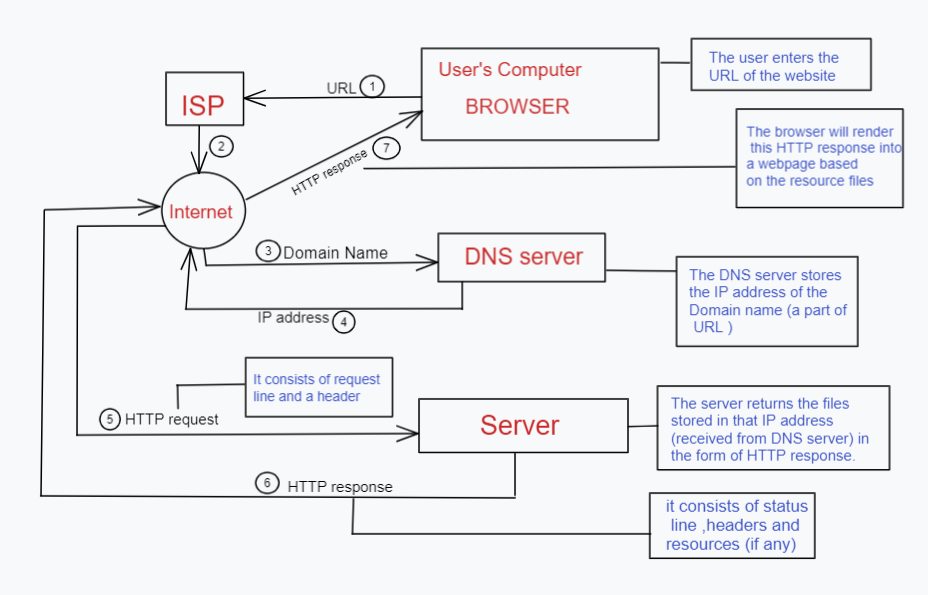
The browser sends the URL to the ISP (Internet Service Provider).It consists of a domain name and a path. The ISP looks up the DNS server for the IP address by searching based on the domain name. The DNS does not search globally; instead it starts with the Local cache, system cache , router cache,etc. Now the ISP has the IP address of the server which contains the files of the web page.
The ISP sends a HTTP request to the Server which contains the request line and the header. The request line consists of the request method, path and HTTP version. The request method tells the server what to do. Example:GET,PUT, etc. The Header line consists of a name and value separated by a colon.It is used to give additional information to the server. Example: (HTTP request)
GET /path/to/file/index.html HTTP/1.1
host:www.facebook.com …..
The server returns a HTTP response which consists of a header , status line and resources (if any).The status line consists of a status code and HTTP version. Example: (HTTP response)
200 ok , 404 files not found,etc.
a. What is the main functionality of the browser?
● The main task is to collect information from the Internet and make it accessible to users.
● Browsers can be used to visit any website. When we type a URL into a browser, the web server redirects us to that website.
● A web browser can open multiple web pages at the same time.
● Back, forward, reload, stop reload, home, and other options are available on these web browsers, making them simple and convenient to use.
b. High Level Components of a browser?
● User Interface - Every part of the browser except the web page.
● Browser engine/Render engine - Its primary job is to render HTML and other resources.Different browsers use different rendering engines: Internet Explorer uses Trident,Chrome use Blink,etc
● Networking - This layer is responsible for the HTTP request and response data.
● Javascript Interpreter - Used for javascript parsing and interpreting.
● Data storage - The browser may need to save all sorts of data locally.
● Backend UI - Used to paint the render tree (combo boxes and windows)
c. Rendering Engine and its uses:

The rendering engine will start getting the contents of the requested document from the networking layer.
Step 1: It will parse the HTML documents and then it will convert them into a DOM node in a tree structure called content tree.
Step 2:Then the engine will parse the style data( external CSS files and in style elements). The visual data of HTML and CSS both are used to create a Render tree.
The render tree contains rectangles with visual attributes like color and dimensions. The rectangles are in the right order to be displayed on the screen.
Step 3: Now it goes through a layout process. This means giving each node the exact coordinates where it should appear on the screen.
Step 4: The render tree will be traversed and each node will be painted using the UI backend layer.
d. Parser :
Parsing means analyzing and converting a program into an internal format that a runtime environment can actually run.
HTML parser can continue when a CSS file is encountered, but <script> tags without an async or defer attribute blocks rendering, and pauses parsing of HTML.When the browser encounters CSS styles, it parses the text into the CSS Object Model (CSSOM). The browser then creates a render tree from both these structures to be able to paint the content to the screen.JavaScript parsing is done during compile time or whenever the parser is invoked, such as during a call to a method.
The output tree (the "parse tree") is a tree of DOM elements and attribute nodes. DOM is short for Document Object Model. It is the object presentation of the HTML document and the interface of HTML elements to the outside world like JavaScript.
e. Script processing:
The script processor executes Javascript code to process an event. The processor can be configured by embedding Javascript in your configuration file.
f. Tree construction :

Starting at the root of the DOM tree, traverse each visible node.Some nodes are not visible (for example, script tags, meta tags, and so on) and some nodes hidden via CSS are omitted since they are not reflected in the rendered output.
For each visible node, find the appropriate matching CSSOM rules and apply them.
Display visible nodes with content and their CSS styles.
g. Order of script processing:
Any code inside the head and body of your page that is not inside a function or object will run as the page is loading — as soon as the page has loaded sufficiently to access that code.
Code Assigned to Event Handlers and Listeners.
Functions Attached to Events on Page Elements.
h. Layout and Painting:
With the render tree we can proceed to the "layout" stage.To figure out the exact size and position of each object on the page, the browser begins at the root of the render tree and traverses it.The output of the layout process is a "box model," which precisely captures the exact position and size of each element within the viewport (all of the relative measurements are converted to absolute pixels on the screen).
Finally, now that we know which nodes are visible, and their computed styles and geometry, we can pass this information to the final stage, which converts each node in the render tree to actual pixels on the screen. This step is often referred to as "painting" or "rasterizing."