🚀 Production-Ready E-commerce Platform - Automated CI/CD with semantic versioning, containerized deployment, and comprehensive testing.
This project implements a simplified online bookstore system using a modern full-stack architecture. The repository is structured as a Monorepo containing the React frontend, the layered ASP.NET Core 10 backend, and all necessary database scripts, orchestrated via Docker. CI/CD pipelines are managed with GitHub Actions.
❗ No Entity Framework Core is used. All database access is implemented using pure SQL queries executed via Dapper.
| Component | Technology | Role in Architecture |
|---|---|---|
| Frontend | React | Presentation Layer (User Interface) |
| Backend | ASP.NET Core 10 (C#) | Layered Architecture (API, Application, Domain, Infrastructure) |
| Database | PostgreSQL | Persistence Layer (Enforcing constraints & triggers) |
| Data Access | Dapper + Pure SQL | High-performance, explicit SQL-based data access |
| Orchestration | Docker / Docker Compose | Containerization for consistent setup |
| CI/CD | GitHub Actions | Build, test, and deployment pipelines |
The backend adheres to a strict Clean / Onion Architecture.
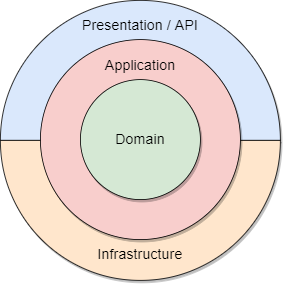
The backend is split into four distinct projects (layers) that govern control flow and data. Dependencies always point inward toward the Domain layer.
| Layer | Project Name | Type of Logic | Key Contents | Dependencies |
|---|---|---|---|---|
| Presentation | OrderProcessing.Api |
API Endpoints, HTTP handling | Controllers (BooksController, ShoppingCartController), Program.cs, appsettings.json. |
Application, Domain |
| Application | OrderProcessing.Application |
Orchestration & Business Logic | Service Interfaces & Implementations (IBookService.cs, BookService.cs), DTOs (Input/Output Models). |
Domain |
| Domain | OrderProcessing.Domain |
Core Business Logic & Contracts | Entities (Book.cs, Customer.cs), Repository Interfaces (IBookRepository.cs). |
None |
| Infrastructure | OrderProcessing.Infrastructure |
Data Access / External I/O | Repository Implementations (BookRepository.cs), SqlFiles/ (complex queries), PostgreSQL connection factories. |
Domain |
- Domain Layer: Pure business logic. No DTOs, no database references. Only entities and repository interfaces.
- Application Layer: Contains service interfaces and DTOs, because services orchestrate operations and convert entities to DTOs for the API.
- Infrastructure Layer: Concrete repository implementations, database access, and external integrations.
- Presentation Layer: Controllers and API endpoints only. Should not contain business logic or database access.
The API project wires dependencies at startup:
builder.Services.AddInfrastructure(connectionString);
builder.Services.AddApplication();- Only the API references Infrastructure and Application to register services.
- Application and Domain remain decoupled from concrete implementations.
- Controller: Receives HTTP request
/api/books/{isbn}and callsIBookService.GetByISBNAsync(isbn). - Application Service:
BookServicecallsIBookRepository.GetByISBNAsync(isbn), applies business rules, and converts theBookentity intoBookDetailsDto. - Repository:
BookRepositoryexecutes SQL via Dapper and returns the entity. - Controller Response: Returns
BookDetailsDtoas JSON to the client.
✅ Note: Entity → DTO conversion happens in the Application layer, not the controller.
order-processing-system/
├── src/
│   ├── Frontend/                          # React Application Source Code
│   │   ├── Dockerfile                     # Build instructions for the React app
│   │   └── src/                           # Components, pages, API service calls
│   │
│   ├── Backend/                           # .NET 10 Solution Projects
│   │   ├── Dockerfile                     # Build instructions for the .NET API
│   │   ├── OrderProcessing.Api/           # API Endpoints, Startup, Controllers
│   │   ├── OrderProcessing.Application/   # Business Logic, Services, DTOs
│   │   ├── OrderProcessing.Domain/        # Entities and Interfaces
│   │   └── OrderProcessing.Infrastructure/
│   │       ├── Data/                      # Repository Implementations (PostgreSQL logic)
│   │       └── SqlFiles/                  # Complex, externalized SQL queries
│   │
│   └── Database/                          # PostgreSQL Setup Scripts
│       ├── 1_schema_creation.sql          # All CREATE TABLE statements
│       ├── 2_triggers.sql                 # Stock replenishment, Negative stock protection
│       └── 3_sample_data.sql              # Data for demonstration
│
├── .github/workflows/                     # GitHub Actions pipelines
│   ├── dev-tests.yml                      # Tests on dev branch and PRs
│   ├── release.yml                        # Production validation on main
│   ├── pr-title-check.yml                  # Validates PR title format
│   └── release.yml                         # Automated releases on main
│
├── package.json                           # Semantic release configuration
├── CHANGELOG.md                           # Auto-generated changelog
├── package.json                           # Semantic release dependencies
├── docs/                                     # Documentation
│   ├── api/                               # API documentation and error handling
│   ├── architecture/                      # Clean Architecture guidelines
│   ├── project/                           # Project setup and architecture notes
│   └── workflow/                          # Git workflow and branching
├── COMMIT_GUIDE.md                        # Commit message guidelines
├── RELEASE_GUIDE.md                       # Release process and versioning
├── linkedin_post_final.md                 # LinkedIn post template
├── Project_DB_Fall2025.pdf                # TA instructions and project task description
├── docker-compose.yml                     # Orchestrates Frontend, Backend, and PostgreSQL services
└── README.md                              # This document
The project implements a professional Git workflow with automated semantic versioning and releases.
- Dev Tests (
dev-tests.yml): Runs on dev branch and PRs targeting dev/main - Backend unit tests + Frontend build verification - Release Pipeline (
release.yml): Runs on main branch pushes - Full validation + automated semantic releases - PR Title Check (
pr-title-check.yml): Validates PR titles follow conventional commit format
main            → production (semantic-release automation)
dev             → integration branch
backend/feature|fix|bugfix|hotfix/*  → backend work
frontend/feature|fix|bugfix|hotfix/* → frontend work
database/feature|fix|bugfix|hotfix/* → database work
misc/*                              → miscellaneous
- Features merge to
devvia PRs (conventional commit titles required) - When ready for release, create PR:
dev→main - Semantic-release automatically:
- Analyzes commit messages for version bumps
- Creates version tags (v1.0.0, v1.1.0, etc.)
- Generates changelog and GitHub releases
- Builds and pushes Docker images
- No manual release branches needed!
feat: add user authentication→ Minor version (1.1.0)fix: resolve shopping cart bug→ Patch version (1.0.1)feat!: change API format→ Major version (2.0.0)
Uses semantic-release with conventional commits for automated releases:
- Format:
MAJOR.MINOR.PATCH(e.g.,1.0.0,1.1.0,2.0.0) feat:commits → MINOR version bumpfix:commits → PATCH version bumpBREAKING CHANGE:→ MAJOR version bump
Feature branch → PR to dev → dev-tests.yml (PR validation)
Merge to dev → dev-tests.yml (integration testing)
PR dev → main → release.yml (semantic-release automation)
- main: Only accepts PRs from
devbranch (requires reviews and CI checks) - dev: Accepts PRs from structured branches (
backend/*,frontend/*,database/*,misc/*) - All PRs: Must follow conventional commit format, pass CI checks, and get reviews
All branches follow the same workflow:
- Features: New functionality (follows full dev → main cycle)
- Fixes: Bug fixes (can go through dev or directly if urgent)
- Hotfixes: Critical production fixes (can bypass dev if truly urgent)
- Use appropriate branch naming:
fix/for regular fixes,hotfix/for critical ones
- Service Interfaces in Application Layer: Allows service to return DTOs without exposing the Domain layer to API models.
- Repository Interfaces in Domain Layer: Domain defines contracts without database knowledge.
- Controller: Calls Application services and returns ActionResult. No mapping happens in controller.
- Mapping: Entity → DTO conversion happens inside Application service implementations.
- Default Dev Branch:
dev(used for feature branches) - Feature Branches:
backend/feature/*,frontend/feature/*,database/feature/* - Fixes: Use
fixin PR titles for semantic-release automation - After onboarding, the default branch will be switched back to
main.
Temporary default branch: dev
During initial development/setup,
devis the default branch to encourage feature branches to be created from it. After onboarding and initial setup, the default will switch back tomain.