

Give your AI a memory. Smart Memory is a SillyTavern extension that quietly works in the background, keeping your AI oriented in long stories, aware of what happened this session, and grounded in facts it has learned across every previous chat with a character - even after weeks away.
It runs automatically. You don't have to do anything special to use it. Just chat, and it takes care of the rest.
This is an independent extension for SillyTavern and is not affiliated with the SillyTavern development team.
Note: Smart Memory currently supports 1:1 chats only. Group chat support is planned for a future release.
I'm a solo developer building tools to make AI roleplay better for everyone. Smart Memory is maintained in my free time, and as I'm currently navigating some financial challenges, any support means a lot.
If this extension adds something to your stories, please consider:
- Sponsoring me on GitHub
- Buying me a coffee on Ko-fi
- Bitcoin:
bc1qjsaqw6rjcmhv6ywv2a97wfd4zxnae3ncrn8mf9 - Starring this repository to help others find it.
- In SillyTavern, open the Extensions menu (the stack of cubes icon)
- Click Install extension
- Paste:
https://github.com/senjinthedragon/Smart-Memory - Click Install just for me (or for all users if you're on a shared server)
Restart SillyTavern. Smart Memory will appear in your Extensions panel.
Smart Memory runs several memory tiers in the background, each focused on a different slice of your story's history.
When your conversation grows long enough to approach your AI's context limit, Smart Memory automatically summarizes everything so far and keeps that summary injected at the top of context. Older messages can fall out of the window without the AI losing the thread of the story.
After the first summary exists, only new messages are processed and folded in - the summary grows with your story rather than being rewritten from scratch every time. The summary is also aware of what is stored in long-term and session memory, so it focuses on narrative flow rather than restating facts already captured elsewhere.
Facts, relationship history, preferences, and significant events are extracted from your chats and stored per character. These memories survive across all sessions - when you open a new chat with a character, everything the AI has learned about them is already there waiting.
Over time, memories are automatically consolidated so the same information doesn't pile up in slightly different forms. Semantic embedding comparison catches near-paraphrase duplicates before they are stored. You end up with a clean, rich picture of the character rather than a cluttered list.
Granular details from the current session - scene descriptions, things that were revealed, how the relationship shifted, specific objects or places that were mentioned. More detailed than long-term memory, and scoped to this chat only. It doesn't carry over to future sessions, but it keeps the AI grounded in the specifics of what's happening right now.
Session extraction is aware of what is already stored in long-term memory and skips facts that are already captured there, so the two tiers complement rather than duplicate each other.
Smart Memory watches for scene transitions - time skips, location changes, those little --- dividers authors use between scenes. When one is detected, a short summary of the completed scene is saved. The last few scene summaries are kept in context so the AI always knows where the story has been, not just where it is.
Unresolved narrative threads - promises made, character goals, mysteries introduced, tensions left hanging - are tracked and kept in context. When the story resolves one, it gets marked closed. This keeps the AI oriented toward where the story is going, not just reacting to the last message.
Come back after a long break and not quite remember where you left off? Smart Memory generates a short "Previously on..." recap and shows it as a dismissible popup so you can read it before the AI responds. It disappears after the first response - just a gentle reminder, not a permanent fixture.
A manual tool you can reach for when something feels off. Click Check Last Response (or use /sm-check) and Smart Memory asks the AI whether the last response contradicts anything in your established facts. Useful for catching drift in long stories - the AI suddenly forgetting a character detail, reversing a decision that was made, that kind of thing.
Note: The continuity checker is only as good as the model doing the checking, and it only knows what is stored in Smart Memory - not what is on the character card by heart. Think of it as a sanity check, not a guarantee.
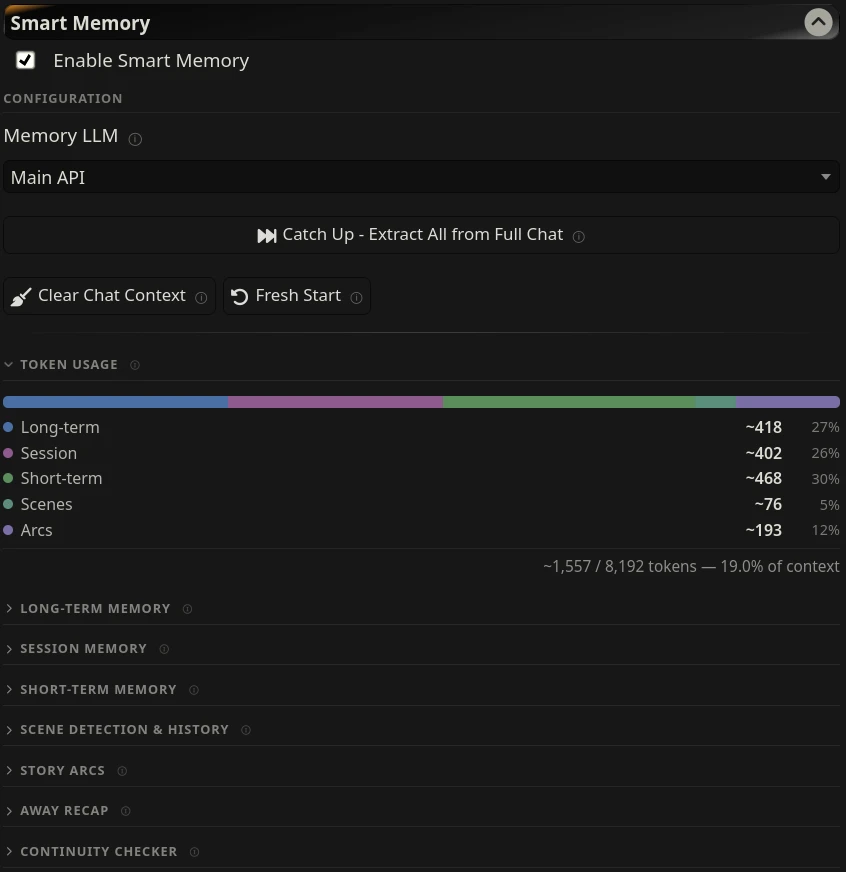
A small bar in the settings panel shows how many tokens each memory tier is currently injecting. It updates after every generation, so you can see at a glance whether Smart Memory is taking up a sensible amount of your context budget.
Smart Memory is designed to work alongside SillyTavern's built-in vector storage, not replace it. Think of them as complementary layers:
| Layer | What it does |
|---|---|
| Message Limit extension | Hard cap on raw messages in context - your VRAM budget |
| Vector storage | Retrieves specific details on demand when they're relevant |
| Smart Memory - session | Always-present curated details from the current chat |
| Smart Memory - short-term | Always-present narrative summary of everything before the window |
| Smart Memory - long-term | Always-present character facts from all previous sessions |
If you're on limited VRAM (8GB or less), keep the Message Limit extension enabled and consider lowering Max session memories to around 15 to keep prompt size comfortable.
Smart Memory's defaults are designed to layer cleanly alongside vector storage. Depth is distance from the user's last message - depth 0 is right before the AI responds, higher numbers are further back.
| Tier | Position | Depth | Notes |
|---|---|---|---|
| Arcs | In-chat | 2 | Shares depth with ST chat vectors intentionally |
| Session | In-chat | 3 | Just above ST's default vector depth |
| Scenes | In-chat | 6 | Further back - past scene context |
| Long-term | In-prompt | - | Near character card |
| Short-term | In-prompt | - | Narrative background |
The away recap is shown as a popup to the user, not injected into the prompt.
If you change ST's vector storage depth, set session memory one higher so it still layers above vectors.
All settings are saved automatically per profile.
Selects which LLM handles all Smart Memory work - summarization, extraction, and recap generation. Setting this to a lighter model leaves your main roleplay LLM free for the actual story.
Options: Main API, Ollama, OpenAI Compatible, or WebLLM Extension.
Smart Memory uses an embedding model to detect near-duplicate memories that differ only in wording. This catches cases that keyword matching misses - for example, "Finn is Senjin's anchor" and "Finn serves as Senjin's emotional foundation" score near-zero in word overlap but are identified as the same fact by vector similarity.
When an embedding model is not available, the system falls back to word-overlap comparison automatically.
| Setting | Default | Description |
|---|---|---|
| Use semantic embeddings | On | Compare memories by meaning rather than word overlap |
| Ollama URL | (blank, uses localhost:11434) | Only change if your embedding model is on a different port |
| Embedding model | nomic-embed-text |
Ollama model tag for embedding generation |
| Keep model in memory | Off | Keeps the embedding model loaded in Ollama between calls rather than unloading after each use - faster for repeated deduplication passes |
Requirements: The embedding model must be installed in Ollama before enabling this. If you already use SillyTavern's built-in Vector Storage extension with Ollama, you likely have nomic-embed-text installed already. If not:
ollama pull nomic-embed-text| Setting | Default | Description |
|---|---|---|
| Enable auto-summarization | On | Summarize automatically at threshold |
| Context threshold | 80% | Summarize when context reaches this % of the model's limit |
| Summary response length | 2000 tokens | Length budget for the summary - also acts as the injection cap |
| Injection template | Story so far:\n{{summary}} |
Wrapper text around the summary |
| Injection position | In-prompt | Where in the prompt the summary appears |
| Setting | Default | Description |
|---|---|---|
| Enable long-term memory | On | Extract and inject persistent character facts |
| Auto-consolidate | On | Periodically merge near-duplicate entries |
| Exclude this chat from long-term memory | Off | Suppresses long-term extraction and injection for this specific chat only - stored memories for other chats are not affected |
| Extract every N messages | 3 | How often automatic extraction runs |
| Max memories per character | 25 | Hard cap on total stored memories. Storage is also balanced per type - no single type (fact, relationship, preference, event) can exceed max / 4 entries, so one category cannot crowd out the others |
| Injection token budget | 500 | Least important memories are trimmed first when the budget is exceeded - based on importance, expiration, recency, and how often a memory has been recalled |
| Injection template | Memories from previous conversations:\n{{memories}} |
Wrapper text |
| Injection position | In-prompt | Where in the prompt memories appear |
| Setting | Default | Description |
|---|---|---|
| Enable session memory | On | Extract and inject within-session details |
| Extract every N messages | 3 | How often automatic extraction runs |
| Max session memories | 30 | Consider lowering to ~15 on limited VRAM |
| Injection token budget | 400 | Least important memories trimmed first when exceeded - based on importance, expiration, and recency |
| Injection template | Details from this session:\n{{session}} |
Wrapper text |
| Injection position | In-chat @ depth 3 | Sits just above ST's default vector depth |
| Setting | Default | Description |
|---|---|---|
| Enable scene detection | On | Detect breaks and store scene history |
| AI detection | Off | More accurate but costs an extra model call per message |
| Keep last N scenes | 5 | How many scene summaries to retain |
| Injection token budget | 300 | Oldest scenes dropped first when exceeded |
| Injection position | In-chat @ depth 6 | Further back in context |
| Setting | Default | Description |
|---|---|---|
| Enable arc tracking | On | Extract and inject open narrative threads |
| Max tracked arcs | 10 | Oldest arcs dropped when limit is exceeded |
| Injection token budget | 400 | Oldest arcs trimmed first when exceeded |
| Injection position | In-chat @ depth 2 | Near current action, alongside chat vectors |
| Setting | Default | Description |
|---|---|---|
| Enable recap | On | Show a recap popup when returning after a gap |
| Threshold | 4 hours | Minimum time away before a recap is generated |
All manual operations are in the Configuration section at the top of the panel, or inside their respective tier sections.
Reads the full chat history and builds memories from it - long-term facts, session details, scene history, story arcs, and summary. Use this to bring Smart Memory up to speed on an existing chat or to build up a character's long-term memory from previous sessions.
A Cancel button appears during processing. Cancelling stops the loop cleanly between chunks - partial results are saved.
If memories already exist for the character, a confirmation prompt will appear before processing begins - running Memorize Chat repeatedly on the same chat can introduce near-duplicate entries on top of existing ones. Use Forget This Chat first if you want a clean re-run.
Only accepted messages are processed - swiped alternatives are ignored.
To build long-term memory from multiple older chats, simply open each one and run Memorize Chat. Memories accumulate and deduplicate automatically. Skip any chats you'd rather not include.
Clears all Smart Memory context for the current chat - summary, session memories, scene history, and story arcs. Long-term memories are not touched. Useful before a Memorize Chat run to re-derive everything cleanly from scratch.
Clears everything for a clean slate - long-term memories for the current character plus all chat-scoped tiers (summary, session memories, scene history, arcs). Does not suppress future memory generation; the AI will begin building fresh memories from the next message onward. Asks for confirmation before proceeding - this cannot be undone.
To prevent a specific chat from contributing to long-term memory at all, use the Exclude this chat from long-term memory checkbox in the Long-term Memory section instead.
Each memory tier has its own Extract Now or Extract button that processes a recent window of messages - not the full chat. Useful for pulling in the latest exchanges outside the automatic schedule.
| Button | Window |
|---|---|
| Long-term Extract Now | Last 20 messages |
| Session Extract Now | Last 40 messages |
| Extract Arcs Now | Last 100 messages |
| Extract Scene | Scene buffer or last 40 messages |
For the full chat backlog, use Memorize Chat instead.
- Summarize Now - forces a short-term summary right now, ignoring the threshold
- Generate Recap Now - generates and shows a recap popup on demand
- Check Last Response - runs the continuity check against the last AI response
- Clear buttons on each tier - remove all stored data for that tier
| Command | Description |
|---|---|
/sm-check |
Check the last AI response for contradictions against established facts |
/sm-summarize |
Force a short-term summary generation now |
/sm-extract |
Run long-term, session, and arc extraction against the current chat now |
/sm-recap |
Generate and show a "Previously on..." recap popup now |
Long-term memories are tagged by type:
fact- established truths about the character, world, or settingrelationship- the current state and history of the relationshippreference- what the user demonstrably enjoys (themes, tone, pacing)event- significant events that should be recalled in future sessions
Session memories are tagged by type:
scene- current or recently completed scene detailsrevelation- something discovered or revealed this sessiondevelopment- how the relationship or situation changeddetail- specific facts, names, objects, or places mentioned
Extraction also assigns:
- Importance (1-3) - how impactful the memory is (
1fluff,2context,3core) - Expiration - expected durability:
scene(short-lived)session(current chat scope)permanent(durable, keep aggressively)
During trimming, Smart Memory scores each entry across multiple dimensions: expiration weight, importance, recency, how often the memory has been recalled, confidence, and keyword frequency. Higher-scoring entries survive; lower-scoring ones are trimmed first. Protected types (relationship, preference, fact for long-term; development, scene for session) are retained more aggressively to preserve continuity.
Licensed under the GNU Affero General Public License v3.0.

