Documentation: User Guide, JavaDocs
Continuous Integration: 


License: 
Wasabi A/B Testing Service is a real-time, enterprise-grade, 100% API driven project. Users are empowered to own their own data, and run experiments across web, mobile, and desktop. It’s fast, easy to use, it’s chock full of features, and instrumentation is minimal.
Learn more about how Wasabi can empower your team to move from hunches to actionable, data-driven user insights with our simple, flexible, and scalable experimentation platform.
- Own your own data - Don’t ship your data to 3rd party services. Manage your own data and protect your users to maintain your competitive advantage.
- Enterprise Grade - Wasabi has been battle tested in production in fin-tech for 2 years in TurboTax, QuickBooks, Mint.com, etc., powering over 1,000 experiments across Intuit.
- High Performance - Consistent performance response times within 30ms server side.
- 100% API Driven - Compatible with any language and environment.
- Platform Agnostic - A uniform, consistent experience across web, mobile, desktop, and also front-end, back-end.
- Get up and running in minutes - Spin up your Wasabi docker in 5 minutes and be in production with the platform, instrumentation, and experiments within a day.
- It’s Free - Don’t pay an arm and a leg for an enterprise-grade platform – the platform is free!
- Extensible - Easily integrates with your existing infrastructure, including analytics and corporate access systems.
- Real-time assignments - Assign users into experiments in real-time, to preserve traffic for other parallel A/B tests.
- Cloud and on-premise - Designed to live in the cloud or in your own data center.
- Analytics - Core analytics functionality and metrics visualization out of the box.
- Administrative UI - Manage and setup your experiments using our user friendly interface.
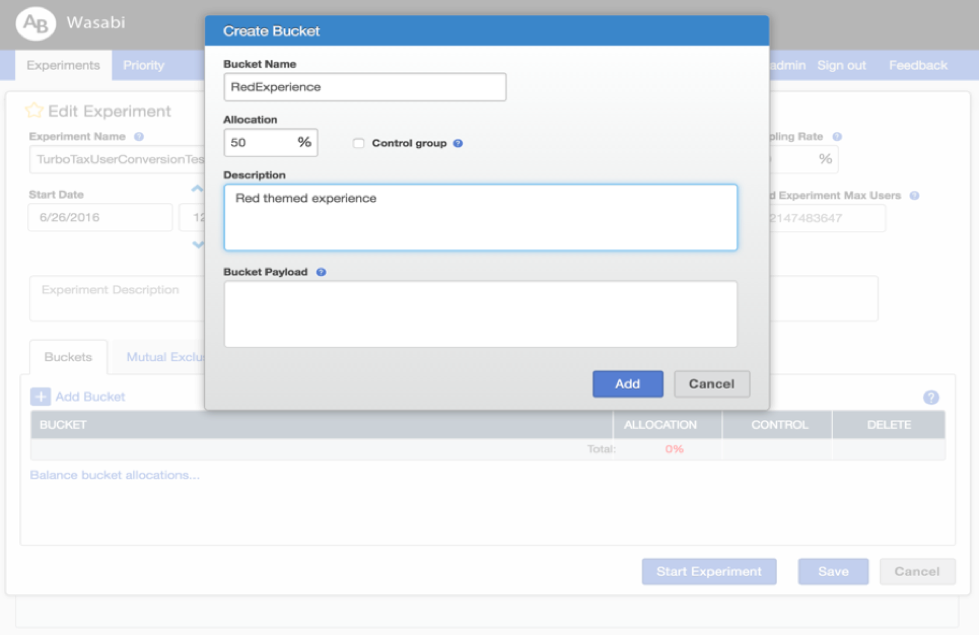
- Create an experiment and its buckets:
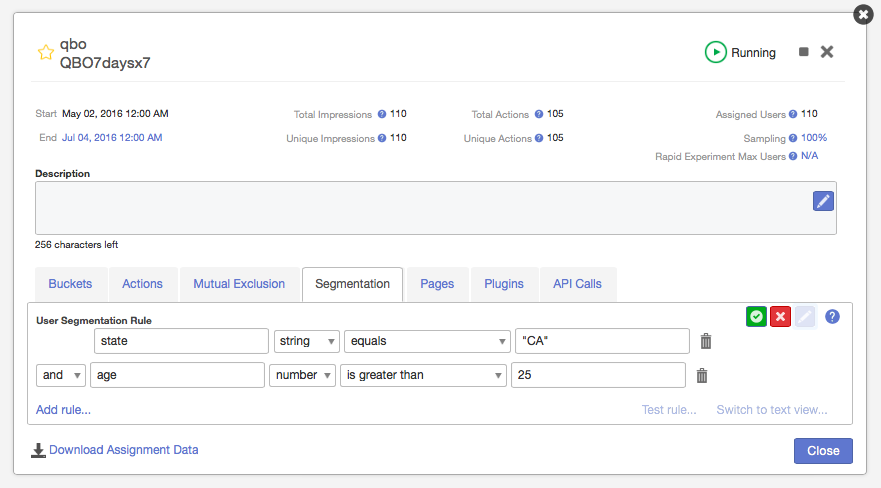
- Filter which customers are considered for your experiment:
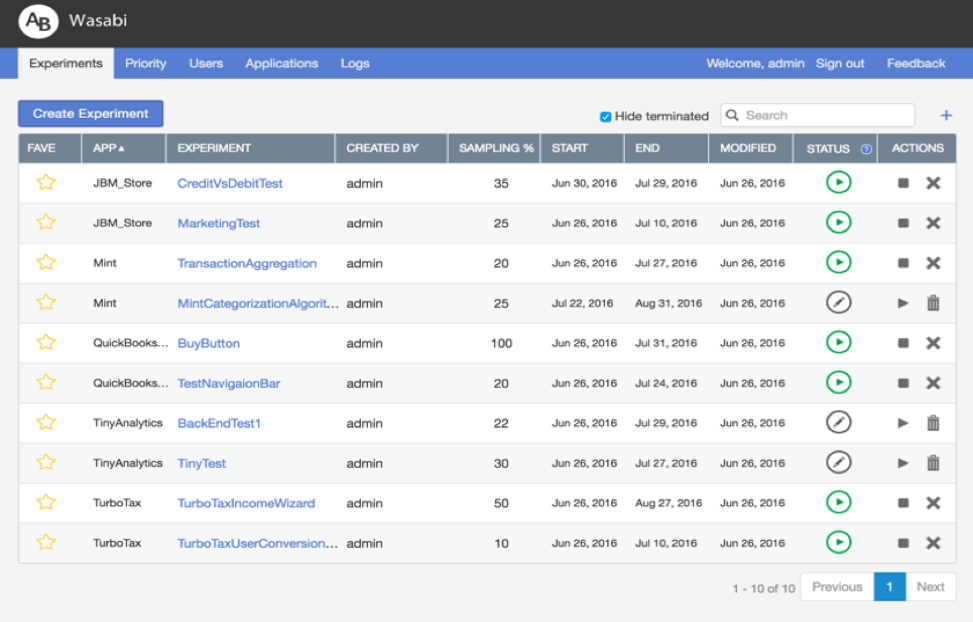
- Follow your currently running experiments:
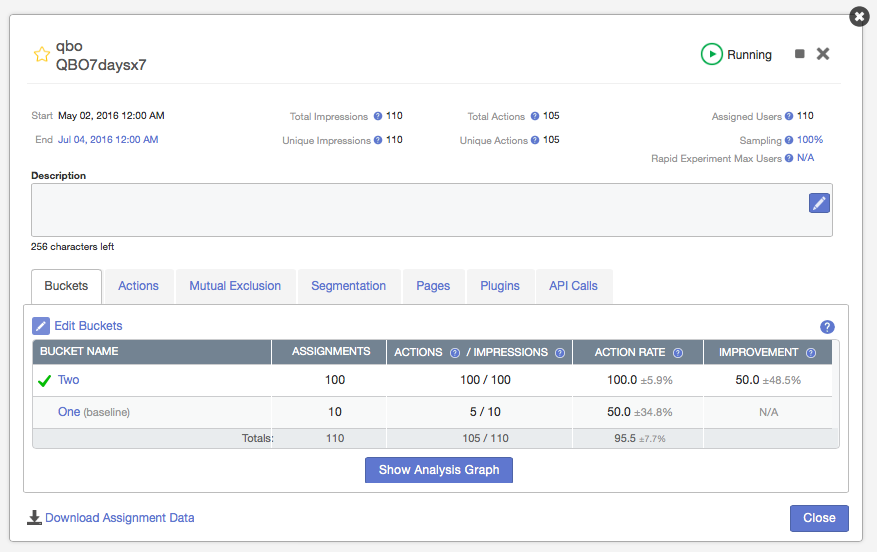
- Track your experiment results in real-time:
Installing Wasabi is straightforward. The following steps will install the needed tools, build and run a complete stack noting that at this time only OSX is supported.
% /usr/bin/ruby \
  -e "$(curl -fsSL https://raw.githubusercontent.com/Homebrew/install/master/install)"
% brew install git
% git clone https://github.com/intuit/wasabi.git
% cd wasabi
% ./bin/wasabi.sh bootstrapNote: if you have installed docker-native set the environment variable 'WASABI_OS'
% export WASABI_OS=native
``

Installed tools include: [homebrew 0.9](http://brew.sh), [git 2](https://git-scm.com),
[maven 3](https://maven.apache.org), [java 1.8](http://www.oracle.com/technetwork/java/javase/overview/index.html),
[docker 1.12](https://docker.com), [node 6](https://nodejs.org/en) and [python 2.7](https://www.python.org).

Similar tooling will work for Linux and Windows alike. Contribute a patch :)

#### Start Wasabi

Now that we have the necessary tools in place let's move on to build and start Wasabi followed by issuing a _ping_
command to verify the build:

```bash
% ./bin/wasabi.sh --build true start
...
wasabi is operational:

  ui: % open http://192.168.99.100:8080     note: sign in as admin/admin
  api: % curl -i http://192.168.99.100:8080/api/v1/ping
  debug: attach debuger to 192.168.99.100:8180

% curl -i http://$(docker-machine ip wasabi):8080/api/v1/ping
HTTP/1.1 200 OK
Date: Wed, 25 May 2016 00:25:47 GMT
...
X-Application-Id: wasabi-api-20151215171929-SNAPSHOT-development
Content-Type: application/json
Transfer-Encoding: chunked
Server: Jetty(9.3.z-SNAPSHOT)

{
  "componentHealths":[
    {
      "componentName":"Experiments Cassandra",
      "healthy":true
    },
    {
      "componentName":"MySql","healthy":true
    }
  ],
  "wasabiVersion":"wasabi-api-20151215171929-SNAPSHOT-development"
}
Congratulations! You are the proud owner of a newly minted and personalized full stack Wasabi instance :)
Ok, enough celebration ... let's get back to business.
- While starting Wasabi, if you run into errors such as this, run this command in your terminal and re-run ./bin/wasabi.sh start:
Cannot connect to the Docker daemon. Is the docker daemon running on this host?
% eval $(docker-machine env wasabi)These are the 3 common API's that you'd use to instrument your client application with Wasabi.
Let's assume that you've created and started an experiment 'BuyButton' in 'Demo_App' application with:
- 'BucketA': green button, control bucket
- 'BucketB': orange button bucket
You can assign a user with a unique ID (e.g. 'userID1') to the experiment by calling this API Request:
Assign a user to experiment and bucket:
% curl -H "Content-Type: application/json" \
    http://192.168.99.100:8080/api/v1/assignments/applications/Demo_App/experiments/BuyButton/users/userID1

{
   "cache":true,
   "payload":"green",
   "assignment":"BucketA",
   "context":"PROD",
   "status":"NEW_ASSIGNMENT"
}
Now the 'userID1' user is assigned into the 'BucketA' bucket. Let's record an impression of their experience with this API Request:
Record an impression:
% curl -H "Content-Type: application/json" \
    -d "{\"events\":[{\"name\":\"IMPRESSION\"}]}" \
    http://192.168.99.100:8080/api/v1/events/applications/Demo_App/experiments/BuyButton/users/userID1
If the 'userID1' user does an action, such as clicking the buy button, you'd record it with this API Request:
Record an action:
% curl -H "Content-Type: application/json" \
    -d "{\"events\":[{\"name\":\"BuyClicked\"}]}" \
http://192.168.99.100:8080/api/v1/events/applications/Demo_App/experiments/BuyButton/users/userID1The following developer resources are available:
API: Swagger API playground
% ./bin/wasabi.sh resource:apiJavadoc
% ./bin/wasabi.sh resource:docWasabi UI
% ./bin/wasabi.sh resource:uiCassandra: cqlsh shell
% ./bin/wasabi.sh resource:cassandraMySQL: mysql shell
% ./bin/wasabi.sh resource:mysqlJava Debugger: Remote attach configuration
-agentlib:jdwp=transport=dt_socket,server=y,suspend=n,address=8180Alas, all good things must come to an end. Let's clean things up a bit stop the newly created Wasabi stack:
At this point in time we now have all the requisite tools installed and as such subsequent invocations of Wasabi will start up much more quickly. Additionally there is no further need to include the -b true or --build true option.
% ./bin/wasabi.sh stopFurther, there are a number of additional wasabi.sh options available you should become familiar with:
% ./bin/wasabi.sh --help

  usage: wasabi.sh [options] [commands]

  options:
    -b | --build [ true | false ]          : build; default: false
    -e | --endpoint [ host:port ]          : api endpoint; default: localhost:8080
    -v | --verify [ true | false ]         : verify installation configuration; default: false
    -s | --sleep [ sleep-time ]            : sleep/wait time in seconds; default: 30
    -h | --help                            : help message

  commands:
    bootstrap                              : install dependencies
    start[:cassandra,mysql,wasabi]         : start all, cassandra, mysql, wasabi
    test                                   : test wasabi
    stop[:wasabi,cassandra,mysql]          : stop all, wasabi, cassandra, mysql
    resource[:ui,api,doc,cassandra,mysql]  : open resource api, javadoc, cassandra, mysql
    status                                 : display resource status
    remove[:wasabi,cassandra,mysql]        : remove all, wasabi, cassandra, mysql
    package                                : build deployable packages
release[:start,finish] : promote releaseLet's turn it up to 11. To facilitate developing Wasabi contributions you can easily build and run from source and readily connect to the a fore mentioned infrastructure:
% mvn package
% ./bin/wasabi.sh start:cassandra,mysql
% dmip=$(docker-machine ip wasabi)
% (cd modules/main/target; \
    WASABI_CONFIGURATION="-DnodeHosts=${dmip} -Ddatabase.url.host=${dmip}" ./wasabi-main-*-SNAPSHOT-development/bin/run) &
% curl -i http://localhost:8080/api/v1/ping
...
The runtime logs can be accessed executing the following command in a another shell:
Viewing runtime logs:
% tail -f modules/main/target/wasabi-main-*-SNAPSHOT-development/logs/wasabi-main-*-SNAPSHOT-development.log% cd modules/ui
% grunt buildEdit Gruntfile.js with the following change to the apiHostBaseUrlValue value, since you would be running the Wasabi server on localhost.
development: {
  constants: {
    supportEmail: 'you@example.com',
    apiHostBaseUrlValue: 'http://localhost:8080/api/v1'
  }
}
% grunt serve% ./bin/wasabi.sh stopNow while that was fun, in all likelihood you will be using an IDE to develop Wasabi features. In doing so you need only add the aforementioned configuration information to your Wasabi JVM runtime prior to startup:
Wasabi runtime configuration:
-DnodeHosts=$(docker-machine ip wasabi) -Ddatabase.url.host=$(docker-machine ip wasabi)Awesome! You are well on your way at this point in time.
Code changes can readily be verified by running the growing collection of included integration tests:
% ./bin/wasabi.sh start test stopWasabi can readily be packaged as installable rpm or deb distributions and deployed at scale as follows:
% ./bin/wasabi.sh package
% find ./modules -type f \( -name "*.rpm" -or -name "*.deb" \)
Note: Java 8 is a runtime dependency
Wasabi is readily embeddable via the following maven dependency GAV family:
<dependency>
    <groupId>com.intuit.wasabi</groupId>
    <artifactId>wasabi</artifactId>
    <version>1.0.20160627213750<build_timestamp></version>
</dependency>All contributions are highly encouraged! You can add new features, report and fix existing bugs and write docs and tutorials. Feel free to open issue or send pull request!
The master branch of this repository contains the latest stable release of Wasabi, while snapshots are published to the develop branch. In general pull requests should be submitted against develop in the form of forking this repo into your account, developing and testing your changes, and creating pull requests to request merges. See the Contributing to a Project
article for more details about how to contribute.
Extension projects such as browser plugins, client integration libraries, and apps can be contributed under the contrib directory.
Steps to contribute:
- Fork this repository into your account on Github
- Clone your forked repository (not our original one) to your hard drive with
git clone https://github.com/YOURUSERNAME/wasabi.git - Design and develop your changes
- Add/update unit tests
- Add/update integration tests
- Add/update documentation on
gh-pagesbranch - Create a pull request for review to request merge
- Obtain 2 approval squirrels before your changes can be merged
Thank you for you contribution!