Coffee
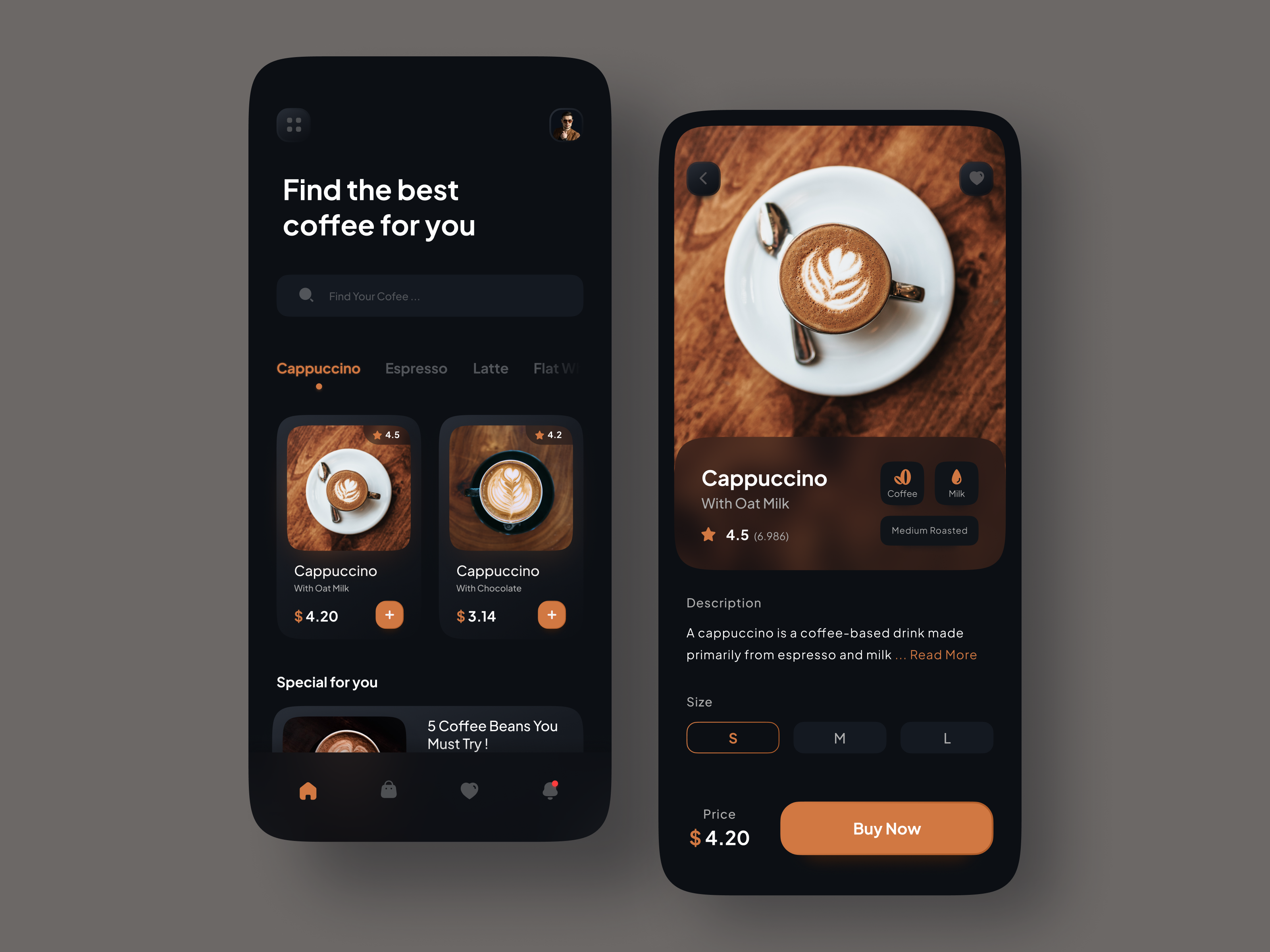
Welcome to Coffee — a beautiful Flutter UI showcasing a visually rich coffee-themed application concept. This project demonstrates clean, modular UI design in Flutter and serves as both inspiration and a foundation for UI-centric Flutter experiments.

Table of ContentsDemo
Features
Screenshots / Prototypes
Getting Started
Prerequisites
Installation
Usage
Project Structure
Contributing
Code Style
Testing
License
Acknowledgements
Demo
Experience the UI flow and animations directly in the GIF above. This showcases the core UI screens and interactions that define the Coffee UI concept.
Features
Coffee provides a rich set of UI screens and visual styles, focusing on delightful presentation:
Visually appealing coffee selection screens.
Smooth transitions and modular widget implementations.
Clean, component-based architecture for UI scalability.
Use of Flutter best practices for layout and styling.
Ready to be extended into a full application or design prototype.
Screenshots / Prototypes
Here are snapshots of core screens as design references. You can add or update these with higher-resolution images as the project evolves.
(Adjust the image paths as needed for your actual screenshots.)
Getting Started
Follow this guide to set up the project locally and begin exploring or contributing.
Prerequisites
Ensure you have the following installed:
Flutter SDK — follow the official installation guide at https://flutter.dev/docs/get-started/install
Android Studio / Xcode (optional, for device emulation)
Git for version control
Installation
git clone https://github.com/shatilsarower/coffee.git cd coffee
flutter pub get
Usage
To run the app:
flutter run
You can test on an emulator, simulator, or connected device.
Project Structure
A high-level overview of the repository layout:
coffee/ ├── android/ # Android project files ├── ios/ # iOS project files ├── lib/ # Dart source files │ ├── screens/ # UI Screens │ ├── widgets/ # Reusable widgets │ ├── models/ # Data models │ └── main.dart # Project entry point ├── asstes/ # Images, GIFs, other media ├── test/ # Unit / widget tests ├── pubspec.yaml # Dependencies & configuration ├── CONTRIBUTING.md # Contribution guidelines └── README.md # Project overview (this file)
Contributing
Contributions are welcome! Check out the CONTRIBUTING.md for detailed guidelines covering:
Reporting issues
Opening pull requests
Code style standards
Testing expectations
Before contributing, please:
Fork the repository.
Create a feature branch (git checkout -b feat/your-feature).
Commit changes with meaningful commit messages.
Open a Pull Request describing your enhancements.
Code Style
This project uses the Flutter and Dart conventions with linting rules enabled via analysis_options.yaml. To maintain consistency:
dart format .
flutter analyze
Testing
Add unit and widget tests as your changes introduce new UI logic or reusable components. Run tests using:
flutter test
License
This project is open-source and distributed under the terms of the MIT License .
Acknowledgements
Inspired by community-driven Flutter UI challenges and concept designs. Flutter Awesome
Thanks to Flutter and Dart developers for the ecosystem and tooling.
Contributors who help refine the UI and expand functionality.
For help getting started with Flutter development, view the
online documentation, which offers tutorials,
samples, guidance on mobile development, and a full API reference.