Installation
STAR-ASO can be run locally on a desktop or remotely on a cluster, assuming the following:
- Windows desktop (if running locally)
- Linux cluster (if running remotely)
It will probably still work with other systems, but we haven't tested it.
STAR-ASO uses the commercial software STAR-CCM+ to solve the Navier-Stokes equations, Python for optimization and running DOE's, and Java for API automation (provided as *.jar files). In order to work, you will thus need to install:
- Python 3.6 (download here)
- STARCCM 12.02 (you will need to acquire your on copy)
Fortunately, STAR-CCM+ is easy to install on your local machine; just follow the installation wizard that comes with the download (same goes for Python). You can install newer versions of STAR-CCM+, but STAR-ASO has only been tested on version 12.02. Also, note that you will need a valid license to run the software (get one from Siemens).
You can install STAR-CCM+ locally on your desktop or remotely on a cluster. Instructions for each one below.
Once you've installed STAR-CCM+ on your local machine, you'll need to do two things:
- Set the system path so to include the "starccm+" binary
- Set the class path in STAR-CCM+ so that it can find the ASO_jar files
These instructions are for Windows (for Linux, just google how to "set system path"):
- Go to "Control Panel\System and Security\System"
- Choose "Advanced system settings"
- Follow steps in images below and specify the location of the STAR-CCM+ binary in step 4
- e.g. C:\Program Files\CD-adapco\12.02.011-R8\STAR-CCM+12.02.011-R8\star\bin


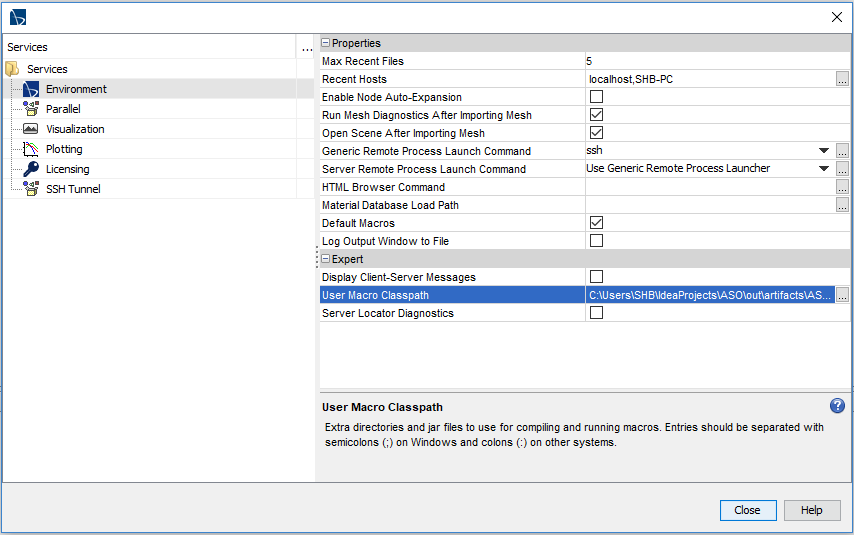
STAR-CCM+ has a very well developed Java API, where users can create their own Java classes to automate tasks inside the software, such as creating an airfoil from coordinates, adaptively meshing, etc. However, in order to take advantage of user-defined classes, STAR-CCM+ must be able to find them. In order to do so, we must specify the macro class path:
- Save the ASO_jar files locally on your computer (anywhere)
- Copy the path to where the files reside
- Open the STAR-CCM+ GUI
- Go to Tools > Options > Environment
- Paste the path as shown here-under
If you need to install STAR-CCM+ on a cluster, contact the IT department at your institution (or Siemens). Unfortunately, I do not have experience installing it on a cluster… where I work it is done for me :-) Once installed, if you've never used a cluster before, this guide may be helpful.