Examples
Here are some examples explaining how to use JCommunique. Note that these are abbreviated versions of the code in the demo package.
// makes a factory with the built-in clean theme
NotificationFactory factory = new NotificationFactory(ThemePackagePresets.cleanLight());
// a normal manager that just pops up the notification
NotificationManager plain = new SimpleManager(Location.NORTHEAST);
// plain.setFadeEnabled(true);  this is a feature under testing - it doesn't look good across all platforms

// creates a text notification
TextNotification notification = factory.buildTextNotification("This is a title",
                                                              "This is a subtitle");
notification.setCloseOnClick(true);
// the notification will disappear after 2 seconds, or after you click it
plain.addNotification(notification, Time.seconds(2));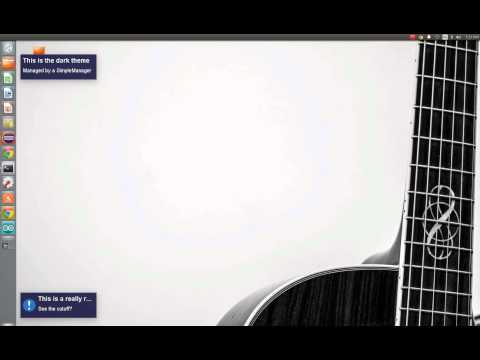
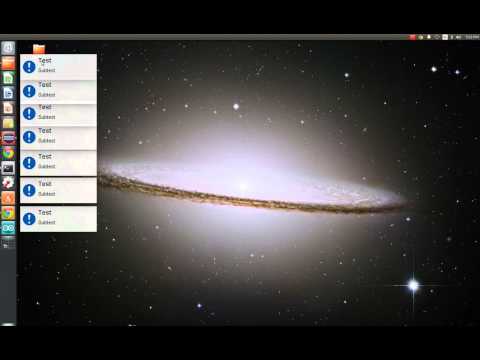
NotificationFactory factory = new NotificationFactory(ThemePackagePresets.cleanLight());
QueueManager manager = new QueueManager(Location.NORTHWEST);

for (int i = 0; i < 5; i++) {
	IconNotification note = factory.buildIconNotification("Test", "Subtest",
IconUtils.createIcon("/com/demo/exclamation.png", 50, 50));
	note.setCloseOnClick(true);
	// make it show in the queue for five seconds
	manager.addNotification(note, Time.seconds(5));
	// one second delay between creations
	Thread.sleep(1000);
}
// makes a factory with the clean theme
NotificationFactory factory = new NotificationFactory(ThemePackagePresets.cleanLight());
// adds a new manager which displays Notifications at the bottom right of the screen
SlideManager manager = new SlideManager(Location.SOUTHEAST);

// adds a notification that appears southeast and slides in the default direction, north
manager.addNotification(factory.buildTextNotification("This is sliding north", "Appeared southeast"), Time.infinite());

manager.setSlideDirection(SlideDirection.WEST);
// adds a notification that appears southeast and slides west
manager.addNotification(factory.buildTextNotification("This is sliding west", "Appeared southeast"), Time.infinite());
// these two notifications should finish in the same end position// makes a factory with the built-in clean light theme
NotificationFactory factory = new NotificationFactory(ThemePackagePresets.cleanLight());
SequenceManager sequence = new SequenceManager();
// makes the notifications fade in and out
sequence.setFadeEnabled(true);
// builds the various test Notifications
Notification note = factory.buildTextNotification("Test", "test");
WindowNotification note2 = factory.buildIconNotification("You must click this!", "To make it go away.",
IconUtils.createIcon("/com/demo/exclamation.png", 50, 50));
note2.setCloseOnClick(true);
Notification note3 = factory.buildAcceptNotification("Test3", "test3");
// adds the Notifications in the order that they should be shown in
// the next Notification will not appear until the previous has become hidden
sequence.addNotification(note, Time.seconds(3));
sequence.addNotification(note2, Time.infinite());
sequence.addNotification(note3, Time.seconds(3));public class CustomNotification extends BorderLayoutNotification {
private JLabel m_label;
private JButton m_button;
private JProgressBar m_progress;
private TextTheme m_theme;
public CustomNotification() {
m_label = new JLabel();
m_button = new JButton("Click me!");
m_progress = new JProgressBar();
m_button.addActionListener(new ActionListener() {
@Override
public void actionPerformed(ActionEvent e) {
removeComponent(m_button);
addComponent(m_progress, BorderLayout.SOUTH);
final Timer timer = new Timer(100, null);
timer.addActionListener(new ActionListener() {
@Override
public void actionPerformed(ActionEvent e) {
m_progress.setValue(m_progress.getValue() + 1);
m_progress.repaint();
if (m_progress.getValue() == 100) {
timer.stop();
hide();
}
}
});
timer.start();
}
});
this.addComponent(m_label, BorderLayout.CENTER);
this.addComponent(m_button, BorderLayout.SOUTH);
}
public void setTextTeme(TextTheme theme) {
m_label.setFont(theme.title);
m_label.setForeground(theme.titleColor);
m_button.setFont(theme.subtitle);
m_button.setForeground(theme.subtitleColor);
m_theme = theme;
}
public String getText() {
return m_label.getText();
}
public void setText(String text) {
m_label.setText(text);
}
@Override
protected void themeSet(WindowTheme theme) {
super.themeSet(theme);
if (m_theme != null) {
// the WindowNotification is going to automatically give all our labels with the set foreground color, but
// we want to change this to the title color of the font
m_label.setForeground(m_theme.titleColor);
m_button.setForeground(m_theme.subtitleColor);
}
}
public static class CustomBuilder implements NotificationBuilder<CustomNotification> {
@Override
public CustomNotification buildNotification(ThemePackage pack, Object[] args) {
CustomNotification notification = new CustomNotification();
// handled by WindowNotification
notification.setWindowTheme(pack.windowTheme);
// handled by us
notification.setTextTeme(pack.textTheme);
if (args.length > 0) {
notification.setText((String) args[0]);
} else {
notification.setText("No text supplied");
}
return notification;
}
}
}// register the custom builder with the factory
NotificationFactory factory = new NotificationFactory(ThemePackagePresets.cleanLight());
factory.addBuilder(CustomNotification.class, new CustomNotification.CustomBuilder());
// add the Notification
NotificationManager manager = new SimpleManager();
manager.addNotification(factory.build(CustomNotification.class, "this is test text"), Time.seconds(5));ATTENTION: Some of these examples might become inadvertently broken as I make changes to the library. Please download the latest version of JCommunique and look at the demos if this is the case. Feel free to open an issue describing the problem as well.