The assignment is to use Terraform to provision a load balancer that points to an Autoscaling group which runs ec2 with an NGINX as static HTML server. I'm also instructed to document my thoughts into a README, in order to showcase how I work and facilitate my mentor in providing me help to get better. LINKS Documentation and tutorial
Just read the intro to terraform, cool and appropriate name. I read about the use cases they portray.
I am downloading the Terraform CLI tool, set path and run terraform, all good.
Okay, first I'm gonna make myself a new AWS account.
Dowloading the amazon CLI
configuring the AWS CLI
- making new user with programmatic access for my laptop
- add user to new group
- Assign to group AdministratorAccess policy: Provides full access to AWS services and resources.
- Provided credentials of new user to
aws configurevia CLI
You can find .tf configuration files language docs here. Copied example from guide, changed region to eu-north-1 and changed AMI to region specific: Ubuntu AMI ami-ada823d3
- "We are explicitly defining the default AWS config profile here to illustrate how Terraform accesses sensitive credentials."
- I understand that I could skip the profile field if there's only one user.
- Details here
terraform init recomends to provide version constrints. Will skip that atm.
Terraform has been successfully initialized!terraform apply
error
error validating provider credentials: error calling sts:GetCallerIdentity: NoCredentialProviders: no valid providers in chain. Deprecated.
For verbose messaging see aws.Config.CredentialsChainVerboseError
Let's debug this, I try:
ls ~/.aws
config credentials
I try
nano nano ~/.aws/credentials
[default]
aws_access_key_id = AKIARR7CRD7BJX7OBI42
I see that the aws_secret_access_key is missing. I edit the credentials with nano
and then:
terraform apply

An execution plan has been generated and is shown below.
Resource actions are indicated with the following symbols:

- create
  ........
So now I know what changes will be applied. I press yes because it looks good..
Error: Error launching source instance....The image id '[ami-2757f631]' does not exist OKAY, I provided a wrong AMI. Changing example.tf and then terraform apply.
Error: Error launching source instance: ... In order to use this AWS Marketplace product you need to accept terms... Wrong AMI again, marketplace AMIs require manual subscription before first use.
Error:Error launching source instance: ... configuration is currently not supported ... "aws_instance" "example" {.. Wrong instance type provided, changing to instance_type = "t3.micro"
and now:
aws_instance.example: Creating...
aws_instance.example: Still creating... [10s elapsed]
aws_instance.example: Creation complete after 13s [id=i-0e0aab534210a10c7]

Apply complete! Resources: 1 added, 0 changed, 0 destroyed.
OK, now I can see in my AWS console the instance initializing. GOOD.
terraform.tfstatestate file. It keeps track of the IDs of created resources so that Terraform knows what it is managing.- It is generally recommended to setup remote state when working with Terraform, to share the state automatically. guide
- "These values can actually be referenced to configure other resources or outputs, which will be covered later in the getting started guide."
I'm going ahead to change the ami to another one. I expect to see the new plan and aprove it.
Switching:
- from Ubuntu Server 18.04 LTS (HVM), SSD Volume Type
- to Amazon Linux 2 AMI (HVM), SSD Volume Type
Instance type remains the same.
terraform applyshows the changes in the plan.
´´´shell Enter a value: yes
aws_instance.example: Destroying... [id=i-0e0aab534210a10c7] ... aws_instance.example: Destruction complete after 4m25s aws_instance.example: Creating... aws_instance.example: Still creating... [10s elapsed] aws_instance.example: Creation complete after 13s [id=i-009ad25d5d4901bdf]
Apply complete! Resources: 1 added, 0 changed, 1 destroyed. ´´´ I can see the new instance on the AWS web console.
terraform destroy the "opposite" of apply
I try it and get a plan of removing everything.
- If I remove everything from the
example.tfI getError: Missing required argument - If I remove only the resource block from
example.tfI get the same plan as interraform destroyI approve the above plan. Result The instance is terminated, and theterraform.tfstateholds no more resources atm.
Going to speed up things after a text from Matt. Going further with the get started guide and assign an elastic IP , edit the example instance to depend on an s3 bucket and add another ec2 instance. terrafrom apply gives me the new plan that I approve.
Error
Error: Error creating S3 bucket: BucketAlreadyExists.....
Error: Error launching source instance: InvalidAMIID.NotFound:
I see that I have a wrong ami for the ec2, and there's a naming conflict with the bucket. Also I notice that in the state I have resource entries for:
- elastic ip
- example ec2 that depends on the bucket.
- both resources have an empty array for instances.
- no instances are launched on the AWS atm.
I change the ami and the bucket name and I terraform apply.
´´´shell
Apply complete! Resources: 4 added, 0 changed, 0 destroyed.
´´´
State file and AWS console agree.
terraform destroy
And I remove all the unused resources.
Implementing dependent resources:
I understand that our setup needs:
- three core resources from AWS, EC2, autoscaling group and Application Load Balancer
- then it also needs some configured software NGINX serving html running on the EC2 instances. I can imagine that we could do this easily by choosing a preconfigured image for our instance, but I keep my options open.
I will start by exploring the autoscaling group, since that is one level above having one instance.
Here I feel confident enough to also start looking at the tutorial I was provided with.
I found the autoscaling group in the AWS provider docs here
Looking at the documentation I see that I also need an aws_launch_configuration resource.
- I insert a
resource "aws_launch_configuration" "example" {[CONFIG …]}I found in the tutorial - I provide the
image_idasamiandinstance_typefrom my previousresource "aws_instance" "example"{[CONFIG …]} - I notice that I am missing a
security_groupsfield. This will allow trafic and specific protocols to and from the ec2 instances.
- I declare a
resource "aws_security_group" "instance" {[CONFIG …]}with rules for tcp port 8080. - Now I am missing the actual
aws_autoscaling_groupresource.
terraform applyhere creates the security group, and launch configuration but no instances are started
- I get the resource
"aws_autoscaling_group" "example" {[CONFIG …]}from the tutorial. - I run
terrafrom applyand approve - Error
AutoScaling Group: ValidationError: At least one Availability Zone or VPC Subnet is required. - Check the documentation, and add field
security_groups = [aws_security_group.instance.id] - SUCCESS There are two ec2 instances running with the assigned inbound rules.
- At this point I want to do a hack and test if the instances are accessible on port 8080.
- I copy from the tutorial the following field and set it in
aws_launch_configuration
  user_data       = <<-EOF
              #!/bin/bash
              echo "Hello, World" > index.html
              nohup busybox httpd -f -p "${var.server_port}" &
              EOF
This "hack" didn't work initially, but then I realised that my image is Linux and busybox is preinstalled on Ubuntu. I changed the image_id and applied again. Now I can curl any of the two instances and get back Hello, World. This gives me good motivation to keep on. I will leave the busybox there for the moment.
The tutorial explains how to setup a classic LB not ALB. My plan is to refer to the provisioners docs here. Another idea is to check how can one do this manually as to figure out what are the dependencies between an ALB and an autoscalling group.
- Declare the example ALB from the documentation, and strip it down to minimum fields.
- The example comes with fields set for
security_groups&subnets. Both are optional according to documentation. - I provide the id for the
resource "aws_security_group" "instance"{[CONFIG …]}and remove thesubnetsfield. Later I realised I was wrong apply yes- Error
Error: Error creating application Load Balancer: ValidationError: At least two subnets in two different Availability Zones must be specified - SO apparently subnets are not optional in this case.
- I refer to the tutorial and I need to bring in a datasource to get the list of subnets available to my VPC.
- From the provider documentation I think something like this will do:
aws_subnet_ids - I take the opportunity and bring also a datasource for my available AZs, and provide it to the
aws_autoscaling_group.
STOP I think I am doing something wrong:
- The security group I assigned to the ALB allows only tcp traffic on 8080.
- I believe the ALB should be receiving traffic on port 80 from any public IP, and then point somehow to the autoscalling group.
- The ALB needs two subnets from different AZs.
- My autoscalling group is in the Default VPC which has three subnets, in two AZs.
- Both of my instances are in the same subnet.
Also from a bit of browsing in the providers documentation I found the following:
aws_autoscalling_grouphas optional fieldtarget_group_arnsthat receives a list ofaws_alb_target_groupARNs for use with ALB.- The AWS manual says also that an Autoscalling Group has to be attached to a target group when choosing ALB.
- The target group must have a target type of instance.
- Also looking at my setup at the moment, the root resource here is the Autoscalling Group. It holds dependecies towards the Launch Configuration and the AZs.
How can I get a reference to the subnets from the Autoscalling Group?
- I can get the VPC from the Autoscalling Group, and from there I can get the subnets.
- I make a datasource of type
aws_subnet_idsand configurevpc_id = "${aws_autoscaling_group.example.vpc_zone_identifier}" - Unfortunately
NOTE: Some values are not always set and may not be available for interpolation.inaws_autoscalling_group - I will do the hack and get the id of the default vpc for the region, and from that extract the subnet ids.
- It is working, I have an ALB in the default VPC attached to all three subnets in 2 AZs.
- I just read this page about the different components of a ALB. This clears up some things.
- Last thing regarding the AZs of the Autoscale group, I will remove the
data "aws_availability_zones" "all" {}and instead configure the subnet ids asvpc_zone_identifier = data.aws_subnet_ids.example.ids. - Applied and working.
- TODO: I should also do something about the ALB security group
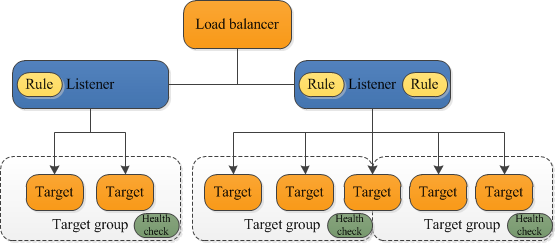
I understand that a aws_lb_target_group resource will be configured to the aws_autoscalling_group. This resource will be the target of the ALB listener rules.
- Bring the example resource from providers doc.
- Configure the port on which targets receive traffic, 8080, and TCP atm.
ConfiguredTCP.health_checkforpath = "/"&matcher = "200". Fingers crossed.- Now attach the
aws_lb_target_groupto theaws_autoscalling_group aplyand gives a string error,gonna try interpolation in array- I removed the dependency from step 4.
applyand after the change it does output the ARN - So I am having this problem, the Autoscale group doesnt wait for the target group ARN. I am thinking to place a
depends onconfiguration, but terraform should be dealing with that. Let's google. - I discovered the
aws_autoscaling_attachment. Hmm... Apparently it can attach to anaws_autoscalling_grouptwo things: a classicaws_elbor anaws_alb_target_group:) - I configure the attchment resource.
- Success the
aws_autoscaling_group.example.target_group_arnsoutputs a real target group ARN. - Missing to connect the ALB to the target group. Listener and rules are next.
Checking the provider documentation of aws_lb_listener one can configure an aws_lb and a default_action towards an aws_lb_target_group.
- Bring the example resource from providers doc.
- Configure ALB and Target Group ARNs and
apply - Error ´The listener and its associated target group have incompatible protocols´ okay.
- Error Both protocols have to be HTTP. Hmm...
- Both in HTTP and same port applies and changes.
- Changing Listener to port 80, and leaving target group at 8080, it still applies and changes.
- In both cases above I do not manage to connect to server.
- Edited the default security group that was auto assigne to the ALB, and now I can get the
Hello, worldmessage! - Success forwarding works on different ports also!
- Configuring one more security group for the load balancer. port 80, tcp.
- Error 504. Apparently the ALB's security group doesn't allow the requests to reach the target.
- Edited the outbound routes! Success
- Changed all ports to 80.
I have decided to use a quickstart maintained AMI, and install nginx through user_data. Provisioners are not recomended, Marketplace images need manual signing, and I couldn't include im my repo a custom image. Here I encountered various problems. First I removed all the resources and worked on a single instance, and tried various scripts through the user_data and through ssh-ing manually in the instance. In the end, the biggest problem was inbound routes that where not configured in the aws_security_group.