Complete Agentic GPU Infrastructure for Claude Code — 192 MCP tools: GPU provisioning, vLLM/SGLang/Ollama inference, Arize Phoenix observability, NeMo Guardrails safety, Qdrant vector DB, Ray cluster management, Datadog monitoring, and Terraform-powered parallel provisioning across 20 cloud providers.
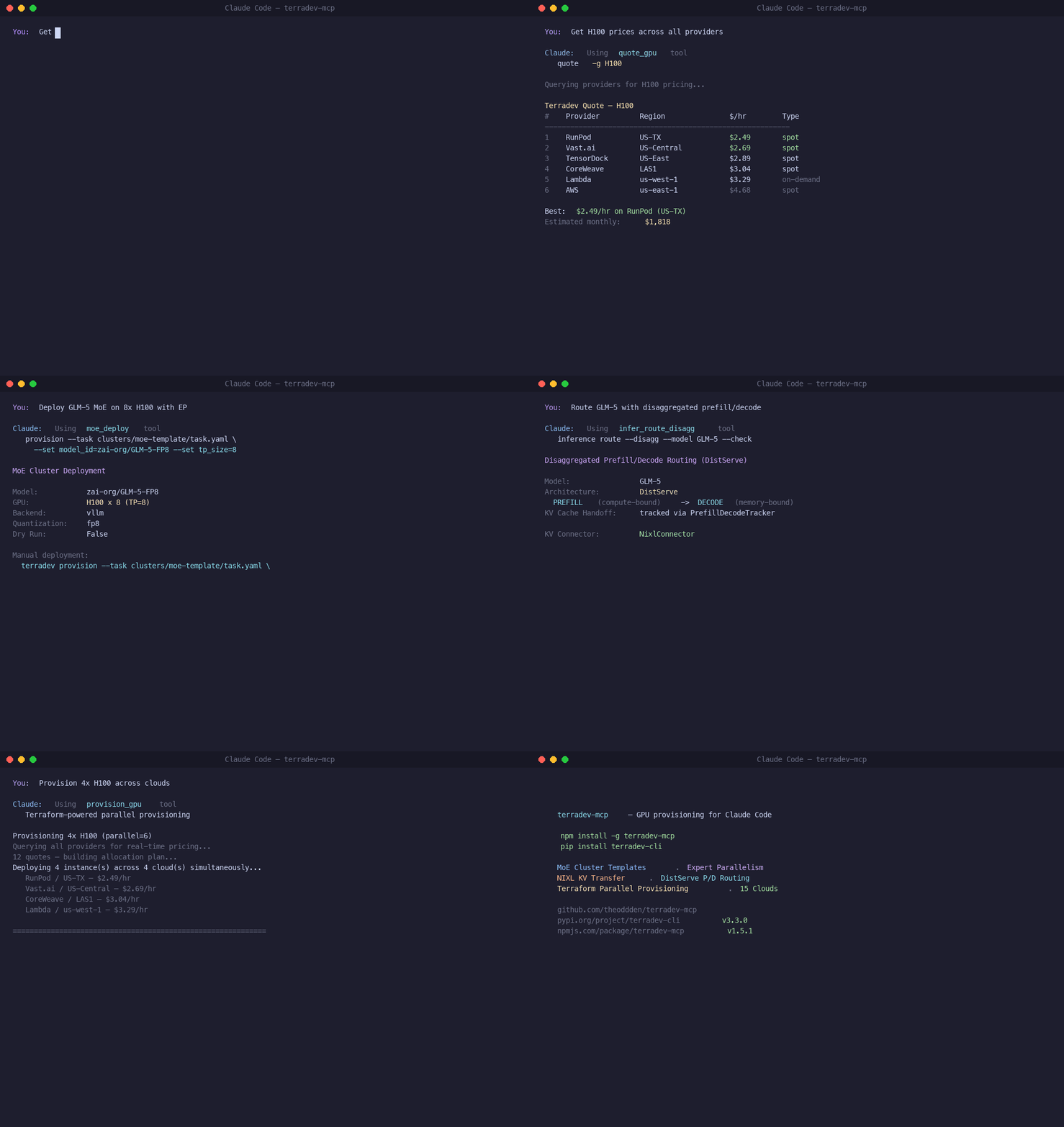
- 192 MCP Tools: Massively expanded from 69 → 192 tools
- Arize Phoenix: LLM trace observability — projects, spans, traces, OTEL env, K8s deployment (7 tools)
- NeMo Guardrails: Output safety — test, chat, config generation, K8s deployment (4 tools)
- Qdrant Vector DB: RAG infrastructure — collections, create, info, count, K8s deployment (6 tools)
- Datadog Monitoring: Metrics, monitors, dashboards, Terraform export (10 tools)
- HuggingFace Hub: Models, datasets, endpoints, smart templates, hardware recommendations (11 tools)
- LangChain/LangGraph: Workflow creation, orchestrator-worker, evaluation (9 tools)
- 20 Cloud Providers: Alibaba Cloud, OVHcloud, FluidStack, Hetzner, SiliconFlow + 15 more
- vLLM Cost Optimizations: LMCache, KV Cache Offloading, MTP Speculative Decoding, Sleep Mode, Multi-LoRA
- Data Governance: Consent management, OPA policy evaluation, compliance reports (6 tools)
- Cost Intelligence: Deep analysis, simulation, budget optimization (4 tools)
- Claude.ai Connector: OAuth 2.0 PKCE flow for remote access
- MoE Cluster Templates: Production-ready infrastructure for Mixture-of-Experts models
- NVLink Topology Enforcement: Automatic single-node TP with NUMA-aligned GPU placement
- Terraform Core Engine: All GPU provisioning uses Terraform for optimal parallel efficiency
Terraform is the fundamental engine - not just a feature. This provides:
- ✅ True Parallel Provisioning across multiple providers simultaneously
- ✅ State Management for infrastructure tracking
- ✅ Infrastructure as Code with reproducible deployments
- ✅ Cost Optimization through provider arbitrage
- ✅ Bug-Free Operation with all known issues resolved
- Install Terradev CLI (v3.7.0+):
pip install terradev-cli
# For all providers + HF Spaces:
pip install "terradev-cli[all]"- Set up minimum credentials (RunPod only):
export TERRADEV_RUNPOD_KEY=your_runpod_api_key- Install the MCP server:
npm install -g terradev-mcpAdd to your Claude Code MCP configuration:
{
  "mcpServers": {
    "terradev": {
      "command": "terradev-mcp"
    }
  }
}Use Terradev from Claude.ai on any device — no local install required.
- Go to Claude.ai → Settings → Connectors
- Add a new connector with URL:
https://terradev-mcp.terradev.cloud/sse - Enter the Bearer token provided by your admin.
That's it — GPU provisioning tools are now available in every Claude.ai conversation.
To host your own instance:
# Set required env vars
export TERRADEV_MCP_BEARER_TOKEN=your-secret-token
export TERRADEV_RUNPOD_KEY=your-runpod-key

# Option 1: Run directly
pip install -r requirements.txt
python3 terradev_mcp.py --transport sse --port 8080

# Option 2: Docker
docker-compose up -d
The server exposes:
GET /sse— SSE stream endpoint (Claude.ai connects here)POST /messages— MCP message endpointGET /health— Health check (unauthenticated)
See nginx-mcp.conf for reverse proxy configuration with SSL.
The Terradev MCP server provides 192 tools for complete GPU cloud management:
local_scan- Discover local GPU devices and total VRAM pool (NEW in v1.2.2)quote_gpu- Get real-time GPU prices across all cloud providersprovision_gpu- Terraform-powered GPU provisioning with parallel efficiency
terraform_plan- Generate Terraform execution plansterraform_apply- Apply Terraform configurationsterraform_destroy- Destroy Terraform-managed infrastructure
k8s_create- Create Kubernetes clusters with GPU nodesk8s_list- List all Kubernetes clustersk8s_info- Get detailed cluster informationk8s_destroy- Destroy Kubernetes clusters
inferx_deploy- Deploy models to InferX serverless platforminferx_status- Check inference endpoint statusinferx_list- List deployed inference modelsinferx_optimize- Get cost analysis for inference endpointshf_space_deploy- Deploy models to HuggingFace Spaces
deploy_wide_ep- Deploy MoE model with Wide-EP across multiple GPUs via Ray Serve LLMdeploy_pd- Deploy disaggregated Prefill/Decode serving with NIXL KV transferep_group_status- Health check EP groups (all ranks must be healthy for all-to-all)sglang_start- Start SGLang server with EP/EPLB/DBO flags via SSH/systemdsglang_stop- Stop SGLang server on remote instance
status- View all instances and costsmanage_instance- Stop/start/terminate GPU instancesanalytics- Get cost analytics and spending trendsoptimize- Find cheaper alternatives for running instances
setup_provider- Get setup instructions for any cloud providerconfigure_provider- Configure provider credentials locally
phoenix_test- Test connection to Phoenix serverphoenix_projects- List Phoenix projectsphoenix_spans- List spans with SpanQuery DSL filtersphoenix_trace- View full execution tree for a tracephoenix_otel_env- Generate OTEL env vars for serving podsphoenix_snippet- Generate Python instrumentation snippetphoenix_k8s- Generate K8s deployment manifest
guardrails_test- Test connection to Guardrails serverguardrails_chat- Send message through safety railsguardrails_generate_config- Generate Colang 2.x configguardrails_k8s- Generate K8s deployment manifest
qdrant_test- Test connection to Qdrantqdrant_collections- List vector collectionsqdrant_create_collection- Create collection (auto-configures from embedding model)qdrant_info- Get collection statsqdrant_count- Count vectors in collectionqdrant_k8s- Generate K8s StatefulSet manifest
# Scan for local GPUs
terradev local scan

# Example output:
# ✅ Found 2 local GPU(s)
# 📊 Total VRAM Pool: 48 GB
#
# Devices:
# • NVIDIA GeForce RTX 4090
#   - Type: CUDA
#   - VRAM: 24 GB
#   - Compute: 8.9
#
# • Apple Metal
#   - Type: MPS
#   - VRAM: 24 GB
#   - Platform: arm64
Hybrid Use Case: Mac Mini (24GB) + Gaming PC with RTX 4090 (24GB) = 48GB local pool for Qwen2.5-72B!
# Get prices for specific GPU type
terradev quote -g H100

# Filter by specific providers
terradev quote -g A100 -p runpod,vastai,lambda

# Quick-provision cheapest option
terradev quote -g H100 --quick# Provision single GPU via Terraform
terradev provision -g A100
# Provision multiple GPUs in parallel across providers
terradev provision -g H100 -n 4 --providers ["runpod", "vastai", "lambda", "aws"]
# Plan without applying
terradev provision -g A100 -n 2 --plan-only
# Set maximum price ceiling
terradev provision -g A100 --max-price 2.50
# Terraform state is automatically managed# Generate execution plan
terraform plan -config-dir ./my-gpu-infrastructure
# Apply infrastructure
terraform apply -config-dir ./my-gpu-infrastructure -auto-approve
# Destroy infrastructure
terraform destroy -config-dir ./my-gpu-infrastructure -auto-approve# Create multi-cloud K8s cluster
terradev k8s create my-cluster --gpu H100 --count 4 --multi-cloud --prefer-spot
# List all clusters
terradev k8s list
# Get cluster details
terradev k8s info my-cluster
# Destroy cluster
terradev k8s destroy my-cluster# Deploy model to InferX
terradev inferx deploy --model meta-llama/Llama-2-7b-hf --gpu-type a10g
# Check endpoint status
terradev inferx status
# List deployed models
terradev inferx list
# Get cost analysis
terradev inferx optimize# Deploy LLM template
terradev hf-space my-llama --model-id meta-llama/Llama-2-7b-hf --template llm
# Deploy with custom hardware
terradev hf-space my-model --model-id microsoft/DialoGPT-medium --hardware a10g-large --sdk gradio
# Deploy embedding model
terradev hf-space my-embeddings --model-id sentence-transformers/all-MiniLM-L6-v2 --template embedding# View all running instances and costs
terradev status --live
# Stop instance
terradev manage -i <instance-id> -a stop
# Start instance
terradev manage -i <instance-id> -a start
# Terminate instance
terradev manage -i <instance-id> -a terminate# Get 30-day cost analytics
terradev analytics --days 30
# Find cheaper alternatives
terradev optimize# Get quick setup instructions
terradev setup runpod --quick
terradev setup aws --quick
terradev setup vastai --quick
# Configure credentials (stored locally)
terradev configure --provider runpod
terradev configure --provider aws
terradev configure --provider vastai- H100 - NVIDIA H100 80GB (premium training)
- A100 - NVIDIA A100 80GB (training/inference)
- A10G - NVIDIA A10G 24GB (inference)
- L40S - NVIDIA L40S 48GB (rendering/inference)
- L4 - NVIDIA L4 24GB (inference)
- T4 - NVIDIA T4 16GB (light inference)
- RTX4090 - NVIDIA RTX 4090 24GB (consumer)
- RTX3090 - NVIDIA RTX 3090 24GB (consumer)
- V100 - NVIDIA V100 32GB (legacy)
This release includes fixes for all known production issues:
| Bug | Fix | Impact |
|---|---|---|
| Wrong import path (terradev_cli.providers) | Changed to providers.provider_factory | ✅ API calls now work |
| list builtin shadowed by Click command | Used type([]) instead of isinstance(r, list) | ✅ No more crashes |
| aiohttp.ClientSession(trust_env=False) | Set trust_env=True for proxy support | ✅ Proxy environments work |
| boto3 not in dependencies | Added boto3>=1.26.0 to requirements | ✅ AWS provider functional |
| Vast.ai GPU name filter exact match | Switched to client-side filtering with "in" | ✅ Vast.ai provider works |
All bugs are now resolved in v1.2.0
The MCP now includes a terraform.tf template for custom infrastructure:
terraform {
  required_providers {
    terradev = {
      source  = "theoddden/terradev"
      version = "~> 3.0"
    }
  }
}

resource "terradev_instance" "gpu" {
  gpu_type = var.gpu_type
  spot     = true
  count    = var.gpu_count

  tags = {
    Name        = "terradev-mcp-gpu"
    Provisioned = "terraform"
    GPU_Type    = var.gpu_type
  }
}Terradev v1.5 integrates the full MoE serving stack:
| Component | What it does | Terradev integration |
|---|---|---|
| Ray Serve LLM | Orchestrates Wide-EP and P/D deployments | build_dp_deployment, build_pd_openai_app |
| Expert Parallelism | Distributes experts across GPUs | EP/DP flags in task.yaml, K8s, Helm, Terraform |
| EPLB | Rebalances experts at runtime | --enable-eplb in vLLM/SGLang serving |
| Dual-Batch Overlap | Overlaps compute with all-to-all | --enable-dbo flag |
| DeepEP kernels | Optimized all-to-all for MoE | VLLM_ALL2ALL_BACKEND=deepep_low_latency |
| DeepGEMM | FP8 GEMM for MoE experts | VLLM_USE_DEEP_GEMM=1 |
| NIXL | Zero-copy KV cache transfer | NixlConnector in P/D tracker |
| EP Group Router | Routes to rank hosting target experts | Expert range tracking per endpoint |
RunPod, Vast.ai, AWS, GCP, Azure, Lambda Labs, CoreWeave, TensorDock, Oracle Cloud, Crusoe Cloud, DigitalOcean, HyperStack, Alibaba Cloud, OVHcloud, FluidStack, Hetzner, SiliconFlow, Baseten, HuggingFace, Paperspace
Minimum setup:
TERRADEV_RUNPOD_KEY: RunPod API key
Remote SSE mode:
TERRADEV_MCP_BEARER_TOKEN: Bearer token for authenticating Claude.ai Connector requests (required in production)
Full multi-cloud setup:
TERRADEV_AWS_ACCESS_KEY_ID,TERRADEV_AWS_SECRET_ACCESS_KEY,TERRADEV_AWS_DEFAULT_REGIONTERRADEV_GCP_PROJECT_ID,TERRADEV_GCP_CREDENTIALS_PATHTERRADEV_AZURE_SUBSCRIPTION_ID,TERRADEV_AZURE_CLIENT_ID,TERRADEV_AZURE_CLIENT_SECRET,TERRADEV_AZURE_TENANT_ID- Additional provider keys (VastAI, Oracle, Lambda, CoreWeave, Crusoe, TensorDock)
HF_TOKEN: For HuggingFace Spaces deployment
| Tier | Price | Instances | Seats |
|---|---|---|---|
| Research (Free) | $0 | 1 | 1 |
| Research+ | $49.99/mo | 8 | 1 |
| Enterprise | $299.99/mo | 32 | 5 |
| Enterprise+ | $0.09/GPU-hr (32 GPU min) | Unlimited | Unlimited |
Enterprise+: Metered billing at $0.09 per GPU-hour with a minimum of 32 GPUs. Unlimited provisions, servers, seats, dedicated support, fleet management, and GPU-hour metering. Run
terradev upgrade -t enterprise_plus.
BYOAPI: All API keys stay on your machine. Terradev never proxies credentials through third parties.