


- Plot multiple
device_trackerentities on a polar chart. - Set a custom center point by selecting a
device_tracker,person, orzoneentity. Uses your Home Assistant location by default.
- Persistent Markers: Create and manage custom points of interest (markers) directly on the radar when using a moving center point. Markers are stored locally in your browser.
- Automatically scales the radar distance to fit all entities, or set a fixed maximum distance.
- Optional, clear distance labels on the grid rings for quick reference.
- Optional "radar ping" animation for entities that are considered to be moving.
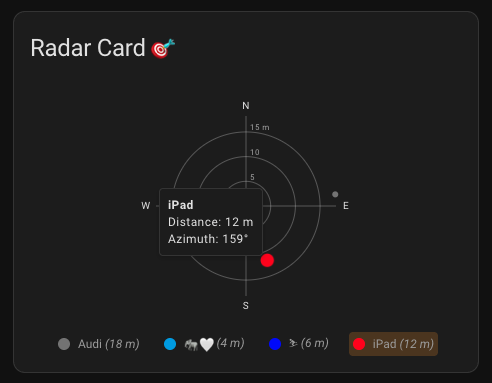
- Hover over points to see a detailed tooltip with distance and azimuth.
- Click entity points to open their more-info dialog.
- Display an optional legend to identify entities by color.
- Click legend items to make the corresponding dot on the radar pulse.
- Customize colors for the grid, fonts, and a default for all entities.
- Override name and color on a per-entity basis.
- Configure legend position (
bottom,left,right) and optionally show distances within it.
This card is available in the following languages:
- English
- German
- French
- Polish
Contributing Translations
If you would like to contribute a new translation:
- Fork the repository on GitHub.
- Copy the
src/translation/en.jsonfile and rename it to your language code (e.g.,es.jsonfor Spanish). - Translate all the values in the new file.
- Submit a pull request with your changes.
This card is available in the Home Assistant Community Store (HACS).

Manual Installation
- Download the
radar-card.jsfile from the latest release. - Place it in your
config/wwwdirectory. - Add the resource reference to your Lovelace configuration under
Settings->Dashboards->...->Resources.- URL:
/local/radar-card.js - Resource Type:
JavaScript Module
- URL:
You can now add the card to your dashboard.
This card is fully configurable through the Lovelace UI editor.
- Main Settings: Configure the card's title, radar distance settings, and center coordinates.
- Appearance: Customize colors, toggle grid labels, and configure the legend's appearance and position.
- Entities: Add, remove, and reorder entities. You can easily sort your entities using drag and drop. Click the pencil icon to edit an entity's name and color individually.
For those who prefer YAML, the options are documented below.
| Name | Type | Default | Description |
|---|---|---|---|
type |
string | Required | custom:radar-card |
title |
string | '' |
The title of the card. |
entities |
array | Required | A list of entity objects to display on the radar. |
center_entity |
string | (from Home Assistant) | Override the center location of the radar by providing a device_tracker or person entity. Takes priority over other center configurations. |
auto_radar_max_distance |
boolean | true |
Automatically adjust the maximum radar distance based on the furthest entity. |
radar_max_distance |
number | 100 |
The maximum distance shown on the radar (in km or mi). Ignored if auto_radar_max_distance is true. |
enable_markers |
boolean | false |
When using a center_entity (moving mode), this enables the ability to add and display persistent markers on the radar. |
grid_color |
string | var(--primary-text-color) |
Color for the radar grid lines and cardinal points. |
font_color |
string | var(--primary-text-color) |
Color for the cardinal point labels (N, E, S, W). |
entity_color |
string | var(--info-color) |
Default color for the entity points on the radar. |
show_grid_labels |
boolean | true |
If true, shows distance labels on the grid circles. |
show_legend |
boolean | true |
Show a legend with entity colors and names below the radar. |
legend_position |
string | bottom |
Position of the legend. Can be bottom, right, or left. |
legend_show_distance |
boolean | true |
If true, shows the entity's distance in the legend. |
location_zone_entity |
string | (from Home Assistant) | Override the center location of the radar by providing a zone entity. |
center_latitude |
number | (from Home Assistant) | Override the latitude of the center location of the radar. Requires center_longitude. Deprecated in favor of location_zone_entity or center_entity. |
center_longitude |
number | (from Home Assistant) | Override the longitude of the center location of the radar. Requires center_latitude. Deprecated in favor of location_zone_entity or center_entity. |
animation_enabled |
boolean | true |
Enable the initial entry animation. |
animation_duration |
number | 750 |
Duration of the animation in milliseconds. |
moving_animation_enabled |
boolean | false |
Enable a radar-like ping animation for moving entities. |
moving_animation_attribute |
string | activity |
The entity attribute to check for the moving state. Requires moving_animation_enabled to be true. |
moving_animation_activities |
array | ['Automotive', 'Cycling', 'Walking', 'Driving'] |
A list of values for the moving_animation_attribute that should trigger the animation. Case-insensitive. |
Each entry in the entities list can be a simple string or an object with more options.
| Name | Type | Default | Description |
|---|---|---|---|
entity |
string | Required | The ID of the device_tracker entity. |
name |
string | (entity friendly name) | An override for the entity name shown in the tooltip. |
color |
string | (from entity_color) |
An override for the entity point color. |
type: custom:radar-card
title: Device Locations
entity_color: 'var(--accent-color)'
entities:
  - entity: device_tracker.person1
    name: Person 1
    color: '#ff0000'
  - device_tracker.person2 # You can also use a simple string
  - entity: device_tracker.car
color: 'blue'type: custom:radar-card
title: My Surroundings
center_entity: person.me
enable_markers: true
entities:
- device_tracker.dog_tracker
- device_tracker.parked_cartype: custom:radar-card
title: Office Area
location_zone_entity: zone.work
entities:
- device_tracker.person1To contribute to the development, you'll need to set up a build environment.
-
Clone the repository:
git clone https://github.com/timmaurice/lovelace-radar-card.git cd lovelace-radar-card -
Install dependencies:
npm install
-
Start the development server: This command will watch for changes in the
srcdirectory and automatically rebuild the card.npm run watch
-
In your Home Assistant instance, you will need to configure Lovelace to use the local development version of the card from
dist/radar-card.js.
For further assistance or to report issues, please visit the GitHub repository.

