A wearable device for the visually impaired that helps them perceive their surroundings using audio cues and touch feedback.

We observed that the visually impaired feel limited because of their disability and increased dependence on friends and family and that there was no product on the market that helps them efficiently. So we decided to take initiative and build a wearable device that helps make their lives easier.
Our solution is a band that sits around the user's head (slightly above eye level). It will provide the user with audio cues and pressure feedback. Its features include:
1. Navigation:
- Mapped Environments: user mapped environments of buildings and campuses
- Unmapped Environments: uses google maps to create a path to the user’s destination
- Audio Cues & Pressure Feedback: provide the user with audio and pressure feedback
2. Object & People Detection:
- Alerts for oncoming people
- Alerts for objects: stairs, doors, uneven surfaces
- Environment scans: scans the environment and tells the user what they are looking at
3. Smart Assistant:
- Text Detection: detects text and reads it out to the user
- Translate: translates languages for the user
- Basic Smart assistant tasks
##What's inside
- Proprietary Pressure Bar: A pressure bar designed by us specifically for this product, will help guide the visually impaired through environments by applying slight pressure on different parts of the forehead. The main purpose of this is to cut down on excessive audio cues.
- Lidar Sensors: Used to create accurate scans of the user’s environment.
- Cameras (wide and narrow): 1) Ultrawide camera used to detect objects and people 2) linear camera to detect foreground objects and text
- Bone Conducting Headphones: Sound is transmitted into the inner ear through skull bones. We retain the ability to hear environment sounds, which is crucial.
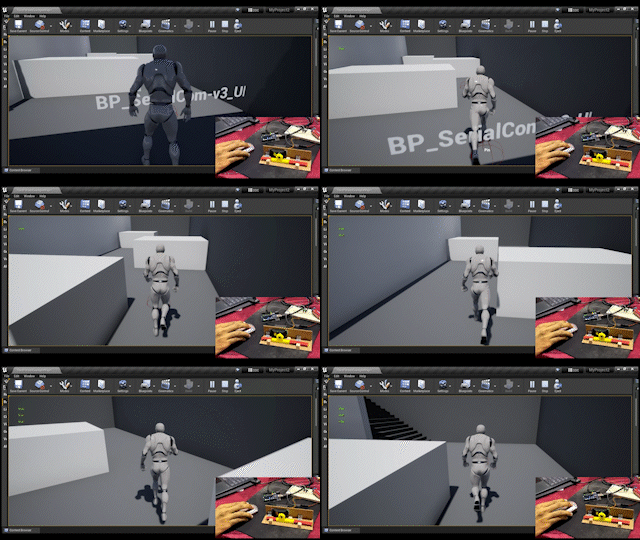
For our demonstration, we have used Unreal Engine 4.27 and Arduino to create an environment where you can control a player in the game and avoid obstacles the output from this game is sent to the Arduino via serial communication and we can see the pressure bar move. The pressure bar is made using a rack and pinion mechanism and a servo motor. We have also used Blender to design and build our prototype and renders that we use in our demo video.
To be honest the entire process was quite challenging to complete within the given period. The major problems we faced were, first, the design and prototyping of the goggles and how we wanted them to look and for them to still be practical in size. Second, connecting the Arduino to Unreal Engine was extremely difficult but in the end, we were able to do it.
We are really happy with the final look of our product and what we were able to deliver for this hackathon. Also since this was our first project on Unreal Engine we are very satisfied with the work we have done. When looking at the product we are building, we are proud of the fact that we are the first to ever use pressure feedback technology to assist the visually impaired.
Our team has picked up a lot of skills thanks to this hackathon. We learned how to use Unreal Engine and how to prototype ideas better. We brushed up on our blender, photoshop, and movie-making skills. We also learned how to work with deadlines and we increased our team synergy.
If we get a positive reaction from the people we show our project to, we will be extremely happy to try to bring our product to life and try to make it commercially available to visually impaired individuals worldwide.

-
Download the arduino code and upload it to an Arduino Uno
-
Download the Unreal Engine 4.27 project file from the link given and keep in under the Unreal Projects folder on your PC (you should have UE 4.27 downloaded)
-
Connect your arduinovto your PC and run the UE project